2026 Enterprise E-Learning Security Evaluation Guide
What if the feature-rich platform on your shortlist isn’t the one your organization can trust? An enterprise grade e-learning platform earns confidence through verifiable controls, not a long list of capabilities. Yet vendor security claims can be difficult to compare, particularly when learning data, user access, and integrations raise operational and compliance questions.
A polished demo may show how a platform works for a small pilot, but it won’t necessarily reveal whether its governance, workflows, and administration can support your organization’s complexity. You need clear criteria, documented evidence, and a way to test fit with your existing environment.
This guide explains how to assess security, governance, integrations, and scalability before shortlisting vendors. You’ll learn which capabilities to verify through documentation or technical review, how to distinguish data security from privacy, and what to test in a representative pilot. We’ll also cover practical evaluation points such as SSO, HRIS compatibility, and SLA scope, so your decision is grounded in evidence and suited to long-term use.
Key Takeaways
- Assess an enterprise grade e-learning platform across security, governance, administration, integrations, and scalability, not just its feature list.
- Ask vendors for current evidence about identity, permissions, data handling, integrations, and accountability before treating security claims as verified.
- Compare vendors against the same requirements to make differences in analytics, support, and administration easier to assess.
- Test representative user roles and training workflows with non-sensitive data before making an implementation decision.
- Use WestNet’s documented SSO, HRIS integration, data migration, SLA, and administrator support as evaluation points, then verify how each fits your requirements.
What Makes an Enterprise-Grade E-Learning Platform Ready for Security Review?
An enterprise-ready learning platform can govern identity, access, learning data, integrations, and administration across an organization’s operating model, with controls the vendor can document and demonstrate. This is more useful than a learner-count threshold. Capacity matters, but it doesn’t show whether a platform can support complex workforce structures or provide evidence for a security review.
A Learning Management System (LMS) organizes learning content and activity. Its scope can include user accounts, course assignments, completion records, assessment results, and role-based learning paths. For a foundational overview of common LMS functions, see Learning Management System (LMS). These records can reveal more than course participation: they may relate to a person’s job responsibilities, training status, or qualifications. That makes decisions about access and vendor accountability part of the initial evaluation, not an afterthought.
Enterprise readiness is more than supporting a large learner population
A system may accommodate many accounts and still be a poor enterprise fit. Consider a company with multiple business units, locations, job families, and contractors. It needs to determine how users are grouped, who administers learning for each group, and how role changes affect course assignments and access. These are governance and workflow questions as much as capacity questions.
Map your organization’s structure before comparing vendors. Identify learner types, administrative responsibilities, and the systems a platform must connect with. For managed service providers supporting client organizations with specialized security needs, msp.readysecure.app provides a white-label security platform designed for structured access and deployment. There’s no universal number of users that makes software enterprise-grade. The test is whether its documented capabilities fit your organization’s complexity and growth plans.
Start with data, access, and accountability
List the information the platform will handle, such as names, work email addresses, department or role details, assigned courses, and completion records. Then ask how access is managed, which vendor materials describe the relevant controls, and who is accountable for security and operational questions. A product page that says “secure” makes a claim. A control becomes assessable when the vendor can explain its scope and provide documentation or demonstrate how it works.
Use a straightforward scenario to expose gaps: if a learner changes departments, who updates their learning access, and how can your organization confirm the change was handled as intended? Ask the vendor to show the workflow and clarify what evidence is available. Don’t assume a feature exists because it’s common in enterprise software. For a broader view of how learning can connect to workforce priorities, explore employee retention through learning.
Set this evidence-first standard early. It gives security, IT, HR, and learning teams a shared basis for assessing the platform before a pilot or vendor shortlist.
Which Security and Governance Controls Should Buyers Verify?
Assess controls across connected areas: identity, permissions, data lifecycle, integrations, and vendor accountability. Ask for current documentation and a walkthrough tied to your requirements. A feature name or broad promise is a starting point for questions, not proof that a control works as your organization needs it to.
Validate each control against internal policy, record the evidence reviewed, and document gaps or follow-up questions. This gives security, IT, HR, and learning teams a consistent basis for judging whether an enterprise grade e-learning platform fits their governance requirements.
How should an enterprise assess identity and administrator access?
For single sign-on (SSO), confirm which identity providers and configurations are supported, how user accounts are created or deactivated, and what happens when an employee changes roles. Ask how administrator and manager permissions can be assigned and limited, and request documentation showing how access is managed. Don’t assume SSO alone answers questions about account lifecycle or administrative privileges.
WestNet documents SSO as an authentication option. Treat it as an evaluation point, then verify configuration compatibility and account-management workflows for your environment. Ask the vendor to demonstrate relevant administrator tasks and explain what documentation is available for your review.
What evidence should vendors provide about data and service commitments?
Request materials describing how learner and account data is handled throughout its lifecycle, including retention and deletion practices. Ask for applicable assurance reports or certifications, incident-response documentation, and details about any subprocessors involved. Verify encryption, audit-log availability, and data-location terms directly. Don’t infer these capabilities from general security language.
Review integrations as data pathways, not just checkboxes. For each HRIS or other connected system, clarify what information is exchanged, how the connection is configured, and which party supports it. WestNet documents HRIS integration, but confirm the supported systems and connection details against your requirements.
WestNet also documents an SLA. Review its scope, exclusions, and service commitments rather than assuming a particular uptime level or response time. Ask who handles questions and what support is included. An LMS product demo can help your team examine documented workflows and identify technical details that still need written confirmation.
How Do Enterprise Learning Platforms Compare Beyond Security?
Security evidence is only one part of platform fit. Compare how each vendor supports your operating model, including integrations, administration, analytics, migration, support ownership, and the learner experience. A feature count can make platforms look similar while hiding practical differences, such as whether your team can manage role changes smoothly or access the reports it needs.
Use one requirements matrix for every vendor. Mark each item as demonstrated, documented, roadmap-only, or unverified. Keep roadmap commitments separate from capabilities available for evaluation today.
| Evaluation area | What to compare | Evidence to record |
|---|---|---|
| Security evidence | Identity, access, data handling, and vendor assurance | Current documentation and answers to open technical questions |
| Integrations and migration | Required HRIS connections, data exchanged, migration responsibilities, and dependencies | Supported-system confirmation, workflow demonstration, and named owners |
| Administration | Roles, enrollment workflows, and management across teams or locations | Demonstration using representative administrative tasks |
| Analytics | Available learning reports, filters, and how teams can use the results | Sample reports and a walkthrough of a relevant use case |
| Support and learner experience | Support ownership, service terms, usability, language needs, and access across learner groups | Documented support scope and representative learner testing |
Which evaluation criteria distinguish a fit from a feature match?
Test the workflows your organization relies on, rather than a generic product tour. For example, map how a new employee receives assigned courses, how a manager reviews completion, and how administrators respond when a learner changes roles. Include migration tasks and clarify which work belongs to your team and which belongs to the vendor.
Include the learner experience in your assessment. If relevant to your workforce, verify language support and how licenses work when users leave or change roles. WestNet documents support for up to 60 site languages and reusable licenses for deactivated users. Confirm how these capabilities align with your needs.
How can buyers compare evidence consistently across vendors?
Send the same questions and evidence requests to every shortlisted provider. After each demonstration, record the result, any dependency, the person responsible for follow-up, and the decision deadline. This turns impressions into a traceable comparison and surfaces gaps before implementation planning begins.
For a deeper look at how organizations can use learning data to inform decisions, see learning analytics and data-driven training. Consider workforce outcomes alongside platform fit, including how learning may support employee retention through learning.
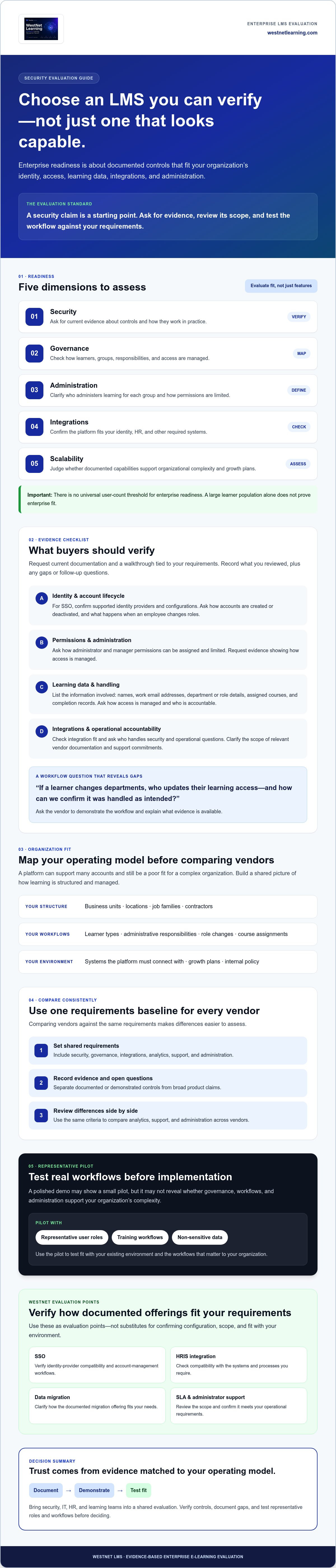
How Can You Validate Enterprise LMS Fit Before Implementation?
Turn your shortlist into a controlled evaluation. A demo can introduce the platform, but a structured pilot reveals whether its workflows and integrations fit your organization. Define success criteria before testing an enterprise grade e-learning platform, then use the same scenarios to assess each vendor.
Follow a clear sequence:
- Map requirements: Identify user groups, sign-in needs, HRIS data flows, administrator tasks, reports, migration assumptions, and learner scenarios.
- Request evidence: Gather documentation for relevant security, privacy, service, and integration questions.
- Test workflows: Use representative roles and non-sensitive test data to exercise priority tasks.
- Document decisions: Record results, unresolved risks, owners, dependencies, and approval criteria before rollout.
What should a security-conscious LMS pilot test?
Agree on test cases with IT, HR, learning, and security stakeholders. Check sign-in and role permissions, course enrollment, completion reporting, support escalation, and HRIS data flows. Include a migration check to confirm that agreed test records are mapped and reviewed by the designated owner.
Keep production data out of the pilot unless your organization has explicitly approved its use and handling. Assign responsibility for test data, integration review, and migration validation. If a control question remains unanswered, log it with a decision owner and due date rather than treating it as resolved by a successful workflow demonstration.
How should stakeholders turn a demo into evidence?
Ask the vendor to demonstrate your priority scenarios, not just deliver its preferred presentation. For each one, capture what was shown, what documentation supports the claim, what depends on your systems or configuration, and what remains unverified. Set acceptance criteria in advance so teams can distinguish a successful test from a promising but incomplete walkthrough.
For distributed workforces, include language access and remote learner workflows in the test plan. WestNet documents up to 60 site languages; confirm that the available language options and configuration meet your needs. This AI learning platform guide for enterprise teams offers related context for organizations assessing global learning needs.
Connect pilot decisions to broader implementation planning. Clarify who owns each integration, migration task, and approval, and carry unresolved dependencies into the rollout plan. To assess WestNet’s documented workflows against your criteria, request an AI Enhanced LMS demo.
Is WestNet’s AI Enhanced LMS a Fit for Enterprise Learning Needs?
WestNet’s AI Enhanced LMS is worth evaluating if your organization needs connected learning administration, HRIS workflows, and support for distributed teams. Fit depends on whether its documented capabilities align with your approved requirements and whether the vendor can answer your outstanding technical and security questions. A feature list can guide the review, but it can’t replace evidence or testing.
Which documented WestNet capabilities merit evaluation?
Use the platform’s documented capabilities to frame specific questions for your evaluation:
- Identity and workflows: WestNet documents SSO and automated enrollment. Confirm supported authentication configurations and how enrollment fits your user lifecycle.
- Integrations and transition: HRIS integration and data migration are documented. Ask which HRIS connections are supported and clarify migration responsibilities, validation steps, and data handling.
- Administration and insight: Administrator support, learning analytics, and a Dedicated Client Success Manager are documented. Determine how these align with your team’s administration and reporting needs.
- Workforce flexibility: The platform supports up to 60 site languages, and deactivated user licenses can be reused. Assess whether these capabilities suit your language and license-management requirements.
- Service terms: WestNet documents an SLA. Review its scope, exclusions, and commitments directly rather than assuming a particular uptime or response guarantee.
These features don’t establish security certifications, encryption standards, audit-log capabilities, data residency, or other controls that haven’t been confirmed. Request documentation for each requirement on your checklist, and keep unverified items open until the vendor provides a clear answer.
What should decision-makers do next?
Compare WestNet’s documented capabilities with your organization’s approved requirements. Mark each item as demonstrated, documented, or still requiring verification. Prioritize questions about the SSO setup, HRIS connections, data migration, SLA terms, and any security evidence your internal reviewers require. This gives your team a practical basis for deciding whether the platform merits further review as an enterprise grade e-learning platform.
Then use a vendor demo to examine relevant workflows, clarify configuration dependencies, and identify evidence that remains outstanding. Include the stakeholders who will assess identity, integrations, administration, and learning operations, and record answers against your criteria. A demo can support your evaluation, but it doesn’t replace written documentation or your organization’s security review.
Ready to assess those workflows with WestNet? Request a WestNet LMS demo and use your requirements checklist to guide the discussion.
Make Your LMS Decision With Confidence
A strong enterprise grade e-learning platform should fit your organization’s workflows and stand up to evidence-based review. Compare vendors against the same requirements, test priority processes with representative scenarios, and keep unverified security questions open until they’re answered.
WestNet’s AI Enhanced LMS documents SSO and standard username-and-password authentication, an SLA, HRIS integration, data migration, and administrator support. Its listed features also include a Dedicated Client Success Manager and transferable user licenses. These are useful evaluation points, not substitutes for verifying security controls, configuration details, and SLA terms against your organization’s needs.
Bring your requirements checklist to a product demo. Ask how the documented capabilities align with your workflows and identify what still needs technical review. Request a WestNet LMS demo to explore the platform with your evaluation criteria in hand. A disciplined review can help your team move forward with clarity and confidence.
Frequently Asked Questions
What makes an e-learning platform enterprise-grade?
An enterprise-grade platform fits an organization’s security, governance, administration, integration, and scalability requirements. Its value isn’t defined by a universal learner-count threshold. Assess whether it can support your workforce structure, access policies, learning workflows, reporting needs, and growth plans. Look for capabilities the vendor can document and demonstrate, then test key workflows with representative users before deciding whether the platform is an appropriate organizational fit.
How do I evaluate the security of an enterprise LMS?
Evaluate security by reviewing documented controls, asking technical questions, and testing relevant workflows. Examine identity and administrator access, permissions, data handling and retention, integrations, vendor accountability, and incident-response information. Request current documentation for claims that matter to your internal review, and record what remains unverified. Assess an enterprise grade e-learning platform against your organization’s security policies rather than relying on marketing language alone.
Does an enterprise learning platform need single sign-on?
Not every organization will require single sign-on (SSO), but it can be important when centralized authentication is part of internal access policy. Confirm whether the platform supports your identity provider and configuration, and ask how account creation, role changes, and deactivation are handled. WestNet’s AI Enhanced LMS documents both SSO and standard username-and-password sign-in. Verify configuration details with the vendor to determine whether either option meets your requirements.
What should an enterprise LMS security checklist include?
Include identity and authentication, administrator and learner permissions, data handling and retention, integration pathways, vendor accountability, and service terms. Ask for documentation on security assurances, incident processes, and any controls your policy requires, such as encryption or audit records. Add HRIS data flows and account lifecycle workflows to the review. Assign an owner to each requirement and mark it as documented, demonstrated, or still awaiting verification.
How can I verify an LMS vendor’s security claims?
Ask the vendor for current, relevant documentation and have technical or security stakeholders review it. Request a demonstration of applicable workflows, then compare what you observe with written materials and internal requirements. Confirm the scope and limitations of any assurance reports or service commitments rather than assuming they address every concern. Record the evidence received, questions outstanding, and the person responsible for resolving each gap before approval.
Can an enterprise LMS integrate with an HRIS and support SSO?
Some enterprise LMS platforms support both, but buyers should verify the specific systems and configurations they need. WestNet documents HRIS integration and SSO for its AI Enhanced LMS; this does not confirm compatibility with every HRIS or identity provider. Ask what information can flow between systems, how the connection is configured, and how account changes are handled. Confirm these details against your organization’s workflows before selecting a platform.
What should an enterprise LMS demo prove?
A demo should show how the platform handles your priority workflows, not just present a general feature tour. Ask to see sign-in, role permissions, enrollment, reporting, and relevant integration or migration steps using representative scenarios. Clarify who owns each process and which requirements need written evidence beyond the demonstration. Record results, dependencies, and unresolved questions so stakeholders can decide whether the platform merits further review or implementation planning.