What if the real value of learning management software isn’t simply hosting courses, but connecting training to the way your organization works? When course content, learner records, and administration sit in disconnected tools, even well-planned training can be difficult to coordinate and evaluate. Decision-makers need more than a feature list. They need to understand how a platform will support their people and workflows as needs change.
A well-chosen LMS can connect course delivery, enrollment, learner activity, and reporting in a more coordinated operation. The right fit depends on who needs access, how training is managed, and which systems the platform must work with. Capabilities such as AI-powered course creation and recommendations, automated enrollment, analytics, and HRIS integration matter when they address your organization’s specific priorities.
This 2026 guide explains how an LMS supports corporate learning, what to assess beyond marketing claims, and what to prepare before evaluation or adoption. Use the practical criteria to map workflows, users, existing systems, and future training needs, then make a decision based on operational fit.
Key Takeaways
- See how learning management software can organize corporate training from course setup through learner activity and reporting.
- Trace the learning lifecycle to identify where HRIS integration and single sign-on can connect training with existing systems.
- Compare platforms against your workflows, administration needs, integrations, learner requirements, and reporting priorities.
- Prepare for adoption by assigning ownership, mapping learner groups, and reviewing existing training records before rollout.
- Explore how the AI Enhanced LMS brings together AI-powered course creation and recommendations, automated enrollment, and learning analytics.
What learning management software does for corporate training
Courses may live in one tool, enrollment details in a spreadsheet, and completion records in another. As training expands across teams, administrators can spend more time reconciling information than coordinating learning. Learning management software brings these activities into a structured system, helping organizations manage training as an operational workflow rather than a collection of separate files.
An LMS is a system for organizing, delivering, and tracking structured learning. Unlike a folder of digital courses, it connects content with learner access, assignments, and progress records. This operational role is central to What is a Learning Management System? A shared learning environment can also support organizations with employees in different locations. See how connected learning for global teams relates to that broader challenge.
Which learning tasks does an LMS bring together?
Think of the course catalog as the organized set of learning materials, enrollment as the process that connects people to relevant training, and learner access as the route to assigned content. Completion records then show each learner’s progress. Together, these parts give administrators and employees a shared structure for managing different learning tasks.
Administrators organize courses, manage enrollment, and review records. Learners access relevant training and follow their assigned learning. For example, when a new employee joins, an administrator can organize onboarding courses and assign them to that learner. The employee can access the materials, while the organization maintains participation or completion records. This illustrates how course content and administration can be coordinated.
When does an organization need more than a shared course library?
A shared library can store useful content, but storage alone doesn’t establish who should take a course, how learners access it, or where progress is recorded. If teams rely on separate spreadsheets to track assignments and completions, administrators may need to reconcile entries, identify the current record, and follow up on missing information. Those steps become harder to coordinate as courses, teams, and training responsibilities grow.
Look for the point where people need a repeatable process, not simply a place to save materials. If employees need different courses, managers need visibility into participation, or administrators must maintain consistent records, a more organized workflow can reduce fragmentation. Map how courses are selected, assigned, accessed, and recorded today. That map helps show whether a shared library is sufficient or a coordinated system better fits the work.
How learning management software connects the learning lifecycle
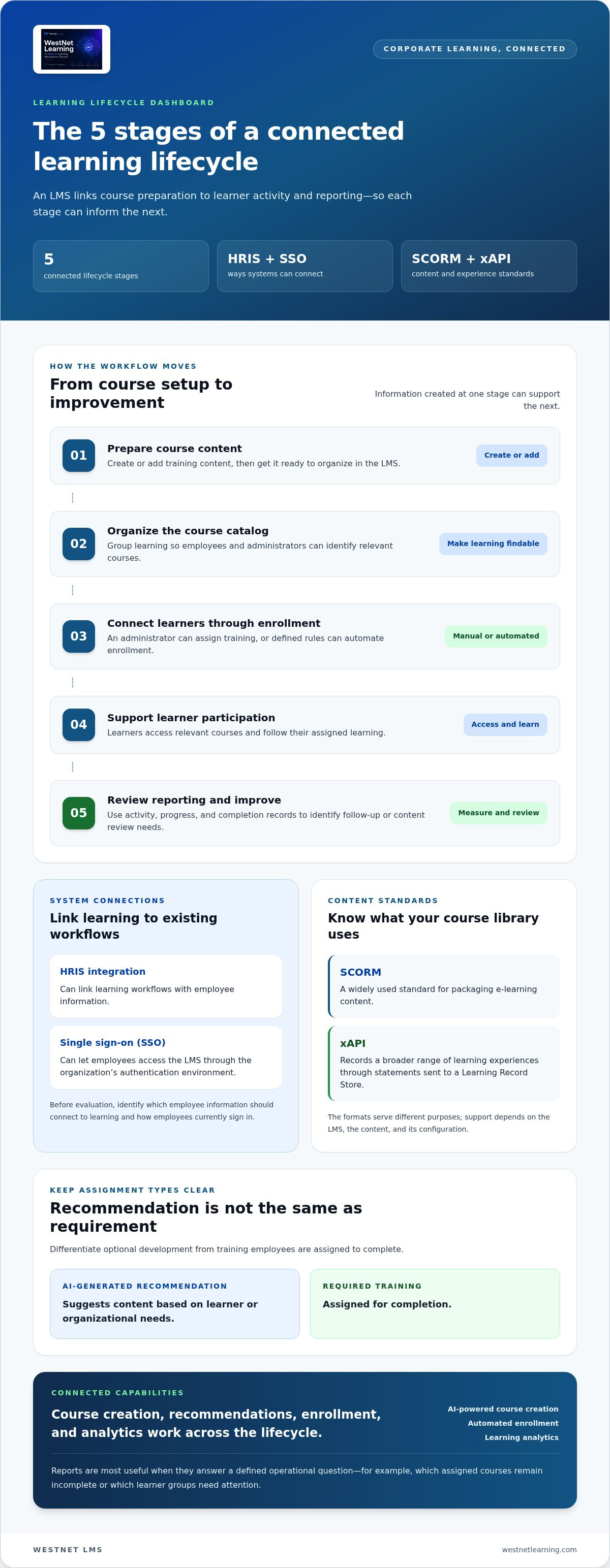
A connected learning lifecycle links decisions made before training with the records reviewed afterward. It starts with preparing course content, then moves through catalog organization, enrollment, learner participation, and reporting. Each stage creates information the next one can use. If these steps sit in separate tools, administrators may need to transfer details manually or reconcile records to understand what happened.
System connections can help close those gaps. An HRIS integration can link learning workflows with employee information, while single sign-on (SSO) can let employees access the LMS through an organization’s authentication environment. Before evaluation, identify which employee information should connect to learning and how employees currently sign in. For a closer look at connectivity considerations, explore this enterprise LMS integration guide.
From course setup to enrollment and learner support
Begin with course preparation. Training content is created or added, then organized in a catalog so employees and administrators can identify relevant learning. Catalog categories can reflect topics, roles, or other organizational groupings. Enrollment connects learners to courses, whether an administrator assigns training or an automated workflow handles the assignment.
Automated enrollment can reduce repetitive administration by applying defined rules rather than requiring the same manual assignment for each learner. Keep recommendations distinct from required learning: an AI-generated recommendation can suggest content based on learner or organizational needs, while required training is assigned for completion. Make the difference clear to employees so they can distinguish optional development from mandatory assignments.
Content standards also affect how courses move into an LMS. SCORM is a widely used standard for packaging e-learning content, while xAPI records a broader range of learning experiences through statements sent to a Learning Record Store. The formats serve different purposes, and support depends on the LMS, the content, and its configuration. Map the formats already used in your course library before planning a transfer.
From participation to reporting and improvement
As learners engage with courses, the LMS can collect activity and completion information for administrators to review. Learning analytics and reporting can help teams examine participation, course progress, and completion records, then identify where follow-up or content review may be useful. Reports are most valuable when they answer a defined operational question, such as which assigned courses remain incomplete or which learner groups need attention. For more on interpreting training data, see this guide to enterprise learning analytics tools.
Gamification adds engagement mechanics such as badges for milestones or leaderboards that display progress. These features can make participation more visible, but don’t guarantee changes in motivation or learning outcomes. Choose them to support a clear training purpose, not simply because they appear on a feature list.
Map these handoffs before selecting a platform. If you’re exploring how a connected system could support your training workflow, review WestNet LMS and its capabilities for corporate learning.
How to compare learning management software by organizational fit
Feature lists make platforms look comparable, but they don’t show how well each one fits your organization’s actual training work. Start by writing down the tasks, users, and systems the LMS needs to support. Then separate essential requirements, which a platform must meet, from desirable features, which could add value but aren’t necessary for core workflows.
The best-fit LMS is the one aligned with defined training workflows. Use the same comparison framework for each platform, assessing operational needs rather than the length of a feature list.
| Area | Questions to assess |
|---|---|
| Workflows | Which training tasks should the platform support, from assignment through follow-up? |
| Administration | Who manages courses, users, permissions, and records? |
| Integrations | Which HR, identity, or other organizational systems need to connect? |
| Learner needs | How do employees access training across roles, departments, and languages? |
| Reporting | Which participation or completion information must administrators review? |
Match platform capabilities to the people who use them
Evaluate the learner experience and administrative controls side by side. Employees need a clear route to relevant learning, while administrators need tools to organize courses and manage access. Consider how role permissions should reflect responsibilities, and whether departments require different catalogs, assignments, or reporting views. For a multilingual workforce, include language selection and content needs in your requirements. WestNet’s platform supports up to 60 site languages, with users selecting a language at login.
Make the comparison specific to user groups. A central learning team may manage shared training, while department administrators oversee learning for their teams. List these roles and the actions each needs to take. This clarifies which controls are essential and helps prevent a polished learner interface from overshadowing administrative gaps, or the reverse.
Compare system fit, flexibility, and scale
Document how employees authenticate today, which HRIS information should connect to learning workflows, and what course formats your organization already uses. Include data migration in the assessment: existing learner records and training content may need to move into the new environment. For SCORM or xAPI content, record the formats and configurations you rely on, then compare platform support against those requirements.
Assess current needs alongside plausible organizational changes, such as new departments, evolving training programs, or a larger learner population. Avoid choosing solely for today’s user count, but don’t prioritize hypothetical needs over current workflows. The 2026 LMS selection guide offers a broader framework for organizing these decisions. If you’re considering a platform for connected corporate learning, explore WestNet’s AI Enhanced LMS against your defined requirements.
How to prepare for learning management software adoption
A successful rollout starts before platform setup. Establish who owns the change, which learners the platform needs to serve, and what training information already exists. This groundwork gives your team a practical sequence for moving from current processes to a coordinated learning operation.
- Map current workflows. Trace how training is created, assigned, accessed, and reported today. Note handoffs, repeated manual tasks, and records kept in separate places.
- Define requirements. Turn workflow needs into priorities. Identify essential learner, administrator, reporting, and system requirements, then separate them from useful but noncritical features.
- Prepare data. Inventory course materials, learner groups, and training records that may need to move into the new environment. Clarify which information is current and who is responsible for it.
- Plan the rollout. Set responsibilities, communication needs, and a sequence for introducing the platform to intended learner groups. Include relevant system connections in the plan.
- Review results. Decide what the team will examine after launch, such as learner access, assignment progress, completion records, or administrator feedback. Use those observations to identify workflow adjustments.
Map current training and administration workflows
Make the process visible. Identify who creates or selects courses, approves or assigns training, manages learner access, answers questions, and prepares reports. List user groups and their learning records, including completion histories or active assignments. Then mark where information is duplicated, delayed, or difficult to retrieve. Prioritize obstacles that affect core training operations so platform requirements address real work rather than assumptions.
Prepare data, integrations, and rollout responsibilities
Build an inventory of user and course information that may need migration. Note relevant HRIS, authentication, and content connections, and assign an internal owner for each decision. Name the people responsible for platform setup, learner communications, and ongoing administration. Clear ownership helps employees know where to go for guidance and gives administrators a defined path for managing the new process.
Before rollout, align the implementation team on what “ready” means: required learner groups are understood, key training records have been reviewed, responsibilities are assigned, and the first workflow is clearly defined. Start with a manageable scope, then use the review criteria established during planning to guide refinements. This creates a feedback loop instead of treating launch as the finish line.
Prepare your organization for a more connected training workflow by exploring the AI Enhanced LMS platform.
How WestNet AI Enhanced LMS supports connected corporate learning
After defining your workflows and evaluation criteria, compare them with a platform’s capabilities. WestNet’s AI Enhanced LMS brings course creation, learner recommendations, enrollment, and reporting into a corporate learning environment. Assess how these functions align with your organization’s responsibilities, systems, and learner groups.
Connect confirmed platform capabilities to real workflows
Course setup is one place to assess fit. AI-Powered e-learning Creation supports course development, while AI-Generated Course Recommendations for learners can help employees discover relevant learning. Recommendations are distinct from required assignments: organizations can assign training employees are expected to complete and use recommendations to surface additional learning opportunities.
For administrators, automated enrollment can support course assignment, while Learning Analytics and Reporting provide visibility into learning activity and records. These capabilities connect routine administration with information teams can review. Gamification features, including leaderboards and badges, can also be part of the learning experience. They offer ways to recognize progress, but don’t guarantee increased engagement or improved outcomes.
Consider the operating context, too. The platform supports up to 60 site languages, with users selecting a language at login, and provides multiple authentication options, including SSO. HRIS integration can connect learning workflows with employee information. Deactivated user licenses can be reused for new users, and administrator support and a dedicated client success manager are part of the platform’s support structure. These capabilities help teams assess fit for access, administration, and workforce needs.
For a broader view of how these capabilities fit together in corporate training, explore WestNet’s corporate training approach.
Evaluate fit through a trial or product demonstration
Use a product evaluation to test priority workflows, not just review a feature list. Choose a representative scenario, such as preparing a course, making it available to a learner group, reviewing activity, and examining the resulting report. Note where each step meets your requirements and which questions remain for your evaluation team. A demo can show the platform in context, while a trial lets you explore it directly.
WestNet offers a 30-day free trial and demos. Focus on the workflows your team identified, including course creation, recommendations, administration, reporting, and relevant integrations. This gives decision-makers a concrete basis for discussing fit across learning, IT, and administration teams.
Ready to assess the platform against your priorities? Start a 30-day free trial.
Make your next learning decision count
Turn your requirements into a practical evaluation. Use a real training workflow to see how learning management software could support your team, then consider what rollout would require from your people and existing systems. A clear evaluation helps you move forward with purpose, not just another feature checklist.
WestNet LMS brings together HRIS integration, data migration, and administrator support. The platform also includes a dedicated client success manager and an SLA, providing defined support structures as your organization plans its approach.
Put your priorities into practice and start your 30-day free trial today. Explore how the platform aligns with your training workflows and identify the next steps that make sense for your organization.
Frequently Asked Questions
What is the difference between an LMS and an LXP?
An LMS typically focuses on organizing, assigning, and tracking structured learning, while an LXP typically emphasizes learner discovery and personalized content experiences. For example, an organization might use an LMS to manage required role-based courses and an LXP to help employees explore optional development resources. These categories can overlap. Compare how each platform handles your actual learning workflows rather than assuming a label guarantees a particular capability or makes one option universally better.
How much does learning management software cost?
The cost of learning management software varies by provider, licensing structure, user volume, and selected capabilities. A headline subscription figure may not reflect the full commitment. Compare what access includes, what implementation may involve, and how support and ongoing administration fit your needs. WestNet’s SaaS subscription fees are typically scaled by user count and include access to core platform features. Outline the learner groups and workflows you plan to support, then assess the overall scope against your requirements.
Can learning management software support compliance training?
Yes, many LMS platforms are used to organize required training, assign courses, and maintain completion records. For example, an organization may use a platform to manage recurring internal learning and review which assignments have been completed. The exact process depends on the platform’s configuration and the organization’s requirements. Define what records and reports your team needs, and assess whether the system can support that process. An LMS does not guarantee legal compliance.
Does learning management software replace an HRIS?
No. An LMS and an HRIS serve different primary purposes: an HRIS supports broader human resources information and processes, while an LMS focuses on learning operations. Integration can connect relevant employee data with learning workflows, such as aligning training access with organizational roles. An LMS isn’t a replacement for an organization’s broader HR information system. Determine which employee data needs to inform learning and how your systems should work together.
Do employees need technical expertise to use learning management software?
Employees generally use the platform interface to access training assigned or recommended to them; they don’t need to administer the learning system. Administrators, by contrast, manage learning operations and platform settings. The experience depends on interface design, access setup, and how the organization introduces the system. During a demonstration or trial, walk through common learner and administrator tasks separately, such as finding a course and managing a learner group.
Can learning management software be used for instructor-led training?
Some LMS platforms support in-person or virtual instructor-led learning alongside self-paced courses. An LMS can help organize event-related learning and associated records, while the live instruction is delivered separately. WestNet’s AI Enhanced LMS includes Virtual & Instructor-Led modules (ILT, vILT), allowing organizations to manage these formats alongside other training. Evaluate the workflow your organization needs to support.