Employee training is where an AI course creator can do more than speed up content production. It helps learning and development teams, subject-matter experts, and organizations turn existing knowledge into editable courses employees can use. Treat AI output as a starting draft, then shape it around your learners and training goals.
Creating a course quickly is only part of the challenge. It also needs to be accurate, easy to assess, and practical to share across your workforce. This guide explains who benefits from AI-assisted course creation and what to consider when reviewing and refining the results.
Explore how to edit generated content, assess learning, share and export courses, and apply these tools to employee training. You’ll also see how a learning management system can connect course creation with workforce learning.
Key Takeaways
- Match course creation tools to your learners, subject matter, and training goals before building.
- Review AI-generated material as a draft, then refine its accuracy, tone, examples, and learning activities.
- Align quizzes and assessments with the skills employees need to demonstrate, not just the content they’ve seen.
- Plan how employees will access courses, and choose sharing or export options that fit your learning workflow.
- Connect course creation with delivery and learning management to bring employee training into a more cohesive process.
Who is AI Course Creator Suitable For?
These tools help teams turn existing expertise into structured learning, interactive activities, and assessments. They can support learning and development teams, subject-matter experts, and organizations building employee training for different roles.
In 2026, the best platform depends on the job: employee training calls for course creation connected to delivery and learner analytics, while standalone content production may prioritize editing and export options. Compare capabilities against your workflow instead of relying on a single ranking. An AI course creator can be a fit when it provides the editing and distribution controls your team needs.
Look for a course generator that works with your source material and lets you shape the course content. For example, Irene Chan took 10 minutes to set up a course from her blog posts about GEO. That example shows how existing materials can provide a starting point, not a substitute for checking accuracy and relevance.
These tools can suit both focused projects and broader training programs. The Academy of NT Technical Skills built 140 training units in 6 months, illustrating how a repeatable workflow can support substantial course development. For employee training, start with a specific audience and goal, such as helping new managers practice giving feedback.
Preview a course before assigning it. Review the learner interface, then check that headings, examples, and activities make sense in sequence. A short scenario followed by a knowledge check can make a policy topic more interactive than a text-only explanation. Revise unclear wording and remove activities that don’t support the learning goal.
AI-generated quizzes and learning activities can help learners apply information, but review every question. Check that the correct answer matches the source material, distractors are plausible, and feedback explains the reasoning. For example, a cybersecurity course could ask employees to identify a suspicious email, then explain which details signal risk.
In the United States, copyright ownership can’t be determined simply by labeling material “AI-generated.” Human contributions, source materials, and the tool’s terms can all matter, so keep drafts and records of who wrote or revised each element.
Course sharing and analytics matter when training extends beyond one author. Check how learners access a course, whether the chosen platform supports the intended sharing workflow, and which completion or assessment data helps improve it. A 14-day trial is one kind of trial users may encounter when evaluating course creation tools; use that period to test a sample course, preview, and learner reporting.
For a practical course-planning sequence, define the audience, learning goal, source material, activity, and review steps before building. A structured training course gives reviewers a clearer basis for assessing content, learner experience, and usefulness. Choosing an AI course creator that supports this workflow can help authors keep those elements connected.
Can I customize and edit the content generated by the AI?
Yes. Treat AI-generated courses as drafts, then edit them to match your organization’s knowledge, terminology, and training goals. For example, if a tool creates a course outline about customer complaints, replace generic scenarios with your actual escalation process and approved language. An AI course creator can generate a starting structure, but subject-matter review makes the material relevant to employees’ work.
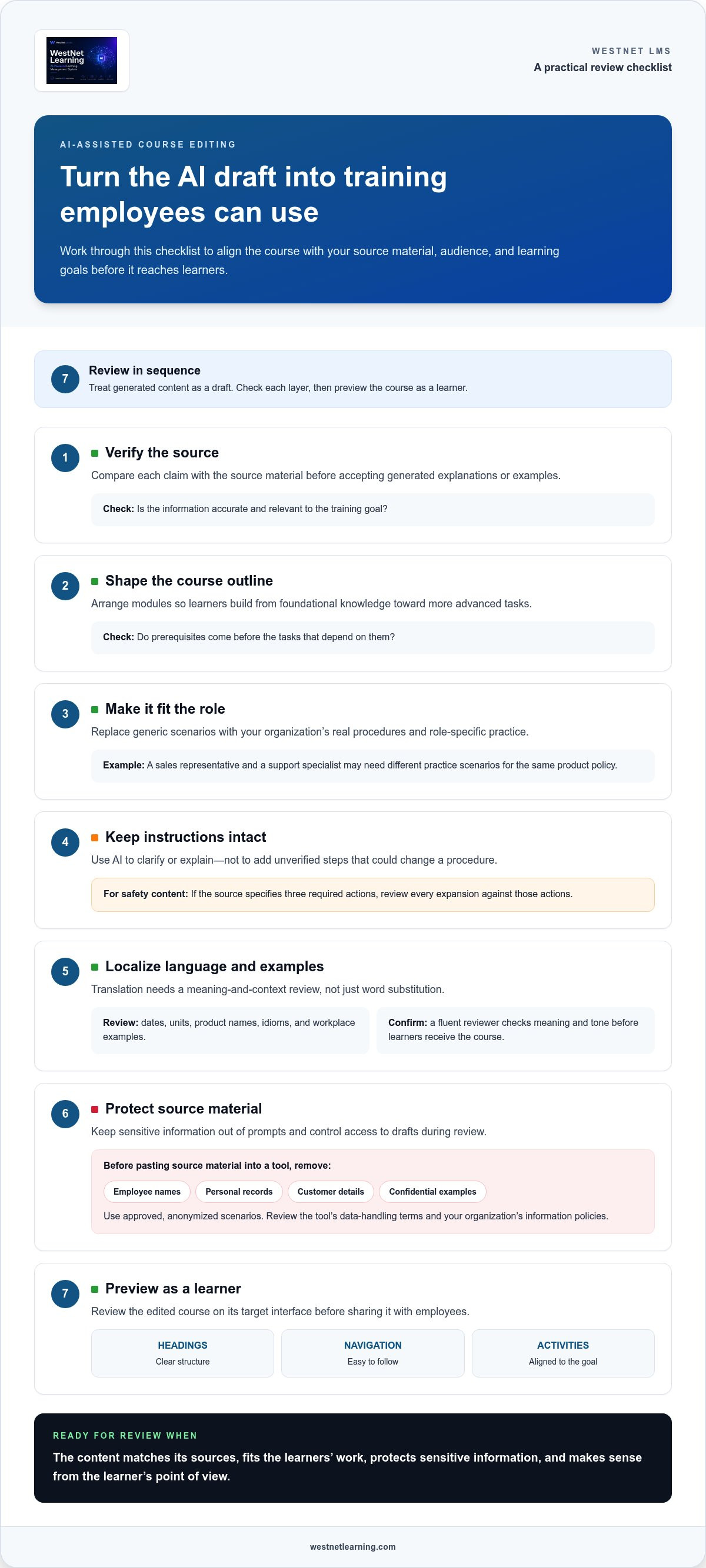
Use a deliberate editing sequence. First, compare each claim with your source material. Next, confirm that the order supports the learning objective. Then adjust examples, explanations, and activities for the intended role. A sales representative and a support specialist may need different practice scenarios, even when studying the same product policy. Record substantive changes so reviewers can see what changed and why.
Review each element that shapes the learner experience:
- Course outline: Reorder modules so prerequisites come before advanced tasks.
- Explanations: Replace broad statements with your organization’s approved procedures.
- Activities: Adapt prompts to realistic decisions, such as choosing the correct escalation route.
- Language: Match terminology to the role, region, and reading level.
AI can expand a brief outline into examples, summaries, or practice prompts. Use this capability selectively. If a safety procedure has three required actions, ask for clearer explanations of those actions, not extra steps that could alter the instruction. A reviewer should compare every expansion with the original source before publishing.
Translation requires localization, not just word substitution. For a course used by teams in different regions, review dates, units, product names, idioms, and workplace examples alongside translated text. Replace examples involving a local process when needed to keep the course clear and accurate. Ask a fluent reviewer to check meaning and tone before learners receive the course.
Protect content during AI-assisted editing. Before pasting source material into a tool, remove employee names, personal records, customer details, and confidential examples. Use approved, anonymized scenarios instead. Review the tool’s data-handling terms and your organization’s information policies to understand how prompts and generated content are handled. Limit access to working drafts to the people responsible for review.
Finally, preview the edited course as a learner. Check headings, navigation, examples, and instructions on the target interface. A structured course customization workflow can help authors keep revisions aligned with learning goals and audience needs.
AI-generated quizzes and assessments
AI-generated quizzes can provide a first set of knowledge checks, but authors need to validate every answer. Start with the learning objective, then ask a tool to draft questions that test recall, application, or decision-making. For a customer service lesson, a scenario might ask which response best resolves a billing concern. Confirm the answer and explanation against your approved procedure before learners see it.
Build an online course by providing trusted source material, defining the audience and objective, generating an outline, and reviewing lessons in sequence. Then refine activities, add assessments, and preview the learner experience before sharing. An AI course creator can accelerate the initial structure, while human review keeps instruction aligned with workplace practice.
Use varied question formats to assess more than memorization. Multiple-choice questions can test recognition, while scenario prompts reveal how learners apply a process. Short-answer questions can surface misunderstandings that fixed options might miss. For each item, verify that distractors are plausible, wording is clear, and feedback explains why an answer works. Avoid trick questions that measure interpretation instead of the intended knowledge.
- Quizzes: Check that each question maps to a lesson objective.
- Scenarios: Use realistic decisions, such as routing a customer request.
- Feedback: Explain the reasoning behind the correct response.
- Review: Remove duplicate, ambiguous, or unsupported claims.
AI can also draft course outlines, lessons, and educational material from source documents. Ask for a sequence that moves from core concepts to practice, then check transitions for gaps. For example, a software lesson should explain a workflow before asking learners to troubleshoot it. Edit generated content to match current terminology and organizational procedures, rather than adding unsupported details.
Voiceovers and video scripts can make material more engaging, especially when a process benefits from spoken explanation. Review scripts for pronunciation, pacing, and visual cues. A script describing a screen-based task should name the interface action as it appears onscreen. Captions and transcripts also help learners follow audio content and revisit key instructions.
AI output alone doesn’t establish accessibility or compliance with U.S. education requirements. Check the finished course for keyboard access, readable text, captions, clear instructions, and compatibility with the intended learning environment. Assess applicable requirements separately for your audience and use case.
Before publishing, test the assessment as a learner and compare results with the intended objectives. A focused training assessment review can help course authors check question quality, feedback, and alignment before integrating quizzes into employee learning.
Sharing, embedding, and exporting courses
Choose a delivery method based on where learners will access the online course and what information you need afterward. A public link can suit a short product introduction, while an internal learning portal can control access to employee training. Before sharing, verify the course structure, images, links, and assessment instructions in the learner view. One outdated link can disrupt the entire learning path.
Embedding places course content inside another page or portal, keeping learners in a familiar environment. For example, an organization might embed a product lesson in its employee resource site. Confirm that the destination supports the embed method, displays the course correctly, and works on employees’ devices. Test navigation and media playback before distributing the page.
Export options serve different purposes. A PDF can preserve a printable reference or provide a static review copy, but it won’t behave like an interactive lesson. A SCORM package is designed for use with compatible learning management systems. Tracking depends on the package settings and receiving LMS, so confirm which completion or score data the system records.
Use this sequence to prepare a course for distribution:
- Set the destination: Choose a link, embedded page, PDF, or SCORM package.
- Review permissions: Confirm that intended learners can open the course and its linked resources.
- Test the export: Open the package in the target LMS and check navigation, media, and assessments.
- Verify reporting: Confirm that completion and assessment results appear as expected.
For SCORM, check compatibility before completing authoring. Confirm that the receiving LMS accepts the selected package type and supports the tracking data your training requires. A compliance course, for example, may need completion records, while a reference module may only need access. Align export settings with the reporting purpose rather than choosing a format out of habit.
Keep PDF exports useful by treating them as companion materials, not replacements for interactive course content. A downloadable procedure checklist can reinforce a lesson, while the online version can include branching scenarios or knowledge checks. Review page breaks, headings, and images in the exported file, since visual elements may shift from the authoring preview.
After launch, track access and learner progress through the destination platform’s available reporting. If completion drops at a particular lesson, inspect its instructions, media, or assessment flow before changing the full course. For example, a broken link in one module may explain a drop-off better than the course structure itself.
Plan sharing, exports, and analytics together. This helps keep the learner experience coherent as a course moves from authoring to an LMS, embedded portal, or printable reference.
Course creation tools for employee training
Employee training starts with a performance need, not a prompt. Identify the task employees must perform, the knowledge they need, and the evidence that shows they can apply it. For example, a retail team learning a new returns process needs clear decision steps, realistic customer scenarios, and a way to practice exceptions. A course builder can organize source material, but the training objective should guide every design choice.
Bring a useful document into the workflow, such as an approved procedure, product guide, or onboarding checklist. Tools like Spacewize can help convert these static documents into interactive training in minutes. Ask the tool to generate a draft outline from that material, then compare each lesson with the original source. Remove unsupported claims and add role-specific examples. A warehouse employee and a team supervisor may use the same safety procedure differently, so one generic explanation may not serve both.
Use this practical sequence to build a course:
- Define the outcome: Describe what learners should do after training.
- Select the source: Choose current, approved documents and examples.
- Generate a structure: Group material into lessons, practice, and assessment.
- Review with a subject expert: Check procedures, terminology, and exceptions.
- Test the learner path: Preview instructions and activities before assigning the course.
Speed matters, but time saved during drafting doesn’t measure training quality. An AI tool may produce a first draft quickly, yet reviewers still need to confirm accuracy, accessibility, and fit with the job. For example, a compliance lesson should distinguish required actions from optional guidance. Keep the approved policy beside the draft while reviewing each instruction.
Plan for upkeep before launch. If a product workflow changes, identify the lessons and assessments affected. Assign an owner to update the source document and course content together. This creates a traceable path from policy revision to learner-facing instruction, rather than leaving employees with an outdated module in a shared folder.
Choose tools for the full employee learning process, not content generation alone. Consider how authors review drafts, how learners access training, and how completion information supports follow-up. For organizations looking to complement internal course development with professional educational programs, established providers such as Trainetics Academy demonstrate how structured training can empower teams. A course for new supervisors, for example, may need to sit alongside other management learning and remain easy to update as internal processes evolve.
For organizations ready to connect course creation with employee training workflows, explore AI course creation for workforce learning as a next step.
WestNet LMS: WestNet AI LMS
WestNet LMS offers WestNet AI LMS, an AI-powered learning management system for corporate training. It brings AI-powered course creation, advanced analytics, and gamification together to support employee development.
Turn to it when your organization needs to connect course creation with delivery and learning insights. AI Course Creator supports course development, while LMS Integrations connect learning workflows with existing tools. Off-the-Shelf eCourses provide ready-made training content when creating every course internally isn’t the right fit.
These capabilities support teams of different sizes, from small groups to tens of thousands of users. Choose the combination that fits your training needs, current tools, and approach to course development.
Visit westnetlearning.com to explore how WestNet LMS can support your employee training goals.
Turn Course Ideas Into a Connected Learning Strategy
Choose a training priority that matters to employees and the organization. It might be onboarding, a process change, or role-specific development. Define what learners should be able to do, then use that outcome to guide your choice of an AI course creator and how you measure its value.
Keep the workflow moving from draft to delivery. WestNet LMS offers WestNet AI LMS, AI Course Creator, and LMS Integrations, bringing course development and learning technology together. Map your current training process, identify where course creation or delivery creates friction, and decide what a more connected approach should support.
Start with the training need you want to address, then explore how the platform can fit your learning goals. Contact WestNet LMS to discuss course creation and take a clear next step toward more cohesive employee learning.
Frequently Asked Questions
What are the key features of an AI course generator?
Look for source-document import, outline generation, editable lessons, quiz creation, and preview tools. An AI course creator should also let authors shape drafts around specific learning goals. For employee onboarding, importing an approved handbook can help organize policies into modules and draft knowledge checks. Consider learner access, reporting, and export options too. The right feature set depends on whether you need standalone authoring or connected course delivery.
What is an AI course creator and how does it work?
It’s software that uses artificial intelligence to turn source material or a prompt into draft learning content. An author might provide a policy document, identify the intended audience, and request a course outline. The tool can generate an initial structure or learning activities for the author to review and edit. Human review remains important for correcting errors and aligning examples with actual workplace procedures.
How do course creation tools compare on features and ease of use?
Compare tools by testing the same task in each, such as turning a product guide into a short employee lesson. Note how easily you can adjust the outline, revise generated text, add assessments, preview the learner view, and export the course. Also consider whether reviewers can collaborate and whether the workflow fits your existing training process. A simple interface matters when authors can complete these steps efficiently.
How much do popular course creation tools cost in the United States?
Costs vary with the tool’s licensing model, user capacity, authoring features, support, and whether learning management is included. Some tools charge by subscription, while others use different access or usage arrangements. For a realistic comparison, list the capabilities your team needs, estimate who will author and take courses, and compare the plans required. Don’t compare a standalone authoring tool with a broader training platform as if they were equivalent.
Can AI course creators generate lessons, quizzes, slides, and videos?
Some tools can draft lessons, quizzes, and slide content, while video capabilities vary. Check which outputs are editable and whether assessments include answer explanations. For example, an AI-generated quiz may need a subject expert to confirm that each correct answer matches the training source. Treat generated media or scripts as drafts, then review wording, visuals, captions, and instructions before learners use them.
Which course creation tools integrate with LMS platforms and payment tools?
Integration options differ, so match the course format and workflow to the systems your organization uses. WestNet LMS offers LMS Integrations, and its product information identifies SCORM and xAPI course creation. For payment tools, identify the transaction workflow you need, such as paid enrollment, then assess whether the intended systems connect. A course creator should fit the learner and payment journey from registration through access and reporting.
What are the privacy and accuracy risks of using AI to create courses?
AI-generated material can contain incorrect details, outdated procedures, or examples that don’t fit your organization. Prompts may also expose confidential information if authors include employee or customer records. Use approved source documents, remove sensitive details from prompts, and have a subject expert review important instructions. Before adopting an AI course creator, examine its data-handling terms and align its use with your organization’s privacy and security policies.
What are the best AI course creator platforms in 2026?
The right platform depends on the job and your workflow. For employee training, look for course creation connected to delivery and learner analytics. For standalone content production, prioritize editing and export options.