What if the fastest way to create more assessment questions isn’t the best way to measure learning? AI generated training assessments can help L&D teams draft questions more efficiently, but speed alone won’t catch factual errors, unfair assumptions, or questions that test the wrong skills.
If you create assessments across multiple courses, the workload is familiar: writing and reviewing every item takes time, and AI output still needs careful scrutiny. The goal isn’t to treat generated questions as finished content. Use AI to draft, then apply human judgment to confirm each assessment is accurate, fair, and aligned with its learning objectives.
This guide explains how to create and validate AI-generated assessment items, with a repeatable review process for gathering meaningful evidence of learning. You’ll also compare standalone AI tools with LMS-based workflows, considering how each fits your authoring, delivery, reporting, and governance needs. Build a process that moves faster without lowering the standard for what learners need to demonstrate.
Key Takeaways
- Use AI generated training assessments as drafts. Distinguish question writing from scoring, validation, and evidence of workplace competence.
- Build a repeatable workflow: define learning outcomes, provide trusted source material, draft items, review them, then pilot and revise.
- Compare standalone tools and LMS-based workflows against practical needs such as source control, accessibility, reporting, integrations, and governance.
- Check each item for factual accuracy, objective alignment, ambiguity, bias, and accessibility. Have a subject-matter expert review answer keys and distractors.
- Pilot the assessment workflow in one course before scaling. WestNet LMS confirms learning analytics and reporting, but its assessment-generation capabilities should be verified.
AI-Generated Training Assessments: What They Can and Cannot Do
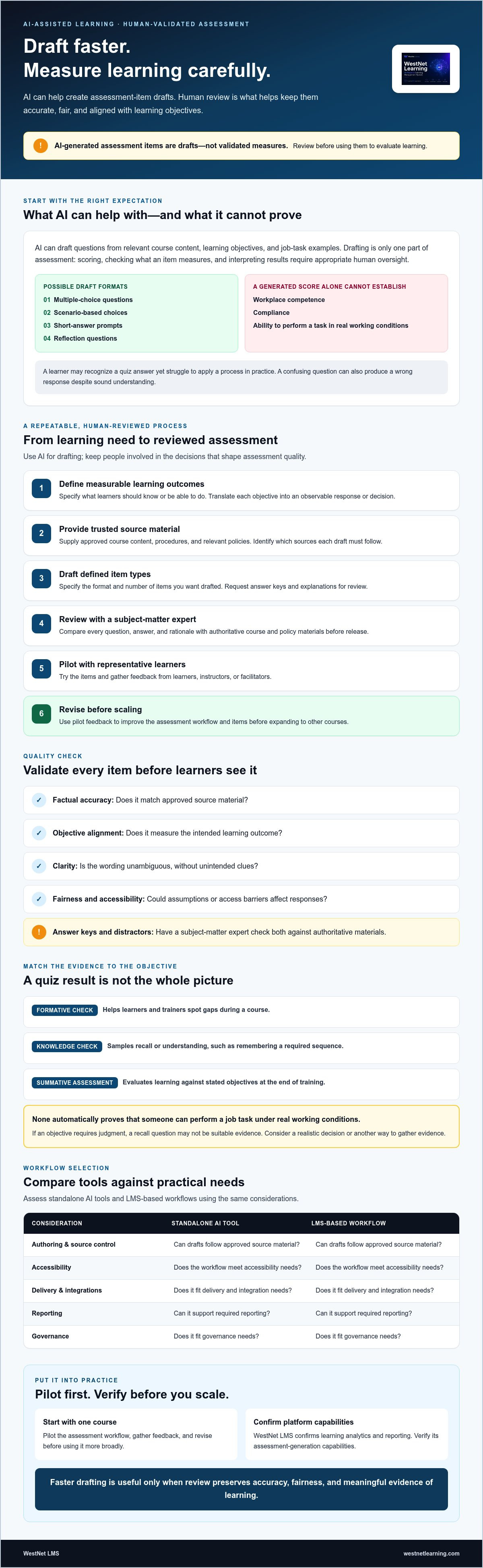
AI-generated training assessments are questions or prompts drafted or adapted with AI, using inputs such as course content, learning objectives, or job-task examples. A tool may produce a useful first draft, but drafting is only one part of assessment. Scoring answers, checking whether items measure the intended skill, and deciding what results mean are separate tasks that require appropriate human oversight.
“AI-generated assessment items are drafts, not validated measures. Review them for accuracy, fairness, and alignment before using them to evaluate learning.” That distinction matters because educational assessment involves systematically gathering and using evidence of knowledge and skills, not simply producing questions. For more context on AI’s role in workplace learning, explore AI in corporate training.
Which training assessments can AI help draft?
Depending on the authoring and delivery tools, AI may help draft multiple-choice questions, scenario-based choices, short-answer prompts, or reflection questions. For example, a knowledge check might ask employees to identify the next step in a documented process. A scenario could ask a learner to choose how to respond to a customer issue. A reflection prompt might ask what information they would verify before taking action.
Give the tool relevant source material. Job tasks and course objectives help connect draft items to the work learners need to do, rather than inviting generic questions based on broad topic labels.
What AI-generated questions do not prove
Keep the type of evidence in view. A formative check can help learners and trainers spot gaps during a course. A knowledge check can sample recall or understanding, such as whether an employee remembers a required sequence. A summative assessment at the end of training can evaluate learning against stated objectives. None automatically proves that someone can perform a job task under real working conditions.
A generated score alone can’t establish competence or compliance. A learner may recognize the right answer in a quiz yet struggle to apply the process in practice. A confusing question, meanwhile, may produce a wrong response despite sound understanding. Review every item for unsupported claims, ambiguous wording, unintended clues, and distractors that are obviously incorrect. If an item is too easy or tests recall when the objective requires judgment, revise it or choose a more suitable way to gather evidence.
How to Create AI-Generated Training Assessments with Human Review
Build a controlled workflow, not a one-click content pipeline. AI generated training assessments are most useful when each draft starts with a clear learning outcome and trusted source material, then goes through subject-matter review before learners see it.
Start with measurable learning objectives
Translate each objective into an observable response or decision. If the goal is to apply a safety procedure, ask learners to choose or explain the correct next step in a realistic situation, rather than simply recall a term. Bloom’s taxonomy can help you plan the level of thinking, from remembering to applying or evaluating. It can’t replace instructional judgment about what the job requires.
Assessment quality depends on how closely each item measures a clearly defined learning objective.
Use this workflow to move from a learning need to a reviewed assessment:
- Define outcomes. Specify what learners should know or be able to do after training.
- Provide source material. Supply approved course content, procedures, and relevant policies. Identify which sources the draft must follow.
- Draft items. Ask the AI tool for a defined format and number of items, and request answer keys with explanations for review.
- Review. Have a subject-matter expert compare every question, answer, and rationale with authoritative course and policy materials before release.
- Pilot. Test the items with representative learners and gather feedback from instructors or facilitators.
- Revise. Correct errors, clarify wording, and remove items that don’t measure the intended outcome.
Write prompts that set clear boundaries
A useful prompt names the learner level, objective, context, format, and feedback requirements. For example: “For new customer-support employees, draft a scenario-based question that measures whether the learner can follow the approved identity-verification procedure. Use only the supplied procedure, include one correct response and plausible distractors, explain the answer, and flag any missing source information instead of inventing details.” Specific instructions make the output easier to review, but they don’t validate it.
Review, pilot, and improve generated items
Check the answer key and each distractor against source material. Look for ambiguous wording, unsupported claims, unintended clues, and questions that reward guessing or cover content the course never taught. Stanford HAI’s framework for validating AI claims can help teams ask disciplined questions about what an AI tool’s output does and doesn’t establish.
During a pilot, ask learners where the wording felt unclear and ask instructors whether responses reveal understanding of the objective. Revise based on that evidence, then review the updated item before release. For broader implementation considerations, read about AI in corporate training. If you’re exploring how AI can support course development, see AI course creation, and verify assessment-generation capabilities separately.
How to Compare AI Assessment Tools and LMS-Based Workflows
Choose a workflow, not just a question generator. Standalone AI assistants can help draft items quickly, authoring tools may bring drafting closer to course development, and an LMS-based workflow can connect learning delivery with learner access and reporting. The right fit depends on how your team controls content, reviews drafts, and manages them after approval. For broader measurement context, see this guide to data-driven training.
What to evaluate before selecting an AI assessment workflow
Compare each option with your organization’s requirements. Establish where approved source material lives, who can use it, how revisions are tracked, and who must approve questions before release. Check accessibility and language needs, data handling, and whether the workflow keeps a usable record of review and approval. Then trace an item from draft to course delivery and reporting. A tool that creates questions but leaves your team to manage every handoff separately may not simplify the full process.
| Evaluation area | Standalone AI assistant | Authoring tool | LMS-connected workflow |
|---|---|---|---|
| Source control | Check how sources are supplied and retained. | Check how drafts connect to course materials. | Confirm how approved learning content is organized. |
| Review workflow | Determine how reviewers exchange and approve drafts. | Check whether review fits your authoring process. | Verify available review steps rather than assuming them. |
| Accessibility | Test output for clear, accessible wording. | Check authoring and output requirements. | Evaluate the learner experience across delivery contexts. |
| Reporting | Confirm what output can be exported. | Check how assessment content and results are handled. | Verify which learning and assessment data is reported. |
| Integrations | Check how drafts move into existing systems. | Confirm compatibility with delivery tools. | Verify required connections and transfer steps. |
| Governance | Set clear permissions and approval practices. | Check version history and access controls. | Confirm oversight, auditability, and administration needs. |
When an LMS-based workflow may be a better fit
An LMS-based approach can be useful when teams want course access and learning activity managed within an established delivery workflow. It may reduce handoffs, but don’t assume an LMS automatically creates, validates, or reports on AI-generated questions. Confirm those capabilities directly during evaluation.
WestNet LMS’s AI Enhanced LMS has confirmed Learning Analytics and Reporting, along with AI-Powered e-learning Creation that supports SCORM or xAPI eCourse creation. These are learning-platform capabilities, not confirmation of assessment-question generation or assessment-specific analytics. Verify assessment formats, review controls, and reporting details before making a product decision. Assess AI authoring options separately, including the available AI course creation capabilities, and consider how they could fit your assessment workflow.
How to Validate AI-Generated Assessments for Accuracy and Fairness
Validation is an ongoing control, not a final proofreading pass. Review each item before release, then revisit it when learner responses, course content, or workplace policies suggest it may no longer be reliable. A consistent process helps teams treat AI generated training assessments as evidence to examine, not decisions to accept automatically.
Check accuracy, fairness, and accessibility
Use a reviewer checklist and keep the approved source material beside each draft. For every question, confirm:
- Factual accuracy: Does each claim and the marked correct answer match current, approved course or policy materials?
- Objective alignment: Does the item assess the stated learning outcome, rather than an unrelated detail?
- Clarity: Could a learner reasonably interpret the question in more than one way?
- Fairness and accessibility: Does it rely on unnecessary cultural assumptions, specialized background knowledge, complex reading, or wording that could create an avoidable barrier?
- Answer quality: Are distractors plausible enough to test understanding, but clearly incorrect according to the source?
Have a subject-matter expert review the answer key and distractors independently. A convincing explanation can still justify the wrong answer, and a distractor that seems obvious to its author may mislead learners. Ask reviewers to explain why the correct response is defensible and why each alternative is incorrect. For controlled review practices in compliance contexts, see compliance training best practices.
Use results as signals, not automatic verdicts
Assessment data can point to issues, but rarely explains them on its own. Review completion and response patterns alongside learner feedback and instructor observations. If a question produces unexpected answers, check whether learners misunderstood the concept, the wording was unclear, or the course didn’t teach the information being tested. Don’t treat one score as a complete judgment of workplace performance.
Keep a record of each item’s source, reviewer approval, revision history, and reason for change or retirement. Recheck questions after a policy or course update, even if the wording still appears sound. A formerly accurate answer may no longer reflect current instructions.
Make validation part of your learning workflow. Explore WestNet LMS features as you evaluate how a learning platform may support your broader training process. Confirm assessment-specific capabilities and review controls directly.
Putting AI-Assisted Assessments into an LMS Workflow
Move from draft to delivery in a controlled pilot. Start with one course where the learning objectives are clear, the source material is stable, and a named reviewer can approve changes. This keeps the initial test manageable and makes it easier to spot workflow gaps before expanding the use of AI generated training assessments.
Pilot with a bounded, measurable use case
Agree on approval responsibilities before any AI-assisted content reaches learners. Decide who checks source accuracy, who confirms alignment with course objectives, and who authorizes release. Establish baseline measures for course completion, learner feedback, and performance on objective-aligned items. These measures can help the team assess the pilot, but they shouldn’t be treated as proof of job competence on their own.
- Select one course: Choose training with current reference material and a clearly defined learner group.
- Define what to monitor: Record existing completion and feedback measures, then determine how you’ll review responses to the pilot questions.
- Test the learner experience: Check that the content displays as intended, instructions are clear, and learners know how to complete the assessment.
- Gather feedback and adjust: Review learner and instructor comments, correct issues, and obtain approval before making the revised version available.
Evaluate WestNet LMS capabilities without assuming features
WestNet LMS’s AI Enhanced LMS can be considered as part of the broader learning workflow. Confirmed capabilities include AI-Powered e-learning Creation, Learning Analytics and Reporting, AI-Generated Course Recommendations for learners, AI-Powered Help for learners and admins, and Administrator Support. AI-Powered e-learning Creation supports SCORM or xAPI eCourse creation. These capabilities may support course development, learner access, and administration, but they don’t confirm automatic assessment-question generation or assessment-specific reporting.
During evaluation, ask directly whether the current platform supports assessment generation and confirm which item types, review controls, scoring options, and reporting capabilities are available. Map the answers to your pilot’s approval steps and measures. For example, clarify how reviewed assessment content would be delivered, what learner information can be reported, and which tasks remain with your team.
Use the WestNet LMS demo to discuss your learning workflow and requirements, including the assessment capabilities you need to verify. A measured pilot gives your team a practical basis for deciding what to scale, what to refine, and where human review must remain in control.
Build a More Reliable Assessment Workflow
AI can help L&D teams develop assessment drafts more efficiently, but learning evidence depends on what those questions measure and how carefully they’re reviewed. Treat AI generated training assessments as starting points: align them to clear objectives, verify them against approved materials, and refine them using learner and instructor feedback.
Choose tools based on the full workflow, from content creation and review to delivery and reporting. WestNet Learning’s AI Enhanced LMS includes AI-Powered e-learning Creation, Learning Analytics and Reporting, a Dedicated Client Success Manager, and Administrator Support. Automatic assessment-question generation isn’t a confirmed capability, so verify assessment features and review controls directly as you evaluate fit.
Request a WestNet Learning demo to discuss your learning workflow and the capabilities your team needs to confirm. With clear governance and human judgment in place, you can explore AI while keeping meaningful learning at the center.
Frequently Asked Questions
What are AI-generated training assessments?
AI-generated training assessments are questions or prompts drafted or adapted with help from an AI tool. Depending on the tools and workflow, they may be used for practice checks, knowledge checks, or end-of-course assessments. AI assistance can speed up drafting, but it doesn’t automatically validate the content, scoring, or relevance. Reviewers still need to confirm that each item measures the intended learning and uses accurate information.
Can AI create quiz questions from training materials?
Yes, some AI tools can draft quiz questions from supplied training materials if the selected tool supports that function. Teams can provide course content and specify the learner level, learning objective, question format, and feedback needed. Treat the output as a draft: compare every question and answer key with the source materials, and check that questions don’t introduce unsupported details or test content learners haven’t been taught.
Are AI-generated assessments accurate?
Not automatically. AI can produce clear, plausible questions that still contain factual errors, ambiguous wording, or answer keys that don’t match approved materials. Accuracy depends on the quality of the source content, the tool’s output, and the human review process. Have a subject-matter expert check the questions and answers, then pilot items where practical. A score alone doesn’t establish that an employee can perform a task at work.
How do you validate AI-generated assessment questions?
Check each question against approved materials and its learning objective. Confirm that the correct answer is defensible, distractors are plausible but clearly wrong, and wording is clear, fair, and accessible. Ask a subject-matter expert to review the answer key independently. Pilot questions with representative learners, gather feedback, and revise confusing or misaligned items. Recheck them after relevant course or policy updates so they remain accurate.
Can AI-generated assessments be used for compliance training?
They can help draft knowledge checks based on approved compliance course or policy materials, but they shouldn’t be treated as proof of compliance or job competence on their own. Have an accountable subject-matter reviewer verify every item and answer before learners receive it. Track approvals and revisions, and review questions when the underlying training or policy changes. Confirm that each assessment measures the specific learning objective.
What should I look for in an AI assessment tool?
Evaluate source control, permissions, version tracking, reviewer approvals, accessibility, data handling, integrations, and how content moves into learner delivery and reporting. Confirm whether the tool generates assessment items, which formats it supports, and what review and scoring controls are available. WestNet Learning’s AI Enhanced LMS confirms AI-Powered e-learning Creation and Learning Analytics and Reporting, but assessment-generation features should be verified directly before selection.