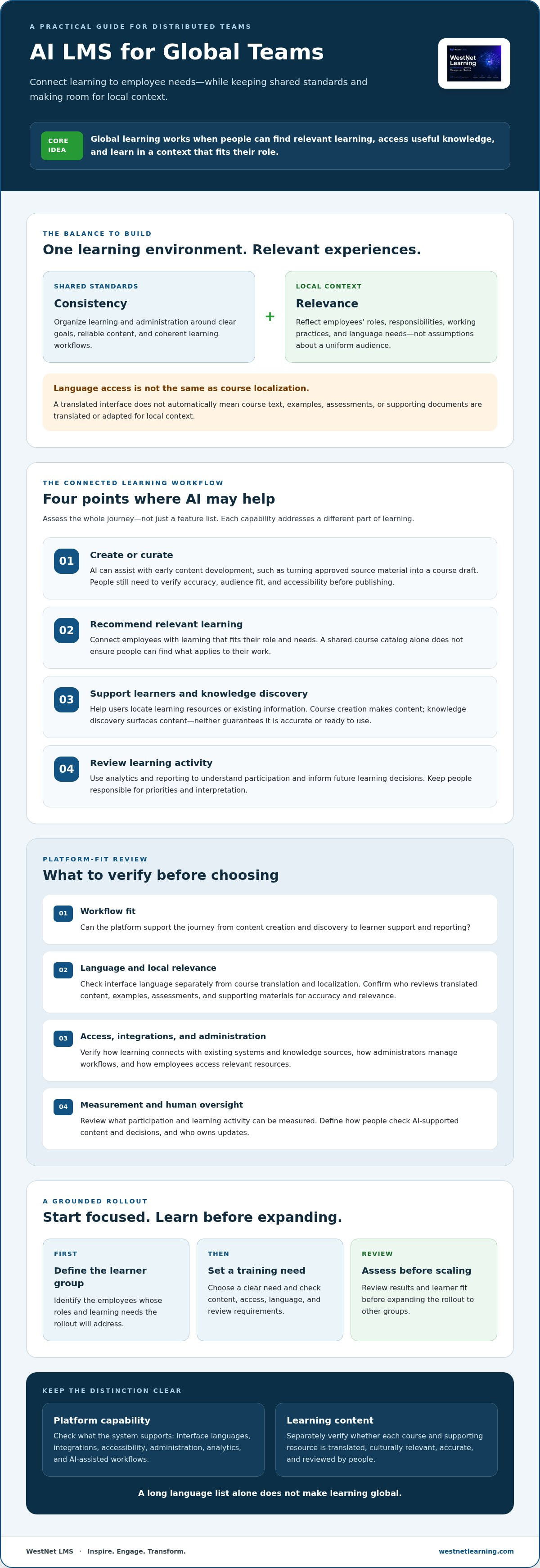
A long language list doesn’t make learning global. An AI LMS for global teams needs to connect training and knowledge with employees’ roles, while maintaining shared standards and allowing for local context. Language access matters, but it doesn’t automatically translate or culturally adapt course content.
Decision-makers often want one consistent learning experience across locations, roles, and languages. But choosing AI features for their novelty can leave the real problems untouched: employees can’t find relevant learning, content is spread across disconnected systems, and teams struggle to measure what’s working.
This article explains how AI can help connect learning through course creation, recommendations, learner support, and analytics. You’ll find practical ways to assess platform fit, including what to verify about language, integrations, accessibility, and human oversight. We’ll also consider WestNet’s confirmed capabilities as an example, while distinguishing site-language support from translated or localized course content.
Key Takeaways
- Use an AI LMS for global teams to connect learning with employee needs while balancing shared standards with local relevance.
- Assess the full learning workflow, from content creation and course discovery to learner support and reporting.
- Look beyond language options: confirm whether course content is translated and culturally relevant for each audience.
- Evaluate platform capabilities across access, administration, measurement, and human review of AI-supported decisions.
- Start with a defined learner group and training need, then review results before expanding the rollout.
Why an AI LMS for global teams is becoming a strategic learning layer
Keeping learning accessible and coherent across distributed teams takes more than putting courses online. Training materials may sit in separate systems, while role expectations, working practices, and preferred learning languages vary across an organization. Employees may have access to the same catalog and still struggle to find what applies to their work. To address this challenge, platforms like heartsy.ai unify scattered learning and organizational data into predictive analytics that support workplace culture.
An AI LMS is a learning management platform that applies artificial intelligence to tasks such as creating learning content, recommending resources, assisting users, or analyzing learning activity. The aim isn’t to add AI for its own sake. It’s to connect learning resources with learner needs and administrative workflows, while keeping people responsible for learning priorities and decisions.
From course catalog to connected learning environment
A course catalog organizes formal learning. A knowledge repository stores information such as procedures, reference documents, and guidance. They serve different purposes, but employees benefit when they can move from a learning activity to relevant supporting material without searching disconnected locations.
An LMS can organize courses, enrollment, and learning records; a knowledge repository can provide information employees need to apply what they’ve learned. AI may help create course content, recommend learning, or assist users in finding answers. These capabilities can support adaptive learning systems, where resources are tailored to learner needs. They don’t replace a sound strategy: teams still need clear goals, reliable content, and oversight of how AI is used.
For a wider enterprise planning perspective, see this enterprise AI learning platform guide.
What global teams need beyond online access
Access is the starting point, not the finish line. Check whether a platform supports consistent access to learning, relevant content by role, useful administrative visibility, and learner assistance. The setup should help administrators manage learning workflows and understand participation, while making it straightforward for employees to find what they need.
Separate interface language from course localization. A platform may let users navigate its interface in a selected language, but that doesn’t mean course text, examples, assessments, or supporting documents have been translated or adapted for local context. Check these separately, including who reviews content for accuracy and relevance.
Needs also differ within locations. Some employees may work across regions; others may primarily serve one market. Build the learning environment around actual roles, responsibilities, and language needs rather than assuming every employee shares the same working pattern. An AI LMS for global teams becomes a strategic layer when it connects access, discovery, support, and administration without treating a diverse workforce as one uniform audience.
How AI connects learning content, recommendations, and knowledge access
An effective learning workflow connects four steps: create or curate content, help employees discover relevant learning, support them as they learn, and review activity to guide future decisions. AI can assist at each point, but those functions solve different problems. Keeping them distinct helps decision-makers assess what a platform can actually do.
AI course creation generates or assists with learning materials; AI knowledge discovery helps people find existing information or learning resources. One creates content, while the other surfaces it. Neither guarantees information is accurate, suitable for a role, or ready to publish. Research on the future of workforce training offers useful context for considering how technology and changing skill needs intersect.
AI-assisted content creation and knowledge organization
AI-powered e-learning creation can support early content development, such as turning approved source material into a course draft. Before publishing, subject matter experts should verify accuracy, check that examples and instructions fit the audience, and review accessibility. Assign clear ownership for updates so learners aren’t relying on outdated material.
Content also needs structure. Descriptive titles, consistent categories, and clear role or topic labels make courses easier to browse and maintain. Organizations exploring AI course creation software should check what the tool generates, what reviewers can edit, and how approval fits their publishing workflow.
Personalized recommendations, assistance, and feedback loops
Recommendations suggest learning a person may find relevant; automated enrollment applies rules to assign or register learners in required training. They serve different purposes. A recommendation might surface a course related to an employee’s learning interests, while an enrollment rule assigns a designated course to a defined group. Check whether administrators can understand and manage each process.
AI-powered help can give learners or administrators another way to get assistance, but it shouldn’t replace human expertise. Confirm how users can escalate questions and how answers are reviewed when accuracy matters. An AI LMS for global teams may also combine recommendations with learning analytics, giving administrators information about course discovery, participation, and completion. These patterns can inform follow-up questions, but don’t prove that a course caused a change in workplace performance. Review the data alongside the learning objective and other relevant evidence.
To see how these capabilities are presented together, review WestNet LMS features as one platform example, then compare each capability with your organization’s workflows and oversight requirements.
How to evaluate an AI LMS for global teams beyond language count
A long list of interface languages can look compelling, but it doesn’t establish that employees can learn effectively in those languages. Interface language support changes the language of platform navigation, while localized course content means learning materials have been translated and adapted for the intended audience. Verify both separately before treating a platform as ready for a global rollout.
Assess the whole operating model: access, content, recommendations, administration, and measurement. A comparison table can help separate confirmed platform functions from claims or details you still need the vendor to verify.
Language, authentication, and administrative readiness
Ask which languages users can select for the platform interface, then ask which course materials are translated and who reviews their accuracy and local relevance. Don’t infer content translation from interface options. WestNet’s AI Enhanced LMS supports up to 60 site languages selected at login; this describes the site interface, not confirmed translation or localization of course content.
Check access against your organization’s requirements. Confirm whether standard sign-in or single sign-on (SSO) fits your access needs, how user records are managed, and whether HRIS integration supports your workflows. Clarify what data migration involves and what administrator support is available. These details should be matched to your systems and processes, not assumed from a language count.
AI usefulness, analytics, and learning governance
Start with a defined learner need. Ask for examples of how recommendations surface relevant courses and what AI-powered help can assist with. Confirm where human review or escalation fits, especially when learners need guidance beyond routine platform support.
Then examine reporting. Can administrators review participation and progress in a way that supports the organization’s learning objectives? Ask how analytics are generated and what activity they represent. Treat reporting as evidence to investigate, not proof that training caused a business result.
Before selection, get direct answers on AI data practices, content controls, and any security claims. Request supporting documentation where appropriate, and identify who can review or manage AI-generated content and outputs.
Use a vendor comparison table with separate columns for confirmed platform functions and questions requiring verification. For example:
- Language: Record stated interface options; verify course translation and localization independently.
- Administration: Record confirmed HRIS integration or user-management functions; verify sign-in, SSO, and migration needs.
- AI and measurement: Record confirmed recommendations, help, and analytics; verify data handling, controls, and reporting detail.
This evidence-first approach makes it easier to compare an AI LMS for global teams on operational fit, not just headline features.
A practical rollout plan for AI-enabled learning across distributed teams
A successful rollout starts with a learning need, not a feature checklist. Choose a defined learner group and a measurable objective, such as helping a particular role complete a required process correctly. Then test whether the platform, learning content, and support model fit the people who will use them.
Set priorities before configuring the platform
Map learner groups, roles, existing courses and reference materials, language requirements, and administrative responsibilities. Decide which workflows need to remain consistent across the organization, such as core enrollment or reporting, and which content or processes may need local adaptation. Keep platform configuration, course translation or localization, and change management as separate workstreams, with clear owners for each.
Set success measures before the pilot begins. Choose indicators tied to the learning objective, such as learners’ ability to demonstrate a defined task, and use platform activity data as supporting context rather than the sole measure.
Pilot, review, and scale with feedback
Use this sequence to move from evaluation to broader deployment:
- Assess needs: Define the learner group, training gap, required content, language needs, and administrative owners.
- Configure the pilot: Set up access and enrollment for the selected group, and prepare the course materials and learner communications.
- Test with representative users: Check sign-in, course discovery and recommendations, learner support, reporting, and content suitability. Include administrators as well as learners.
- Review evidence: Compare results with the learning objective, examine participation and progress data, and gather direct feedback about access, relevance, and usability.
- Refine and expand: Address gaps in configuration, content, or communication before extending the rollout to additional groups.
Keep the review grounded. A high completion rate alone doesn’t establish that employees can apply what they learned. Combine platform reporting with feedback and objective-specific checks. For additional measurement context, consult this guide to employee performance tracking and learning data.
Scale only when the pilot shows that the learning need is being addressed and the operating model is manageable. An AI LMS for global teams should support consistent processes while leaving room to improve content and implementation based on local feedback.
To explore how a platform could fit your rollout plan, review WestNet’s AI LMS capabilities.
What an AI LMS for global teams can look like in practice
Once you’ve defined your requirements and separated confirmed capabilities from items to verify, compare platforms against the workflows your teams actually need. WestNet LMS’s AI Enhanced LMS offers an example of AI-supported creation, recommendations, assistance, and reporting within a learning platform. Assess its features against your organization’s content, access, and governance requirements.
Map confirmed WestNet capabilities to team requirements
AI-Powered e-learning Creation can support course-authoring workflows. Treat generated material as a draft for review: subject matter experts should check accuracy, accessibility, and suitability before publication. AI-Generated Course Recommendations for learners can help learners discover courses, while AI-Powered Help for learners and admins provides a support capability, not a replacement for human expertise.
For administration and measurement, the AI Enhanced LMS includes Learning Analytics and Reporting, automated enrollment, and HRIS integration. The platform also supports up to 60 site languages selected by users at login. This confirms site-language options only. It doesn’t establish that courses are translated or culturally localized, so confirm course-language availability and review responsibilities separately.
The platform supports standard sign-in and Single Sign-On (SSO). Check which option fits your organization’s access requirements, and verify other technical, data-handling, and content-control needs with the vendor.
Build a shortlist and see the workflow firsthand
Use your documented requirements as a comparison checklist. For each platform, record what’s confirmed, what needs a vendor answer, and what your team must provide or review. Consider how recommendations, learner and administrator help, enrollment workflows, and analytics fit your intended use. This keeps a polished feature list from overshadowing practical questions about implementation and oversight.
Support matters too. WestNet LMS confirms a Dedicated Client Success Manager and administrator support. Ask how these options align with your rollout and ongoing administration needs, and clarify what support applies to your organization.
A focused evaluation can begin with one workflow: identify the learners, the course or content they need, and the administrative steps involved. Then compare that workflow across your shortlist. Review WestNet LMS’s stated capabilities and decide which questions to raise in a product discussion. A platform’s fit depends on your requirements, not its feature count alone.
Build a more connected learning strategy
An effective AI LMS for global teams connects learning with employee needs, but platform selection is only one part of the work. Define the learning objective, verify how AI features support it, and plan separately for access, course localization, administration, and human review.
WestNet’s AI Enhanced LMS includes AI-Powered e-learning Creation, AI-Generated Course Recommendations for learners, HRIS Integration, and a Dedicated Client Success Manager. It supports up to 60 site languages selected at login, but that does not confirm translated or localized course content. Verify language needs and content availability for your learners before making a decision.
Start with a focused pilot, assess it against learning objectives, and use learner and administrator feedback to guide next steps. Explore the platform’s confirmed capabilities: Explore the WestNet AI Enhanced LMS.
With clear priorities and careful evaluation, you can build a learning environment that supports shared goals while respecting the needs of distinct teams.
Frequently Asked Questions
What is an AI LMS for global teams?
An AI LMS for global teams is a learning management system that uses artificial intelligence to support learning tasks across a distributed workforce. Depending on the platform, that may include creating course content, recommending relevant courses, assisting learners or administrators, and analyzing learning activity. Evaluate each function against a defined need, and keep human review in place for learning strategy, content accuracy, and important decisions.
Can an AI LMS support employees who speak different languages?
Yes, an LMS may offer a multilingual interface, language-specific course materials, or both, but these are separate capabilities. Check which languages users can select in the platform and whether courses, assessments, and supporting resources are translated and locally relevant. WestNet’s AI Enhanced LMS supports up to 60 site languages selected at login. That fact alone doesn’t confirm that course content is translated into those languages.
How does AI help global teams find relevant learning content?
AI-generated recommendations can surface courses that may be relevant to an employee, helping learners discover options in a larger catalog. Their usefulness depends on the available content and how well recommendations align with learner needs. AI-powered help can also assist learners or administrators. Treat both as support capabilities: confirm what they do, how users can seek human help, and whether recommendations can be reviewed.
What should I compare when choosing an AI LMS for a global workforce?
Compare more than language options. Assess access and authentication, course availability and localization, learner recommendations and support, administrative workflows, integrations, reporting, and governance of AI features. Ask vendors to distinguish confirmed functions from items requiring configuration or verification. For example, confirm whether HRIS integration fits your systems, whether SSO is available for your access requirements, and what analytics can report about participation and progress.
Does supporting 60 site languages mean courses are available in 60 languages?
No. Site-language support refers to the language users can select for the platform interface; it doesn’t establish that courses are translated or culturally adapted. WestNet’s AI Enhanced LMS supports up to 60 site languages selected at login, but course-language availability should be confirmed separately. Ask which specific learning materials are translated, how content is reviewed, and whether localized examples or assessments are available for your audiences.
How can an organization measure whether an AI LMS is helping global teams?
Start by defining the learning objective, then choose measures that reflect it. Learning Analytics and Reporting may help administrators review participation, progress, and course completion, while an assessment or task-based check can provide evidence related to learning. Gather learner and administrator feedback, too. Interpret platform activity carefully: completing a course doesn’t by itself prove that employees retained knowledge or applied it at work.
Can an AI LMS integrate with an organization’s existing HR systems?
Some learning platforms offer HRIS integration, but the specific systems and workflows supported vary by vendor. WestNet’s AI Enhanced LMS includes HRIS Integration. Before selecting a platform, confirm compatibility with your organization’s HR system, what user information can be exchanged, and how synchronization and administration work. Don’t assume a general integration claim covers every system or meets your organization’s data and access requirements.
Is an AI LMS a replacement for human learning and development teams?
No. An AI LMS can assist with activities such as course creation, recommendations, learner support, and reporting, but people remain essential to set learning priorities, review content, and interpret results. Subject matter experts should check AI-assisted materials for accuracy and suitability. Learning and development teams can use learner feedback and organizational context to decide what to change, rather than relying on automated outputs alone.