What if the biggest certification-tracking risk isn’t a missed renewal date, but a record no one can find when it matters? When credentials and supporting documents are spread across spreadsheets and systems, managers may struggle to see who holds which qualification and what needs attention. Choosing automated certification tracking software starts with making those records easier to review and identifying the capabilities your process actually needs.
A useful system should fit the way your organization assigns learning, records credentials, and reviews progress. Not every feature is essential, and details such as expiration-date handling, renewal alerts, and evidence storage should be confirmed with each provider. This guide will help you define requirements, map a repeatable process for assigning and reviewing certifications, and assess how an LMS might connect credential tracking with course records and employee data. You’ll also find practical questions to ask during a demo, including questions about reporting and HRIS integration, so you can evaluate the platform against your workflows rather than its feature list.
Key Takeaways
- Define the credential details, reports, and follow-up steps your organization needs before comparing automated certification tracking software.
- Connect credential requirements to learning assignments and completion records, while confirming whether credential updates need a separate process.
- Use a required, useful, or optional feature checklist to compare reminders, reporting, integrations, permissions, migration, and support.
- Plan a repeatable rollout by assigning ownership, cleaning records, testing configurations, and piloting with a representative group.
- Assess whether WestNet’s competency/certification tracker, learning certificates, automated enrollment, and reporting fit your workflow, then verify specific requirements during a demo.
Automated Certification Tracking Software: What It Tracks and Why It Matters
Automated certification tracking software organizes employee credentials, their current status, and related learning records so administrators can review and maintain them in one system. A tracking process might include recording a credential, assigning related training, documenting course completion, and following up when a record needs attention. The exact workflow depends on your credential rules and the platform’s capabilities.
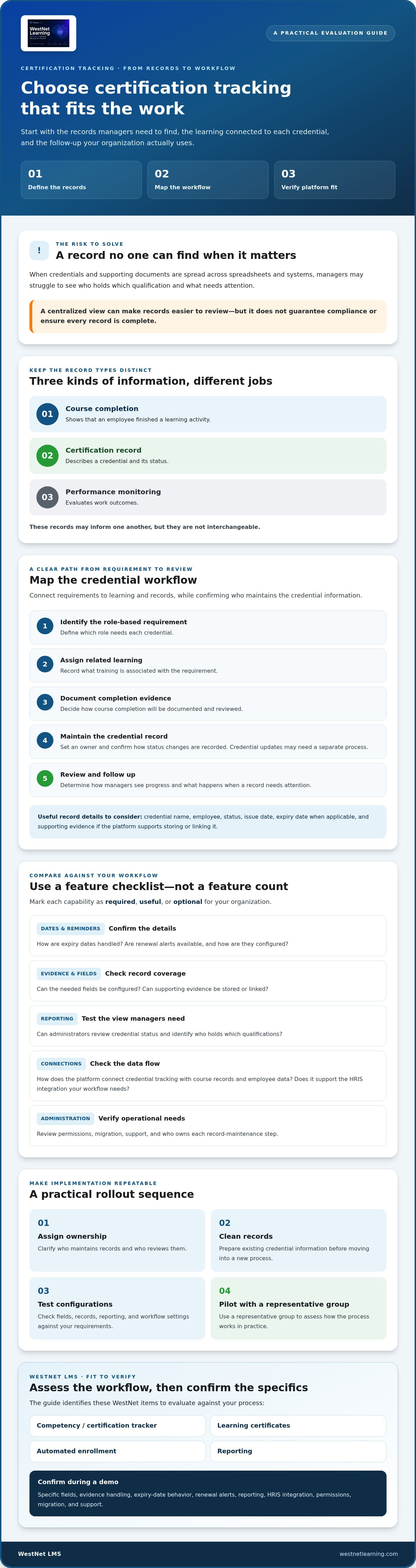
Keep three record types distinct. A course completion shows that an employee finished a learning activity. A certification record describes a credential and its status. Performance monitoring evaluates work outcomes. These records may inform one another, but they are not interchangeable. The meaning and purpose of professional credentials can vary, as outlined in this overview of Professional certification.
A centralized view can help managers identify who holds which credentials, plan learning assignments, and retrieve records without searching disconnected files. It can support consistent administration, but it doesn’t guarantee compliance or ensure that every record is complete. For more context on how learning platforms fit into a broader technology strategy, see this guide to enterprise AI learning platforms.
Which employee certification records should a system organize?
Start by listing the information your process needs, then confirm which fields the platform supports. A record may include:
- Credential and employee: the credential name and the employee who holds it.
- Status and dates: current status, issue date, and, when applicable, expiry date.
- Supporting evidence: documentation associated with the credential, if the platform supports storing or linking it.
Not every organization needs every field. Confirm how administrators can configure fields, manage evidence, and report on credential status. WestNet’s confirmed administrative options include a competency/certification tracker and learning certificates. Verify the specific fields and evidence-handling options you need with the provider.
When does spreadsheet tracking stop being practical?
Spreadsheets can work for a small, stable set of credentials when ownership and review responsibilities are clear. Coordination can become harder as teams grow or credential types multiply. Separate copies may drift, record owners may be unclear, date checks may rely on manual review, and supporting evidence may be stored elsewhere. The issue isn’t that spreadsheets always fail. It’s that keeping a dependable process takes more coordination as the records and responsibilities grow.
Use those points of friction to map your workflow before choosing a system. Decide who maintains each record, how status changes are documented, and how managers retrieve information. Then compare those needs with what a platform demonstrably supports. Don’t assume that “automated” means every reminder, date field, or evidence step is handled automatically.
How Automated Certification Tracking Software Connects Credentials to Training
A credential workflow is easier to manage when requirements connect to the learning and records that support them. Start by defining which role needs each credential, what learning is associated with it, how completion will be documented, and who maintains the credential record. This creates a clear path from requirement to follow-up, rather than treating course activity and credential status as unrelated information.
Credentialing involves establishing and reviewing qualifications, not simply assigning a course. The National Association Medical Staff Services explains what credentialing is and why the process depends on gathering and assessing relevant information. Map the specific steps your organization uses. For example, an administrator might identify a role-based requirement, assign related learning, review completion evidence, and update the credential record according to internal procedure.
How should credential requirements connect to courses?
Document the relationship between each role, credential, required learning, completion evidence, and responsible administrator. If one course must be completed before another activity, decide whether prerequisites are needed and confirm that the platform supports them. Automated enrollment may help assign courses based on your configured workflow, but course enrollment is not the same as credential renewal. Confirm separately whether course completion can update a particular credential record automatically.
WestNet’s confirmed LMS capabilities include automated enrollment, a competency/certification tracker, and learning certificates. Consider these together when mapping learning and credential administration, but verify the exact connection between a course and a credential with the provider. Ask what happens after course completion, which record is updated, and whether an administrator needs to review or enter the credential status.
What data and reporting should administrators review?
Useful oversight depends on matching user and learning information to the credential process. Identify which administrators and managers need to review employee identity, department, assigned courses, completion records, and credential status. Then confirm which views, filters, and exports are available to each group. WestNet lists User Management and Learning Analytics and Reporting among its administrative capabilities. Validate that the available certification-related fields and reports meet your team’s needs.
Integration is a workflow decision, not just a checkbox. WestNet supports HRIS integration, but buyers should confirm which systems are available and clarify the fields exchanged, sync direction, update frequency, and handling of changed or incomplete records. The LMS integrations overview offers context for evaluating system connections. To assess how certification tracking and training records could work together, request a platform demonstration and bring your credential rules and reporting questions.
How to Compare Automated Certification Tracking Software Before You Buy
Compare platforms against your credential workflows, not the length of a feature list. For each requirement, mark it Required if your process depends on it, Useful if it would simplify administration, or Optional if you don’t need it now. This keeps your shortlist focused and makes trade-offs easier to see.
Credential fields | Required if: Your process depends on consistent records. Verify which fields can be configured, including credential name, employee, status, dates, and supporting evidence.
Reminders and renewal steps | Required if: Staff need a defined follow-up process. Ask whether reminders or renewal workflows are available, who receives them, and whether timing and delivery can be documented. Treat these capabilities as unconfirmed until demonstrated.
Reporting and exports | Required if: Administrators or managers need regular status reviews. Test filters, role-based views, and export options with realistic scenarios.
Integrations | Required if: Employee or organizational data needs to connect with another system. Confirm supported connections, fields exchanged, sync direction, and update frequency.
Permissions | Required if: Different users need different levels of access. Check what administrators, managers, and employees can see or change.
Migration and support | Required if: Existing records need to move into the platform. Clarify data validation, administrator responsibilities, and the available migration and support options.
Also assess administrator usability, implementation effort, scalability as credential records grow, and data ownership. Ask how your organization can access and export its records, and what happens if your needs or platform arrangements change. A polished demo is less important than a workflow your team can maintain reliably.
Which certification tracking capabilities should buyers verify?
Use sample records to test the details: a credential with an expiry date, a status change, supporting evidence, and a renewal step. Ask whether the system stores an audit history, whether reminders are configurable, and how reminder delivery is recorded. Confirm these capabilities rather than assuming they exist. Test a manager’s view and an administrator’s export as well. WestNet lists a competency/certification tracker and Learning Analytics and Reporting among its capabilities, but specific fields, alerts, histories, and reports should be checked against your requirements.
How can you assess LMS and HRIS fit?
Confirm that an HRIS connection can provide the employee fields and organizational structure your workflow relies on. Ask how records are matched, how often information syncs, and how exceptions are handled. For migration, clarify which data can be transferred, how it will be checked, and which tasks remain with your administrators. For related program-planning considerations, see WestNet’s compliance training best practices. Use the same scenarios to compare each option for automated certification tracking software, and note what the vendor demonstrates and what still needs confirmation.
How to Implement Certification Tracking: A Practical Rollout Plan
A successful rollout depends on clear ownership and dependable records, not just software configuration. Use a controlled pilot to uncover gaps before expanding the process across teams. Assign owners, document decisions, and make each step repeatable.
How should teams prepare existing certification records?
Inventory records from spreadsheets and other sources. Identify duplicates, incomplete entries, and conflicting values, then agree on which source will be authoritative. Define what each field means, who can update it, which roles can view it, and how supporting evidence should be handled. Before moving data, confirm the migration scope, validation process, and administrator responsibilities with the provider.
Use this rollout sequence:
- 1. Inventory credentials. List credential types, employee groups, current records, and related learning.
- 2. Define ownership. Identify who maintains records, approves changes, handles exceptions, and reviews upcoming renewal dates.
- 3. Clean the data. Resolve duplicates and incomplete entries. Flag information that needs verification rather than guessing.
- 4. Configure the workflow. Set up the agreed fields, access, enrollment steps, and reporting options supported by the platform.
- 5. Test with a pilot group. Choose participants and credential types that reflect the range of real workflows.
- 6. Train and communicate. Explain who updates records, where employees find assigned learning, and how to raise questions.
- 7. Review and expand. Gather feedback, resolve issues, and confirm launch readiness before extending access to more groups.
How can administrators test the new workflow?
Build test cases around different roles, credential statuses, and renewal timelines. Check that enrollment follows the intended process, course completion is recorded as expected, and administrators can update credential records. Test manager report access and exports as well. Don’t assume course completion automatically changes a credential status. Confirm that behavior with the vendor and include a manual review step if needed.
During the pilot, record questions and revise administrator guidance before a wider launch. Test exception handling with scenarios such as a missing record, an incorrect employee assignment, or incomplete evidence. Establish a recurring review process for upcoming renewals, and specify who investigates discrepancies and how they are resolved.
Keep a launch checklist that captures the record owner, data source, field definitions, access levels, test cases, migration validation, employee communications, and outstanding decisions. Treat every unresolved capability as a question to confirm, not an assumed feature. This matters when configuring automated certification tracking software for your organization’s credential rules.
To review how an LMS could support your rollout, request a WestNet LMS demonstration and bring your workflow, sample records, and reporting requirements.
Evaluate WestNet's Certification Tracking Fit and Choose Your Next Step
WestNet’s LMS may be worth evaluating if you want to consider credential administration alongside learning activity, user records, and reporting. Confirmed capabilities include a competency/certification tracker, learning certificates, automated enrollment, and Learning Analytics and Reporting. These offer a starting point for assessing whether an LMS-based approach fits your workflow. They don’t establish that every certification-management feature is included, so verify your specific requirements before deciding.
Where might an LMS-based certification tracker fit?
An LMS-based tracker may be relevant if your process connects credential requirements with course assignments, employee information, and learning reports. WestNet also lists User Management, HRIS integration, data migration and administrator support, and a Dedicated Client Success Manager among its capabilities. These features may support a broader learning administration workflow, but they shouldn’t be taken as confirmation of standalone certification-management functionality. Review the WestNet LMS features to see the platform capabilities described by WestNet.
Check any details that affect your credential rules directly with the provider. Ask whether the tracker supports expiry dates, expiration alerts or renewal reminders, evidence attachments, audit history, and credential-specific reporting. Confirm how fields can be configured, how reports can be filtered or exported, and whether completed courses update credential records automatically. These are decision points to verify, not capabilities to assume from the presence of a tracker.
What should you test in a WestNet LMS demo?
Bring a realistic credential scenario and ask to see how an administrator handles it from setup through review. For example, walk through a sample employee record, assign a relevant course, check how completion is recorded, and examine a report that reflects the information your managers need. If HRIS data or migration is part of your plan, clarify available integrations, data fields, sync behavior, migration scope, and administrator responsibilities.
Use the demonstration to distinguish confirmed platform functions from open questions. Verify how learning certificates are created and managed, what administrators can configure in the competency/certification tracker, and which views are available to managers. A feature may sound relevant but still needs to be tested against your process.
If you’re evaluating automated certification tracking software as part of a wider LMS decision, bring your credential rules, sample records, and reporting requirements to the discussion. Request a WestNet LMS demo to explore how the confirmed capabilities align with your workflow.
Build a More Manageable Credential Workflow
Effective certification tracking starts with clear requirements. Decide which employee and credential details to record, who owns updates, and how learning connects to each credential. Then compare platforms against your actual workflow, confirm uncertain features, and pilot the process before a wider rollout. The right automated certification tracking software should make records easier to review and maintain without encouraging assumptions about alerts, evidence handling, or renewal automation.
WestNet’s LMS provides a competency/certification tracker and learning certificates, with HRIS integration, data migration, and administrator support among its confirmed capabilities. Whether those features fit depends on the credential fields, reports, and administrative steps your team needs. Bring those requirements into a platform discussion and verify each one directly.
Request a WestNet LMS demo to explore the confirmed capabilities and discuss how they align with your learning and credential workflows. Start with a focused set of requirements, ask practical questions, and choose a process your team can manage confidently.
Frequently Asked Questions
What is automated certification tracking software?
Automated certification tracking software organizes employee credentials, their status, and related learning records in a system administrators can review and maintain. Depending on the platform and its configuration, records may include credential names, employees, dates, evidence, and follow-up steps. It differs from a general course-completion record, which shows learning activity, and from performance monitoring, which focuses on work outcomes. Confirm which record fields and actions the system supports.
How does certification tracking software help manage employee renewals?
It can give administrators a centralized view of credential status and relevant dates, helping them identify records that need review and plan renewal-related follow-up. Depending on organizational rules, that process might include assigning refresher learning or documenting an updated credential. Don’t assume the platform automatically sends reminders or renews credentials. Ask vendors whether alerts and renewal workflows are available, configurable, and suitable for your process.
Can an LMS track employee certifications?
Yes, an LMS can track employee certifications if it includes a credential-tracking capability. This lets organizations consider certification records alongside course assignments, completion records, user data, and learning reports. WestNet’s LMS includes a competency/certification tracker and learning certificates. Before selecting a platform, verify which credential fields and reports it supports and whether course completion updates a credential record automatically or requires administrator action.
What features should I look for in certification tracking software?
Start with the fields your organization needs, such as employee, credential, status, and relevant dates. Then evaluate reporting, user permissions, integrations, data migration, and administrator support. If your process depends on reminders, evidence attachments, audit history, or renewal workflows, ask vendors to demonstrate each capability rather than relying on a feature label. Prioritize requirements according to your workflow, distinguishing essential functions from useful or optional additions.
Is a spreadsheet enough to track employee certifications?
A spreadsheet may be sufficient for a small, stable set of records with clear ownership and a consistent review process. As teams or credential types grow, duplicated files, manual date checks, scattered evidence, and unclear responsibilities can make coordination harder. Assess how reliably your team can keep records current and retrieve them. If maintaining the process has become difficult, compare systems against your requirements before deciding whether to move.
How do you implement certification tracking software?
Begin by inventorying credentials and existing records. Define field meanings, record owners, access rules, and the source of truth, then clean and validate data before configuring the system. Test enrollment, completion records, updates, reports, and exception handling with a representative pilot group. Train users, communicate responsibilities, and revise guidance based on feedback. Before expanding, confirm the migration scope with the provider and establish a routine for reviewing records and upcoming renewals.
Does WestNet LMS automatically send certification expiration reminders?
The available product information confirms that WestNet LMS includes a competency/certification tracker, but it doesn’t confirm automatic expiration reminders or renewal alerts. Ask WestNet to demonstrate whether the tracker supports expiry dates, how notifications can be configured, and who receives them. Also verify whether administrators can report on upcoming expirations and how reminder activity is recorded. Confirm these details against your credential workflow before relying on them.