What if the biggest gap in multilingual training isn’t creating content, but connecting creation to learner access and delivery? An automated multilingual training course creator can help accelerate course development, but “multilingual” can mean anything from a translated course to an LMS interface learners can switch at login. Those capabilities aren’t interchangeable.
AI can reduce manual authoring work, yet generated content still needs human review for accuracy, clarity, and cultural fit. And language access only solves part of the challenge if course administration and delivery remain fragmented. The right platform should support a coherent workflow, with clear boundaries between what it automates and what your team reviews.
This guide explains how to assess AI-assisted course creation, language access, quality review, and LMS delivery as connected capabilities. You’ll learn what to look for as your course catalog grows, including the distinction between translating course content and changing the LMS interface language. WestNet AI LMS brings AI-Powered e-learning Creation together with course administration, SCORM or xAPI course creation, and support for up to 60 site languages, which users select at login. Use these practical criteria to compare platforms and identify a fit for your training operations and growth plans.
Key Takeaways
- Evaluate an automated multilingual training course creator across three distinct functions: AI-assisted authoring, course-language workflows, and LMS interface language.
- Build a workflow from source materials and learning objectives through expert review to delivery, keeping subject-matter experts responsible for validating content.
- Compare platforms on practical needs such as editing control, output formats, enrollment, reporting, and integrations, not just AI features.
- Assign clear owners for subject accuracy, language quality, accessibility, and final approval to maintain quality as your course catalog grows.
- WestNet AI LMS combines AI-Powered e-learning Creation with course administration and learner access, and supports up to 60 site languages selected by users at login.
What Does an Automated Multilingual Training Course Creator Actually Do?
An automated multilingual training course creator is a tool or connected workflow that uses AI to help build learning materials, supports language-related processes, and delivers courses through a learning platform. The label can describe very different capabilities, so separate what the system creates from what it translates and what learners see in the LMS.
Multilingual course creation means developing and managing learning experiences for people who use different languages; it doesn’t automatically mean the course content is translated. Assess the full workflow, not just the number of interface languages a platform lists. A learner may be able to navigate the LMS in a preferred language while the course itself remains in another.
Course creation, translation, and localization are different capabilities
Course authoring turns source material and learning objectives into a structured learning experience, such as a sequence of lessons, activities, and assessments. AI may help draft or organize that material. Instructional design provides useful context for how learning experiences are planned, developed, and evaluated.
Translation changes course content from one language to another. Localization adapts it for learners’ context, which may involve revising examples, terminology, or cultural references. These are separate steps from authoring. As you compare tools, determine how translated or localized versions are reviewed, edited, kept aligned with the source, and published. A language count alone won’t answer those questions.
What multilingual support can mean inside an LMS
Distinguish the learner-facing site language from the language used in course materials. A site-language setting changes interface elements, such as navigation labels; it doesn’t by itself translate lessons. Course availability is another separate consideration: learners need access to the appropriate course version, whether that content was authored in that language or translated through a separate process.
WestNet AI LMS supports up to 60 site languages, with users selecting a language at login. This describes the LMS site-language experience, not automatic course translation or a count of supported course languages. Its AI-Powered e-learning Creation supports SCORM or xAPI course creation, while delivery and learner access are managed through the LMS. For broader context on AI’s role in training, explore AI in corporate training.
Keep the distinctions clear: authoring creates the learning experience, translation changes its language, localization adapts its context, and LMS settings shape how learners access the platform. Evaluate how those pieces connect before treating a single language-support figure as evidence of a complete multilingual workflow.
How Does AI Course Creation Fit a Multilingual Training Workflow?
AI can help transform approved material into a course draft, but a dependable multilingual workflow still needs clear ownership at each stage. Treat generated content as a starting point, not an approved learning experience. Subject-matter experts remain responsible for validating what the training teaches, while language reviewers assess translated or localized versions before learners receive them.
From source material to a structured course
Start with current source content, defined learning objectives, and a clear picture of the intended learners. For example, a safety procedure and an objective to recognize a hazard give an AI authoring workflow stronger direction than a document alone. WestNet’s AI-Powered e-learning Creation supports SCORM or xAPI course creation. Explore AI in corporate training for broader context on how these tools fit into learning operations.
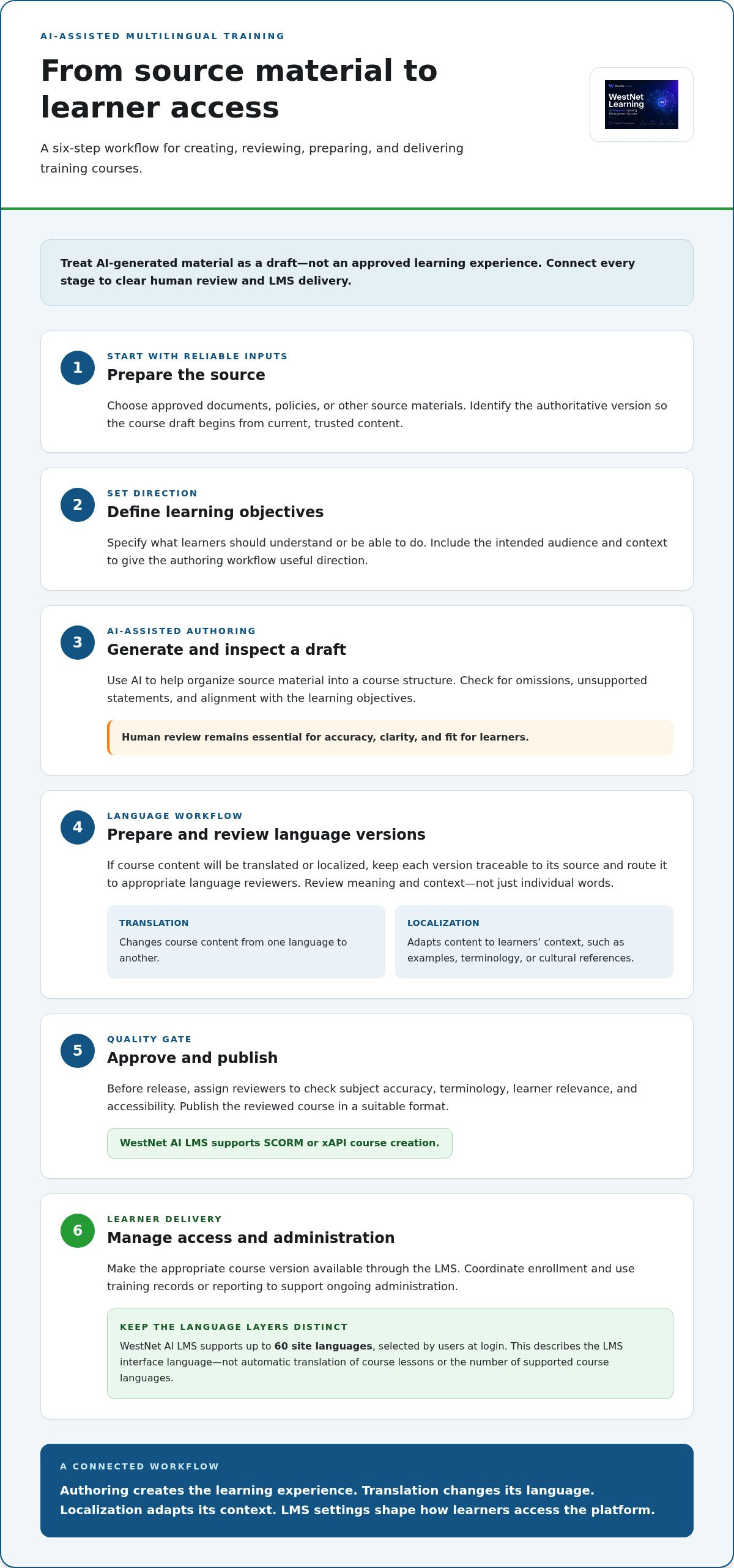
Use this sequence to connect creation, review, and delivery:
- Prepare the source: Select approved documents, policies, or other materials, and identify the authoritative version.
- Set learning objectives: Define what learners should understand or be able to do, along with the relevant audience and context.
- Generate a draft: Use AI to help organize the material into a course structure. Review the draft for omissions, unsupported statements, and alignment with the objectives.
- Prepare language versions: If content will be translated or localized, keep versions traceable to the source and route them to appropriate language reviewers. AI-assisted authoring doesn’t, by itself, establish that course content has been translated.
- Approve and publish: Review the final course, then publish it in a suitable format and make it available through the LMS.
- Manage delivery: Coordinate learner enrollment and use training records or reporting to support ongoing administration.
Review, publish, and manage the learning experience
Before release, assign reviewers to check subject accuracy, terminology, learner relevance, and accessibility. For multilingual versions, review meaning and context, not just whether individual words appear correctly translated. Keep a clear approval step so a generated draft or edited language version doesn’t become live before the right people have assessed it.
SCORM or xAPI course creation connects authoring to an LMS publishing workflow by preparing course content for delivery and management. After publishing, administrators can coordinate enrollment and monitor training activity. WestNet AI LMS supports automated enrollment and Learning Analytics and Reporting as part of that operational picture.
To explore the authoring capability in more detail, review AI course creation capabilities and consider how they fit your organization’s content review and publishing process.
How Should Buyers Compare Multilingual Course Creator Features?
Compare the workflow, not a headline language count. An automated multilingual training course creator should be assessed across authoring, course-language processes, learner-facing site language, review, and delivery. A high interface-language count doesn’t tell you whether course materials are translated, how versions are reviewed, or how training connects to your existing systems.
Use this checklist: compare source-material handling, editing control, course and site languages, review ownership, publishing formats, enrollment, reporting, and integrations.
Capability
What to assess
Authoring
Can the workflow use your source materials and learning objectives? Can your team edit and manage the draft?
Course-language workflow
How are translated or localized versions created, reviewed, and kept aligned with the source?
Site language
Does the language count refer to LMS navigation and settings, course content, or both?
Review
Can reviewers assess accuracy, terminology, learner relevance, and accessibility before publishing?
Delivery and operations
Which formats are supported? Can the LMS support enrollment, reporting, and connections to existing systems?
Compare language coverage without relying on headline counts
Ask what a platform’s language coverage actually applies to. Site navigation, course materials, and publishing workflows are different capabilities. Also consider how your team will review specialized terminology and context, since a translated course still needs to make sense for its learners.
WestNet AI LMS supports up to 60 site languages, selected by users at login. This refers to the site-language experience, not automatic translation or a stated count of course languages. Review WestNet LMS features to see how its capabilities fit your evaluation criteria.
Check enterprise delivery and operational fit
Assess whether authoring connects cleanly to course publishing and ongoing administration. WestNet AI-Powered e-learning Creation supports SCORM or xAPI course creation. Automated enrollment and Learning Analytics and Reporting support training administration, while HRIS Integration, Data Migration & Administrator Support is relevant when existing systems and data need to be considered.
Map each requirement to a step in your current operation: preparing content, approving it, publishing the course, enrolling learners, and reviewing activity. For connected-system needs, explore LMS integration capabilities. This makes it easier to compare platforms on operational fit, not just on authoring features or language claims.
How Can Teams Protect Quality While Scaling Multilingual Training?
Automation can accelerate drafting and routine course workflows, but it doesn’t remove the need for validation. An automated multilingual training course creator can help teams produce and manage learning materials; people still need to confirm that the content is accurate, clear, appropriate for its audience, and ready to publish. Define accountability before expanding the catalog.
Assign named owners for four areas: subject-matter accuracy, language quality, accessibility review, and final approval. One person may hold more than one role, but each responsibility should have a clear owner. That structure makes it easier to identify who can resolve a terminology question or approve a revised course version.
Create a practical quality-assurance process
Begin with the source. Confirm that it’s current and approved, and that the learning objectives match the training need before AI-assisted authoring starts. Then establish a repeatable review and correction process:
- Subject-matter owner: Checks factual accuracy, completeness, and alignment with approved source content.
- Language reviewer: Reviews terminology, clarity, context, and suitability for the intended learners.
- Accessibility reviewer: Checks the learner experience against the organization’s accessibility expectations.
- Final approver: Records approval before the course or revised version is published.
Keep a record of the source version, reviewer decisions, and approved course versions. When the source changes, identify which related courses and language versions need review. A consistent version-control process helps teams avoid updating one course while leaving a linked version out of date. It also gives administrators a clear path for correcting published material.
Keep administration and learner access manageable
Quality depends on delivery as well as content. Before expanding access, map learner groups, departments, roles, and enrollment rules. Decide who manages course updates, assigns training, and handles questions about access. Clear administration reduces uncertainty as new teams and course versions are added.
WestNet AI LMS includes automated enrollment and Learning Analytics and Reporting to support ongoing training operations. Administrators can use reporting to monitor training activity, then route content or process issues to the appropriate owner. Treat those records as operational visibility, not proof on their own that learners have mastered the material.
Build review ownership and course administration into the same workflow. Explore WestNet AI LMS as you plan a governed approach to creating, reviewing, and delivering training.
How Does WestNet AI LMS Support Multilingual Corporate Training?
A multilingual training workflow depends on more than course creation or a language setting alone. WestNet AI LMS brings AI-assisted course development together with LMS administration and learner access, helping organizations assess those capabilities as parts of one training operation.
The distinction matters: WestNet AI LMS supports up to 60 site languages, with users selecting a language at login. This describes the language learners can choose for the LMS site, not automatic translation of course materials or a count of supported course languages. Course content still follows its own authoring and language-review process.
Connect course creation with LMS administration
AI-Powered e-learning Creation supports SCORM or xAPI course creation, connecting authoring to formats used in course delivery. Once training is ready to publish, automated enrollment can support the process of assigning learners, while administrators manage training operations through the LMS. Learning Analytics and Reporting provides a way to review training activity and inform ongoing administration.
For organizations that need training operations connected with existing systems, HRIS Integration can be part of the platform evaluation. Consider how course creation, enrollment, learner access, and reporting fit together in your current workflow, rather than treating each feature as an isolated tool.
Evaluate fit through a focused platform walkthrough
Bring a practical scenario to your platform review: one sample course, the learner groups who need it, and the site-language access those learners will use. Trace the workflow from course creation and review through publishing, enrollment, and reporting. This makes it easier to see how platform capabilities map to your training operations.
WestNet includes a Dedicated Client Success Manager and Administrator Support to support platform administration. A focused walkthrough can help decision-makers connect those support resources with their operational needs and growth plans. To explore the workflow in context, schedule a WestNet LMS demo.
Build a Connected Training Workflow That Can Grow
Choosing an automated multilingual training course creator means looking beyond AI drafting or a headline language count. Assess how course content is created and reviewed, how learners access the LMS, and how publishing, enrollment, and reporting fit your operations. Keep course-language workflows distinct from site-language settings, and assign clear owners to validate content before it reaches learners.
WestNet AI LMS connects AI-Powered e-learning Creation with SCORM or xAPI course creation and LMS administration. It supports up to 60 site languages, with users selecting a language at login. HRIS Integration and a Dedicated Client Success Manager provide further points to consider as you evaluate operational fit.
See how those capabilities could align with your training workflow. Schedule a WestNet LMS demo to explore course creation, learner access, and administration together. With clear review practices and a platform that supports your operations, you can build a more cohesive foundation for training across your organization.
Frequently Asked Questions
What is an automated multilingual training course creator?
An automated multilingual training course creator uses AI to help develop course materials and supports processes for preparing and delivering learning across languages. Its capabilities can vary: authoring a course, translating or localizing its content, and changing the LMS interface language are separate functions. For example, an LMS may let employees change navigation language without translating lesson text. Evaluate how each function works and where human review fits before selecting a platform.
Can AI create training courses in multiple languages?
AI tools can help draft course material in different languages, but the workflow depends on the platform and source content. Some teams create a course in one language, then translate or localize it as a separate step. Have qualified reviewers check terminology, meaning, and learner relevance before publishing each version. WestNet’s AI-Powered e-learning Creation supports course creation, but this should not be understood as automatic translation of course content.
Does an LMS automatically translate courses when a learner changes the language?
No, changing an LMS interface language doesn’t necessarily translate course content. A language setting may change navigation, menus, or other site elements, while lessons and assessments remain in their authored language. Course translation or localization is a distinct content workflow. Before assigning training, make sure learners can access the appropriate course version, and distinguish that availability from the language they select for the LMS interface.
How can a company check the quality of AI-generated multilingual training?
Set clear review ownership before publishing. A subject-matter expert should verify accuracy and alignment with approved source material; a language reviewer should assess terminology, clarity, and context. Assign an accessibility reviewer and a final approver as well. Keep records of decisions and course versions, and define how corrections will be made after publication. This process helps teams manage quality without treating AI-generated content as automatically validated.
What should buyers compare in a multilingual course creator?
Compare authoring and editing controls, source-material handling, course-language workflows, site-language options, and review steps. Then assess delivery: supported output formats, learner enrollment, reporting, and integrations with existing systems. Ask what each language claim describes, because interface language and translated course content are not interchangeable. A useful comparison maps these capabilities to the full workflow, from source material and approval to learner access and ongoing administration.
How many languages does WestNet LMS support?
WestNet AI LMS supports up to 60 site languages, with users selecting a language at login. This refers to the LMS site-language experience, not a stated number of course languages or automatic course translation. Course materials follow a separate authoring and language workflow. Keep that distinction in mind when assessing whether a platform’s interface settings and the language of its learning content meet different learner needs.
Can an AI-created course be delivered through an LMS?
Yes. An AI-created course can be published through an LMS when it’s prepared in a format the platform supports. WestNet AI-Powered e-learning Creation supports SCORM or xAPI course creation. After publishing, LMS capabilities can support administration, such as enrollment and reporting. Confirm that the course version, review status, and intended learner group are clear before making it available, especially when managing multiple language versions.
What is the difference between course localization and LMS language support?
Course localization adapts learning content for its intended audience, potentially addressing language, terminology, examples, and context. LMS language support refers to the learner-facing platform interface, such as navigation and settings. A learner might select a site language while opening a course written in another language. These capabilities solve different needs, so assess course content workflows and LMS interface options separately when planning multilingual training.