A corporate eLearning solution brings together a learning platform, course content, reporting, and employee training formats. The right combination depends on what employees need to learn and how your organization manages that learning.
It’s easy to focus on the platform first, but course authoring, ready-to-use courseware, and options such as self-paced or live online learning also shape the experience. Compare these elements to assess corporate eLearning choices more clearly.
This guide explains the main corporate eLearning approaches and how they differ. Compare platforms, analytics, course creation tools, off-the-shelf courses, and learning formats, then use the decision guidance to identify what fits your training goals and workflows.
Key Takeaways
- Match learning formats to the task: combine self-paced study with live or blended sessions when interaction and practice matter.
- Use reporting to connect course completion and learner progress with the skills and workplace outcomes your organization wants to improve.
- Compare platforms by their fit with your training workflows, existing systems, content standards, and learner needs.
- Choose between ready-to-use courseware and authored content based on whether training needs broad coverage or organization-specific scenarios.
- Build a coordinated learning setup with WestNet AI LMS, AI Course Creator, LMS Integrations, and Off-the-Shelf eCourses where they fit your requirements.
What are corporate elearning solutions?
Workplace digital learning helps employees build the knowledge and skills needed for their roles. Programs can combine online courses, live sessions, assignments, and progress tracking to support training goals.
Blended Learning and Instructor-Led Training
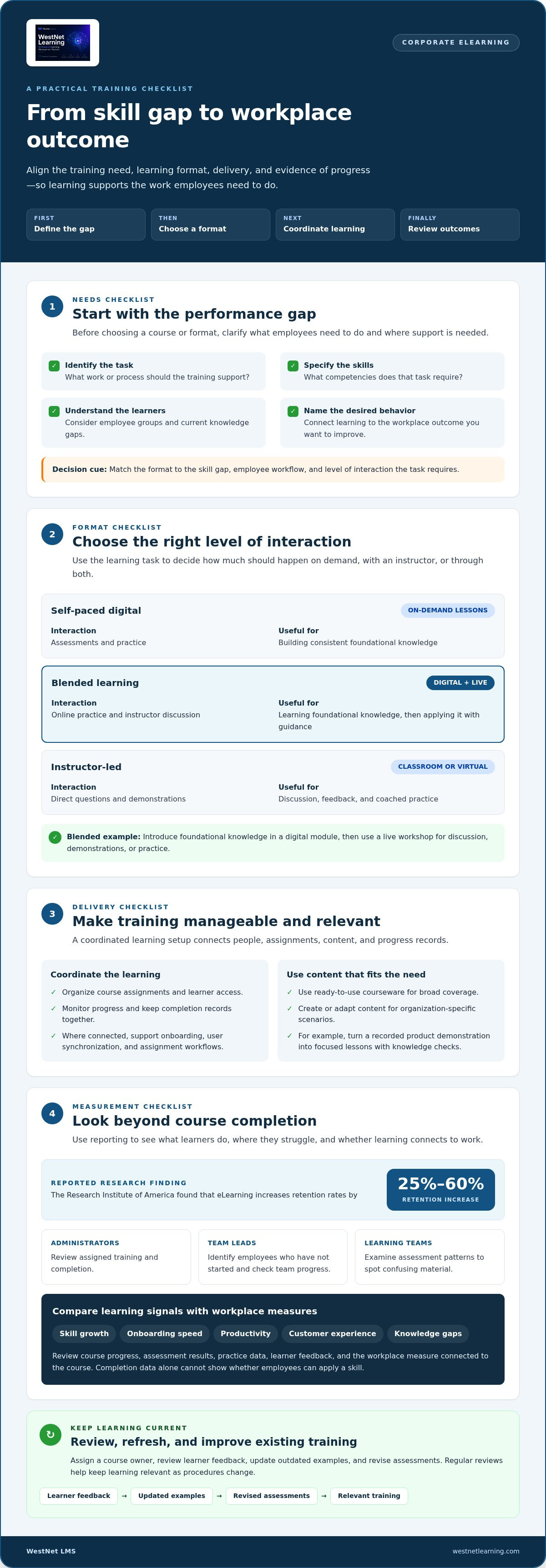
Blended learning combines self-paced digital lessons with instructor-led sessions, such as an online module followed by a live workshop. The digital portion can introduce foundational knowledge, while an instructor uses discussion, demonstrations, or practice to address questions. Compared with fully self-paced learning, this format offers direct interaction; compared with classroom-only training, employees can revisit digital materials. Corporate eLearning can connect both modes around a shared workplace objective.
Repurposing and Updating Existing Training
Existing training can be converted into shorter digital modules, refreshed with current examples, and paired with new assessments. For example, a recorded product demonstration could become focused lessons with knowledge checks. Assign a course owner, review learner feedback, update outdated examples, and revise assessments. This builds on useful materials instead of requiring every resource to be created from scratch. Regular reviews keep corporate eLearning relevant as procedures change.
Managing and Monitoring Employee Training
Training management coordinates course assignments, learner access, and progress monitoring. A connected learning ecosystem can support automatic onboarding, user synchronization, assignment workflows, and centralized reporting. For example, an employee’s role can determine which introductory courses appear in their learning plan. These capabilities distinguish managed digital training from standalone files or sessions without a shared completion record.
Training Aligned With Business Priorities
Business-aligned training targets the competencies employees need for organizational operations, including compliance, operational efficiency, and innovation. Start with a performance gap: identify the task, the skills it requires, and where employees need support. Then select relevant content and a learning format. A customer-service scenario, for instance, can connect practice directly to service goals rather than covering unrelated material.
Assess requirements before choosing a format. Identify employee groups, tasks, current knowledge gaps, and desired workplace behaviors; then decide whether digital, live, or blended learning best addresses each gap. This needs analysis helps determine whether eLearning fits the performance problem, rather than treating every training request as a course-development task.
| Option | Delivery | Interaction | Useful for |
|---|---|---|---|
| Self-paced digital | On-demand lessons | Assessments and practice | Consistent foundational knowledge |
| Blended learning | Digital lessons plus live sessions | Online practice and instructor discussion | Knowledge followed by guided application |
| Instructor-led | Live classroom or virtual session | Direct questions and demonstrations | Discussion, feedback, and coached practice |
Choose a format by matching the skill gap, employee workflow, and level of interaction the task requires.
How Important Are Reporting and Analytics?
Reporting helps businesses see whether employee training supports workplace goals, not just whether courses were opened. Corporate eLearning makes learning activity easier to review across teams, while analytics help identify where programs need adjustment. Benefits can include consistent access to training, visibility into skill gaps, and evidence to improve onboarding, productivity, or customer experiences.
Corporate Platforms and Learning Management Systems
A learning management system (LMS) organizes course assignments, learner records, and progress information. A corporate eLearning platform can also connect training with business tools and support different learning formats. For example, administrators can compare course participation across departments, while managers view progress relevant to their teams. This shared structure provides a clearer picture than scattered files, attendance notes, or separate spreadsheets.
Start by deciding which questions each reporting role needs answered. An administrator may track assigned training and completion, while a team lead may need to identify employees who have not started. Learning teams can examine assessment patterns to spot confusing material. These views make platform data more useful because each report supports a specific decision or follow-up action.
Learning Analytics and Effectiveness Measurement
Completion data alone cannot show whether employees can apply a skill. Compare course progress and assessment results with workplace measures such as skill growth, onboarding speed, productivity, customer experience, or knowledge gaps. For example, low assessment scores on one topic can signal that its explanation or practice needs revision. Reviewing these signals over time helps teams evaluate whether training content remains aligned with its intended outcome.
The Research Institute of America found that eLearning increases retention rates by 25% to 60%. To understand results within a program, examine assessment responses, practice data, learner feedback, and the business measure connected to the course. If a module targets a process change, review whether employees follow that process afterward. This gives corporate eLearning teams a basis for refining material rather than relying on completion alone.
Learning Management Systems and Authoring Tools
An LMS manages course delivery and learner records; an authoring tool creates or edits learning materials. Organizations may use both, publishing a scenario-based lesson through the LMS for assignment and tracking. This distinction clarifies responsibilities: content creators refine explanations and activities, while administrators manage access and reporting. Aligning course assessments with the skills taught also makes results easier to interpret.
Personalized Paths and Certifications
Personalized learning paths organize courses around an employee’s role, development goals, or career progression. An LMS with AI functionality can support tailored paths, career tracking, and certifications. A sales employee, for example, might progress from product knowledge to advanced practice, while a manager monitors relevant milestones. Review learner results and update recommendations as responsibilities and skill needs evolve.
Corporate eLearning platform comparisons
Compare delivery platforms by what they manage, how employees access learning, and how content reaches them. Start with your organization’s training needs, then assess systems, standards, and learner workflows.
LMS, LCMS, and LXP Delivery Platforms
An LMS manages learners, course assignments, and training records. An LCMS focuses on creating, storing, and maintaining learning content, while an LXP emphasizes discovery and personalized learning experiences. Their roles can overlap, so compare the primary task each platform must perform. For example, a compliance team may prioritize assignment records, while a content team may need structured authoring and reuse.
Authoring Tools and Platform Selection
Authoring tools build lessons; delivery platforms distribute them and capture learner activity. Decide whether your organization needs to create custom courses, assign specific training to selected groups, or provide a broad course selection. Then check support for SCORM, xAPI, and cmi5 content standards. For example, an existing course library should be deliverable without rebuilding every module for a new platform.
Corporate Platform Selection
Assess the platform against your industry’s management systems and anticipated training needs. List the workflows it must support, such as onboarding, corporate events, live sessions, and on-demand learning. Then map each workflow to a platform capability and identify where integrations are required. An enterprise with role-based compliance learning, for instance, needs clear assignment and completion records alongside flexible course delivery.
Separate essential requirements from useful additions. A platform may offer a large online course selection, while another may focus on assigning specific learning to defined employee groups. Compare how each handles user access, course updates, progress visibility, and reporting. This helps prevent a broad content library from obscuring a more immediate operational need.
Mobile and Web Availability
Web access suits employees who complete learning at a desktop, while mobile access can support training between tasks or away from a workstation. Compare how each experience presents text, video, assessments, and progress information. For example, a long course designed for a monitor may need shorter sections and simpler navigation on a phone. Mobile-friendly materials can make learning easier to access across work settings.
If employees use both live and on-demand training, confirm the platform supports each format. Test a representative course on mobile and desktop, including its assessment and completion record. This reveals practical differences in readability, navigation, and continuity before choosing a platform for organization-wide use.
| Platform type | Primary role | Useful comparison criteria |
|---|---|---|
| LMS | Manage learners and delivery | Assignments, records, live and on-demand training |
| LCMS | Create and manage content | Authoring, content maintenance, standards support |
| LXP | Support learning discovery | Personalized access, course selection, learner experience |
Rank required workflows first, then match platform type, standards support, integrations, and mobile or web needs to each priority.
Course authoring and ready-to-use courseware
Training programs need content employees can apply, not simply courses that fill a catalog. Choose between ready-to-use courseware and new course creation by matching the learning objective, audience, and required workplace behavior.
Course Authoring and Quality
Authoring software lets teams structure lessons, add examples, and build assessments around a learning objective. Start by defining what employees should know or do after the course. Then organize the material into clear sections, add relevant visuals, and check each assessment against the objective. A software lesson, for example, can pair a brief demonstration with a practice task.
Quality depends on clarity and relevance as much as production value. Keep terminology consistent, use workplace examples, and make instructions easy to follow. Seventeen percent of learners say they are more engaged when eLearning is concise, easy to understand, and well-organized. Communication tools such as discussion prompts or instructor feedback can add context to independent study.
Ready-to-Use Courseware
Off-the-shelf courses provide existing material for broad topics, including compliance subjects and software basics. They can help teams address common learning needs without developing every lesson from scratch. Review each course against your audience’s knowledge level, terminology, and job context. A general software course may cover core functions, while employees still need examples relevant to their daily workflows.
Ready-made content works best when its learning objectives align with the training program. Identify any gaps, then supplement the course with internal procedures or a focused discussion. This keeps a common course useful without presenting generic examples as organization-specific guidance.
AI-Assisted Course Creation
AI-assisted creation can help learning teams turn source material into course drafts, reducing manual content-preparation steps. WestNet’s AI Course Creator can support teams building learning content from their materials. Review each draft for accuracy, tone, examples, and alignment with the intended skill before assigning it to employees.
Human review remains important. A subject-matter expert can check whether a procedure is current, while an instructor can assess whether an activity reflects real decisions employees face. Use AI to accelerate course creation, then apply editorial and instructional judgment to strengthen the learning experience.
Custom Courses and Live Learning
Custom development suits training that must reflect an organization’s processes or specific behavior changes. A practical workflow includes needs analysis, performance mapping, design, development, and measurement. For example, a customer-service course can use the organization’s scenarios and expected response steps. This differs from broad courseware, which addresses common topics rather than internal procedures.
Pair on-demand lessons with live events when employees need both flexible access and instructor interaction. A short digital module can introduce a process, then a live session can let employees practise decisions and discuss questions. Forty-three percent of L&D professionals struggle to respond quickly while maintaining quality, making clear objectives and reusable course materials valuable planning tools.
Corporate eLearning definitions and formats
Corporate eLearning is workplace learning delivered through digital materials, platforms, or connected live sessions. The term describes how people engage with content; the learning solution combines that format with course design, delivery, and follow-up. Choose by matching the task, learner context, and practice required.
Digital learning has changed form over time. Classroom-based corporate training was common in the 1970s and 1980s; personal computers entered the market in 1980, enabling video-based CD-ROM courses. Those programs could include animation, video, assessments, and interactive elements. Today, the same design principles can be applied through online lessons, mobile content, simulations, and live virtual sessions.
Use these distinctions to compare formats:
- Self-paced learning: Employees access on-demand lessons and complete them independently, useful for foundational knowledge or repeatable procedures.
- Virtual instructor-led training: An instructor delivers a live online session, allowing questions, demonstrations, and discussion in real time.
- Blended learning: Digital preparation and live instruction work together, such as an online introduction followed by guided practice.
- Microlearning: Short digital units focus on a specific concept; impactful bite-sized learning can last 2 minutes or 10 minutes.
- Experiential and social learning: Employees learn through realistic practice, shared discussion, or collaboration around workplace challenges.
Let the learning objective guide the format. Use a searchable reference lesson for a process employees revisit, but choose a simulation when they must practise decisions. A live instructor session can help learners unpack complex scenarios, while an assessment can check whether they understand a key step. For example, a safety procedure may combine a concise digital explanation with a simulated decision and instructor-led discussion.
Authoring shapes how these formats work together. Organize materials around one clear outcome, then select the interaction that supports it: a demonstration for a sequence, a question for recall, or a scenario for judgment. Keep the format accessible across the devices employees use, and make navigation consistent between lessons. These choices make learning solutions easier to follow without forcing every topic into the same course structure.
To select a format, define the skill or knowledge employees need, identify whether they need explanation, practice, or discussion, then choose the simplest delivery method that supports that outcome. For teams developing digital materials, explore AI course creation as one way to structure course content for online learning.
WestNet LMS: WestNet AI LMS
WestNet LMS offers WestNet AI LMS, an AI-powered platform for managing corporate training and employee development. It combines automated course creation, advanced analytics, and gamification to support personalized learning, while LMS Integrations connect learning with existing tools.
Use the AI Course Creator when your team needs to build course content, or choose Off-the-Shelf eCourses for ready-to-use training. WestNet AI LMS can scale from small teams to tens of thousands of users, making it suitable for organizations coordinating learning across different roles and teams.
Bring your platform, content, reporting, and integration needs into one decision. Contact WestNet LMS to discuss how its learning solutions fit your training goals.
Turn Your Learning Strategy Into Action
Make your next step a focused decision: identify the workforce capability you want to strengthen, then define how learning should support it. A corporate eLearning strategy gains direction when teams connect course choices to real tasks, learner access, and the outcomes leaders need to observe. Start with one priority area, clarify what employees need to do differently, and use that goal to guide platform and content decisions.
Set a review point before launching a new program. Gather learner feedback, examine assessment results, and consider whether employees can apply what they learned in their roles. Use those insights to refine the next iteration so the training approach evolves alongside business priorities.
WestNet LMS offers WestNet AI LMS, AI Course Creator, and LMS Integrations to support training delivery, course creation, and connected learning tools. Contact WestNet LMS to discuss your options and identify a practical next step for your organization. Build with purpose, then keep improving.
Frequently Asked Questions
How Can You Keep Corporate E-Learning Content Updated?
Keep content current by assigning an owner and defining review triggers, such as a policy revision, software release, or recurring learner error. Store a dated source file and change log so updates can be traced. Before republishing, test links, media, assessment answers, and mobile display; retire superseded copies from catalogs and shared folders. This helps prevent employees from opening outdated versions through saved bookmarks.
How Can You Measure Corporate E-Learning Success?
Measure success by checking whether learners can perform the target task, not only whether they opened a course. Before launch, record a baseline through a knowledge check or work sample. After training, review comparable tasks, supervisor observations, and relevant indicators, such as repeat errors or support requests. If scores rise but work remains unchanged, adjust the practice activity or job aid, then reassess.
How Do You Improve Low Engagement in Corporate E-Learning?
Start by locating where engagement drops: course entry, a specific lesson, an assessment, or completion. Ask a sample of employees what obstructed progress, then address the cause. For example, clarify instructions, remove redundant screens, improve captions, or place the course within an existing work routine. A manager’s brief explanation of why the learning matters can connect the module to immediate job responsibilities.
How Do You Solve Corporate E-Learning Integration Challenges?
Trace one learner record from account creation through enrollment, completion, and reporting. Identify which system owns employee identity, then align matching fields such as email, department, and role. Test a small cohort before a broader release; check for duplicate accounts, delayed status changes, and mismatched course identifiers. Document responsibility for each handoff so teams can isolate failures instead of manually reconciling every record.
How Can I Improve My Company’s eLearning Content Strategy?
Plan around a defined audience and business question, rather than growing the course count. Survey employees before a learning event to identify their needs, then prioritize materials that address them. Select a subject-matter contributor or industry thought leader when a topic requires current expertise. After delivery, use learner questions and assessment responses to decide what to revise, retain, or remove from the next program cycle.
How Do You Define eLearning?
eLearning is learning delivered through electronic devices and digital materials, including online lessons, videos, assessments, and simulations. It can be self-paced or combined with live instruction. For example, a technician might review a digital procedure, then practise decisions in a simulated task. The term describes the delivery medium; the goal, content, interaction, and assessment shape the learner’s experience.
How Do You Deploy or Host eLearning?
Organizations typically host eLearning on a learning management system (LMS) or learning experience platform (LXP). Prepare the course package or digital files, publish them to the platform, set learner access, and test enrollment from start to completion. Verify that assessment results and completion records appear correctly. Custom courses can also be deployed in an organization’s existing LMS instead of moving them to a new environment.
What Is Corporate eLearning?
Corporate eLearning applies digital learning to workplace capabilities and organizational needs. Its objectives connect to roles, operational tasks, compliance topics, onboarding, or professional development. A retail organization, for example, might use digital modules to teach service procedures, while managers review completion and assessment outcomes. The defining feature is the workplace purpose, not whether a lesson uses video, text, live instruction, or simulation.