If you want to compare zoomlearn with WestNet AI LMS, start by identifying the exact ZoomLearn product and version you’re evaluating. The name alone isn’t enough to establish which platform or capabilities belong in the comparison.
That distinction matters because a fair evaluation depends on what each product is designed to do. WestNet AI LMS brings corporate training capabilities together in a learning management platform, including AI-powered course creation, learner recommendations and help, analytics, automated enrollment, and HRIS integration. Compare those capabilities with the work your organization needs to complete, not with broad claims or a headline feature count.
This guide provides a practical way to map training workflows, document evidence, and assess WestNet AI LMS against your workforce needs. Use the same criteria for each product, test representative tasks, and make your decision based on fit.
Key Takeaways
- Before you compare zoomlearn, identify the exact vendor and product version so the evaluation uses relevant information.
- Map capabilities to real training workflows, including course creation, learner support, reporting, enrollment, and administration.
- Use a weighted scorecard to prioritize your organization’s needs, then compare evidence across integrations, learner access, analytics, and governance.
- Test representative workflows against your own requirements to see how each platform fits in practice.
- Assess WestNet AI LMS capabilities such as SCORM or xAPI course creation, HRIS integration, authentication options, and support for up to 60 site languages against your workforce needs.
Compare ZoomLearn and WestNet AI LMS: Start with the right decision
A sound LMS decision starts with the work the platform must support, not the length of its feature list. Map your training cycle: how learners access courses, how administrators assign and manage them, which systems need to connect, and what reports help your team make decisions. This gives you a concrete basis to compare zoomlearn against your organization’s priorities.
First, establish exactly what “ZoomLearn” means in your evaluation. Record the provider, product name, version, and configuration so you don’t attribute another product’s features to it. WestNet AI Enhanced LMS is also referred to as WestNetLMS or WestNet MLP. For foundational context on LMS terminology, see Learning Management System (LMS).
Use the same organizational scenario to evaluate both platforms, and keep documented facts separate from assumptions. WestNet’s comparison resources can help structure your review; use the LMS comparison guide alongside product information that applies to the exact products you’re assessing.
What should a ZoomLearn LMS comparison answer?
Define the buying decision before reviewing features. Separate essential requirements from useful enhancements, then link each one to a task: creating or importing a course, assigning it to learners, helping users who need support, connecting employee records, or producing a report. For example, if dependable enrollment and completion tracking are priorities, evaluate those workflows directly rather than giving extra weight to unrelated AI features.
For every product claim, note the source and the date you reviewed it. Check that product documentation applies to the version and configuration under consideration, and record what you still need to validate in a demonstration or trial.
How to keep the comparison fair and useful
Compare equivalent configurations only when there is enough information to make the comparison meaningful. For each requirement, record whether it is confirmed, not applicable, or requiring verification. A missing detail is an evidence gap, not proof that a capability is absent.
- WestNet AI LMS: Documented evaluation points include AI-powered e-learning creation, learner course recommendations, AI-powered help, learning analytics and reporting, automated enrollment, and HRIS integration.
- ZoomLearn: Identify the product and version, then document its features, integrations, and administrative capabilities from product-specific information. Don’t fill gaps with assumptions or details about similarly named products.
Don’t declare a winner until you’ve weighted each criterion against your use case. A platform that fits one organization’s access and administration needs may not fit another’s integration or reporting priorities. Keep evidence visible, test important workflows, and let verified fit guide the decision.
Compare ZoomLearn and WestNet LMS features by training workflow
Compare capabilities by the tasks your team needs to complete, not by feature labels alone. The table lists WestNet’s documented features and gives you a practical way to assess each workflow in both products. Add product-specific evidence for ZoomLearn as you confirm it.
| Workflow | WestNet AI LMS | ZoomLearn | Practical evaluation |
|---|---|---|---|
| Course authoring | AI-Powered e-learning Creation; supports SCORM or xAPI. | Document product-specific course authoring capabilities. | Test how a draft course becomes usable learning content. |
| Recommendations | AI-Generated Course Recommendations. | Document whether recommendations are available and how they work. | Assess how learners find relevant next courses. |
| Learner support | AI-Powered Help for learners and administrators. | Document learner and administrator support features. | Check how users get help with common learning tasks. |
| Analytics | Learning Analytics and Reporting. | Document reporting capabilities and available information. | Review whether reports answer your training questions. |
| Automation | Automated enrollment. | Document which assignment and enrollment steps can be automated. | Trace assignment and enrollment steps for a sample group. |
| Administration | HRIS Integration, data migration, administrator support, a Dedicated Client Success Manager, and a Service Level Agreement. | Document user and role administration, integrations, migration, and support. | Evaluate user and role administration, integrations, migration, and ongoing support. |
Assess WestNet’s documented functions against specific operational needs. AI-Powered e-learning Creation supports SCORM or xAPI, so include the course formats your organization uses in an authoring test. To evaluate AI-Generated Course Recommendations, consider whether learners can find courses that fit their training goals. Test AI-Powered Help with common questions from both learners and administrators. Treat each as a feature to assess in context, not a promise of a particular outcome.
For a closer look at WestNet’s documented capabilities, review the WestNet LMS feature overview and map relevant functions to your workflow checklist.
Compare analytics, automation, and administration
Evaluate Learning Analytics and Reporting by listing the questions your team needs reports to answer, such as whether assigned training is being completed or where administrators need to follow up. For Automated enrollment, trace how a learner moves from assignment to course access. Include the steps for bringing employee records into the LMS through HRIS Integration, and define what data and course information you need to migrate.
Administration extends beyond assigning courses. Include user and role management in your test plan, then review the operational support structure. A Dedicated Client Success Manager and Service Level Agreement are listed WestNet features to consider in your review. Assess the corresponding capabilities for ZoomLearn against product-specific information, using the same questions and test scenarios.
Compare learner experience, integrations, and organizational fit
Platform fit depends on how well everyday access and administration match your workforce. Consider where employees need to access learning, which languages they use, how they sign in, and what support they need. To compare zoomlearn fairly, use the same learner profiles and administrative scenarios for each platform, and document the evidence behind each assessment.
Which platform supports your learner and administrator needs?
Start with the learner journey. WestNet AI LMS includes AI-Generated Course Recommendations, AI-Powered Help, and gamification with leaderboards and badges. Evaluate how recommendations relate to your learning goals, whether help supports common tasks, and whether badges or leaderboards suit your training culture. A feature’s presence alone doesn’t show how easy it is to use, so test it with representative learners.
Language and access can be practical decision points. WestNet supports up to 60 site languages, with learners choosing a language at login. It also offers multiple authentication options, including SSO and standard username-and-password sign-in. Compare those options with your organization’s access requirements, and assess the equivalent options for ZoomLearn using product-specific information.
For administrators, map routine tasks before scoring either platform. Consider how you organize users and roles, handle batch loads, maintain course catalogs, and enroll learners. WestNet’s Automated enrollment is relevant to assignment workflows; assess the steps against your own process. Apply the same task list to ZoomLearn so the comparison reflects day-to-day administration rather than feature descriptions alone.
How to assess integrations, migration, and scale
List the systems and data flows the LMS must support, including HRIS records, authentication, existing learner accounts, and course materials. WestNet offers HRIS Integration, Data Migration, and Administrator Support. Assess these capabilities against the systems you use and the information you need to transfer. A general integration description does not establish how a particular setup will work, so include the relevant workflows in your evaluation.
WestNet also allows deactivated user licenses to be reused for new users, which may be relevant when workforce membership changes. Include user access and license management in your comparison, and document how each product handles those needs based on its product-specific information.
Use a representative test: a learner signs in, finds a course, gets support, and completes training; an administrator manages access, enrollment, and reporting. Compare the steps, evidence, and operational requirements for each product. For details on LMS integration capabilities, review the systems and workflows relevant to your evaluation.
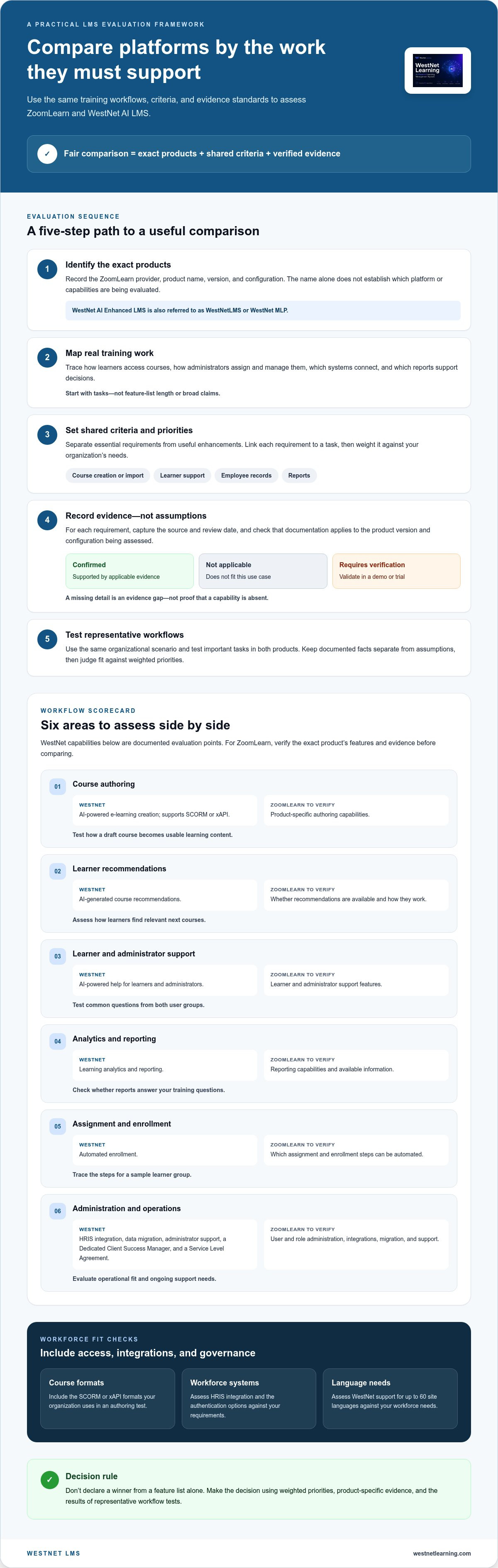
Choose between ZoomLearn and WestNet with a practical evaluation framework
Turn the comparison into a repeatable decision process. The aim isn’t to reward the platform with the most features. It’s to find the product that supports your priority workflows with credible evidence and a manageable fit for your team.
Build a weighted LMS scorecard
Use the same criteria, weights, and test scenarios for WestNet and ZoomLearn. Set priorities before reviewing product presentations, and score evidence quality separately from capability. This helps distinguish a feature that appears to fit from one that has been documented and tested.
- Define requirements. Separate must-haves from enhancements. Include authoring, HRIS connection, SSO, language support, learner assistance, reporting, administration, and governance.
- Weight the criteria. Give higher priority to requirements that affect daily operations or are essential for your workforce. Keep the weights consistent across both platforms.
- Verify evidence. Record whether each item is supported by current product information, demonstrated in a walkthrough, or still needs verification. Note the source and date.
- Test workflows. Have a learner and an administrator complete representative tasks rather than relying only on a feature checklist.
- Review fit. Compare weighted results alongside evidence gaps, integration requirements, and operational needs. Distinguish a confirmed capability from an unresolved question.
A practical scorecard can cover authoring, integrations, administration, learner support, analytics, and governance. For each category, record the requirement, its importance, the capability evidence, and a separate confidence score. For example, a required HRIS connection may have high importance, while its evidence score reflects whether product information and a workflow test support the connection you need.
Test the workflows your team will actually use
Use a demo or trial to assess the steps that matter: prepare a course, enroll the right learners, get help as a learner, and review training reports as an administrator. Include representative users from both groups. Their feedback can reveal friction that a feature list won’t show, such as unclear navigation or extra administrative steps.
For WestNet, evaluate AI course creation against your content workflow, then test enrollment and reporting with a realistic training scenario. WestNet offers a free 30-day trial or a demo as evaluation options.
Compare pricing models after identifying equivalent plans, configurations, and included capabilities from current product information. Don’t infer total cost from a partial feature list or assume different pricing structures are directly comparable. Use these LMS pricing considerations to frame the questions without assuming an unverified amount.
Ready to assess WestNet against your team’s requirements? Request a WestNet AI LMS demo and use your scorecard to guide the evaluation.
Evaluate WestNet AI LMS against ZoomLearn and take the next step
A confident platform decision rests on evidence that maps to your organization’s training workflows. Compare the learner experience, administrator effort, integration requirements, reporting needs, and governance expectations. WestNet AI LMS offers documented capabilities to evaluate, including AI-powered course creation, automated enrollment, HRIS integration, learner support, and analytics. Test those capabilities against your scorecard rather than treating them as proof of superiority over ZoomLearn.
What to validate before making a platform decision
Make each requirement testable before choosing a platform. Assign an owner, identify the product information you’ll use, and define what a successful workflow looks like. For example, an IT lead can assess authentication against sign-in requirements, while a training administrator checks enrollment and reporting with a representative course.
Confirm that the specific product configuration you evaluate supports your intended training and administration workflows. Keep unresolved items in a verification list, and don’t fill information gaps with assumptions or claims from similarly named products.
Compare platforms and experience WestNet directly
Assess WestNet’s capabilities in context. If language access matters, evaluate its support for up to 60 site languages, with users selecting a language at login. If your workforce changes over time, consider that deactivated user licenses can be reused for new users. Test how these features fit your learners and administrative processes.
Review the evidence side by side: note which requirements are documented, demonstrated, or still unresolved, then decide whether each gap affects your decision. Organizations can assess WestNet AI LMS through a demo or a free 30-day trial, using their own workflows and criteria.
Ready to put your requirements into action? Compare learning management systems and evaluate WestNet against the same criteria you apply to ZoomLearn. Bring your scorecard, test the workflows that matter, and choose your next step with confidence.
Make your LMS decision with confidence
The strongest comparison starts with your training workflows, not a feature-count contest. Before you compare zoomlearn with WestNet AI LMS, identify the exact ZoomLearn product and assess both platforms using consistent criteria and representative learner and administrator tasks. If a claim can’t be verified, keep it marked as an open question rather than treating it as fact.
Use your evaluation to see how documented capabilities align with your organization’s needs. WestNet AI LMS offers AI-Powered e-learning Creation with SCORM or xAPI support, supports up to 60 site languages, and includes a Dedicated Client Success Manager and Service Level Agreement. Test these capabilities against your content, workforce, and support requirements. The right fit depends on how well the workflows meet your priorities.
Take the next step with your scorecard in hand. Explore WestNet AI LMS and assess the platform against the training goals you’ve defined. Request a demo or start a free 30-day trial to evaluate the workflows that matter to your team.
Frequently Asked Questions
What is ZoomLearn, and is it a learning management system?
“ZoomLearn” alone doesn’t establish which product or provider you’re evaluating. Identify the exact vendor and product version before treating it as an LMS or attributing features, integrations, or pricing to it. Don’t assume it refers to a similarly named service. If the product identity is unclear, record that as an open research item and avoid making unsupported comparisons.
How does ZoomLearn compare with WestNet AI LMS?
To compare zoomlearn with WestNet AI LMS, first identify the ZoomLearn product, then assess both platforms against the same training workflows. WestNet’s documented capabilities include AI-Powered e-learning Creation, AI-Generated Course Recommendations, AI-Powered Help, Learning Analytics and Reporting, automated enrollment, and HRIS Integration. Compare product-specific evidence and workflow fit, not feature counts alone.
Does ZoomLearn offer AI course creation?
Assess ZoomLearn’s course creation features using product-specific information for the product and version you’re considering. Don’t infer a capability from the product name or from another vendor’s AI tools. WestNet AI LMS includes AI-Powered e-learning Creation, with support for SCORM or xAPI. To assess authoring fit, test how the platform supports your content workflow and the formats your organization uses.
Can ZoomLearn integrate with an HRIS?
Assess ZoomLearn’s HRIS integration capabilities using information for the specific product you’re evaluating. For a fair comparison, document the workflows you need, such as employee data exchange, and compare them with the supported integration details. WestNet AI LMS includes HRIS Integration, along with Data Migration & Administrator Support. Evaluate these capabilities against your organization’s systems and data requirements.
How do I choose between ZoomLearn and WestNet AI LMS?
Choose by matching documented capabilities to your training priorities. Define essential requirements for course creation, learner access and support, integrations, administration, analytics, and governance. Apply the same criteria to both platforms, and score feature availability separately from evidence quality. Test a representative learner and administrator workflow, then review unresolved questions before making a decision.
Does WestNet AI LMS support multiple languages and single sign-on?
Yes. WestNet AI LMS supports up to 60 site languages, and users select a language at login. It also offers multiple authentication options, including Single Sign-On (SSO) and standard username-and-password sign-in. During evaluation, compare these options with your organization’s language and authentication requirements.
Can I try WestNet AI LMS before choosing a platform?
Yes. Organizations can start a free 30-day trial or request a demo of WestNet AI LMS. Use the evaluation to test actual tasks, such as creating a course, enrolling learners, getting help, and reviewing reports. Invite administrators and representative learners, then record results against your requirements. This gives your team practical evidence to support a platform decision.