A training notification without a clear next step is just another inbox interruption. A corporate LMS with automated notifications should support training workflows, reduce manual follow-up, and help learners and managers see what needs attention.
Administrators want fewer overdue-course chases, employees want relevant prompts, and managers need a clearer view of progress. The challenge is choosing automation that solves those problems without adding noise. This guide explains how to evaluate notification workflows, connect them to enrollment and training processes, and select an LMS that helps teams act at the right time.
You’ll learn what to look for in workflow flexibility, learner communication, reporting, and system integrations. You’ll also see how automated enrollment and learning analytics can support a coordinated training operation. WestNet’s AI Enhanced LMS brings task automation, HRIS integration, and reporting into that wider picture, helping decision-makers assess how an LMS can keep learning progress visible and manageable.
Key Takeaways
- Evaluate a corporate LMS with automated notifications by whether its messages point learners, administrators, or managers toward a clear next step.
- Map each training workflow from the triggering event to its audience, required action, and follow-up owner.
- Compare notification automation across workflow flexibility, audience controls, integrations, reporting, and administrator oversight.
- Reduce message fatigue by prioritizing communications that help employees complete required training or take a meaningful next step.
- Consider how automated enrollment, AI-generated course recommendations, HRIS integration, and learning analytics can support a more coordinated training system.
Why a Corporate LMS with Automated Notifications Needs More Than Reminders
A corporate LMS with automated notifications should connect training activity to a useful next step, not simply add messages to employees’ inboxes. A practical definition: A corporate LMS notification is a message tied to a learner, administrator, or manager action, with value shaped by its context and the action it enables.
That distinction matters. “Training is available” announces an event; “Open your assigned onboarding course” tells the learner what to do. A useful notification workflow makes the relevant task easy to see and act on. The LMS provides a broader structure for delivering and managing learning, as outlined in this overview of the Learning Management System (LMS).
Which corporate training moments benefit from notifications?
Start with moments when a clear prompt can help someone move training forward:
- Onboarding: A learner may need guidance to open an assigned course, understand what comes next, or continue learning. Administrators can use progress information to identify where follow-up may help.
- Compliance training: Learners need to know which assigned course requires attention. Administrators and managers need completion visibility to understand progress and decide whether follow-up is needed.
- Ongoing development: In recurring learning programs, notices can keep relevant assignments or next steps visible. Choose an approach that fits the program rather than assuming a set message frequency.
These examples show why context matters: the same training update may call for different actions from a learner, manager, or administrator. Notifications can support the workflow, but they don’t guarantee completion or replace clear ownership.
What should a learner or manager do after receiving a notice?
Make the intended action explicit. A learner might open an assignment, complete a course, or continue a learning path. A manager might review team progress and identify who needs support. An administrator might check assignment status and coordinate follow-up. Avoid messages that report activity without explaining what the recipient should do with that information.
Separate these responsibilities when evaluating a system. Learner-facing prompts should direct employees to their training task; manager and administrator communications should support oversight and follow-up. This role-based approach helps reduce irrelevant reminders while keeping ownership visible.
Notifications work best as one part of a coordinated learning operation, alongside assignments, learner records, and progress reporting. For a broader view of how these elements fit together, explore LMS for corporate training.
How Automated LMS Notifications Connect Enrollment, Progress, and Follow-Up
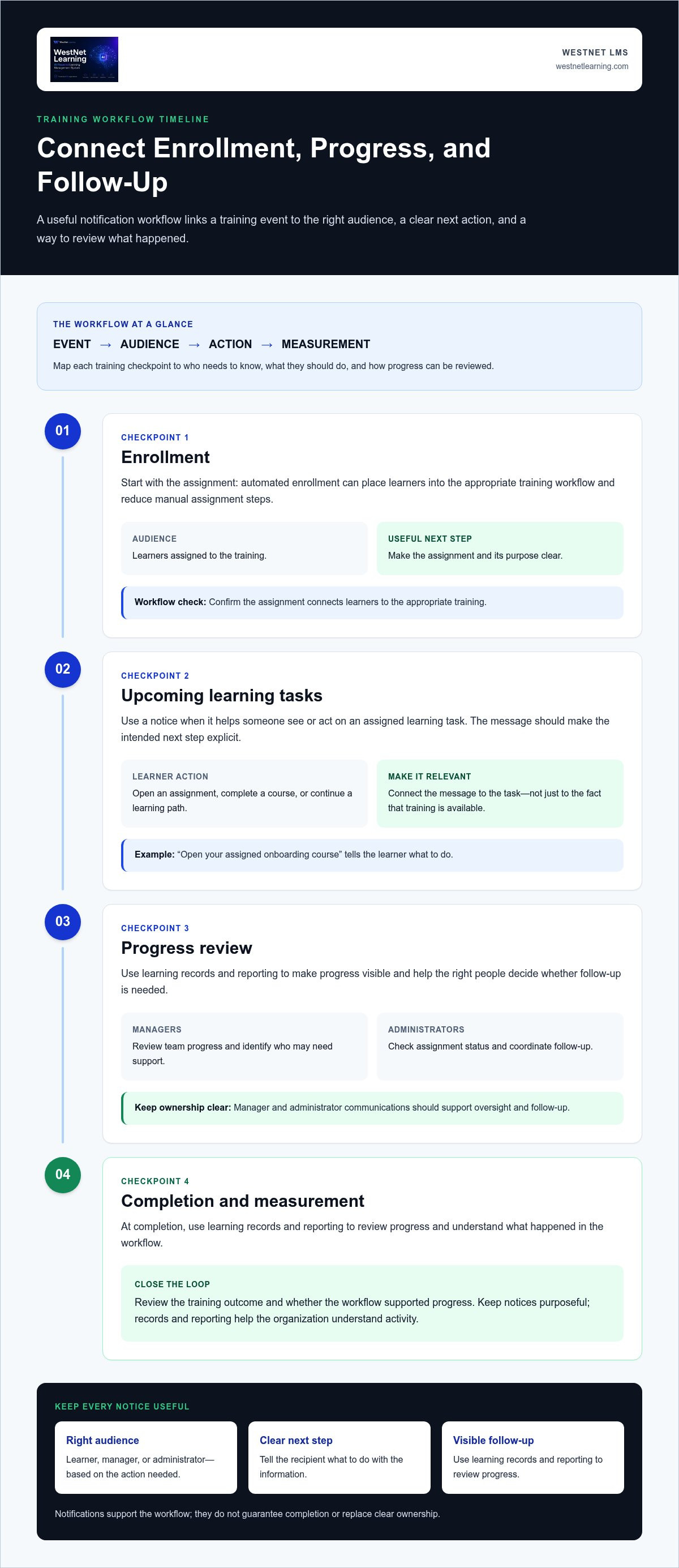
Notifications work best within a defined training lifecycle. A useful workflow connects an event to the people who need to know, gives each audience a clear action, then uses learning records and reporting to review what happened. An effective notification workflow is event, audience, action, and measurement.
This framework helps buyers assess a corporate LMS with automated notifications beyond whether it can send messages. Consider how course assignments, learner records, and organizational roles inform who receives information and what follow-up makes sense. Keep each notice purposeful: it should support the next step, while records and reporting help the organization understand progress.
Map notification events to the training lifecycle
Map communications to meaningful checkpoints: enrollment, upcoming learning tasks, progress review, and completion. For example, automated enrollment can reduce manual assignment steps by placing learners into the appropriate training workflow. Align the message and next action with that assignment.
When planning a workflow, trace a sample course from assignment through completion. Note where a notice would help someone act or follow up, and make sure each message has a defined audience and purpose.
Connect people, systems, and accountability
HRIS integration can connect user and organizational information across systems, supporting a more coherent foundation for training workflows. Identify the information your process relies on and how it should be used, rather than assuming every integration shares the same data.
Define responsibilities by role. Learners need information that helps them access or complete assigned learning. Managers may need progress visibility to identify follow-up needs, while administrators oversee assignments and workflow coordination. This separation makes it clear who acts next.
For more detail on connecting learning operations with organizational systems, explore WestNet’s HRIS integration capabilities. WestNet’s AI Enhanced LMS combines HRIS integration with automated enrollment and other task automation as part of a broader corporate learning system. To discuss how those capabilities fit your workflows, request an LMS demo.
How to Compare Corporate LMS Notification Automation
Compare systems against real training scenarios, not a feature label. For each notice, identify who receives it, what action it communicates, and how the organization can see whether the workflow supported progress. Use the questions below to build a consistent comparison across platforms.
| Evaluation area | Questions to ask | What to look for |
|---|---|---|
| Workflow triggers | Which training events can start a notification workflow? Can the organization configure the workflow around its processes? | Clear alignment between a training event and a relevant next step. Compare the triggers and configuration options available in each platform. |
| Audience controls | Can communications be relevant to learners, managers, and administrators according to their responsibilities? | Recipients see information they can act on, rather than updates intended for another role. |
| Integrations | How does the LMS connect with systems that support user and organizational information? | A practical fit with your existing environment, including a clear understanding of integration scope and data flows. |
| Reporting | Can administrators review learning activity and progress related to assigned training? | Useful visibility for assessing learner progress and deciding where follow-up may be needed. |
| Administrator oversight | How can administrators manage workflows and understand who owns follow-up? | Responsibilities are clear, and the process is manageable without unnecessary manual tracking. |
Test message quality, too. A notice that simply announces an assignment leaves the recipient to work out what happens next. A more useful communication makes the requested action clear, such as opening an assigned course or reviewing progress. Walk through a representative training scenario and assess whether each audience receives relevant information without redundant or low-value messages.
Evaluate relevance, control, and learner experience
Check that message timing and audience match actual training responsibilities. Consider how administrators can prevent overlapping communications and whether employees can understand each notice without extra explanation. Language also affects usability: WestNet supports up to 60 site languages, with users selecting their language at login.
Check reporting, integrations, and administrative workload
Review whether reporting helps administrators understand learning activity and progress, then assess HRIS integration, data migration, and administrator support as part of operational fit. WestNet’s AI Enhanced LMS includes Learning Analytics and Reporting and HRIS integration. Evaluate those capabilities alongside notification requirements, since reporting and integration serve different parts of the workflow. For broader reporting considerations, explore this guide to data-driven training.
Use the same scenarios and evaluation questions across your shortlist to make differences visible. To see how WestNet’s broader learning workflows fit your organization, request an LMS demo.
How to Plan Automated Training Notifications Without Creating Message Fatigue
More automation doesn’t automatically mean clearer communication. Before configuring a corporate LMS with automated notifications, decide which messages genuinely help people complete training or understand what to do next. Then check for overlap with email, HRIS communications, and manager-led follow-up. A learner shouldn’t receive several notices about the same assignment unless each has a distinct purpose.
Start with a simple planning record for every proposed message:
- Training event: What course or learning activity is the communication about?
- Audience: Is it intended for learners, managers, administrators, or a specific group?
- Action: What should the recipient do after reading it?
- Follow-up owner: Who reviews progress or acts if the next step remains incomplete?
Prioritize messages tied to required work or a meaningful learning step. Remove communications that repeat information already available elsewhere, use unclear language, or have no owner responsible for follow-up. The aim isn’t to maximize notices. It’s to make each one useful.
Create a notification governance checklist
Assign an owner to review message content, intended audiences, and workflow changes. Establish a straightforward way to flag duplicate, outdated, or ambiguous communications, and decide who can approve revisions. Set review practices that fit your organization’s training and compliance processes so important messages remain clear as programs change.
Before rollout, map planned LMS notices alongside existing email, HRIS, and manager communications. A small pilot with a defined learner group can reveal confusing wording or unnecessary overlap before a workflow reaches a broader audience.
Measure whether communication supports learning operations
Use available learning reports to review participation and course completion alongside the administrator effort required for follow-up. Ask learners whether messages made the next step clear, and ask managers whether they had enough visibility to act. These signals can show where to refine the audience, wording, or ownership.
Interpret results carefully. If completion changes during a pilot, that alone doesn’t prove notifications caused the change; assignments, workload, course relevance, and other factors may also contribute. Treat the data as a prompt for investigation, not a guaranteed outcome. WestNet’s AI Enhanced LMS includes Learning Analytics and Reporting to support visibility into learning activity. Administrators can assess communication processes as part of the wider workflow.
Ready to evaluate how training workflows could fit your organization? Request a demo of the AI Enhanced LMS.
Evaluate WestNet's AI Enhanced LMS for Corporate Training Workflows
Notification automation is one part of a corporate learning system. To assess whether a corporate LMS with automated notifications fits your organization, map the workflows you want to improve, then examine how enrollment, learning activity, reporting, integrations, and support work together. Keep notification requirements distinct from other LMS capabilities, and evaluate how each workflow supports your intended audiences and actions.
Match WestNet LMS capabilities to organizational needs
WestNet’s AI Enhanced LMS supports automated enrollment and other task automation, which can reduce manual steps involved in assigning and managing training. Choose a priority workflow, such as onboarding or recurring compliance learning, and identify which administrative tasks you want to streamline. Then assess how the platform’s capabilities fit those needs.
Other capabilities support a connected learning environment. AI-generated course recommendations can help surface relevant learning options, while Learning Analytics and Reporting provide visibility into learning activity. HRIS integration connects the LMS with organizational systems, and administrator support helps teams manage learning operations. The platform also includes a Dedicated Client Success Manager. Review the WestNet LMS features overview to explore the platform’s capabilities.
Choose a low-friction next step
Before evaluating a platform, document your priority workflows: who needs training, what administrators currently manage manually, what managers need to see, and how you’ll assess progress. Bring those requirements into a demo to discuss how the platform’s capabilities align with your organization’s learning operations.
WestNet offers a demo and a free 30-day trial to evaluate the AI Enhanced LMS. Use your workflow map to guide the evaluation and focus on the fit between your operational needs and the platform.
Request a WestNet LMS demo to explore how the AI Enhanced LMS could support your corporate training workflows.
Build a More Connected Training Workflow
The right corporate LMS with automated notifications does more than send reminders. It connects training events to relevant actions, gives learners and managers clearer direction, and helps administrators review progress without relying on manual chasing. Evaluate how each communication fits your workflows, who owns follow-up, and whether reporting helps you understand what is happening.
WestNet’s AI Enhanced LMS supports automated enrollment and other task automation, alongside Learning Analytics and Reporting and HRIS integration. Data Migration & Administrator Support can also help address the operational work involved in managing a learning system. Together, these capabilities provide a broader foundation for connected corporate training. Plan notification workflows around your organization’s specific needs.
Take the next step with a clear picture of your priority training processes. Request a WestNet LMS demo to explore how the AI Enhanced LMS could fit your workflows.
With a thoughtful evaluation, you can move toward training communications that are more relevant, manageable, and actionable for your teams.
Frequently Asked Questions
What is a corporate LMS with automated notifications?
A corporate LMS with automated notifications is a learning platform that can send messages connected to training activity and configured workflows. Depending on the system, notices may guide learners to assigned courses or help managers and administrators review progress. Useful automation makes the next step clear and reaches the people responsible for taking it. Compare platforms based on their configuration options, audience controls, reporting, and fit with your training processes.
Can an LMS automatically remind employees about required training?
Yes, some LMS platforms can automate reminders for required training, but available triggers, schedules, audiences, and delivery options vary by product and configuration. During evaluation, trace a required course from assignment to completion and identify which messages the platform supports. Make sure each reminder tells employees what action to take, while managers and administrators have appropriate visibility to support follow-up.
How do automated LMS notifications reduce training administration?
Automated notifications can reduce manual follow-up by communicating training actions to the relevant audience as part of a configured workflow. For example, a learner may receive a prompt to access an assigned course, while an administrator reviews progress through available reports. Automation doesn’t remove the need for oversight. Clear ownership, accurate learner records, and useful reporting help administrators focus follow-up where it’s needed.
What notifications should a corporate LMS include?
Choose communications that support your training lifecycle, such as notices about assigned learning, upcoming tasks, progress review, and completion. The right set depends on your programs and responsibilities. A learner-facing notice should make the learner’s next step clear; a manager or administrator notice should support oversight or follow-up. Avoid adding messages just because a platform can send them. Prioritize relevance and clear actions.
How can a company prevent LMS notification fatigue?
Prevent notification fatigue by documenting each message’s purpose, audience, requested action, and follow-up owner. Review planned LMS communications alongside existing email, HRIS, and manager workflows to identify overlap. Remove notices that repeat information without adding a useful next step. A small pilot, paired with learner and manager feedback, can reveal confusing or unnecessary messages before the workflow is used more broadly.
Why does HRIS integration matter for automated LMS workflows?
HRIS integration can connect the LMS with organizational systems that hold relevant user and organizational information. This may support more coordinated user management and training workflows, depending on the systems and integration configuration. Evaluate how the connection fits your processes, including data migration and administrator support needs. Platforms can differ in the information they share and the integration functions they support.
How should I compare LMS automated notification features?
Compare platforms using the same training scenario and assess workflow configuration, audience controls, integrations, reporting, and administrator oversight. Check whether a notice gives its recipient a specific action, not just an announcement. Also review how the system distinguishes learner tasks from manager or administrator follow-up. Ask for a walkthrough of the workflow and separate confirmed product capabilities from options that depend on configuration.
Can an AI-powered LMS personalize corporate learning workflows?
An AI-powered LMS can support personalization through capabilities such as course recommendations, while workflow automation can help coordinate training tasks. These functions are related but distinct: recommendations don’t automatically mean notifications are personalized. WestNet’s AI Enhanced LMS includes AI-generated course recommendations, automated enrollment and other task automation, Learning Analytics and Reporting, and HRIS integration. Assess each capability against your organization’s learning and operational needs.