A single login can remove a familiar access barrier, but it won’t make an LMS the right fit for your workforce by itself. A corporate LMS with single sign on should connect to the identity systems employees already use and fit the way learning is assigned and managed.
Too many credentials and login steps can frustrate employees. Yet SSO addresses authentication, not every access or administration challenge. Identity-provider compatibility, user provisioning, permissions, and LMS workflows all affect whether the experience works in practice.
This guide explains what SSO can and can’t solve, which technical and operational questions to ask vendors, and how to compare platforms against your organization’s learning needs. You’ll also learn what to verify about supported providers, protocols, configuration, and provisioning before implementation. The goal is to choose an LMS that fits your identity environment and supports how your workforce learns.
Key Takeaways
- Assess a corporate LMS with single sign on as part of your wider identity and learning workflows, not as a standalone login feature.
- Trace how identity-provider sign-in connects to learner accounts, LMS roles, and access to assigned learning.
- Compare vendors by confirming identity-provider and protocol compatibility, administrative requirements, support, and testing options.
- Align IT and L&D on account ownership, role mapping, and learner access expectations before implementation.
- WestNet LMS offers SSO and standard username/password sign-in, along with HRIS Integration and Data Migration & Administrator Support. Verify provider support, configuration, and provisioning details with the vendor.
Corporate LMS With Single Sign-On: What It Does for Employee Access
Employees shouldn’t have to treat every learning platform as a separate destination with a separate login routine. Single sign-on (SSO) lets users access connected services through an organizational sign-in process. With a Single sign-on (SSO) setup, an employee authenticates through the organization’s configured identity system, which can then provide a route into the learning management system.
Corporate LMS SSO connects an organization’s sign-in process to its learning platform. It can reduce separate login steps, but it doesn’t define course access, enrollment, or learning requirements. The experience depends on how the organization configures its identity system and how the LMS connects to it.
How SSO changes the learner login experience
A learner might open the LMS and be directed to an organizational sign-in page. After the identity system verifies the user, the learner returns to the LMS and accesses the account associated with that identity, subject to the platform’s access rules. In some configurations, employees may not need to enter a separate LMS password; in others, the process may include additional steps. Don’t assume SSO removes every password or prompt.
SSO changes the path into the platform, not the learning itself. It doesn’t redesign courses or guarantee better learning outcomes. Organizations planning broader corporate training programs should evaluate content and learning workflows separately from authentication.
What SSO does not automatically solve
Authentication and authorization are different controls. Authentication confirms that a user is who they claim to be; authorization determines what that user can access. An employee may successfully sign in but still need the right LMS role, course assignment, or enrollment to see specific learning content.
That distinction matters during implementation. User records must correspond to the right people, roles must reflect access requirements, and enrollment workflows must place learners in the appropriate courses. SSO doesn’t automatically create or maintain those rules. The organization still needs clear ownership of identity data and LMS administration.
SSO alone doesn’t guarantee security, compliance, or a consistent employee experience. Those depend on the full configuration and the organization’s policies, systems, and operating practices. Treat SSO as one part of the access model, then verify how identity, permissions, and learning administration work together. A smoother sign-in is useful, but it’s only one part of an LMS that fits the organization.
How Corporate LMS SSO Connects Identity, Users, and Learning Workflows
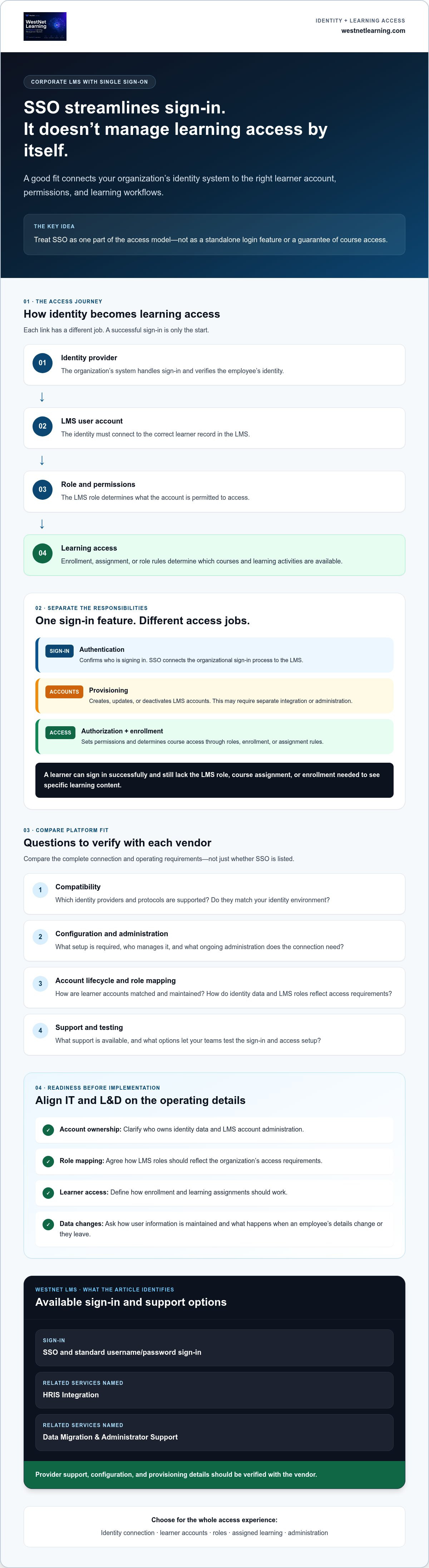
SSO is one link in a larger access process, not the whole process. An identity provider verifies the employee’s sign-in and communicates the result to the LMS through a configured technical exchange. The LMS then matches that identity to a user account and applies its roles and learning access rules. Each step must connect correctly for sign-in to lead to the right learning experience.
- Identity provider: The organization’s system that handles sign-in.
- User account: The LMS record associated with the employee’s identity.
- LMS role: The permissions assigned to that account.
- Learning access: Courses or learning activities available through roles, enrollment, or assignment rules.
Authentication confirms who is signing in; provisioning creates, updates, or deactivates the LMS account; authorization and enrollment determine which learning resources that account can access. These processes may connect, but SSO alone doesn’t mean they happen automatically.
Authentication, provisioning, and authorization are different
Keep these responsibilities distinct when assessing a corporate LMS with single sign on. Authentication checks identity during sign-in. Provisioning manages the user’s account lifecycle, such as creating an account or updating its details. Authorization sets platform permissions, while enrollment or assignment rules determine access to particular courses. Ask vendors which processes their integrations support and which require separate administration.
Where HRIS and learning administration fit
HRIS information can help maintain LMS user profiles, but the data flow depends on the integration and its configuration. Ask which fields transfer, such as department, supervisor, or role, how often records update, and what happens when someone changes teams or leaves. Then clarify whether those fields trigger LMS role changes or course enrollment, or whether administrators handle those steps separately.
Before implementation, have IT and L&D map the full journey: identity verification, account matching, role assignment, and course access. Confirm the LMS’s supported identity providers, technical handshakes, protocols, configuration needs, and provisioning workflows directly with the vendor. Don’t assume a standard or automatic synchronization is supported. The U.S. General Services Administration’s Enterprise Single Sign-On (SSO) Playbook provides additional context for planning enterprise SSO.
For a closer look at how HRIS connections fit into an LMS environment, review WestNet’s LMS integration options. Use the information to frame vendor questions about your own systems and workflows.
How to Compare Corporate LMS Platforms With SSO
Don’t stop at a vendor’s “SSO supported” claim. Compare how authentication fits your identity environment, how learner accounts are managed, and what happens when sign-in or access fails. A corporate LMS with single sign on is a better fit when its access model works alongside your organization’s user-management and training workflows.
| Evaluation area | What to confirm |
|---|---|
| Authentication options | Which sign-in methods are available, and can the LMS support your intended learner access process? |
| Identity compatibility | Does the vendor support your identity provider and required protocol for your specific configuration? |
| Administration | How are user records, roles, departments, and enrollment rules maintained? |
| Support | Who helps with configuration and troubleshooting? Review the stated support arrangements and any Service Level Agreement. |
| Validation | Can your team test sign-in, account matching, permissions, and course access before rollout? |
Questions to ask about compatibility and configuration
Ask vendors to name the identity providers and technical standards they support, then confirm that support applies to your configuration. Don’t assume a protocol is compatible simply because it’s widely used. Clarify who owns setup, what information each team must provide, how testing is supported, and who manages configuration changes. Ask how sign-in failures are diagnosed and what support is available. EDUCAUSE’s SSO for learning management systems resource offers an example of connecting enterprise identity tools with a learning platform.
Compare administration beyond the login screen
Evaluate user lifecycle management alongside SSO. Check whether HRIS integration is available, which user details can be exchanged, and whether automated enrollment supports your processes. Confirm how roles, departments, and access rules are updated. Consider your workforce’s language needs, too. WestNet LMS confirms standard username/password sign-in and SSO, plus HRIS Integration, Data Migration & Administrator Support. Verify identity-provider compatibility and configuration details directly. For a broader view of learning-platform needs, explore the corporate LMS overview.
Turn vendor claims into a practical test: have IT and L&D validate the learner journey using representative accounts and course assignments. A platform demo can help you review your identity requirements and confirm relevant SSO and administration details with the team.
Prepare for Corporate LMS SSO: A Practical Readiness Checklist
A successful rollout starts before anyone configures a login. For a corporate LMS with single sign on, IT and L&D need shared expectations for account ownership, learner roles, and course access. Use this sequence to surface gaps early and give each team a clear responsibility.
- Identify stakeholders: Name the identity administrator, LMS administrator, HRIS owner, and learning stakeholders. Agree who makes decisions and who handles questions during testing and rollout.
- Document requirements: Record user groups, expected LMS roles, course access needs, account creation and update expectations, and exceptions such as users who need another sign-in method.
- Confirm compatibility: Ask the vendor to verify your identity provider, supported technical standards, configuration requirements, and any dependencies. Clarify what information and customer resources are needed.
- Test real journeys: Use approved test accounts to check sign-in, role access, new-user handling, and account changes. Define what counts as success and what the fallback process will be if a test fails.
- Prepare support: Document where employees report access issues, who investigates them, and how issues are escalated. Make responsibilities clear before launch.
Before configuration: align teams and requirements
Settle ownership questions first. IT and L&D should agree which system is authoritative for employee identity, who maintains LMS records, and how departments, supervisors, and roles map to learning access. Include edge cases, such as a changed role or a user who can sign in but can’t see an assigned course. Ask the vendor what configuration details are required and which steps your administrators will perform.
Review the systems involved, not just the login connection. If HRIS information or other tools need to connect with the LMS, confirm what data is exchanged and how workflows are handled. WestNet’s LMS integration options provide a starting point for discussing platform connectivity; verify the specific systems and requirements that apply to your setup.
During testing and rollout: validate real user journeys
Test with representative roles, such as a learner and a manager, using approved accounts rather than assumptions. Confirm each person reaches the right account and sees the expected learning access. Record outcomes, define acceptable fallback sign-in options, and assign an owner to investigate failures. Recheck account changes as well as initial access so the test reflects ongoing administration.
Use a demo to walk through your requirements and clarify open questions before setting a rollout plan. You can request a WestNet LMS demo to review your SSO and integration requirements with the team.
Evaluate WestNet LMS SSO Against Your Organization’s Requirements
Evaluate the access model alongside the administration behind it. WestNet LMS offers standard username/password sign-in and SSO, giving organizations authentication options to assess against their workforce needs. The right fit depends on more than SSO availability: your identity provider, account processes, and learning workflows must align with the platform’s configuration.
What WestNet LMS confirms, and what buyers should verify
Confirmed features include HRIS Integration, Data Migration & Administrator Support, and automated enrollment. These capabilities can inform your evaluation of how employee information and learning administration may fit together, but they don’t establish that your specific records sync automatically or that a particular workflow is included.
Before selecting a corporate LMS with single sign on, ask WestNet to confirm the technical details for your environment. Verify whether your identity provider and required protocol are supported, what configuration is needed, and whether SSO is included in the relevant subscription or requires configuration or additional services. Clarify which team is responsible for setup, testing, account changes, and troubleshooting. Also confirm how HRIS information relates to LMS profiles and automated enrollment, including which fields and workflows apply to your use case.
Bring specific scenarios to the discussion: a new employee needs an account and assigned learning; a current employee changes departments; or a learner can sign in but can’t access an expected course. These questions help distinguish confirmed platform capabilities from items that require configuration or further validation.
Choose a low-friction next step
Prepare your questions before evaluating the platform. Ask IT to document identity-provider and protocol requirements, while L&D outlines account ownership, role mapping, enrollment expectations, and learner access needs. Use a demonstration to discuss technical fit and responsibilities. If the requirements appear aligned, the available free 30-day trial can provide another way to evaluate the platform; confirm how your SSO requirements can be assessed during the trial.
Take the next step with a focused review. Request a WestNet LMS demo to discuss your identity setup, integration needs, and learning workflows with the team.
Make SSO Part of a Smarter LMS Decision
A corporate LMS with single sign on can simplify the path to learning, but a successful fit depends on more than the login screen. Confirm identity-provider and protocol compatibility, clarify who manages user accounts and permissions, and test real learner journeys before rollout.
Evaluate authentication alongside the systems and workflows that support learning. WestNet LMS offers standard username/password sign-in and SSO, as well as HRIS Integration, Data Migration & Administrator Support. Verify the technical requirements, setup scope, and responsibilities that apply to your organization before making a decision.
Bring your identity and learning-workflow questions to a product discussion, then consider whether the available free 30-day trial is a suitable way to assess your requirements. Request a WestNet LMS demo and take a practical next step toward a more connected learning experience.
Frequently Asked Questions
What is a corporate LMS with single sign-on?
A corporate LMS with single sign-on connects a learning platform to an organization’s sign-in process. Employees may access the LMS after authenticating through an approved organizational login flow. The experience depends on the identity provider and how the LMS is configured. Before choosing a platform, ask the vendor to confirm which identity providers and protocols are supported, what setup involves, and how your IT team can validate the connection.
Does single sign-on mean employees never need another password?
No. SSO can reduce separate sign-in steps for connected services, but it doesn’t necessarily remove every password or login prompt. The experience depends on your organization’s identity policies, system configuration, and the other tools employees use. Some users or situations may require another sign-in method. Ask your identity administrator and LMS vendor to explain expected learner journeys, exceptions, and fallback options before rollout.
How do I know whether an LMS supports my identity provider?
Ask the vendor to confirm compatibility with your specific identity provider and configuration. Request details about supported protocols, setup requirements, who configures the connection, and what testing support is available. A general claim that an LMS offers SSO doesn’t confirm compatibility with your systems. Have your IT or identity team validate the proposed sign-in flow against your organization’s requirements before making a purchasing decision.
Does LMS single sign-on automatically create and remove employee accounts?
No. Authentication and provisioning are separate capabilities. SSO verifies a user’s identity at sign-in, while provisioning creates, updates, or deactivates user accounts. Ask whether the LMS supports your required account lifecycle workflows and how HRIS data is handled. Clarify who maintains user roles and course enrollment, too. Don’t assume that an SSO connection automatically synchronizes employee records or manages learning access.
What should I ask during an LMS SSO demo?
Ask which identity providers and protocols the LMS supports, who configures the connection, and what information your IT team must provide. Request a walkthrough of learner sign-in, role-based access, user updates, and exception handling. Clarify how testing works, who supports configuration, and how access problems are diagnosed. Bring representative use cases, such as a new employee or a role change, so the demo reflects your workflows.
Can a corporate LMS offer SSO and standard username-and-password sign-in?
Yes. An LMS may offer multiple authentication options, though availability and how each option works depend on the platform and configuration. WestNet LMS confirms both standard username/password sign-in and SSO. Ask how administrators manage these options, which learners can use each sign-in route, and whether any configuration is needed for your organization. Confirm these details with the vendor rather than assuming the options work identically in every setup.
Is single sign-on enough to evaluate an enterprise LMS?
No. SSO is one part of an LMS evaluation. Consider user management, HRIS integration, enrollment workflows, reporting, administrator support, and alignment with your learning needs. Ask IT to validate technical fit and rollout responsibilities, then involve L&D and system owners in assessing day-to-day workflows. A broader review helps determine whether the platform supports both employee access and the administration required to deliver learning effectively.