A polished LMS presentation can make every platform look like the right choice. But a corporate training LMS software demo only earns confidence when it tests your real workflows, not just a vendor’s feature list. If you’ve left sales presentations unsure how enrollment, integrations, reporting, or learner access would work in your organization, that hesitation is a useful signal: the demo needs a sharper test.
You already know the platform must work for administrators and learners while fitting your existing systems and organizational scale. This guide will help you prepare focused scenarios, ask vendors to demonstrate how they handle your priorities, and capture evidence you can use to compare options consistently.
Use the evaluation criteria ahead to assess training workflows, integrations, administration, analytics, and learner experience. You’ll also learn how to gather stakeholder feedback and clarify practical next steps, so your decision is based on demonstrated fit and a clear path forward.
Key Takeaways
- Define the workflows, learner groups, and reporting needs the platform must support before meeting with vendors.
- Use a corporate training LMS software demo to test realistic tasks, not just review a polished feature tour.
- Compare vendors with consistent criteria, including workflow evidence, requirements, open questions, and stakeholder feedback.
- Separate what you see in the demo from claims that need documentation or technical review.
- Assess how WestNet LMS capabilities align with your priorities, then clarify integration and rollout questions before deciding next steps.
What should a corporate training LMS software demo prove?
A corporate training LMS demo is a guided evaluation of whether a learning platform can support an organization’s training workflows, learner experience, administration, and reporting requirements. It should help buyers judge practical fit, not simply confirm that features exist. A general Learning Management System (LMS) overview can clarify common terminology, but your own requirements should set the standard for the demonstration.
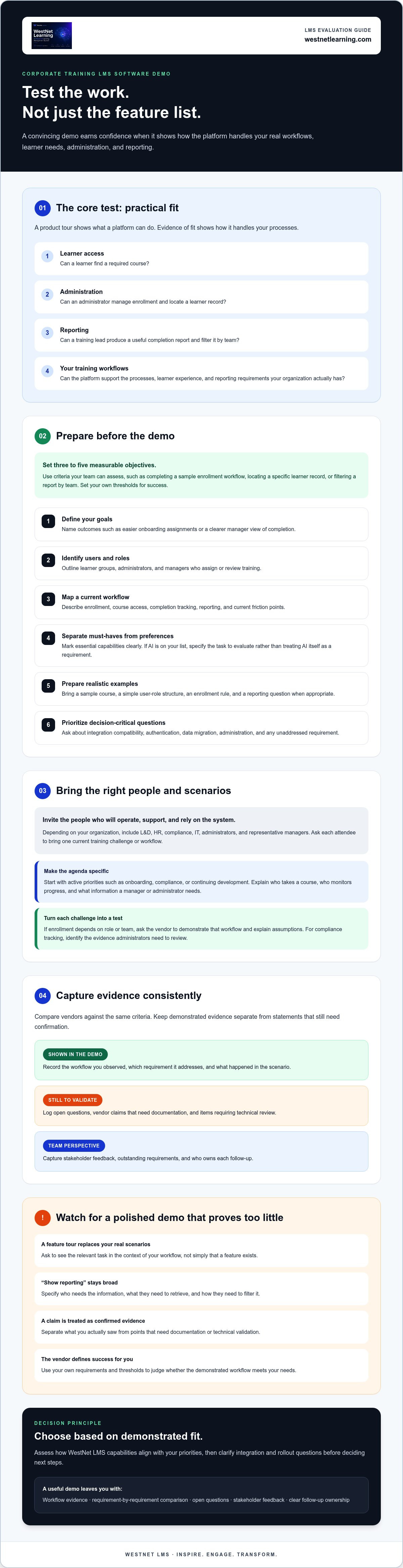
A product tour shows what the platform can do. Evidence of fit shows how it handles your processes. For example, can a learner find a required course, can an administrator manage enrollment, and can a training lead produce a useful completion report? Before the presentation, define three to five measurable objectives. Set criteria your team can assess, such as completing a sample enrollment workflow, locating a specific learner record, or filtering a report by team. Use your own thresholds rather than accepting a vendor’s definition of success.
Which stakeholders should attend an LMS demo?
Bring the people who will operate, support, and rely on the system. Depending on your organization, that may include L&D, HR, compliance, IT, administrators, and representative managers. Ask each attendee to bring one current training challenge or workflow so the conversation stays grounded in daily work. Assign an evaluator to record what the presenter demonstrates, what remains an open question, and who owns each follow-up.
Which training problems belong on the demo agenda?
Start with active priorities, such as onboarding, compliance, or continuing development. Describe how learners are enrolled today, how completion is tracked, and what reporting teams need to make decisions. Be specific: explain which user group takes a course, who monitors progress, and what information a manager or administrator needs to retrieve. This gives the vendor a clear scenario to demonstrate rather than a broad request to “show reporting.”
Then connect each challenge to a requirement. If enrollment depends on role or team, ask the vendor to demonstrate the relevant workflow and explain any assumptions. If compliance tracking is a priority, identify the evidence administrators need to review. Compare relevant corporate training LMS capabilities against those needs, and note anything that requires technical validation rather than relying on the presentation alone.
A focused agenda makes the corporate training LMS software demo easier to evaluate across vendors. For a WestNet LMS discussion, bring your requirements to the demo request page and clarify which workflows you want to assess.
How to prepare for a corporate training LMS software demo
A focused corporate training LMS software demo starts before the vendor joins the call. Share enough context to make the walkthrough relevant, while separating must-have requirements from features that would simply be useful. That distinction keeps the discussion tied to operational needs instead of drifting into an open-ended product tour.
Use this checklist to build a clear brief:
- 1. Define your goals. Set three to five outcomes, such as making onboarding assignments easier to manage or giving managers a clear view of completion.
- 2. Identify users and roles. Outline learner groups, administrators, and managers who need to assign or review training.
- 3. Map a current workflow. Describe how enrollment, course access, completion tracking, and reporting work today, including friction points.
- 4. Separate requirements from preferences. Mark essential capabilities as must-haves and desirable features as secondary. Use AI in corporate training as background if AI is on your list, then specify the task you want to evaluate rather than treating AI itself as a requirement.
- 5. Prepare realistic examples. Bring a sample course, a simple user-role structure, an enrollment rule, and a reporting question when appropriate. Ask the vendor what sample data or scenarios can be used.
- 6. Prioritize your questions. Put decision-critical items first, including integration compatibility, authentication, data migration, administration, and any requirement the vendor hasn’t yet addressed.
What information should you share with the vendor?
Summarize learner groups, administrator responsibilities, training formats, and current processes. Explain whether HRIS data, single sign-on or other authentication options, and migration of existing course or learner data matter to your evaluation. Don’t assume a particular connection or migration approach is supported. Ask which scenarios the vendor can demonstrate, what sample information is needed, and where technical review or documentation will be required.
How do you build a realistic demo agenda?
Request a workflow-led walkthrough, not a feature-by-feature presentation. Reserve time to follow a learner’s course discovery and completion, review an administrator task, inspect a relevant report, and discuss integration questions. Tie each segment to an objective. For example, ask what evidence would show that a manager can monitor the right group. The Kirkpatrick Model for training evaluation can help frame questions around the training results you need to assess.
Keep a shared record of demonstrated evidence, unanswered questions, and the person responsible for validation. If you’re preparing to assess WestNet LMS, you can request a demo with your priority workflows and questions ready.
Compare corporate LMS demo features against real workflows
Turn each priority into a task the vendor can demonstrate and your team can evaluate. In a corporate training LMS software demo, a feature name alone is not evidence of fit. Record the expected result, what you actually observe, any requirement the workflow must meet, and who will assess it. Use separate ratings for learner experience and administrative control. A simple average can hide a major weakness in either area.
| Workflow | Demo evidence | Requirement | Open question | Evaluator |
|---|---|---|---|---|
| Course discovery | A learner locates a relevant course from the catalog. | Course titles and categories make the intended course findable. | How are recommendations generated and managed? | Learner representative |
| Enrollment | An administrator applies a sample enrollment rule to a learner group. | The correct users receive the intended assignment. | Can the rule reflect our roles or source data? | L&D administrator |
| Completion tracking | A learner completes a course and an administrator checks the resulting status. | Progress is visible to the appropriate role. | Which completion details can be reviewed or exported? | Training lead |
| Reporting | A report is filtered by a relevant group or course. | Results answer a defined management question. | Can the view be adjusted to our reporting needs? | HR or compliance |
| Administrator task | An administrator updates a catalog item or manages a user role. | The task is clear and permissions match responsibilities. | What controls or steps need further validation? | System administrator |
Set acceptance criteria before the walkthrough. For instance, specify which learner group should appear in a report and what information the administrator needs to confirm. Then score the learner’s ability to complete the task separately from the administrator’s ability to configure, track, or report on it. This creates a more useful comparison than relying on one overall impression. For a deeper look at turning platform information into data-driven training decisions, consider what decisions each report should support.
How should you evaluate course creation and learner recommendations?
Ask the vendor to demonstrate AI-powered course creation with a clearly scoped example, then inspect what can be reviewed and edited before content is published. Don’t assume an AI-generated draft is ready to use. For recommendations, ask what learner or course information informs them, how administrators can review the result, and whether those steps match your governance requirements.
How should you test integrations and administration?
Ask how HRIS integration and data migration apply to your environment, and verify which systems and options are supported rather than assuming compatibility. If relevant, request a demonstration of authentication options, including SSO. Test catalog, enrollment, role management, and reporting against explicit acceptance criteria, then record any answer that needs technical confirmation or documentation.
How to spot a polished demo that does not prove LMS fit
A smooth presentation can make a platform look effortless. It doesn’t, by itself, establish that the LMS will fit your workflows, connect with your systems, or meet your organization’s support needs. Treat the corporate training LMS software demo as one source of evidence, not a substitute for documentation or technical review.
Classify every requirement using a simple scorecard:
- Demonstrated: You saw the workflow work against your stated scenario.
- Partially demonstrated: The presenter showed some of it, but an important step or condition remains unclear.
- Not demonstrated: The feature or workflow wasn’t shown.
- Needs verification: The claim requires documentation or technical review.
Keep presenter demonstrations separate from verbal claims. A displayed report is evidence of what the interface can show; statements about integration scope, migration responsibilities, or support terms need follow-up. If compliance is a priority, assess the relevant compliance training management workflows against your requirements, then confirm what records and reporting the platform supports.
Which questions expose gaps in a vendor presentation?
Ask how the demonstrated process changes for different roles, departments, or learner groups. Clarify what a report’s completion status means, which data fields it uses, and how those definitions can be confirmed. For migration, ask who handles each step and what information or files are required. For integrations, define the systems and data flows in scope. Review applicable SLA terms and support responsibilities in vendor documentation rather than relying on a summary in the presentation.
How can you assess AI, language, and engagement claims?
Ask the vendor to show how AI-powered help works in a real learner or administrator task, and clarify where users go when the response doesn’t resolve an issue. Verify language details directly: WestNet materials state support for up to 60 site languages, with users selecting a language at login. Ask to see the relevant experience. For gamification, inspect leaderboard and badge controls, then consider whether visibility and competition fit your learning culture.
Apply the same evidence standard to every vendor. Mark each claim with its scorecard status, name an owner for open questions, and don’t convert “needs verification” into “demonstrated” until you have the evidence. That discipline makes the comparison more reliable and highlights what must be resolved before a decision.
To assess WestNet LMS against your own workflows, request a focused LMS demo and bring the requirements you need to verify.
Evaluate WestNet LMS in a demo and plan the next step
Once your evaluation criteria are clear, use them to assess WestNet LMS against the workflows that matter to your organization. Focus on observable evidence: how a capability works in context, which roles can use it, and what still needs confirmation. A corporate training LMS software demo should help your team understand both practical fit and the questions to resolve before moving forward.
Which WestNet capabilities should you ask to see?
Connect each request to a stated need. If content creation is a priority, ask to see an example of AI‑Powered e‑learning Creation and how administrators review or edit the result. Explore how AI‑Generated Course Recommendations for learners are presented. For operational fit, ask to examine Learning Analytics and Reporting, automated enrollment, Gamification - Leaderboard and badges, and relevant administrator controls. If your organization uses HRIS data or existing courses, discuss HRIS Integration, Data Migration & Administrator Support, including which systems and options apply to your environment. WestNet also lists a Dedicated Client Success Manager, so clarify how that role relates to the support your team needs.
Authentication deserves a specific conversation, too. WestNet materials describe multiple authentication options, including SSO. Ask which options are relevant to your setup and what information your IT team needs to validate compatibility. Treat the demo as a way to identify fit and follow-up work, not as proof that every connection or configuration is already confirmed.
What should happen after the LMS demo?
Bring stakeholders together to score WestNet against the same prioritized requirements used for other vendors. Record what was demonstrated, what remains uncertain, and who will verify each open item. Confirm the applicable HRIS integration scope, migration responsibilities, SLA terms, and support responsibilities through the appropriate documentation or technical review.
WestNet offers a free 30-day trial as well as demo requests. Confirm the current trial terms, what access is included, and which workflows your team can test. Then agree on decision criteria and a review date, so the evaluation leads to a clear next step rather than an open-ended trial.
Ready to put your requirements into a focused discussion? Explore WestNet and request a demo, bringing your priority workflows, integration questions, and evaluation criteria with you.
Turn Your LMS Evaluation Into a Confident Next Step
A useful corporate training LMS software demo gives your team more than a tour. It lets you test priority workflows, compare vendors using consistent criteria, and separate demonstrated capabilities from details that still need verification. Keep learner experience and administrative fit in view, and assign owners to resolve outstanding questions about integrations, migration, support, and trial terms.
As you evaluate WestNet LMS, consider whether its AI-powered course creation and learner recommendations, analytics, automated enrollment, and gamification align with your training needs. Ask how the relevant workflows operate in your environment. You can also clarify the scope of administrator support, the role of a Dedicated Client Success Manager, and the applicable terms of the listed Service Level Agreement.
Bring your requirements and questions to the next conversation. Explore WestNet LMS and request a demo to assess its fit for your organization. A focused evaluation puts you in a stronger position to choose the right path forward.
Frequently Asked Questions
What should I look for in a corporate training LMS software demo?
Look for evidence that the LMS supports the workflows your learners and administrators actually use. Ask the vendor to demonstrate course discovery, enrollment, completion tracking, reporting, and relevant integrations or accessibility needs. Record what was shown, what remains unverified, and who will follow up. Compare vendors against the same requirements so a polished presentation or strong stakeholder impression doesn’t replace evidence of operational fit.
How long should a corporate LMS demo take?
There’s no single ideal duration; set the time around the people, workflows, and technical questions your evaluation needs to cover. Share your priorities with the vendor in advance, then reserve time for questions and unresolved requirements. If the agenda includes too much, ask for focused sessions rather than rushing through important tasks. The aim is enough time to evaluate priority scenarios, not to view every feature.
Can I request a demo using my organization’s workflows?
Yes, ask whether the vendor can tailor the demonstration to your use cases, roles, training formats, and reporting needs. For example, you might request a walkthrough of how a particular learner group is enrolled and how a manager reviews completion. Share only appropriate sample information, and clarify how it will be handled. Don’t assume every process can be configured or connected to live systems during a demo.
What questions should I ask during an LMS software demo?
Ask how learners find and complete training, how administrators enroll users, and how managers review results. Then cover integration scope, authentication, migration responsibilities, reporting definitions, support, and applicable SLA terms. For AI features, ask what the system produces, what users can review or edit, and what governance steps apply. Record answers that need written confirmation or technical validation so they don’t get mistaken for demonstrated capabilities.
How do I compare corporate LMS vendors after demos?
Use the same scorecard for each vendor, with criteria linked to your required workflows. Mark each item as demonstrated, partially demonstrated, not demonstrated, or needing verification. Include stakeholder feedback, integration findings, support terms, and unresolved risks. Weigh essential requirements more heavily than optional features. Ask vendors to clarify important claims in writing, and make sure the team distinguishes observed evidence from statements that still need confirmation.
Does WestNet LMS offer a free trial as well as a demo?
Yes. WestNet offers a free 30-day trial and accepts demo requests. Confirm the current trial terms directly, including what features and support are available and which workflows your team can test. Ask whether setup is required and clarify how access works so your evaluation plan reflects the applicable offer.
What should I prepare before requesting a WestNet LMS demo?
Prepare a short brief covering learner groups, training priorities, administrator roles, and current enrollment and reporting processes. Note relevant HRIS, authentication, data migration, and language requirements, without assuming compatibility. Bring a few must-have scenarios and questions about AI features, support, and SLA terms. Ask the WestNet team what information would make the demonstration relevant, and avoid sharing sensitive data unless it’s appropriate and necessary.