The LMS with the longest feature list may be the wrong replacement. If you’re researching CourseSight LMS alternatives, focus on which platform can support your training workflows, connect with your existing systems, and remain manageable as your organization grows.
Comparisons can be difficult because product pages don’t always present features on consistent terms. A mismatch can add work around migration, integrations, administration, or learner adoption. Start by documenting your requirements, not ranking platforms by feature count.
This guide offers a practical framework for comparing options across training needs, integrations, administration, and learner experience. You’ll learn what to verify in vendor information, demos, or trials, and how to build a shortlist around your current workflows and future plans. We’ll also cover WestNet AI Enhanced LMS as one platform to evaluate, with questions to help you compare its AI-powered course creation, learner recommendations, analytics, and integration capabilities with your needs.
Key Takeaways
- Start your search for CourseSight LMS alternatives with documented training needs, workflow requirements, and future plans.
- Compare platforms using consistent evidence for administration, automation, learner experience, reporting, integrations, and support.
- Match LMS categories to your training model, whether you prioritize employee development, compliance, blended learning, or course sales.
- Use scripted demos and representative learner and administrator scenarios to test shortlisted platforms before making a decision.
- Evaluate WestNet AI Enhanced LMS against your requirements, including its confirmed course creation, analytics, automation, and integration capabilities.
Why consider CourseSight LMS alternatives for corporate training?
Reviewing CourseSight LMS alternatives can reflect changing needs, not necessarily a verdict on your current platform. Your organization may be growing, changing how it delivers training, or identifying requirements that weren’t clear when the original system was selected. Before deciding new software is the answer, pinpoint the operational problem you want to solve.
Start with evidence from your own workflows rather than assumptions about what CourseSight does or doesn’t support. A Learning Management System (LMS) can support different learning models, but a corporate training team’s priorities may differ from those of an academic institution, a course-selling business, or a training provider managing external bookings. Workplace requirements might include employee enrollment, HR system connections, clear progress reporting, and an accessible learner experience. Confirm platform capabilities using current vendor information before including them in a comparison.
Define your context first. For an overview of requirements organizations may consider for workplace learning, see LMS options for corporate training.
What should trigger an LMS alternatives review?
Look for recurring friction: administrators repeatedly handling enrollment manually, reports that don’t answer practical questions, learners struggling to find or complete training, or workflows that no longer fit the organization. Separate must-haves from preferences. Then trace each issue to its likely source: configuration, integration, course content, process design, or a platform capability that needs verification.
- Workflow: Where do handoffs or repetitive tasks slow training down?
- Reporting: What decisions can’t administrators make with the available data?
- Learner needs: What makes training hard to access, navigate, or complete?
Turn each concern into a question you can test. For example, if enrollment takes repeated manual steps, ask vendors to demonstrate how a representative user gets assigned to the right learning. This keeps the review focused on observable needs without presuming that a particular platform has or lacks a feature.
When is an LMS alternative the wrong solution?
A platform change may not fix an unclear process or a configuration that hasn’t been aligned with the organization’s needs. Before committing to migration, document the outcome you want, how you’ll recognize it, and which system capability is necessary to achieve it. Then review the current CourseSight setup and verify alternatives’ claims with authoritative sources and, where possible, a relevant demonstration.
Keep the review grounded in verifiable requirements. Check current information on CourseSight’s features, plans, integrations, and support, and verify competitor claims directly with their vendors. This helps distinguish a platform gap from a workflow issue and gives your shortlist a defensible basis.
Which criteria matter most when comparing CourseSight LMS alternatives?
Use one scorecard for every platform. A shared framework makes it easier to distinguish a polished presentation from evidence that a system can support your workflows. Start with the criteria below, then set priorities for your organization rather than treating every feature as essential.
| Criterion | Priority | Evidence source | Demo result |
|---|---|---|---|
| Administration and user management | Must-have or preferred | Vendor documentation and your workflow requirements | Can an administrator complete routine tasks clearly? |
| Automation and enrollment | Set by enrollment volume and process | Workflow walkthrough and vendor confirmation | Can the system handle a representative enrollment scenario? |
| Learner experience and delivery | Based on learner needs | Test account, accessibility checks, and language requirements | Can learners find and complete assigned training? |
| Reporting and analytics | Based on management decisions | Sample reports and reporting documentation | Can stakeholders answer their key questions? |
| Integrations and support | Based on technical requirements | Current integration list and support terms | Are requirements and escalation paths clear? |
Record evidence, not just a yes or no. Note what the vendor demonstrated, what still needs confirmation, and any configuration or technical dependencies. You can also review corporate LMS features as examples of capabilities to verify. For a broader market overview, Forbes' top learning management systems offers another comparison point, but your own workflow requirements should guide the decision.
How should teams assess features and learner experience?
Test the learner journey from login through course completion. Check navigation, accessibility needs, mobile use if relevant, recommendations, and required site languages. For compliance workflows, verify how assignments, completion records, and reports would support your process. Don’t assume a platform meets a requirement based on a feature label alone. Assess gamification against your learning goals, and check whether managers, administrators, and learning leaders can access reporting that answers their questions.
How should buyers evaluate integrations and administration?
Confirm HRIS, authentication, data migration, and other existing-tool requirements directly with each vendor. Ask to see user management, enrollment, and recurring administrative tasks in a realistic scenario, rather than relying on a feature tour. Review LMS integration considerations to structure technical questions, and clarify dependencies with the vendor. For another comparison point, explore the WestNet LMS demo using the same scorecard.
How do LMS alternatives differ by training model and organizational fit?
Choose a platform category that matches the work your organization needs to do. Employee development, recurring compliance assignments, blended learning, and paid course sales can all involve learning content, but their operational requirements differ. A broad feature list won’t tell you whether a platform fits your learners, administrators, and delivery model.
Compare shortlisted platforms against the same requirements. Mark each item Demonstrated, Needs verification, or Not a fit, and record the supporting documentation or scenario-based demo. This makes gaps and unanswered questions easier to spot.
Employee development: Can it support employee enrollment, relevant learning recommendations, progress visibility, and useful reporting?
Compliance training: Can administrators assign required learning, track completion, and produce records that meet your organization’s requirements?
Blended learning: Can it support the combination of digital learning and live sessions your program requires? Verify scheduling and attendance workflows if those matter.
Course sales: Can it support the external learner journey and registration or purchase processes your business needs?
This approach keeps comparisons grounded in evidence instead of implying an objective ranking. Verify current platform claims with vendors, including details about plans and feature availability.
Which platform type fits employee and compliance training?
For employee and compliance learning, prioritize repeatable administration: assigning training to the right groups, seeing who has completed it, and producing reports administrators and managers can use. If certification tracking or specific records are required, define exactly what must be captured and confirm it in a demonstration. Review compliance training LMS capabilities as a reference point for questions to ask.
Corporate LMS products are generally evaluated around workforce learning workflows. Open-source platforms may involve a different balance of control and operational responsibility. Assess the technical resources and ongoing administration they require rather than assuming they’ll be simpler or more flexible.
When might course-commerce or instructor-led tools fit better?
Course-commerce platforms are designed around offering learning to external customers, so examine how they handle the learner purchase and registration journey. Training providers delivering live sessions may also need scheduling, attendance, and session-management workflows. Those needs differ from an employer assigning internal training to staff.
Be precise about delivery requirements. If live instruction is part of your model, verify the platform’s relevant capabilities. If your priority is scalable employee learning, test those workflows instead. A larger feature set isn’t proof of better fit. The strongest candidate is the one that can demonstrate your essential requirements with the least friction.
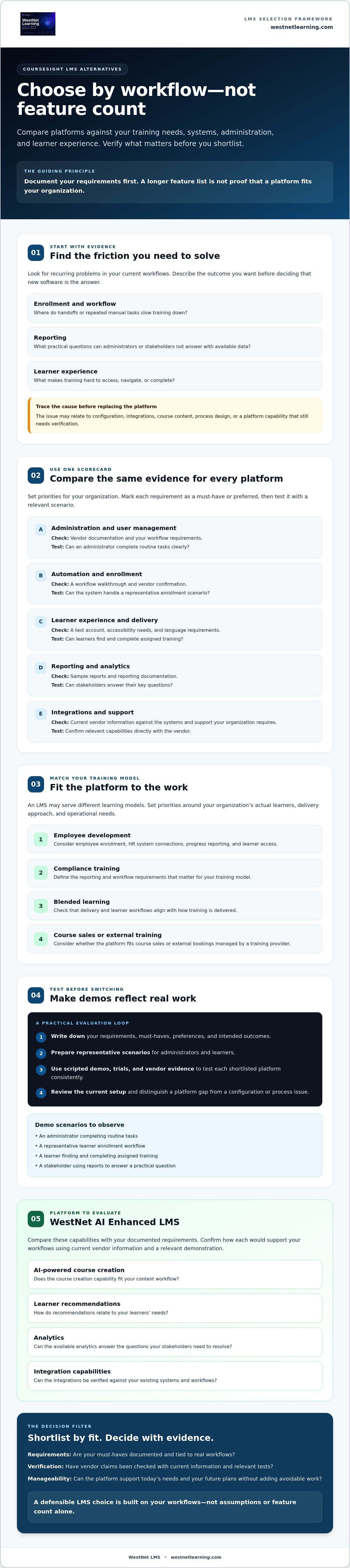
How can you test CourseSight LMS alternatives before switching?
A structured pilot turns a promising shortlist into evidence you can use to make a decision. Test the workflows your team relies on, including migration and authentication, rather than letting a vendor-led feature tour set the agenda. For strategic context on how learning systems can support organizational change, see AI-powered LMS platform evolution.
- Document requirements. Define must-have workflows, technical requirements, acceptance criteria, and how you’ll compare results with your current process.
- Build a shortlist. Include only platforms that appear to meet those requirements, and note claims that still need vendor confirmation.
- Script each demo. Use the same realistic scenarios for every vendor, such as assigning a course, completing it as a learner, and reviewing the resulting report.
- Involve test users. Include representative learners, managers, administrators, and relevant training content so the pilot reflects day-to-day use.
- Review evidence. Record what worked, open questions, migration dependencies, owners, and any gaps against the acceptance criteria.
- Make the decision. Approve a switch only when the evidence supports the requirements and the organization has addressed rollout and rollback considerations.
What should a structured LMS demo prove?
Ask vendors to demonstrate priority workflows end to end, not simply confirm that a feature exists. Have administrators perform user management, enrollment, reporting, and configuration tasks while test learners navigate and complete assigned content. Check authentication and data migration against your technical requirements. Request clear, documented answers on security, data handling, service levels, and support, then assign an owner to resolve anything that remains unclear.
How can a pilot reduce switching risk?
Choose a small but representative group and define success measures before the pilot starts. For example, check whether learners can complete the intended journey and whether administrators can produce the reports they need. Compare findings with a current-state baseline rather than relying on impressions alone.
Document training needs, migration dependencies, unresolved technical questions, and rollback considerations before approving a broader rollout. A demo can help you evaluate WestNet AI Enhanced LMS against the same requirements. Request a WestNet LMS demo to test its fit alongside other CourseSight LMS alternatives.
Could WestNet AI Enhanced LMS be a CourseSight alternative?
WestNet AI Enhanced LMS is one option to evaluate, not an automatic replacement for CourseSight or a guaranteed fit for every organization. Compare it with your documented training, integration, and administration requirements, then verify relevant capabilities through a demonstration or trial. Assess it alongside other CourseSight LMS alternatives using the same criteria and evidence.
Which confirmed WestNet capabilities should buyers validate?
Connect each capability to a specific need, and ask to see how it works in a realistic scenario:
- AI-powered e-learning creation: If course development is a priority, review the AI course creation capabilities and assess whether they suit your content workflow.
- Learner recommendations: Check how recommendations appear to learners and whether they align with your learning goals.
- Analytics and reporting: Identify the reports administrators, managers, and learning leaders need, then verify that the available analytics can support those questions.
- Automated enrollment and gamification: Test enrollment against your recurring workflows, and assess whether gamification fits the learning experience you want to provide.
- Integration and access: Verify HRIS integration and SSO options against your technical requirements. Confirm whether transferable user licenses fit your administration model, and check site-language needs against WestNet’s support for up to 60 site languages.
These capabilities are evaluation points, not proof of a particular result. Ask how each works for your configuration and confirm any technical dependencies before making a decision.
What are the next steps for a fair comparison?
Use the same written requirements and test scenarios for CourseSight and every shortlisted platform. For example, ask each vendor to demonstrate enrollment, a learner’s course journey, and the reports your team relies on. Compare what you observe, document open questions, and verify current CourseSight details and competitor claims directly with their vendors.
WestNet offers a demo and a free 30-day trial, giving your team ways to examine fit against its requirements. Validate integration and migration needs before drawing conclusions from a trial. If WestNet’s confirmed capabilities match your evaluation criteria, request a WestNet LMS demo to review relevant workflows with the vendor.
Choose your next LMS with confidence
The strongest CourseSight LMS alternatives shortlist starts with your organization’s documented workflows, not a feature-count ranking. Compare platforms against consistent requirements, then test them with realistic learner and administrator scenarios before deciding whether a switch will address the actual need.
WestNet AI Enhanced LMS is one option to assess against that framework. Its confirmed capabilities include AI-powered e-learning creation and learner recommendations, learning analytics and reporting, HRIS integration, data migration, and administrator support. A demo or free 30-day trial can help your team investigate whether these capabilities align with your requirements. Confirm technical fit and migration dependencies directly as part of your evaluation.
Ready to compare WestNet against your criteria? Request a demo and evaluate WestNet AI Enhanced LMS. Use the same requirements and scenarios to decide whether it fits your organization’s training and administration needs.
Frequently Asked Questions
Is CourseSight LMS the right fit for corporate training?
CourseSight may fit your organization if it supports your training workflows, administration requirements, integrations, learner needs, and reporting expectations. Start by documenting must-have capabilities, then verify current product details directly with the vendor. Test priority tasks in a demo or trial, and compare the evidence with alternatives using the same criteria. A feature list alone won’t show whether the system works well for your team’s day-to-day training needs.
What are the best alternatives to CourseSight LMS?
There’s no single best choice for every organization. The right CourseSight LMS alternatives depend on whether your priority is employee learning, compliance training, instructor-led delivery, course sales, or another training model. Compare current capabilities, integrations, administration, learner experience, and support against your requirements. Verify vendor claims directly, since features and availability can change. A shortlist built around your workflows is more useful than a general ranking.
How do I compare CourseSight LMS alternatives?
Build a consistent scorecard covering required workflows, integrations, reporting, administration, learner experience, support, and implementation considerations. Mark each item as verified, unverified, or not applicable. Then ask vendors to demonstrate the same scenarios, such as assigning learning, completing a course, and reviewing progress. Include representative administrators and learners in testing. This evidence-based approach helps you compare practical fit instead of ranking platforms by feature count.
Can an LMS alternative support compliance training?
Some learning platforms support compliance workflows, but capabilities vary and need to be checked against your requirements. Verify enrollment controls, completion reporting, certification records, reminders, and data retention. Ask each vendor to demonstrate a representative compliance course and reporting process. If your organization has regulatory or audit obligations, confirm them with qualified internal stakeholders. Don’t assume that a product feature, on its own, guarantees compliance.
How can I test an LMS before switching from CourseSight?
Define realistic training scenarios and acceptance criteria before starting a pilot. Test administrator tasks, learner access, reporting, authentication, integrations, and migration assumptions with representative users. Record issues, open questions, and dependencies, then compare the results with your current platform. Before approving a rollout, clarify support, data handling, transition responsibilities, and rollback considerations. A structured pilot helps your team base its decision on observed workflows rather than a vendor presentation alone.
Does WestNet AI Enhanced LMS offer a free trial or demo?
WestNet Learning states that organizations can request a demo and start a free 30-day trial. Use an evaluation to test relevant workflows, such as AI-powered course creation, learner recommendations, analytics and reporting, automated enrollment, or integrations. Confirm current availability and applicable terms directly with WestNet before planning your assessment. Testing against written requirements can help your team determine whether the platform aligns with its training and administration needs.