What if a leaderboard makes training more visible without making learning more meaningful? That’s the challenge with employee engagement gamification tools: points and badges can attract attention, but activity alone doesn’t show whether employees are progressing or learning.
Learning leaders often see the same pattern: employees start a course, participation fades, and completion figures tell only part of the story. Gamification can make learning milestones easier to see, but its mechanics need to support a relevant goal and work for a diverse workforce. Otherwise, earning points can become the goal instead of learning.
This guide explains which features can support employee learning, how to choose mechanics that encourage participation without turning training into a points exercise, and what to measure beyond clicks and leaderboard activity. You’ll also see how badges and leaderboards can fit into an LMS alongside recommendations, analytics, and automated enrollment. The aim is to connect engagement signals to learning progress, then fit the approach to your teams’ workflows and existing systems.
Key Takeaways
- Use employee engagement gamification tools to reinforce learning progress, not to make points the goal.
- Match badges or leaderboards to the learning objective and audience. Keep competition optional when it may not suit every team.
- Compare tools across learner relevance, reporting, accessibility, integrations, and administrative effort before making a decision.
- Run a focused pilot with a defined audience and behavior to observe. Refine the approach using participation and learning evidence.
- Consider how recommendations, analytics, and automated enrollment can complement gamification within an LMS workflow.
What Employee Engagement Gamification Tools Do, and Why Workplace Learning Uses Them
Employee engagement gamification tools are learning technology features that apply game mechanics, such as badges, progress indicators, and optional leaderboards, to workplace learning activities. Their purpose is to make learning steps and milestones visible, not to turn every course into a competition. The broader idea of applying game elements beyond games is outlined in What is Gamification?
Keep the category clear. Employee recognition and rewards programs may acknowledge contributions across an organization, while learning gamification connects mechanics to training or development activities. A standalone course platform delivers learning content; gamification features may be built into an LMS alongside course access, progress tracking, and reporting. Recommendations can help learners find relevant content, but they’re a complementary capability, not a game mechanic.
Which employee learning activities can gamification support?
Consider optional development courses, onboarding modules, or recurring learning activities. A badge can mark a completed milestone, while a progress indicator can show how far a learner has moved through a learning path. A leaderboard may suit a voluntary team challenge, but it doesn’t need to feature in every course. Match the mechanic to the activity and audience. For more on applying these mechanics to employee training gamification, explore practical training examples. Learning access also matters for distributed teams; mobile learning for the modern workforce offers related context.
In an LMS, gamification features can sit within established learning workflows. WestNet LMS includes badges and leaderboards, as well as AI-generated course recommendations. These capabilities can make milestones visible and help learners discover courses, but their presence alone doesn’t establish that someone has mastered the material.
Engagement is more than logging in or earning points
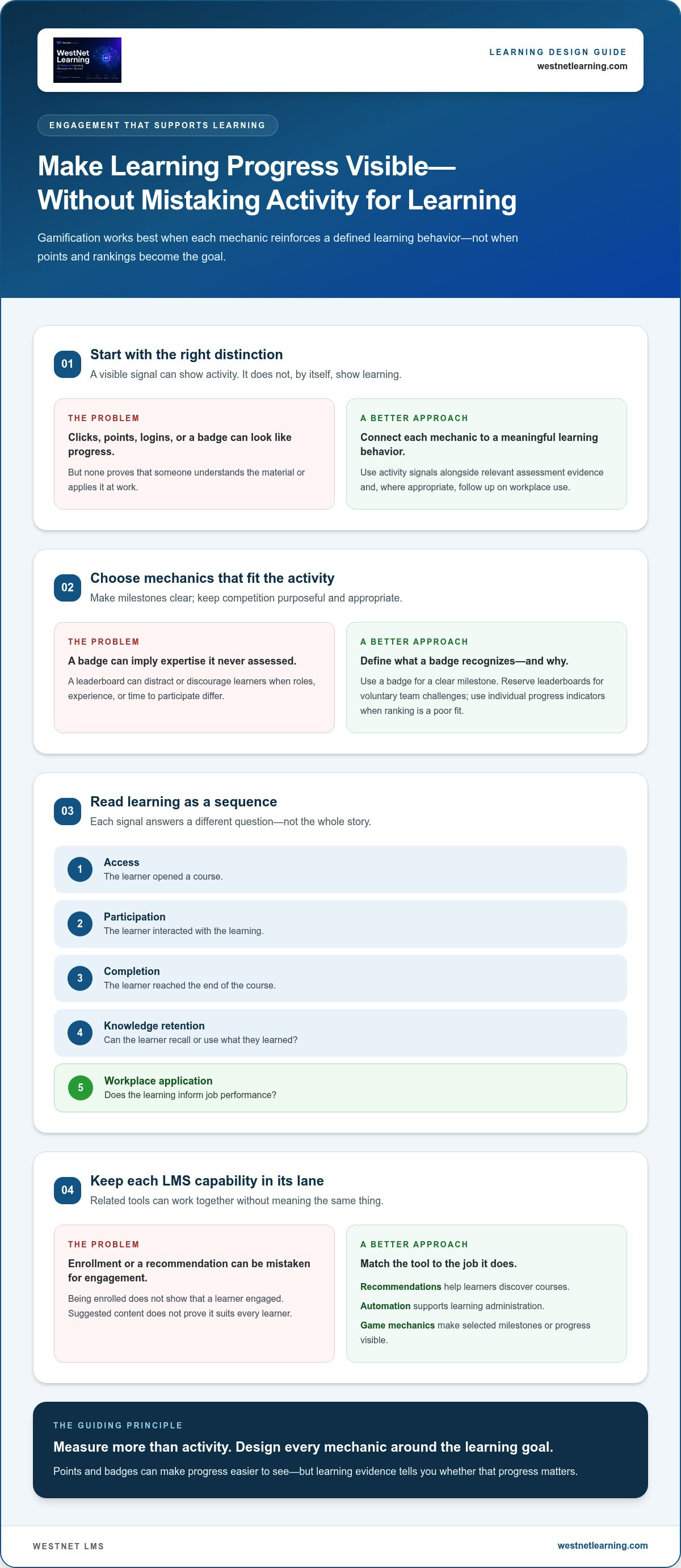
Measure learning as a sequence, not a single activity count. Access shows that someone opened a course; participation indicates interaction; completion records that they reached its end. Knowledge retention asks whether they can recall or use what they learned, while workplace application concerns whether that learning informs job performance.
These signals answer different questions. A login or badge can indicate activity, but neither proves understanding or application. Interpret platform activity alongside relevant assessment evidence and, where appropriate, follow up on workplace use. Don’t treat points, clicks, or completion totals as evidence of learning outcomes by themselves. This distinction gives leaders a clearer basis for assessing whether gamification supports the learning goal.
How Gamification Features Shape the Employee Learning Experience
Well-chosen mechanics give learners clear cues: what they’ve achieved, where they can go next, and whether progress is individual or shared. The design matters more than the number of features. Each gamification mechanic should reinforce a defined learning behavior, not reward activity for its own sake.
Badges and leaderboards: recognition, progress, and healthy competition
A badge can mark a meaningful milestone, such as completing an onboarding module or finishing a learning pathway. Set criteria that clearly describe what the learner has done. A badge can make progress visible, but it shouldn’t imply expertise unless the activity actually assesses that expertise.
Leaderboards introduce comparison, which may suit an opt-in team challenge with a shared learning goal. Public rankings can distract or discourage some learners, especially when people have different roles, experience levels, or time to participate. In those situations, individual progress indicators can recognize effort without ranking colleagues. Employee engagement gamification tools should offer mechanics that fit the audience rather than make competition the default.
WestNet Learning’s AI Enhanced LMS includes badges and leaderboard capabilities. Choose how to use them based on the activity’s purpose and the experience you want to create.
Recommendations and automation: reducing friction in learning
After a learner completes a course, a relevant recommendation can help surface a useful next step, such as a related development course. Recommendations support discovery; they don’t replace a clear learning pathway or prove that suggested content suits every learner. WestNet Learning’s AI Enhanced LMS includes AI-Generated Course Recommendations for learners, alongside Learning Analytics and Reporting.
Automated enrollment plays a different role. It can support learning administration by enrolling learners in assigned courses, but enrollment itself isn’t a game mechanic and doesn’t show that someone has engaged with the content. Keep each capability tied to its purpose: recommendations guide discovery, automation supports administration, and game mechanics make selected milestones or progress visible.
Course content and discovery also connect to the systems that manage learning materials. For a related look at content workflows, read about AI course conversion tools for LMS compliance. To see how these features fit within WestNet Learning’s platform, explore the AI Enhanced LMS features.
How to Evaluate Employee Engagement Gamification Tools Without Chasing Vanity Metrics
Start with the learning goal, then assess whether a tool’s mechanics, reporting, and workflows help you pursue it. Game elements can distract when they’re disconnected from useful learning. A high leaderboard position, for example, doesn’t show whether someone understood or can apply the material.
Engagement metrics need learning context before they can support sound decisions. Treat activity as a signal to investigate, not a verdict on effectiveness. Compare patterns by course, audience, and learning objective instead of relying on one score.
Which metrics show participation, and which show learning?
Keep distinct indicators separate. Enrollment records access to a course; active participation suggests interaction; milestone completion shows progress through a defined activity. Assessment results offer evidence of learning, though they need to be interpreted in relation to what the assessment measures. None of these signals alone proves knowledge retention, workplace application, or business impact.
For example, a rise in badge awards alongside flat assessment results may indicate that learners are completing activities without demonstrating stronger understanding. Review what changed, for whom, and in which learning context before drawing conclusions. Leaderboard activity alone can’t establish improved retention or productivity.
How to compare tool fit across different workforces
Use a consistent evaluation framework. Compare employee engagement gamification tools across the needs that shape learner experience and administration:
| Evaluation area | What to examine |
|---|---|
| Mechanics | Are badges, progress indicators, and leaderboards configurable to the learning goal? |
| Learner relevance | Can learners see a clear connection between activities and useful skills or responsibilities? |
| Reporting | Can administrators distinguish enrollment, participation, milestones, and assessment results? |
| Accessibility and language | Can employees access and understand learning in ways that suit their needs and language preferences? |
| Integrations | Can the tool fit existing learning and administrative workflows? |
| Administrative effort | How much work is needed to assign learning, monitor progress, and maintain mechanics? |
Competition won’t suit every learner or activity. Consider whether optional team challenges fit the audience, and whether individual recognition offers a more inclusive alternative. For distributed workforces, assess mobile relevance and language support. WestNet Learning’s AI Enhanced LMS supports up to 60 site languages, with users selecting a language at login. Explore the longer-term connection between learning and employee retention, without treating gamification as a guaranteed outcome.
How to Introduce Gamification into Employee Learning Responsibly
Introduce gamification as a focused learning design choice, not a layer of competition applied to every course. A limited pilot helps you test whether a mechanic supports a specific behavior, works for its intended audience, and fits existing learning operations before expanding it.
Start with a learning objective, not a leaderboard
Define the behavior you want to support first. If the goal is to help employees begin an assigned module, for example, a progress indicator may make the next step clear. If the goal is to encourage movement through a voluntary development pathway, a badge could recognize a defined milestone. Set a baseline and decide what evidence would prompt you to keep, change, or remove the mechanic.
Pilot, listen, and refine the experience
Run the pilot with a clear audience and one behavior to observe. Review platform activity alongside learner and manager feedback; neither points nor comments alone tell the whole story. Check whether differences in roles, schedules, language, or access affect participation. Keep the experience accessible, explain how progress is recognized, and make clear what activity is tracked and why. Where competition isn’t suitable, offer individual progress as an alternative.
Use this five-step rollout to move from idea to informed adjustment:
- Define a learning goal. Specify the behavior you want to support, such as starting a module or progressing through a development pathway.
- Choose a matching mechanic. Select a badge, progress indicator, or optional leaderboard based on the behavior, not novelty.
- Set the pilot scope. Identify the audience, activity, baseline, and evidence you’ll review.
- Gather evidence and feedback. Compare participation and milestone activity with relevant learning evidence, then ask learners and managers about the experience.
- Refine before expanding. Keep the mechanic if it supports the goal and feels fair. Adjust or remove it if it creates friction or unintended pressure.
Plan for access as well as mechanics. Employees may use different devices or have different opportunities to participate, so consider whether the experience works across their learning contexts. For practical context, read about mobile learning for the modern workforce. An LMS can bring selected mechanics and reporting into established workflows; WestNet Learning’s AI Enhanced LMS includes badges, leaderboards, and Learning Analytics and Reporting.
Explore AI Enhanced LMS features to support a considered employee learning experience.
Where Employee Engagement Gamification Tools Are Heading, and How an LMS Fits
Learning experiences increasingly connect game mechanics with course suggestions, progress information, and administrative workflows. This is a trend, not a guarantee that every platform will combine these elements or that combining them will improve learning outcomes. The practical question is whether the capabilities work together around your learning goals.
From isolated game mechanics to connected learning journeys
A badge or leaderboard can make a milestone visible; a course recommendation may help a learner identify a next step. Analytics and reporting can help administrators review activity across courses, while automated enrollment supports the process of assigning learning. These capabilities have different roles. Together, they can provide a clearer view of how learning is organized and used, but activity data still needs interpretation.
Personalization is also evolving. AI-generated recommendations are a capability in WestNet Learning’s AI Enhanced LMS; broader use of adaptive pathways is a developing trend, not a certainty. As employee audiences vary, consider language access and the devices employees use. WestNet Learning’s platform supports up to 60 site languages. Evaluate accessibility requirements against your organization’s needs rather than assuming language options alone address them.
A practical next step for evaluating an LMS
Use this checklist to assess whether employee engagement gamification tools fit your learning operations:
- Mechanics: Can you use badges or leaderboards in ways that suit different learning activities?
- Reporting: Can administrators review participation and learning evidence as distinct signals?
- Recommendations: Can learners be guided toward relevant next courses?
- Automation: Can enrollment workflows support course administration?
- Administrative support: Is there a clear way for administrators to get help managing the platform?
WestNet Learning’s AI Enhanced LMS includes Gamification - Leaderboard and badges, AI-Generated Course Recommendations for learners, Learning Analytics and Reporting, automated enrollment, and a Dedicated Client Success Manager. Evaluate these capabilities against your use case rather than treating them as a promise of higher participation or better outcomes. Consider how they fit together in your intended learning workflow and what evidence the reporting can help you review.
Request an AI Enhanced LMS demo to explore how the platform’s capabilities fit your learning environment.
Make Gamification Serve Meaningful Learning
Effective employee engagement gamification tools connect mechanics to a clear learning purpose. Badges and leaderboards can make progress visible, but they’re only part of the picture. Pair participation signals with learning evidence, and choose mechanics that suit the people and activities involved.
An LMS can bring these elements into a shared learning workflow. WestNet Learning’s AI Enhanced LMS includes leaderboard and badge capabilities, Learning Analytics and Reporting, and AI-Generated Course Recommendations for learners. These features can help administrators review activity and learners discover relevant next steps, while keeping the focus on learning goals rather than points alone.
Ready to explore how those capabilities fit your learning environment? Start the 30-day free trial of the AI Enhanced LMS and take a practical next step toward a more connected employee learning experience.
Frequently Asked Questions
What are employee engagement gamification tools?
Employee engagement gamification tools apply game mechanics to workplace learning activities. In an LMS, these may include badges for defined milestones, leaderboards for optional challenges, and recommendations that help learners find relevant courses. They’re different from organization-wide recognition programs, which may reward contributions beyond learning. The aim is to make learning progress more visible and support participation, while assessing learning outcomes separately from points, logins, or course completion.
Do gamification tools actually improve employee engagement?
They can support participation, but results depend on how the mechanics fit the learning goal, audience, and course experience. A badge may make a learning milestone visible, while a leaderboard may suit a voluntary team challenge. Neither feature guarantees stronger engagement or better learning. Set a clear objective, try the mechanic with a defined group, and review learner feedback and learning evidence before deciding whether to adapt or expand it.
Which gamification features are most useful for employee training?
The most useful features depend on the training activity. Badges can recognize completion or a defined milestone, while leaderboards can add an optional team challenge where comparison suits the audience. Course recommendations can help learners discover relevant next steps. An LMS may bring these features together with Learning Analytics and Reporting, giving administrators a way to review activity. Choose features for their relevance to the learning goal, not simply because they’re available.
Can leaderboards make workplace learning less inclusive?
Yes. Public rankings can create pressure or disadvantage employees who have different roles, schedules, experience levels, or opportunities to participate. Competition may suit some learning activities, but it shouldn’t be the default for every team or course. Consider making leaderboards optional, using team-based challenges where appropriate, or recognizing individual milestones instead. Explain how rankings work and provide ways for employees to make progress without being compared publicly.
How do you measure whether learning gamification is working?
Compare participation signals with evidence of learning. Enrollment, course activity, and milestone completion help show whether learners are engaging with an activity; assessment results offer a separate indication of progress against learning objectives. Review patterns by course and audience, and gather learner feedback to understand the experience. A badge or leaderboard position alone doesn’t prove knowledge retention, workplace application, or business impact. Define what evidence matters before introducing a mechanic.
Are employee engagement gamification tools suitable for remote and multilingual teams?
They can support distributed teams when employees can access the learning platform and mechanics suit varied work contexts. Consider whether activities work for different schedules and roles, and offer individual recognition as an alternative to competition. Language support matters too: WestNet Learning’s AI Enhanced LMS supports up to 60 site languages, with users selecting a language at login. Assess language needs and accessibility as part of implementation rather than assuming one setup fits every learner.