What if the best use of an employee performance tracking LMS isn’t to watch employees more closely, but to make development decisions more informed? When learning activity is scattered across systems and spreadsheets, it’s hard to see progress in context. A completed course shows participation, not necessarily that someone can apply a new skill at work.
That gap is familiar to learning and HR teams. Managers need useful evidence to guide coaching and development, while employees need to know that learning data won’t become a substitute for trust or a surveillance tool.
This guide explains how to set up LMS-based tracking that connects learning activity to employee development. You’ll learn how to choose relevant indicators, create a repeatable review process, and use results responsibly. The aim is to combine learning records with thoughtful follow-up, without assuming that training alone caused a change in performance.
Key Takeaways
- Use an employee performance tracking LMS to bring learning records and related reporting into a coherent review process, not as standalone proof of job performance.
- Start with a small set of role-relevant learning objectives and observable indicators tied to the development goals you want to support.
- Interpret completion, assessment, and competency information in context. Each can signal progress, but none tells the whole story on its own.
- Turn data into fair action by reviewing patterns, checking context, discussing development needs, and agreeing on next steps.
- Assess whether reporting, competency tracking, integrations, and administration features fit your workflow before choosing an LMS.
What an employee performance tracking LMS can and cannot tell you
An employee performance tracking LMS brings learning records and related reporting together to help teams review participation and development progress. A Learning Management System (LMS) can support learning administration, tracking, and reporting, but it doesn’t automatically measure every part of someone’s work. Its value depends on the activities and assessments configured, and on how managers interpret the resulting evidence.
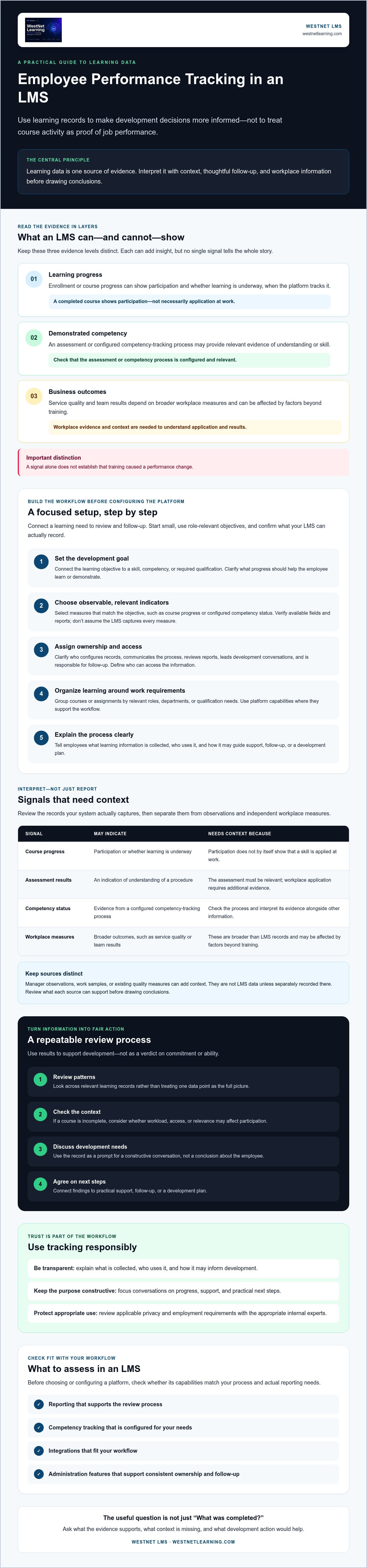
Keep three evidence levels distinct. Learning progress describes activity, such as enrollment or course progress, when the platform tracks it. Demonstrated competency requires relevant evidence, such as an assessment or a configured competency-tracking process. Business outcomes, such as service quality or team results, depend on broader workplace measures and can be affected by factors beyond training.
For example, completing a customer-service course shows participation. An assessment may indicate understanding of a procedure. Whether an employee applies it during customer interactions requires workplace evidence and context. None of these signals alone establishes that training caused a performance change.
Which parts of employee performance can LMS data illuminate?
Start with the records your system actually captures. Enrollment and course progress may show whether learning is underway. Assessment results or competency status may add evidence when those processes are configured. Check the platform setup rather than assuming a particular report field or measurement is available.
Then separate platform records from manager observations and independent performance measures. Coaching notes, work samples, or operational metrics gathered through tools like Nodal AI can add context, but they aren’t LMS data unless separately recorded there. Review the evidence together and ask what each source can support before drawing conclusions.
Why tracking should support development, not surveillance
Make the purpose clear. If employees don’t know what learning information is collected or how it may inform decisions, tracking can feel like monitoring without a constructive aim. Explain which learning records are reviewed, who uses them, and how they may guide support, follow-up, or a development plan.
Keep conversations focused on progress and practical next steps. If an employee hasn’t completed a course, first check whether workload, access, or relevance may be affecting participation. Treat the record as a prompt for discussion, not a verdict on commitment or ability.
Before establishing data practices, review applicable privacy and employment requirements with the appropriate internal experts. A clear purpose, transparent communication, and careful interpretation help managers use learning evidence responsibly while preserving employee trust.
How to set up employee performance tracking in an LMS
Build the workflow before configuring the platform. A focused setup connects a learning need to review and follow-up, rather than collecting records without a clear purpose. Use this sequence to keep the work practical and assignable.
Define goals, roles, and indicators before configuring the LMS
Start with a small number of role-relevant objectives. For example, a team may need to learn a required process and demonstrate its key steps in an assessment or workplace review. Choose indicators that match each objective, then confirm that your LMS can record or report them before making them part of the workflow.
- Step 1: Set the development goal. Connect each learning objective to a skill, competency, or required qualification. State what progress should help the employee learn or demonstrate.
- Step 2: Select observable indicators. Choose measures relevant to the objective, such as course progress or configured competency status. Check which fields and reports are available. Don’t assume the LMS captures every measure you want.
- Step 3: Assign ownership. Identify who configures learning records, communicates the process, reviews reports, and leads development conversations. Clarify who can access the information and who is responsible for follow-up.
These decisions help make the tracking process consistent across managers. For a broader framework for using evidence to guide learning decisions, explore data-driven training practices.
Configure learning records and communicate the process
Once goals and responsibilities are clear, organize learning around actual work requirements. Group courses or assignments by relevant roles, departments, or qualification needs, and use platform capabilities only where they support the defined process.
- Step 4: Configure the learning workflow. Set up relevant enrollment and learning records. Where available and appropriate, use development plans or competency and certification tracking to support follow-up. Keep the configuration focused on agreed objectives.
- Step 5: Explain the approach. Before launch, tell employees what learning information is tracked, who reviews it, and how it may inform development. Explain how they can raise questions or discuss support they need.
- Step 6: Review and refine. At an interval suited to training requirements and team workflows, check whether the indicators are useful, responsibilities are clear, and follow-up is happening. Adjust the process if the data doesn’t help managers make constructive decisions.
Keep the process transparent and manageable. If you’re assessing platform fit, review LMS features against your reporting, development-plan, and competency-tracking requirements, then verify details with the provider.
Which LMS indicators show progress and which need context?
An employee performance tracking LMS can bring different kinds of learning evidence into view, but those indicators answer different questions. Course completion, assessment results, competency status, and workplace outcomes aren’t interchangeable. Treat each as a signal to interpret, not a complete verdict on an employee’s ability or contribution.
Use this comparison to decide what you can reasonably learn from each data point. Available reports and fields vary by platform and configuration, so confirm what your LMS records before building a review process around a specific indicator.
| Evidence category | What it can suggest | What it can’t establish alone |
|---|---|---|
| Learning activity | Enrollment or course progress, where tracked, can show participation and whether learning is underway. | It doesn’t prove understanding, skill mastery, or application on the job. |
| Assessment evidence | Results from a configured assessment can indicate understanding of the material or progress toward a learning objective. | They don’t necessarily show consistent performance in real work situations. |
| Competency status | A structured record can show progress against defined competency or certification criteria. | It can’t establish more than the criteria and evidence behind the status support. |
| Workplace outcomes | Relevant operational measures may show trends in work results over time. | A trend alone doesn’t prove that training caused the change. |
Separate learning activity from competency evidence
Completion records participation, not mastery. An assessment adds a different kind of evidence, but its usefulness depends on whether it aligns with the objective. Competency tracking offers a structured view only when criteria are clearly defined and the process for recording status is understood. Confirm which reports and fields your platform supports before naming specific measures. Learning Analytics and Reporting can support review of learning information, but it isn’t an independent measure of job performance.
Interpret workplace outcomes without overstating attribution
Compare workplace trends with role expectations and operational context. A change may coincide with training, but workload, tools, staffing, or process changes could also influence results. Timing alone doesn’t establish cause.
Combine relevant LMS records with appropriate manager feedback or other workplace evidence. If learning activity rises while an employee still needs support applying a process, use that as a cue to discuss barriers and next steps, not as proof that the training succeeded or failed. This balanced interpretation keeps tracking useful and fair.
How to review LMS tracking data and turn it into fair action
A useful review turns records into a conversation, not a verdict. Set a repeatable process so managers and learning teams interpret indicators consistently, check context, and agree on practical support. An employee performance tracking LMS can organize learning information, but people still need to make fair decisions about what it means.
Build a useful reporting and review cadence
Choose a review interval that fits the training requirement and your organization’s workflow. Required learning may call for a different rhythm than ongoing development. Keep the cadence consistent enough to notice patterns, but don’t treat one missed activity or isolated result as a settled conclusion.
Use this sequence for each review:
- Review patterns: Look at relevant learning indicators over the period, rather than reacting to a single data point.
- Validate context: Check whether records are complete and the assigned learning is relevant. Consider access, workload, role changes, and other factors that may explain stalled progress.
- Discuss needs: Ask the employee what’s helping or getting in the way before deciding what the data means.
- Agree next actions: Identify a practical follow-up, such as clarifying expectations, providing time to complete learning, or discussing a relevant development goal.
Summarize findings in plain language. A brief account of the pattern, the context checked, and the agreed follow-up helps managers and learning teams stay aligned without overstating what LMS records prove.
Use tracking insights to support employee development
Respond to stalled progress with curiosity before escalation. A learner who hasn’t advanced may be facing competing priorities, unclear instructions, or a mismatch between the course and the role. Confirm the cause with the employee, then choose a proportionate response rather than applying an automatic penalty.
When relevant evidence supports a skill gap, connect it to a suitable learning step or development-plan follow-up. Set a clear expectation for what the employee and manager will do next, then revisit it at the next appropriate review. This keeps tracking focused on progress and shared responsibility.
Learning opportunities can also contribute to a workplace where employees see a path to grow. Explore how learning can support employee retention for related ideas.
As you refine your process, consider LMS options for development-focused learning reviews.
How an LMS can support a sustainable employee tracking workflow
A sustainable process depends on fit, not on collecting the most data. Select an employee performance tracking LMS by starting with the review workflow you’ve defined, then checking whether its capabilities support that process without treating learning records as a complete picture of job performance.
Match LMS capabilities to the tracking process
Use these questions to assess whether a platform can support your organization’s needs:
- Reporting: Does Learning Analytics and Reporting provide information relevant to your review goals? Confirm which report fields and export options are available before relying on specific measures.
- Development and competency workflows: Can development plans and competency or certification tracking support the follow-up your roles require? Agree on criteria and responsibilities before configuring them.
- Integrations: Does the platform’s HRIS Integration align with your systems? Ask the provider to clarify intended data flows and integration requirements rather than assuming which employee records are exchanged.
- Administration and learner support: Understand what administrator support is available and how employees can get help using the learning process.
WestNet LMS’s AI Enhanced LMS includes Learning Analytics and Reporting, development plans, competency and certification tracking, HRIS Integration, Data Migration & Administrator Support, and a Dedicated Client Success Manager. These capabilities can support a review and follow-up workflow, but they don’t independently verify workplace performance or establish that learning caused a business result. See the LMS features overview for more information about platform capabilities.
Evaluate the approach before expanding it
Start with a defined group and a limited set of learning objectives. Check whether the process is usable for learners and managers, whether records are accurate enough for review, and whether the information helps prompt relevant development conversations. Gather feedback from both groups before extending the workflow to other roles.
Use what you learn to refine the setup. Remove indicators that don’t inform action, clarify confusing communications, and verify integration or reporting requirements with the provider. A deliberate rollout gives your organization a chance to resolve gaps before the process becomes routine.
Choose an LMS that supports your goals and keeps interpretation in human hands. If WestNet LMS’s capabilities appear relevant to your workflow, a demonstration can help you explore the platform.
Make learning data a foundation for employee growth
A strong employee performance tracking LMS supports better development conversations, not automatic judgments. Set indicators that fit role-specific learning goals, review them alongside workplace context, and agree on follow-up with employees. Course progress and assessment evidence can guide questions, while managers remain responsible for interpreting what those signals mean.
The right platform should also fit the workflow behind those conversations. WestNet LMS’s AI Enhanced LMS includes Learning Analytics and Reporting, development plans, and competency and certification tracking to support reviews of learning progress and next steps. Administrator support and a Dedicated Client Success Manager can also support organizations as they manage their LMS.
Build a process that’s clear, consistent, and focused on helping people develop. Explore WestNet LMS’s AI Enhanced LMS to see whether its capabilities align with your organization’s approach. With thoughtful indicators and responsible follow-up, learning data can help make employee development more purposeful.
Frequently Asked Questions
Can an LMS track employee performance?
An LMS can track learning activity and related evidence, but it doesn’t independently measure every aspect of job performance. Depending on its configuration, it may record course participation, assessment evidence, or competency status. These indicators can help managers identify learning progress or follow-up needs. To assess workplace performance, interpret LMS records alongside relevant manager observations or other appropriate work evidence, rather than treating course data as a complete evaluation.
What should you track in an employee performance tracking LMS?
Track indicators that connect to defined learning goals, such as enrollment, course progress, assessment evidence, or competency and certification status where available and relevant. An employee performance tracking LMS is most useful when each indicator has a clear purpose. For example, course progress can show participation, while a configured assessment may indicate understanding. Confirm which fields and reports your platform supports before making a measure part of your review process.
How do you use LMS data to improve employee performance?
Use LMS data to guide a conversation and identify a practical next step. Review learning patterns, check whether the information is accurate, and ask the employee about barriers or support needs. If evidence points to a relevant skill gap, agree on suitable learning or a development-plan action, then follow up at an appropriate time. Keep workplace context in view, since LMS data alone can’t show that training caused a change in performance.
Does course completion prove an employee has learned a skill?
No. Course completion records participation or progress, not necessarily mastery or workplace application. An assessment aligned with the learning objective can offer additional evidence of understanding, but it still may not show whether an employee can apply the skill consistently on the job. Consider what the completion record or assessment actually demonstrates, then use relevant workplace observations or other evidence to inform broader conclusions about skill use.
How can employee performance tracking avoid feeling like surveillance?
Be transparent about the purpose and limits of tracking. Tell employees what learning information is collected, who reviews it, and how it may support development or follow-up. Keep conversations focused on learning needs and practical assistance, rather than interpreting an isolated record as a judgment of commitment. Give employees an opportunity to explain context, and consult appropriate internal experts about applicable privacy and employment requirements before establishing data practices.
Can an LMS connect learning data with an HRIS?
Some LMS platforms support HRIS integration, but the data exchanged and how the connection works depend on the systems and setup. Confirm the intended data flows, requirements, and responsibilities with the provider before implementation. Don’t assume which employee records will transfer or synchronize. WestNet LMS confirms HRIS Integration as a capability. Ask the provider to clarify how it fits your organization’s systems and planned learning review process.