What if employee training could do more than record course completions? The right employee training and development software can connect learning activity to employee growth while giving administrators a clearer way to manage delivery and progress.
If training is spread across spreadsheets, separate courses, and manual follow-up, it’s difficult to see how learning supports development. Limited administrative capacity can make even consistent training hard to coordinate. Choosing a platform isn’t just about assigning courses. It’s about creating a workflow employees can use and leaders can learn from.
This 2026 buyer’s guide explains how to evaluate software that brings training delivery, employee development, and measurable progress together. You’ll learn what to assess in learning workflows, automation, integrations, and analytics, and how to match those capabilities to your organization’s needs. We’ll also look at how WestNet LMS connects course creation, learner recommendations, administration, and reporting to support a more unified approach to workplace learning.
Key Takeaways
- Evaluate employee training and development software by how well it connects learning activity to employee growth, not just course completion.
- Trace the learning workflow from content creation and assignment through learner support and activity review to identify disconnected steps.
- Compare platforms across learner experience, administration, content workflows, reporting, and integration needs to avoid adding another silo.
- Use a structured rollout process that defines outcomes, maps users, inventories content, assesses integrations, and gathers feedback from key stakeholders.
- See how WestNet AI LMS capabilities, including AI-Powered e-learning Creation, learner recommendations, analytics, gamification, and task automation, align with your evaluation priorities.
Why Employee Training and Development Software Needs to Connect Learning with Growth
Employee training and development software helps organizations organize, deliver, and track workforce learning. It can coordinate learning activities and show participation, but its value also depends on whether that information helps support employee growth.
A completed course shows that an employee finished an assigned learning activity. By itself, it doesn’t show whether the employee can apply the material, has strengthened a capability, or is prepared for a future responsibility. Completion data is useful, but leaders need to interpret it alongside role requirements, employee goals, and follow-up conversations. Otherwise, learning records can measure activity without guiding development.
How employee training differs from employee development
Training addresses an immediate need: helping someone learn the knowledge, procedures, or skills required for a current task or role. Examples include learning a new internal process, using a workplace system, or completing role-specific onboarding.
Development takes a longer view. It supports continued capability growth that may prepare an employee for changing responsibilities or future opportunities. The concepts are connected, but they aren’t interchangeable. A coordinated software workflow can make training easier to assign and track, then give managers and employees clearer information to discuss when setting development priorities. For a foundational perspective, see this Training and Development Overview.
When disconnected training workflows become a business problem
Look for operational signals, not just complaints about software. Administrators may assign courses manually, store completion records in separate files, and assemble reports from inconsistent sources. Employees may also have an uneven experience when learning instructions, course access, and follow-up information are spread across different processes.
These gaps make practical questions harder to answer: Who has completed required learning? Which learning activities relate to an employee’s goals? Where is follow-up needed? If records are scattered or out of date, managers may lack a shared basis for development planning, while administrators spend time reconciling information instead of improving the workflow.
Map the handoffs. Note where a course is selected, assigned, accessed, recorded, and reviewed. Then identify what information managers need to connect that activity to an employee’s next development step. This helps distinguish a genuine platform need from a process issue and gives decision-makers a clearer basis for evaluating software.
A thoughtful approach to employee training and development guidance considers both immediate learning requirements and longer-term growth. The goal isn’t to make every course a career plan. It’s to create a coherent workflow that records learning activity and makes relevant information available for useful development conversations.
How Employee Training and Development Software Connects the Learning Workflow
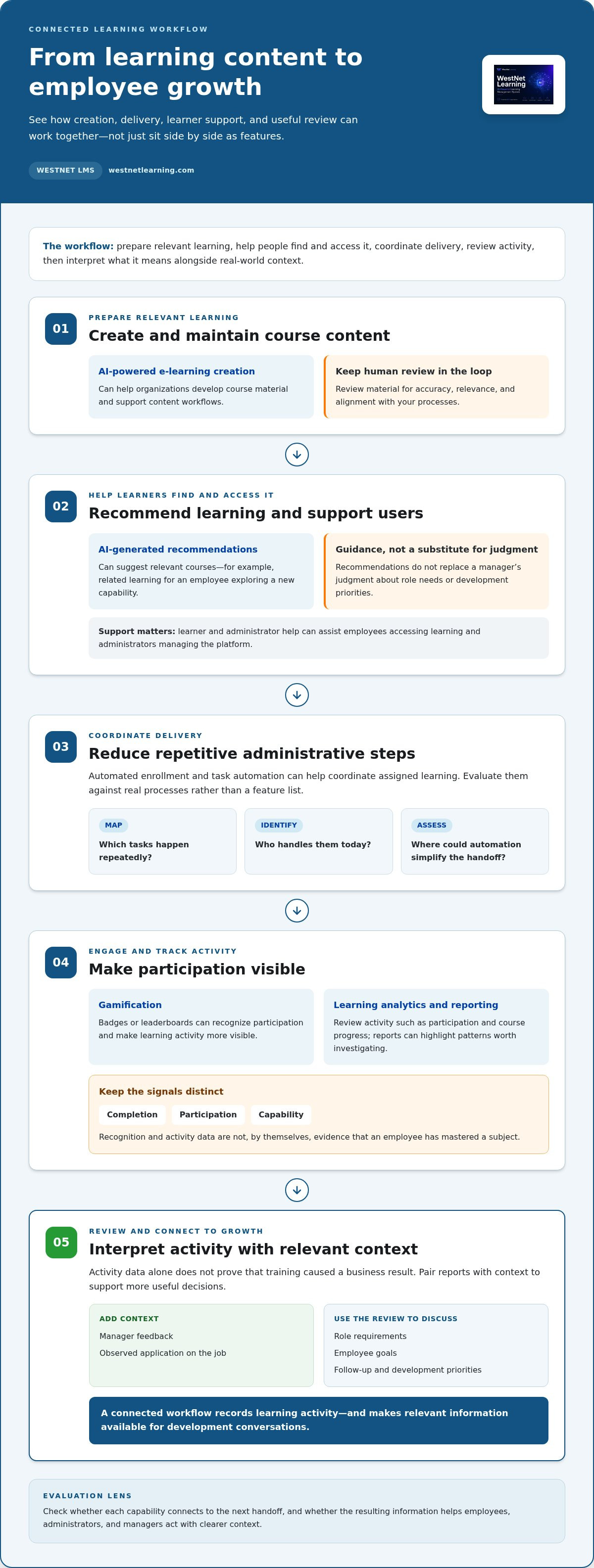
A connected learning workflow moves from relevant content to learner access, ongoing support, and useful review. Evaluating employee training and development software through these stages helps reveal whether capabilities work together or simply sit side by side as a feature list.
Course creation, recommendations, and learner support
Start with the learning content. AI-powered e-learning creation can help organizations develop course material, while AI-generated recommendations serve a different purpose: suggesting relevant courses to learners. For example, an employee exploring a new capability may be directed to related learning in the system. A recommendation can guide discovery, but it doesn’t replace a manager’s judgment about role needs or development priorities.
Consider how content is prepared and maintained, too. AI course creation can support content workflows, but organizations still need to review material for accuracy, relevance, and alignment with their processes. Learner and administrator help can also support people using the platform, from employees accessing learning to administrators managing it.
Administration, engagement, and reporting
Once learning is ready, the workflow shifts to delivery. Automated enrollment and task automation can reduce repetitive administrative steps, such as coordinating enrollment in assigned learning. Map these capabilities to real processes: which tasks happen repeatedly, who handles them today, and where could automation simplify the handoff?
Engagement tools have a role, too. Gamification features such as badges or leaderboards can recognize participation and make learning activity more visible. Treat them as recognition mechanisms, not evidence that an employee has mastered a subject. Completion, participation, and capability are different signals, and each should be interpreted appropriately.
Learning Analytics and Reporting help administrators review activity, such as participation and course progress. Reports can highlight patterns worth investigating, but activity data alone doesn’t prove that training caused a business result. Pair reports with relevant context, such as manager feedback or observed application on the job. When assessing enterprise learning analytics tools, ask whether they help decision-makers ask better questions and choose useful follow-up.
Assess the stages as one system. If content creation, enrollment, learner support, and reporting are disconnected, administrators may still need manual work to bridge them. A coherent workflow makes handoffs easier to understand and gives teams a clearer view of what happens after learning is assigned.
WestNet AI LMS brings together AI-Powered e-learning Creation, AI-Generated Course Recommendations for learners, AI-Powered Help for learners and admins, automated enrollment, task automation, gamification, and Learning Analytics and Reporting. Explore WestNet AI LMS in the context of the learning workflows your organization needs to connect.
How to Compare Employee Training and Development Software Without Buying on Features Alone
A long feature list can make platforms look similar while hiding differences in how they fit your organization’s work. Compare employee training and development software against real tasks and decisions. First, separate must-haves, such as a required HRIS connection, from useful enhancements, such as gamification. Then evaluate each platform against the same criteria instead of rewarding the longest checklist.
Use this comparison framework to guide demonstrations and internal discussions:
| Area | Evaluation question | Useful evidence |
|---|---|---|
| Learner experience | Can employees find and access relevant learning? | Walk through the learner journey, including language access if it matters to your workforce. |
| Administration | Can administrators manage enrollment and recurring tasks efficiently? | Map a routine assignment process and identify any steps that remain manual. |
| Content workflows | Can teams create or manage the content they need? | Trace how content is prepared, reviewed, made available, and maintained. |
| Reporting | Can managers and administrators answer specific learning questions? | Review reports for enrollment, progress, and activity, then identify decisions they inform. |
| Integrations | Does the platform fit existing systems and processes? | Assess authentication, HRIS connection, data migration, and administrator support against current workflows. |
Match platform capabilities to organizational requirements
Requirements differ by role. Learners need accessible courses and clear next steps; administrators need manageable workflows; managers need relevant visibility for follow-up; and L&D teams need practical ways to manage learning content and review activity. Ask each group to describe its current process and friction points. Treat language access and organizational scale as specific requirements to assess, not assumptions that apply equally to every buyer.
Software should simplify work, not create another disconnected system. Trace how information moves between existing tools and the learning platform. Include authentication, HRIS connection, migration, and support in the evaluation so implementation needs aren’t overlooked. Record which requirements are essential and which are preferences before comparing vendor feature counts.
Evaluate AI, analytics, and engagement with clear criteria
Evaluate AI by its intended job. Does AI-powered course creation address a defined content workflow? Do AI-generated recommendations help learners discover courses relevant to their needs? Ask for a demonstration of the actual process and distinguish a useful capability from a broad claim. Apply the same discipline to vendor statements and external performance statistics: look for clear evidence, context, and an explanation of what was measured.
For analytics, bring specific questions: Can the team review who enrolled, who progressed, and which learning activities are being used? A report that displays activity may support follow-up, but it doesn’t establish learning mastery or prove business impact by itself. Gamification can recognize participation through features such as badges or leaderboards; it should complement relevant learning, not substitute for it.
Finally, score each platform against your must-haves first, then consider enhancements. This keeps the decision anchored in operational fit and development priorities rather than feature volume alone.
How to Select and Roll Out Employee Training and Development Software
Turn your evaluation criteria into a rollout plan before choosing employee training and development software. Involve administrators, managers, learners, and relevant system owners early. Each group sees different requirements, from daily enrollment tasks to how employees access learning and how existing systems exchange information.
Use this sequence to move from requirements to a measured launch:
- Define outcomes. Specify what the organization needs to coordinate, such as required training, ongoing development, or clearer visibility into learning activity. Set baseline measures and decide when the team will review them.
- Map users. Identify learner groups, managers, administrators, and L&D responsibilities. Document training needs, language requirements, and who will maintain courses and enrollment processes.
- Inventory content. List current courses, formats, owners, and review status. Map how content is created, approved, assigned, and updated before deciding what to migrate or replace.
- Assess integrations. Document required connections to HRIS, authentication, and other business systems. Ask relevant system owners to describe current data flows and identify dependencies that could affect implementation.
- Pilot the workflow. Select a representative group, then test access, enrollment, content, learner support, and reporting using realistic tasks. Gather structured feedback from learners, managers, and administrators.
- Review and refine. Compare pilot observations with the baseline and requirements. Address gaps, adjust processes, and set regular review dates for participation and learning reports after launch.
Prepare requirements, users, and learning content
Make ownership explicit. Name who approves course updates, handles learner questions, manages enrollment, and reviews reports. Establish content governance before migration: define how accuracy and relevance will be reviewed, who can publish changes, and how outdated material will be identified. Clear ownership keeps the learning library manageable as needs change.
Plan learner communication, too. Explain where employees will access learning, how assignments will be communicated, and where they can get platform help. If language access matters, capture which languages employees need as a formal requirement. Document current course formats and workflows so migration decisions reflect real use, not just the files available.
Pilot, launch, and improve the learning operation
Choose a pilot group that reflects the workflows the platform must support, rather than limiting the test to administrators. Ask participants to complete representative tasks and report where instructions, access, or course content create friction. Give administrators a clear support path during the pilot and decide how feedback will be recorded, prioritized, and resolved.
Before broader launch, confirm enrollment responsibilities, learner communications, and the schedule for reviewing reports. Track baseline measures such as enrollment and progress, then revisit them on planned dates. Treat changes in activity as signals to investigate, not as proof of business impact. Use feedback and reporting together to refine courses, communication, and administrative steps.
Once your requirements and pilot criteria are clear, request a demo of WestNet AI LMS to see how its learning, administration, and reporting capabilities align with your planned workflow.
Evaluate WestNet AI LMS for Employee Training and Development
Use the requirements you’ve defined to assess whether WestNet AI LMS connects the learning tasks your organization needs to manage. Rather than treating capabilities as a checklist, trace a practical workflow: how learning content is created, how employees find relevant courses, how administrators coordinate delivery, and how teams review learning activity. This makes it easier to judge the platform against your priorities for employee training and development software.
Connect employee learning needs to WestNet AI LMS capabilities
For organizations coordinating varied training needs, AI-Powered e-learning Creation supports course development, while AI-Generated Course Recommendations for learners help people discover relevant courses. These capabilities serve different steps in the workflow. As you evaluate them, consider the content you need to create and how employees could use recommendations to find learning that fits their needs. Organizations remain responsible for reviewing course material for accuracy and relevance.
For administration and review, WestNet AI LMS brings together:
- Automated enrollment and other task automation to support recurring administrative workflows.
- Learning Analytics and Reporting to review learning activity and inform follow-up.
- Gamification, including leaderboards and badges to recognize participation without treating it as proof of mastery.
- AI-Powered Help for learners and admins to support people using and managing the platform.
HRIS Integration, Data Migration & Administrator Support, along with a Dedicated Client Success Manager, supports implementation and ongoing administration. Map each capability to a need identified by your team, then use a demo or trial to walk through representative tasks instead of evaluating features in isolation.
Scale and language access may also factor into fit. WestNet AI LMS supports up to 60 site languages, with users selecting a language at login, and can scale from small teams to tens of thousands of users. Consider whether those capabilities align with your organization’s current needs and anticipated growth; they won’t be equally important to every buyer.
Take the next step with a trial or demo
Bring your documented requirements into the evaluation. Select a few representative scenarios, such as creating or managing learning content, reviewing learner recommendations, coordinating enrollment, and examining reports. Note what each user needs to accomplish and gather feedback from administrators, managers, and learners. This keeps the assessment focused on operational fit rather than assumptions about what a feature should do.
Evaluate WestNet AI LMS through the free 30-day trial or request a WestNet AI LMS demo. Use the opportunity to assess how its capabilities align with your learning workflows, employee development priorities, and administration needs. Decide based on the evidence your team gathers, without assuming software alone will deliver a particular performance or business outcome.
Turn Your Evaluation Into a Learning Strategy
The strongest platform decision is one your organization can put into practice. Use your requirements to set clear ownership for learning workflows, decide how progress will be reviewed, and make space for feedback as employee needs evolve. That gives your team a foundation for adapting its approach over time, rather than treating implementation as a one-time technology project.
Choose employee training and development software that supports the way your organization wants learning to work, from day-to-day coordination to longer-term growth. Evaluate the fit using real tasks and the priorities your stakeholders defined. A focused assessment can help your team move forward with greater clarity and purpose.
Start a free 30-day WestNet AI LMS trial using WestNet AI LMS. Explore the platform against your requirements and decide whether it aligns with your learning strategy.
Frequently Asked Questions
Can employee training and development software support remote and frontline employees?
Yes, if the learning setup fits how each group works and accesses training. Remote employees may need clear online access and flexible ways to complete assigned courses, while frontline teams may need learning that fits around shifts and operational duties. Before selecting a platform, map when and where each group can participate, how assignments reach them, and who can help if access or scheduling becomes a barrier.
Is AI-generated training content ready to use without review?
No. Treat AI-generated material as a draft that requires a subject matter expert’s review before employees rely on it. Check facts, terminology, procedures, and alignment with current company policies. For example, if a course explains a workplace process, have the process owner verify each step and identify outdated instructions. Also review whether examples suit the intended audience and whether employees can understand the content without missing important context.
How should managers use employee learning data?
Managers should use learning data as a prompt for a constructive conversation, not as a complete assessment of someone’s ability. A record of course activity can help identify topics to revisit or prompt a discussion about whether an employee has had a chance to apply new knowledge. Pair that information with observed work, employee feedback, and agreed development goals. Avoid drawing conclusions from a single metric or treating course activity as a performance rating.
Can employee training software replace a learning and development team?
No. Software can support coordination, content management, and reporting, but people still need to set learning priorities and exercise professional judgment. L&D teams help identify capability needs, guide content review, advise managers, and assess whether learning remains relevant as work changes. A platform may reduce some manual tasks, giving specialists more room to focus on program quality, governance, and the employee experience.
How often should employee training content be reviewed?
Review content on a schedule that reflects its subject and risk, and whenever the underlying process changes. A course covering a stable topic may need a different review cadence than one tied to frequently updated procedures. Assign an owner, record the last review, and define triggers such as policy updates, new systems, recurring learner questions, or manager feedback. This creates a practical way to spot stale material before it causes confusion.
What should employees know about AI-generated course recommendations?
Employees should understand that a recommendation is a suggestion for discovering relevant learning, not a formal instruction or a complete judgment of their capabilities. It may point to a useful course, but it might not reflect an employee’s full experience, current projects, or career interests. Employees can discuss the suggestion with their manager and compare it with their development goals before deciding whether it fits their next learning step.
What is the difference between an LMS and employee training software?
An LMS, or learning management system, is a platform used to organize and manage learning activities. “Employee training software” is a broader, less precise label that may refer to an LMS or to tools focused on particular parts of training, such as course creation or delivery. Compare the actual workflow each tool supports, including how learning is assigned, accessed, recorded, and reviewed, rather than relying on the product category alone.