What if connecting learning systems created more data gaps instead of closing them? An enterprise LMS with API can connect learning workflows to HR, identity, and other business systems. The value depends on which data moves, how it’s governed, and who maintains the connection.
It’s reasonable to be cautious. Fragmented learner, organization, and completion records make reporting harder, while a poorly planned integration can introduce security and data-quality risks. A ready-made integration may simplify a common connection. An API can support broader or more tailored data exchange, but it also requires clear technical planning and ongoing ownership.
This guide explains what an LMS API does, how it differs from a prebuilt integration, and which data, security, governance, and support criteria matter when assessing fit. You’ll also learn how to plan a scalable connection, from mapping HRIS data and enrollment workflows to preparing for migration and administrator support. The goal is a connected learning ecosystem that reduces operational friction without adding fragile complexity.
Key Takeaways
- Use an enterprise LMS with API to connect learning workflows with business systems, while defining which data should move and why.
- Map the path from a source system to the LMS, then establish synchronization rules and validate the resulting records.
- Assess integration fit across data needs, access controls, monitoring, support, and long-term ownership.
- Reduce avoidable rework by planning in phases and prioritizing a small number of high-value workflows first.
- See how WestNet LMS’s HRIS Integration, Data Migration, and Administrator Support can contribute to connected learning operations.
What an Enterprise LMS with API Does for Connected Learning
An LMS API is a structured interface that allows software systems to exchange permitted data and actions according to defined rules. For organizations using an enterprise LMS with API, it can connect learning operations with business systems while preserving control over what information moves and how it is used.
A Learning Management System organizes and delivers learning, as described in this overview of a Learning Management System. Connected to HR, identity, reporting, or content workflows, it can reduce duplicate administration and make learning records more useful across the organization. For example, workforce changes managed in an HR system may inform learner administration, while completion records can contribute to workforce reporting. The connection depends on the capabilities of the systems and the integration design.
What data can an enterprise LMS exchange?
Common data categories include learner profiles, organization attributes such as department or role, course enrollments, and completion records. Before designing a connection, list the specific fields and actions each workflow needs. Available data and permissions vary across systems.
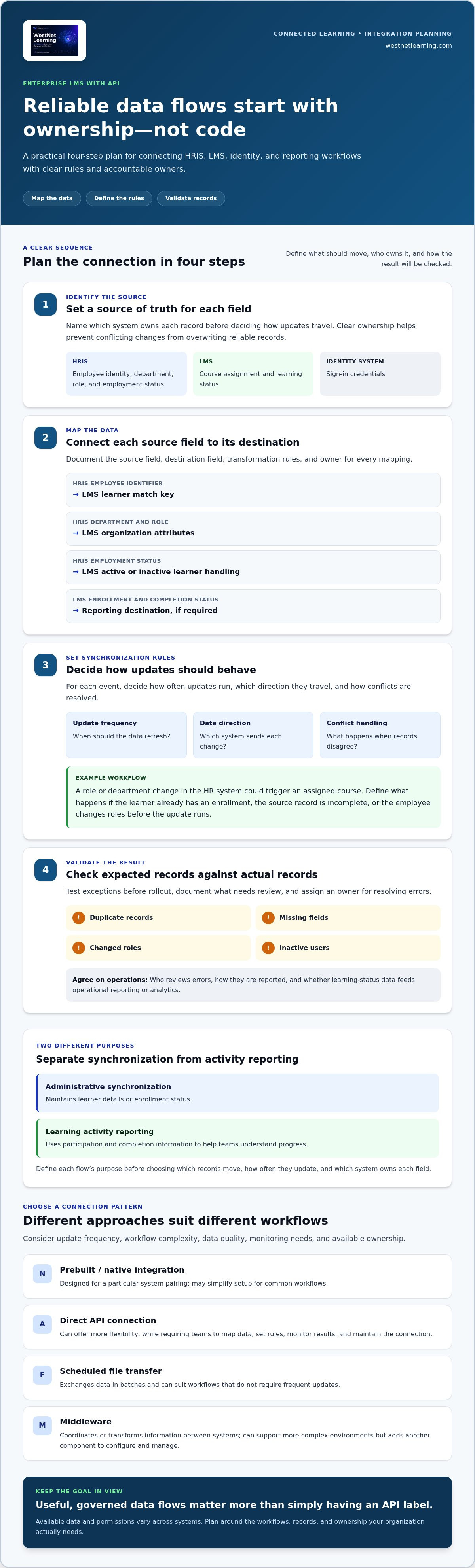
Keep administrative synchronization distinct from learning activity reporting. Synchronization may maintain learner details or enrollment status. Activity reporting uses participation and completion information to help teams understand progress. Define the purpose of each flow before deciding which records should move, how often they should update, and which system owns each field.
API integration versus native integration and file transfer
These connection approaches solve related problems in different ways. A prebuilt, or native, integration is designed for a particular system pairing and may simplify setup for common workflows. A direct API connection can offer more flexibility, but teams still need to map data, establish rules, monitor results, and maintain the connection.
Scheduled file transfer exchanges data in batches, which can suit workflows that don’t require frequent updates. Middleware sits between systems to coordinate or transform information. It can support more complex environments, but adds another component to configure and manage. Choose an approach based on update frequency, workflow complexity, data quality, monitoring needs, and available ownership.
A user-facing integration feature may provide configuration controls or connect a familiar business application, but that isn’t the same as an API itself. The API is the underlying interface; files and middleware are other ways to move or coordinate data. Explore LMS integrations and connectivity as part of the wider integration picture. The value comes from useful, governed data flows, not simply having an API label.
How Enterprise LMS API Data Flows Work Across Business Systems
A reliable integration starts with decisions about data, not code. In an enterprise LMS with API workflow, teams need to know which system owns each record, how changes should travel, and how they’ll confirm the result. HRIS-to-LMS learner provisioning is a useful example for planning these decisions.
Map the systems, records, and ownership first
List the systems involved, then assign a source of truth for each field. An organization might treat its HRIS as authoritative for employee identity, department, role, and employment status, while the LMS manages course assignment and learning status. Identity systems may separately govern sign-in credentials. Clear ownership prevents conflicting updates from overwriting reliable records.
Map events separately: creating a user, changing a role, recording a departure, and updating learning status can each require different rules. A simplified data map might look like this:
- HRIS employee identifier → LMS learner match key
- HRIS department and role → LMS organization attributes
- HRIS employment status → LMS active or inactive learner handling
- LMS enrollment and completion status → reporting destination, if required
For each mapping, document the source field, destination field, transformation rules, and owner. This makes it easier to resolve mismatches and update the integration when business definitions change.
Set synchronization, error handling, and reporting expectations
Use a four-step flow to structure the work:
- Identify the source: Name the system that owns each field or event.
- Map the data: Match fields and define how differences in format or meaning are handled.
- Set synchronization rules: Decide how often updates run, which direction they travel, and how conflicts are resolved.
- Validate the result: Compare expected and actual records, then document exceptions and their owners.
For example, a business rule could assign a required course when an employee enters a particular role or department. Automated enrollment can connect that HR event to a learning assignment. Define what should happen if the learner already has an enrollment, the source record is incomplete, or the employee changes roles before the update runs.
Test duplicate records, missing fields, changed roles, and inactive users before rollout. Agree on who reviews errors, how they’re reported, and whether learning-status data feeds operational reporting or analytics. Standards work from the IEEE Learning Technology Standards Committee (LTSC) offers broader context for interoperability, but practical consistency still depends on clear mappings and governance. For wider planning considerations, explore this strategic roadmap for modernizing corporate learning systems.
How to Evaluate Enterprise LMS API Fit, Security, and Maintainability
An API can connect systems, but it doesn’t remove the need for integration design, governance, or ongoing maintenance. Evaluate an enterprise LMS with API against the workflows your organization needs, then establish who will manage the connection as systems and business rules change.
Which technical and operational questions should buyers answer?
For each workflow, define the required records, direction of exchange, update frequency, and business owner. Review documentation and operating procedures for testing, version changes, and incident escalation. IT, HR, and L&D should agree on who can access data, who resolves exceptions, and how long information is retained.
Keep security and governance practical: send only the data a workflow needs, limit access to the minimum necessary, and maintain a way to review relevant activity. Set a process for approving, testing, and communicating changes to fields, permissions, or connected systems. For a public-sector reference point on API access and usage expectations, consult api.data.gov.
| Review area | Questions to resolve |
|---|---|
| Use cases and data objects | Which workflow is in scope, and which learner, enrollment, or completion records are required? |
| Access controls | How is access limited, and who approves or reviews it? |
| Monitoring | How will teams identify failed updates, duplicates, or unexpected changes? |
| Support and ownership | Who handles technical incidents, data exceptions, and routine maintenance? |
How should teams compare API, native, and middleware approaches?
Compare options against the workflows and capacity you have, not against a label. Consider the number of systems involved, the transformations required, how frequently data must update, and whether internal teams can maintain the chosen model.
| Approach | Flexibility and effort | Governance and maintenance |
|---|---|---|
| Direct API | Can be shaped around specific workflows; requires integration design and testing. | Your team must define monitoring, change control, and ongoing ownership. |
| Native integration | May streamline a supported, common connection; flexibility depends on its design. | Clarify which settings and exceptions your team manages. |
| Middleware | Can coordinate multiple systems or transformations; adds a component to configure. | Assign responsibility for the intermediary, its rules, and its monitoring. |
Maintainability matters as much as initial connectivity. Tie integration decisions to outcomes such as reduced manual administration or more dependable learning reports, then review learning management system ROI factors. For related integration context, explore WestNet LMS integrations.
How to Plan an Enterprise LMS API Integration Without Avoidable Rework
Keep the first release focused. An enterprise LMS with API can support connected learning workflows, but expanding too quickly can make testing, data governance, and ownership harder to manage. Start with a small set of high-value outcomes, then build a roadmap that clarifies decisions and responsibilities before implementation begins.
Prepare requirements and a realistic integration scope
Document the intended business outcomes, source systems, user groups, required fields, and measures of success. For example, a first phase might focus on keeping learner profiles current and assigning role-based learning, while broader reporting connections remain a later enhancement. Separate launch-critical workflows from future requests so the initial scope stays testable.
Assign accountable owners across IT, HR, L&D, and platform administration. Each workflow needs someone responsible for its business rules, data quality, approvals, and exceptions. Include data migration and administrator support in implementation planning, especially when existing learner records or learning histories need to be brought into the new operating model.
Test, launch, and govern the connected LMS
Use a phased roadmap, with a decision and sign-off at each stage:
- Scope: Select priority workflows and define success measures.
- Inventory: Identify systems, data fields, owners, and migration needs.
- Design: Document mappings, permissions, synchronization rules, and exception handling.
- Test: Check representative user journeys, data accuracy, access boundaries, and failure scenarios.
- Migrate and launch: Reconcile records, complete user acceptance testing, and communicate operational changes.
- Monitor: Review errors and outcomes after launch, then refine before adding workflows.
Plan for recovery, not just success. Define rollback steps for a launch issue, the decision-maker who can pause or reverse a change, and how affected records will be reconciled. Before release, have HR, IT, and L&D validate realistic scenarios, including a new learner, a role change, and a failed update.
After launch, schedule issue reviews and set expectations for monitoring, change approvals, support escalation, and periodic access reviews. These practices keep an integration governable as requirements evolve. For broader enterprise learning context, read about AI-powered LMS platform strategy.
Ready to align learning workflows with your implementation plan? Explore your LMS integration options.
How WestNet LMS Supports Connected Enterprise Learning
Connected learning depends on more than moving records between platforms. Teams also need clear administration, reliable learner data, and workflows that reflect how the organization assigns and manages training. WestNet LMS brings together capabilities that support this broader integration strategy.
Connect integration planning with learning administration
WestNet LMS includes HRIS Integration, Data Migration, and Administrator Support. These capabilities support planning around learner and organization management and the practical work of moving records and administrative processes into an enterprise LMS with API capabilities. Define which system owns each learner field, how organizational changes should be handled, and what information administrators need to keep records useful.
Authentication is another part of the learner experience. WestNet LMS offers standard username and password sign-in, as well as Single Sign-On (SSO). These platform authentication options are distinct from API connection design. Keep the requirements for user sign-in separate from the data and workflows you want to integrate.
After setup, automated enrollment can connect learning assignments with defined business rules, while learning analytics and reporting can help administrators review learning activity and progress. Together, these capabilities support ongoing operations, from managing enrollments to understanding how learning is being used.
Evaluate WestNet LMS against your enterprise requirements
Bring a practical system inventory to the evaluation. Include your connected applications, priority workflows, required data, field ownership, and success criteria. Clarify whether your immediate priority is learner administration, enrollment, reporting, or a combination, and identify which teams will own each process.
WestNet LMS includes a Dedicated Client Success Manager and Administrator Support, which can support your implementation and ongoing administration planning. Use your workflow inventory to discuss operational fit and identify how the platform’s HRIS Integration, data migration, and enrollment capabilities relate to your learning operations.
For a closer look at how WestNet LMS could align with your learning operations, request a WestNet LMS demonstration. Bring your system inventory and priority questions, and use the session to explore the platform in the context of your enterprise learning requirements.
Build a More Connected Learning System
A successful enterprise LMS with API strategy starts with purposeful data flows, clear ownership, and realistic governance. Choose the workflows that matter most, define which systems own key records, and plan how you’ll test, monitor, and maintain each connection over time.
WestNet’s AI Enhanced LMS supports connected learning operations with HRIS Integration, Data Migration, Administrator Support, and automated enrollment. Multiple authentication options include standard sign-in and Single Sign-On, while a Dedicated Client Success Manager can support your broader platform evaluation. These capabilities contribute to integration planning alongside your organization’s workflow and governance decisions.
Bring your system inventory, priority workflows, data ownership questions, and success criteria into your next evaluation. Explore WestNet LMS and request a demonstration to consider how its learning administration capabilities align with your enterprise requirements.
Start with a clear plan, then expand with confidence. A well-governed learning ecosystem can make it easier to connect workforce development with the systems and processes that support your organization.
Frequently Asked Questions
What is an enterprise LMS API?
An enterprise LMS API is a structured interface that lets software systems exchange permitted data and actions according to defined rules. It can support connections between learning platforms and business applications, such as HR, identity, or reporting systems. The available records and actions depend on the systems involved and the integration design. An API provides a connection mechanism, but it doesn’t define the business rules or ongoing ownership by itself.
How does an LMS API connect to an HRIS?
An LMS can connect with an HRIS by mapping selected workforce records and defining how updates should move between systems. For example, an organization might use HRIS data to inform learner profiles or enrollment rules, while the LMS records course activity. Teams should decide which system owns each field and how to handle changes or exceptions. WestNet LMS includes HRIS Integration to support connected learner and organization management.
What is the difference between an LMS API and a native integration?
An LMS API is an interface for exchanging permitted data or actions between software. A native integration is a packaged connection designed for a particular system or workflow, often with less configuration for the intended use. A native integration may use an API behind the scenes, but its setup and flexibility depend on how it was built. Compare both approaches by workflow fit, configuration needs, monitoring, and ongoing ownership.
Are enterprise LMS APIs secure?
An API isn’t secure simply because it exists. Security depends on the controls and governance applied to the connection, including limiting access to necessary data, assigning appropriate permissions, reviewing activity, and managing changes. Coordinate responsibilities across IT, HR, and learning teams. Standard LMS sign-in and Single Sign-On support user access, but they shouldn’t be mistaken for details about API authentication.
Can an LMS API automate employee enrollment?
It can, if the connected systems support the required data exchange and the organization defines clear enrollment rules. For instance, a role or department change might trigger an assignment, with exceptions handled when a learner already has the course. Test the rules with realistic records before relying on them operationally. WestNet LMS includes automated enrollment, which can support defined learning assignment workflows.
How do you plan an enterprise LMS API integration?
Start by identifying the business outcomes, systems, workflows, required records, and owners. Map which system controls each field, set data and synchronization rules, then test accuracy, permissions, exceptions, and user journeys before launch. Include migration needs, rollback steps, monitoring, and post-launch issue review in the plan. Prioritize a small number of high-value workflows first, then expand once the initial connections are operating as intended.