What if an HRIS connection did more than transfer employee records and helped organize the learning workflows that depend on them? An HRIS integrated LMS can align learner administration with workforce changes, but only when your organization defines which data should move, which system owns it, and what actions it should support.
If your team updates employee details in multiple systems or manually changes course enrollments after people move roles, the strain is familiar. Accurate records matter, but so do clear data ownership and a reliable process for handling hires, departures, and department changes.
This guide explains which HRIS and LMS workflows are worth connecting, what to compare when evaluating integration approaches, and how to plan a manageable implementation. You’ll learn how to set expectations for data synchronization, decide whether learning records should flow back to the HRIS, and assign responsibilities for data and administration. A defined scope helps bring learner information and training processes into closer alignment without adding unnecessary complexity.
Key Takeaways
- An HRIS integrated LMS can connect employee record changes to learner administration and training workflows.
- Map the data and lifecycle events that matter, then define which system owns each record and process.
- Compare integration options by data scope, workflow automation, administration, reporting, and support.
- Prepare for implementation by documenting workflows and assigning clear roles to data owners, administrators, and learning stakeholders.
- Explore how WestNet’s AI Enhanced LMS combines HRIS integration with data migration and administrator support.
Why an HRIS-Integrated LMS Matters for Connected Employee Learning
An HRIS-integrated LMS is a learning platform connected to an organization’s human resources information system. The connection can align employee and organizational records with learning access, enrollment, and administration. This gives HR and L&D teams a more consistent basis for managing training workflows.
A one-time user-list import creates a starting snapshot, not an ongoing connection. As employees join, leave, or change roles, that list can become outdated unless someone updates it. An integration supports data movement according to agreed workflows, so employee changes can inform learner administration instead of remaining separate in another system.
The value is operational as well as technical. If a department change affects required training, connected records can help administrators manage the related enrollment workflow. If an employee leaves, the organization can define how the change should affect learning access and records. The integration does not set these policies. Teams need to decide the rules and responsibilities behind them.
What does an HRIS-integrated LMS connect?
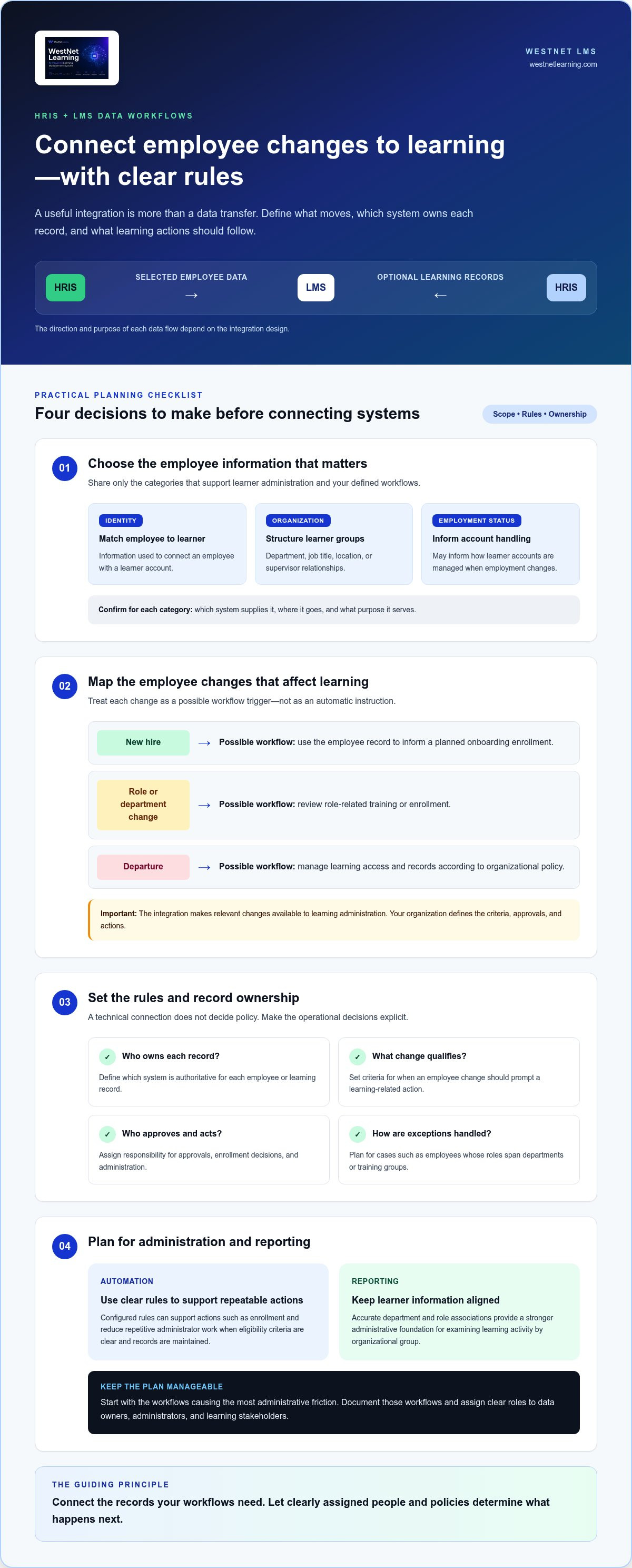
The HRIS generally holds employee and organizational information, while the LMS manages learning access, course enrollment, and learning records. Depending on the design, selected details such as identity, job title, department, or supervisor relationships may support learner administration. Some organizations may also plan for learning information to flow back to the HRIS. Define the purpose and ownership of each flow, since the right scope depends on your workflows and integration design.
Which organizations benefit most from connected learning data?
Connected learning data may be especially useful when an organization has frequent hires, role changes, department moves, or location changes that affect training assignments or administration. HR teams may own employee records, while L&D teams manage learning programs and enrollment. Clear coordination helps prevent gaps, but not every organization needs the same integration depth. Start with the workflows causing the most administrative friction, then define a scope that fits your processes.
Keep the design practical. Identify which employee changes should prompt a learning-related action, who approves that action, and which system remains authoritative for each record. This turns integration from a technical connection into a governed workflow. For a broader view of how platforms connect, explore LMS integration options.
How HRIS and LMS Data Flows Support Learner Administration
Think of the connection as two distinct layers: employee information moving between systems, and learning rules that use that information to guide administration. Keeping these layers separate helps teams decide what data to share without assuming every record change should automatically trigger an LMS action.
Common employee record categories may include:
- Identity: information used to match an employee to a learner account.
- Organization: department, job title, location, or supervisor relationships that can help structure learner groups.
- Employment status: information that may inform how the organization manages a learner’s account when employment changes.
The integration design determines which categories move, in which direction, and for what purpose. The HRIS may supply selected employee information to the LMS. Learning records may also flow back when that exchange is part of the design. For broader context on system connectivity, see this system-connectivity reference.
Which employee changes can affect learning workflows?
A new hire’s record could inform a planned onboarding enrollment. A department change may prompt a review of role-related training, while a departure may lead administrators to manage account access according to organizational policy. These are possible workflow responses, not automatic outcomes. Teams define the criteria, approvals, and actions. An HRIS integrated LMS can make relevant employee changes available to learning administration while leaving policy decisions with the organization.
How do automation and reporting fit into the data flow?
Once a change is available to the LMS, configured rules can support actions such as enrollment. Automation can reduce repetitive administrator work, provided eligibility criteria are clear and records are maintained. Plan how to handle exceptions too, such as employees whose roles span departments or training groups.
Reliable learner records also give learning analytics and reporting a stronger administrative foundation. If an employee is associated with the wrong department or role, it may be harder to interpret learning activity by organizational group. Reporting capabilities can help teams examine learning activity, while the information available depends on the platform and setup. To explore how learning systems connect with other platforms, visit WestNet LMS's LMS integration information.
How to Compare HRIS-Integrated LMS Options Without Overlooking Fit
Compare how each option would support your organization’s actual workflows, not just whether two systems can connect. An HRIS integrated LMS should fit your data ownership model, administration capacity, and learning processes. Use consistent criteria to identify gaps before they become ongoing work.
What integration criteria should buyers evaluate?
Start by mapping the required data categories to their source of truth. Then distinguish initial migration from ongoing synchronization. Migration establishes the starting records; ongoing processes need to accommodate updates, corrections, and exceptions. Clarify who resolves mismatches and who approves changes. HR may own employee records, IT may oversee system access, and L&D may manage learning rules, but responsibilities should fit your organization’s structure.
Integration can add complexity when ownership is unclear. With explicit governance, it can reduce scattered manual steps. Assess administrator workload from end to end, including maintaining mappings and workflows, reviewing exceptions, and coordinating changes. An approach that automates enrollment but leaves exception handling unclear may simply move the work elsewhere. For broader context on connected systems, review this external integration reference.
How can teams judge integration value beyond connectivity?
Trace each proposed data flow to a concrete task. Ask whether a change in organizational information informs an enrollment decision, or whether a learning record is needed outside the LMS. Check that automation removes a step rather than creating a new review burden. Define reporting questions in advance, without assuming particular fields or metrics will be available.
Use your comparison to identify the simplest design that meets those needs. Explore WestNet’s LMS integration options as you assess how platform connectivity may fit your workflows.
How to Prepare for an HRIS-Integrated LMS Implementation
A successful implementation starts with decisions about people, processes, and data, not just a technical connection. Use this sequence to establish a manageable scope for an HRIS integrated LMS and give teams a clear path from preparation through ongoing review.
- Inventory current workflows. Document how learner accounts are created and maintained, how training is assigned, and where staff repeat updates across systems. Prioritize processes such as onboarding or compliance enrollment.
- Define the data and hierarchy. Identify the employee information needed for learner accounts and organizational structure. Agree how departments, roles, and reporting relationships should appear in the LMS, and clean up incomplete or inconsistent source records before migration.
- Assign ownership. Name the owners for HR source data, LMS administration, access decisions, and exception handling. Include HR, IT, and L&D stakeholders so each team understands its responsibilities and can resolve issues without unclear handoffs.
- Set enrollment rules and migration scope. Specify which learner groups and learning workflows to include. Define the conditions for enrollment, account changes, and exceptions, then plan how existing data will be reviewed and migrated.
- Test representative scenarios. Before broader rollout, test cases such as a new hire, a department change, and a departure. Check that the intended records and learning actions are handled correctly, and document how administrators should address exceptions.
- Review after launch. Confirm that learner access, enrollment processes, and reporting continue to support organizational needs. Capture recurring issues and assign an owner to review workflow and data changes over time.
What should teams define before integration work begins?
Be explicit about which system owns each record and who can approve corrections or access changes. Decide which hierarchy elements matter for learning administration, and keep the initial scope focused on workflows with clear operational value. This boundary helps teams avoid transferring data simply because it is available.
How should teams manage testing and ongoing administration?
Test common scenarios as well as exceptions, such as a missing department value or a role that does not match an enrollment rule. Record who investigates each issue, what action they can take, and when it should be escalated. After launch, review whether administrators can maintain the process and whether learners receive appropriate access.
WestNet’s AI Enhanced LMS includes HRIS integration, data migration, and administrator support to help organizations prepare connected learning workflows. Book an LMS demo to explore how the platform may support your implementation priorities.
How WestNet’s AI Enhanced LMS Supports HRIS-Connected Learning
WestNet LMS brings HRIS integration into the learning platform’s administration capabilities. For organizations evaluating an HRIS integrated LMS, the key question is how the connection supports practical responsibilities such as managing learner information, organizing users, and administering enrollment workflows.
Which confirmed capabilities support connected administration?
The platform includes HRIS Integration, Data Migration & Administrator Support. These capabilities support both implementation preparation and the administration of connected learning processes. An HRIS sync administrative option works alongside user management and organization management, including hierarchy and department administration.
Automated enrollment can support defined learning workflows, while administrators set appropriate rules and manage exceptions. A connection can make relevant information available, but the organization still needs to decide how that information should shape learning access and assignments.
Learning Analytics and Reporting adds a view of learning activity alongside these administrative capabilities. Together, consistent learner administration and reporting can help teams review how learning processes are operating. The value depends on your setup and reporting needs, so define the questions you want learning information to help answer rather than assuming specific report fields.
Explore WestNet LMS integrations to review platform connectivity, and see LMS features for a broader view of available administrative and learning capabilities.
What is a practical next step for evaluating fit?
Map your HRIS workflows against your LMS requirements before deciding the scope. Note which records support learner administration, which processes may benefit from enrollment automation, and what migration preparation your existing data requires. Bring HR, IT, and L&D into the discussion so data ownership, administrator responsibilities, and exception handling are considered together.
That map gives your team a grounded basis for evaluating fit. Explore WestNet LMS integration capabilities and consider how its AI Enhanced LMS could support your connected learning priorities.
Build a More Connected Learning Workflow
A successful HRIS integrated LMS does more than move employee information between systems. It connects defined data flows to practical learning tasks, with clear ownership for records, enrollment rules, exceptions, and administration. Start by choosing the workflows that matter most, then assess integration scope, migration needs, and ongoing responsibilities together.
WestNet Learning’s AI Enhanced LMS brings together HRIS Integration, Data Migration & Administrator Support with HRIS sync, user management, automated enrollment, and Learning Analytics and Reporting. These capabilities support connected learner administration and give teams tools for managing learning processes and reviewing learning activity.
Explore WestNet Learning’s AI Enhanced LMS to see how it can support your organization’s connected learning priorities. Explore WestNet Learning’s AI Enhanced LMS.
Frequently Asked Questions
What is an HRIS-integrated LMS?
An HRIS-integrated LMS is a learning management system connected to an organization’s human resources information system. The HRIS provides employee and organizational information, while the LMS manages learning access, enrollment, and records. An HRIS integrated LMS can use agreed data flows to support learner administration as employees join, change roles, or leave. The integration’s scope depends on the organization’s workflows, data ownership, and design.
How does an HRIS integration with an LMS work?
An HRIS integration makes selected employee or organizational information available to the LMS according to a defined design. That information may help administrators manage learner accounts or support rules for enrollment and access. The systems’ connection and any actions it supports depend on the organization’s setup. Teams should determine which data moves, which system owns each record, how exceptions are handled, and whether learning information needs to flow back.
What data should an HRIS send to an LMS?
Send only the employee and organizational information needed for defined learning workflows. Teams may consider identity details for matching learner accounts, along with department, job title, supervisor relationships, or employment status where relevant. The right scope depends on how the organization administers learning and structures its records. Document the purpose and ownership of each data category, then align the planned exchange with the integration design.
Can an LMS automatically enroll employees through an HRIS integration?
An LMS can support automated enrollment when the integration and enrollment rules are configured for that workflow. For example, an organization might define how a learner group or employee change informs an assignment. Automation depends on accurate source data, clear eligibility criteria, and agreed exception handling. It does not mean every HRIS update should trigger enrollment. Review the rules and test representative scenarios before using them broadly.
What is the difference between an HRIS integration and a user import?
A user import loads employee records into an LMS, often as a one-time or administrator-initiated action. An HRIS integration establishes a designed connection for selected data flows that can support ongoing learner administration. An import may provide the starting records, but it does not by itself keep later changes aligned. Plan for both initial data migration and the processes for maintaining records, resolving exceptions, and managing updates.
How should a company prepare for an HRIS-integrated LMS?
Prepare by inventorying learning workflows, identifying the employee data they require, and deciding which system owns each record. Clean up source data and clarify organizational hierarchies before planning migration. Assign responsibilities across HR, IT, and L&D for administration, access decisions, and exceptions. Define enrollment rules, then test scenarios such as a new hire or department change. After launch, review learner access, workflow performance, and reporting needs.