An LMS launch rarely slips because one task was forgotten. It slips when ownership is unclear, dependencies surface late, or teams disagree on what “ready” means. An LMS implementation project plan template helps connect the work across L&D, IT, HR, and business teams before those gaps disrupt the launch.
You already know an LMS project involves more than selecting a platform. Integration, data migration, content preparation, testing, and change management all need clear owners and realistic sequencing. This guide gives you a practical plan to adapt to your organization, with phases, deliverables, decision gates, and measurable success criteria.
Use it to define scope and outcomes, map dependencies such as HRIS integration and course migration, and prepare administrators and learners for launch. You’ll also see how platform selection fits into the wider project, including capabilities such as HRIS integration, data migration and administrator support, and SCORM or xAPI eCourse creation. Build alignment early, track readiness with evidence, and give your team a clear path from planning through post-launch review.
Key Takeaways
- Use an LMS implementation project plan template to define scope, owners, deliverables, dependencies, and success measures before work begins.
- Choose a planning approach that fits your project, then sequence phases and parallel workstreams around clear ownership and decision points.
- Build a risk register and readiness checks to surface migration, integration, content, access, capacity, and adoption issues early.
- Set measurable launch and post-launch criteria so teams can assess readiness and track whether the LMS is meeting its objectives.
- Make platform fit one workstream in the plan by mapping administration, content, access, integrations, and reporting needs to relevant capabilities.
Why an LMS implementation project plan needs more than a launch date
A go-live date marks a destination. It doesn’t show the route, who’s responsible for each leg, or what must be true before the organization is ready to launch. An LMS implementation project plan is the working document that connects scope, owners, deliverables, timing, dependencies, and decisions. Unlike a feature checklist, it explains how the organization will deliver and verify a usable learning system.
That distinction matters because an LMS project is not only a technology deployment. A Learning Management System (LMS) supports the delivery and management of learning, but implementation also involves people, processes, content, and connected systems. A platform might be configured while learner records still need cleanup, course materials are incomplete, or managers haven’t planned how employees will access training. A date alone cannot coordinate those dependencies or resolve ownership gaps.
Start with the business problem, then define the outcomes the project should support. For example, an organization launching role-based onboarding might track whether new employees can access assigned learning and complete required courses within a defined period. Another project may prioritize consistent training records or simpler administration. Choose measures that reflect your objectives, establish how each will be assessed, and avoid treating course completion as the only signal of success.
What the implementation plan should make clear
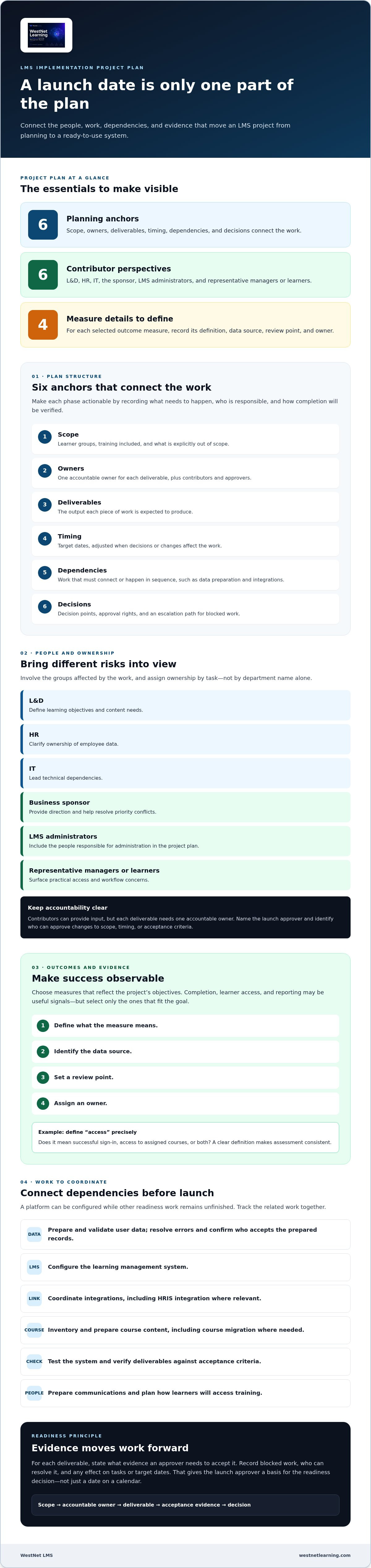
Write down which learner groups and training are in scope, what is excluded, and what a successful result looks like. Then make each phase actionable: name an accountable owner, contributors, approver, deliverable, dependency, decision point, and evidence of completion. For instance, “prepare learner data” is too broad on its own. Specify who owns the source data, which fields need validation, what errors must be resolved, and who accepts the prepared records.
Include an escalation path for blocked work and identify who can approve a scope change or resolve competing priorities. These decision rights keep routine questions from stalling progress and make it clear when a change affects launch readiness. Record the decision, its owner, and any resulting changes to tasks or target dates.
Who should contribute to an LMS implementation plan?
Bring together L&D, HR, IT, the business sponsor, LMS administrators, and representative managers or learners. Each group sees different risks. L&D can define learning objectives and content needs; HR can clarify ownership of employee data; IT can lead technical dependencies; and managers and learners can identify practical access or workflow concerns. The sponsor should provide direction, while a named launch approver makes the readiness decision.
Assign ownership by work, not by department name alone. Identify who maintains user data, prepares course content, coordinates integrations, communicates changes, and approves launch. Contributors may provide input, but each deliverable needs one accountable owner. This structure also helps connect the LMS project to broader workforce development: align course priorities and intended outcomes with the organization’s employee training plan where relevant.
Make the LMS implementation project plan template reflect those decisions from the outset. A shared plan turns organizational learning goals into coordinated work, with clear responsibilities and evidence that each stage is ready to advance.
LMS implementation project plan template: fields to complete before work begins
Turn project goals into a usable record before tasks start moving between teams. A strong LMS implementation project plan template captures not only what needs to happen, but who owns the work, what it depends on, and how the team will know it is complete. Copy the fields below into your project tracker, then tailor each entry to your scope.
Set outcomes, scope, and project governance
Begin with the business need and the learners the project will serve. Record priority training, what’s explicitly out of scope, and outcomes that can be observed. Completion, learner access, or reporting may be useful measures, but select only the ones that connect to the project’s objectives. Give each measure a definition, a data source, a review point, and an owner so it can be assessed consistently. For example, define whether “access” means successful sign-in, access to assigned courses, or both.
Set governance before assigning work. Name the sponsor, project lead, workstream owners, approvers, and escalation contacts. The sponsor can resolve priority conflicts; the project lead coordinates work; and workstream owners deliver their assigned outputs. Record who has authority to approve changes to scope, timing, or acceptance criteria.
Map deliverables, dependencies, and acceptance criteria
Break the work into manageable items such as content inventory, user-data preparation, LMS configuration, integrations, testing, communications, and launch. For every item, capture:
- Objective and scope: The intended result, learner group, and boundaries of the work.
- Owner and contributors: One accountable owner plus people supplying input or completing supporting tasks.
- Deliverable and acceptance criteria: The output and the evidence required for an approver to accept it.
- Dependency and decision owner: Predecessor tasks, decisions still needed, and the person authorized to make them.
- Due date and status: A target date labeled as fixed or estimated, alongside a clear progress state.
- Success measure, risk, and assumption: The relevant outcome, possible blocker and mitigation, plus conditions the plan currently relies on.
Separate commitments from planning estimates. Mark fixed constraints, such as an approved launch date, distinctly from provisional dates that depend on data readiness or integration decisions. Don’t hide unknowns in a blank cell: write “decision pending,” name the decision owner, and add the date by which the decision is needed. This makes uncertainty visible without treating it as settled scope.
Illustrative row, not a standard timeline: Work item: confirm course formats; owner: L&D lead; contributors: LMS administrator; dependency: content inventory; deliverable: format requirements; acceptance: priority courses and required formats documented and approved; due date: project-specific target; status: in progress; decision owner: L&D sponsor; risk: source files unavailable; mitigation: identify alternate content early.
For course-format requirements, record the source format, the format needed for the planned learning experience, and how course behavior and completion records will be validated. WestNet LMS supports AI-powered eCourse creation in SCORM or xAPI, so include those requirements in your platform-fit review. If you’re assessing platform fit as part of this planning work, explore WestNet LMS alongside your requirements.
How to sequence LMS implementation phases and compare project approaches
The right plan makes progress visible without pretending every task can happen in a straight line. A checklist-led approach is easy to scan and useful for tracking discrete actions, but can hide dependencies between tasks. A phase-led plan groups work around decision points, giving sponsors a clear view of readiness while offering less detail about parallel activity. A workstream-led plan shows ownership across areas such as content, data, integrations, and communications, but needs active coordination to prevent teams from working to conflicting assumptions.
For most projects, combine the strengths: organize the plan into phases, then track parallel workstreams within each phase. Let work proceed concurrently only when owners, inputs, dependencies, and approval points are explicit. For example, content inventory can advance alongside integration discovery, while final course loading may depend on configuration and format decisions. The LMS implementation project plan template should make those relationships visible, not simply list tasks in date order.
Organize work into decision-ready implementation phases
Use each phase to produce an output that supports a decision to proceed. Discovery confirms learner needs, outcomes, scope, stakeholders, and constraints. Design sets site preferences, roles, catalog structure, and learning workflows; configuration turns those decisions into the LMS setup. Validation checks migrated records, integration behavior, and pilot feedback. Launch follows communications and release approval, while optimization uses post-launch observations to prioritize improvements.
Compact phase-to-deliverable map:
- Discovery: approved scope, outcomes, and constraints.
- Design: documented roles, catalog, and learning workflows.
- Configuration: configured environment and prepared content.
- Validation: test results, migration checks, and pilot feedback.
- Launch: communications completed and release approval recorded.
- Optimization: prioritized improvements based on post-launch review.
Set a decision gate between phases. At each gate, the approver reviews the deliverables and outstanding dependencies, then records whether work can proceed, needs revision, or is blocked. For example, the gate for migration should not pass until field mappings are approved and sample records have been checked against the project’s acceptance criteria. This prevents an unresolved data mapping or access decision from being mistaken for completed readiness.
Make integrations, migration, and content visible workstreams
Give technical and learning tasks their own owners while connecting them to phase gates. For migration, record source systems, data owners, field-mapping decisions, representative test records, validation results, and sign-off. For each required connection, including authentication and HRIS, name the owner and define how the team will test it. The HRIS and LMS workflow guide can help shape HR-data planning.
Content readiness needs the same visibility: inventory priority courses, identify required formats, assign preparation and review owners, and tie upload or conversion work to configuration and validation. Keep communications and learner adoption in the plan too, since a technically ready system still needs clear access instructions and launch support. Define who will answer learner questions and how issues will be routed during launch.
Build timeline estimates from the actual scope, available resources, data readiness, integration complexity, and decision turnaround. Treat dates that depend on unresolved inputs as estimates, not commitments. To consider platform fit alongside these workstreams, explore WestNet AI LMS.
LMS implementation risks, readiness checks, and launch measures
Risk control works best when it’s part of the project record, not a discussion that happens only after a blocker appears. Add a risk register to the LMS implementation project plan template with fields for description, probability, impact, owner, mitigation, trigger, and contingency. Define probability and impact using a shared scale, such as low, medium, and high, so teams can compare concerns consistently.
Make the register useful by distinguishing risks from related records. A risk could happen; an issue is already affecting work; an assumption is being treated as true until verified; and a decision records a choice that someone authorized has made. For example, incomplete employee records are a risk, while a failed migration test is an issue. Assign mitigation actions to named project roles, and define when a risk must be escalated, such as when a trigger threatens a phase gate or a launch-critical deliverable.
Assess risks across the full implementation, not only the technology. Data quality can affect user records and reporting; integration dependencies can delay access or enrollment workflows; incomplete content can leave priority learners without required courses. Also consider whether users can sign in with the intended roles, whether project teams have capacity to complete and verify their work, and whether communications will prepare learners and managers for the change. Connect training-related operational risks to the organization’s company risk management plan where it helps align responsibilities.
Identify risks early and assign mitigation owners
Review the register at project checkpoints and whenever scope, dependencies, or assumptions change. Each high-priority risk should have a practical mitigation, a trigger that signals action is needed, and a contingency if mitigation doesn’t work. For example, if required learner fields fail validation, the data owner can correct the source or document an approved alternative before migration sign-off. Keep the escalation route clear and record whether the risk affects a decision gate, launch date, or acceptance criterion.
Validate readiness before and after launch
Replace vague gate labels like “ready” with evidence the approver can review. Test learner access and roles, course behavior, completion records, reporting, and required integrations against documented expectations. A pilot can reveal usability concerns and defects before wider rollout; assign owners and dispositions to feedback, then confirm that launch communications are clear.
Readiness means documented evidence, accepted exceptions, and a named approver for each gate. Use three separate checks:
- Pilot approval: Representative learners can access the system, complete priority learning, and produce the expected records; feedback and defects have documented owners and next steps.
- Launch approval: Required tests have results on record, launch-critical issues are resolved or explicitly accepted by the approver, and communications and support responsibilities are assigned.
- Post-launch review: Named owners review the measures tied to project objectives, such as access, completion, or reporting, and record follow-up actions.
Set thresholds that fit the project instead of borrowing a universal target. As you evaluate platform fit, compare capabilities with the access, data, and reporting requirements recorded in your plan. Explore WestNet AI LMS as one part of that review.
Choose an LMS that fits the plan, then move toward implementation
Use the project plan as the basis for platform evaluation. Convert each requirement into a question the team can answer with documented evidence: Can administrators manage the intended workflows? Can priority courses be supported in the formats you use? How will learners sign in? Which integrations are needed? What reporting must support your project’s success measures? For specialized learning and arts organizations evaluating solutions like Paritor, this also means tailoring requirements to unique scheduling, lesson tracking, and administration workflows. This keeps the platform decision connected to implementation work instead of becoming a separate feature comparison.
For each criterion, record its priority, the workstream it affects, the evidence needed to assess fit, and any project-specific decision still required. For example, a requirement for HRIS data exchange belongs in the integration workstream and should connect to user-data ownership and migration validation. A requirement for completion reporting should connect to the measure the business intends to review after launch, much like how educational institutions assessing platforms like Rise prioritize real-time dashboards for student activity and performance analytics. This makes gaps and configuration questions visible before they become assumptions in the plan.
Map platform capabilities to project requirements
Compare requirements with capabilities that align to specific work. WestNet AI LMS includes HRIS Integration, Data Migration & Administrator Support, which can inform integration, data-preparation, and administration planning. For content, document whether your courses require SCORM or xAPI, then evaluate WestNet’s AI-Powered eCourse creation against those needs. Keep format decisions tied to the course inventory and validation criteria.
For learner access, record whether standard sign-in or Single Sign-On options fit your intended approach. If enrollment workflows matter, include automated enrollment as a criterion and document the conditions your team needs to plan around. For organizations serving learners across languages, note the required site languages and compare them with WestNet AI LMS support for up to 60 site languages. A Dedicated Client Success Manager is another relevant consideration when defining project coordination and administration needs.
Keep these capability checks distinct from project outcomes. A platform feature can support a workstream, but it doesn’t by itself establish that data is ready, content is approved, or learners are prepared. Assign owners to unresolved configuration decisions and carry them into the appropriate project phase.
Use the plan to make a confident next-step decision
Review requirements with the stakeholders who own the affected workstreams. Mark each item as a fit to evaluate, a configuration decision, or an open dependency, then document the evidence and decision owner. This gives the team a grounded view of alignment across administration, content, access, integrations, and reporting without assuming that one platform choice resolves every implementation task.
With the criteria and decision questions in hand, stakeholders can evaluate WestNet AI LMS through a demo or the free 30-day trial. Use that evaluation to connect platform capabilities back to your documented requirements and update the plan with project-specific decisions. A well-maintained LMS implementation project plan template helps carry that clarity from platform assessment into coordinated implementation work.
Explore the WestNet AI LMS and assess its fit with your implementation plan.
Turn your implementation plan into the next decision
A plan creates value when teams use it to make decisions, not simply record them. Before work begins, share the draft with the people accountable for delivery and invite them to identify assumptions, unresolved choices, and dependencies that could affect their work. Then agree on how the plan will be maintained as priorities or project conditions change. This gives stakeholders a practical reference point and helps keep decisions connected to implementation requirements.
Use your LMS implementation project plan template to guide the next platform conversation. Bring the requirements your team has defined, focus on the workstreams that matter most, and assess whether the platform aligns with your intended approach. WestNet AI LMS can be evaluated through a demo or the free 30-day trial.
Explore the WestNet AI LMS and assess its fit with your implementation requirements. With clear criteria and shared direction, your team can move forward with confidence.
Frequently Asked Questions
What should an LMS implementation project plan include?
An LMS implementation project plan template should connect the business objective to deliverables and approval decisions for each major task. Include scope boundaries, owners and contributors, phases, dependencies, risks, success measures, and launch criteria. Add a change log showing who approved scope adjustments and why. For example, if a new department joins the rollout, record the added content, access, or testing work before revising target dates.
How long does an LMS implementation project take?
An LMS implementation’s duration depends on its scope and how quickly dependencies are resolved. Integration complexity, migration volume and quality, content readiness, available resources, and decision speed can all affect the schedule. Separate confirmed dates from estimates, and tie estimated work to its prerequisites. For instance, a configuration task dependent on approved user-data mapping shouldn’t be treated as schedule-ready until that mapping decision has an owner and expected resolution date.
Who should be on an LMS implementation team?
An LMS implementation team should include a sponsor for direction, a project lead for coordination, and representatives from L&D, HR, IT, and system administration. Add business representatives who understand how training fits into daily work, plus learner input where it can reveal usability or access needs. Assign decision rights clearly: the HR data owner may validate employee records, while an L&D approver may accept course materials and learning workflows.
What is the difference between LMS implementation and LMS migration?
LMS implementation covers preparing the system and organization for use, including configuration, access, integrations, content, testing, communications, and adoption planning. LMS migration is the narrower activity of transferring and validating existing users, learning records, or course content in a new environment. Migration may be one implementation workstream. For example, a team can import historical completion records but still need to test learner roles, course assignment, and reporting before launch.
How do you measure whether an LMS implementation is successful?
Measure success against the business objectives set for the project, rather than relying on one universal metric. Launch readiness checks whether required functions and processes have passed agreed tests; post-launch measures show whether the system is supporting intended learning or operational outcomes. A project focused on onboarding might track timely access to assigned learning, while a reporting-focused project could assess whether managers receive the records they need to review.
Can an LMS implementation plan account for HRIS and single sign-on integrations?
Yes. Treat each required connection as a planned work item with an accountable owner, documented data flows, dependencies, test cases, and sign-off evidence. For an HRIS connection, define which employee fields inform LMS records and who validates the mapping. For single sign-on, identify the teams responsible for the access setup and tests. Record expected results and how defects will be handled before approval, rather than treating “integration complete” as sufficient proof.
What should happen after an LMS goes live?
After launch, make ongoing ownership explicit. Assign someone to track issues, route learner questions, and review whether support items are resolved or need escalation. Schedule a reporting review and gather feedback from learners, managers, and administrators to identify friction that launch testing may not have exposed. Set an optimization checkpoint in advance, then use those findings to prioritize adjustments against the project’s objectives and available resources.