The lowest LMS quote can become the most expensive choice once implementation, integrations, support, and changing user counts enter the picture. Comparing lms pricing by subscription label alone can leave your budget exposed.
It’s reasonable to want a clear answer to one question: what will an LMS actually cost your organization? The challenge is that providers may define billable users differently, bundle features into higher tiers, or list added services separately. Per-user pricing can also shift as your workforce grows or changes.
This guide explains common LMS pricing models and shows how to estimate total cost of ownership without relying on broad market averages. Use the checklist to compare user counts, implementation, migration, integrations, support, and the features your teams need. You’ll also see why license reuse and user lifecycle policies belong in the conversation. Compare the full scope, not just the opening quote, and base your decision on your organization’s requirements.
Key Takeaways
- Compare lms pricing models by how they count learners and how changes in usage could affect your budget.
- Separate recurring subscription charges from possible setup, migration, integration, and support fees. Confirm each item with the vendor.
- Normalize proposals using the same learner groups, feature requirements, and support questions.
- Review contract terms and user lifecycle rules, including whether deactivated licenses can be reassigned.
- Assess WestNet’s AI-enabled capabilities, analytics, and integrations against your requirements, then verify current pricing and quote scope directly.
LMS pricing explained: what organizations are paying for
LMS pricing is the charges and commercial terms an organization pays for access to a learning management platform and any related services included in its agreement. Providers package platform access, implementation, support, and integrations differently, so compare the full scope of each quote rather than a single subscription figure. For a foundational overview of what an LMS does, see Learning Management System.
Separate costs by timing. A subscription is usually recurring, while setup or migration may be quoted as one-time work. Some services or usage may be billed separately. These are possibilities to check, not charges that apply to every provider. Ask each vendor to identify what’s included, what could trigger an additional fee, and how changes in usage affect the total.
What does an LMS subscription usually cover?
Access, eligible users, available features, storage limits, and support commitments vary by provider and agreement. Request a written inventory of included capabilities and service commitments, along with any exclusions or conditions. WestNet’s LMS features overview can help you identify capabilities to assess, such as analytics, AI-enabled tools, and integrations. Confirm which functions are included in the specific quote you receive.
Why do LMS quotes look different?
Start with the billing definition. A seat may refer to a registered account, while an active-user model may count only people who use the platform during a defined period. Then check billing frequency, contract scope, included features, and usage thresholds. These terms determine what the quoted amount represents. They aren’t interchangeable labels.
Separate confirmed details from items that still need clarification. A proposal may state its recurring fee and user basis but leave setup, migration, integration work, or support scope unclear. Ask vendors to document those points and explain how user changes are handled. For example, WestNet states that deactivated user licenses can be reused for new users. Confirm how that applies to your organization’s expected user turnover and the terms of its quote.
A lower headline fee doesn’t establish a lower total cost. Compare equivalent user counts, capabilities, and service scope, then account for recurring charges and any additional costs the vendor confirms. To review WestNet’s pricing information, visit the WestNet pricing page and verify current subscription terms directly.
LMS pricing models compared: per-user, active-user, and fixed-fee structures
Pricing labels tell only part of the story. To compare lms pricing, identify exactly what triggers a charge, how the provider counts learners, and whether that basis changes during your contract. The models below are common concepts, not claims about any specific provider’s current offer.
| Model | Billing basis | Forecasting considerations | Questions to ask |
|---|---|---|---|
| Licensed-user | A charge tied to the number of users assigned or registered, according to the vendor’s definition. | May be easier to estimate against planned headcount, but seasonal hires or infrequent learners could affect the count. | When does a user become billable? Can licenses be reassigned after deactivation? |
| Active-user | A charge based on users who meet the provider’s activity criteria during a specified period. | Costs may vary with participation. Occasional learners may still qualify as active, depending on the rules. | What action counts as activity, and how often is usage measured? |
| Fixed fee | A set charge for an agreed scope, which may include limits or conditions. | Can make budgeting more predictable, but confirm what happens if learner numbers or requirements change. | Are there user, storage, feature, or usage limits, and what happens if we exceed them? |
How per-user and active-user pricing differ
A licensed-user model usually charges based on assigned or registered accounts. An active-user model usually counts users who meet a defined usage threshold. Those definitions vary by provider. Ask whether learners who log in only occasionally still count, and whether reporting periods or minimum commitments affect the calculation. Match the quote assumptions to real participation, seasonal hiring, and expected workforce changes, not just current headcount.
When transferable licenses matter
Reusable licenses can matter when employees leave and new learners join. WestNet confirms that deactivated user licenses can be reused for new users, which may be relevant to organizations with ongoing turnover. Confirm how deactivation, reassignment, and billing work under the specific agreement, including whether the departing user’s access must be removed before a license can be reassigned.
WestNet subscriptions are typically scaled by user count, but verify the current quote structure and how users are counted. For a sound forecast, model expected user changes alongside recurring charges and other agreed costs. CoSN’s Total Cost of Ownership framework offers a broader way to consider technology costs beyond the initial fee. To review WestNet’s current pricing information, see the WestNet pricing details.
LMS total cost of ownership: look beyond the subscription fee
A realistic LMS budget includes more than the recurring platform subscription. Build a total cost of ownership estimate by separating confirmed fees from possible additional costs, then include the time your team will invest to launch and operate the system. These are items to investigate, not charges that every provider applies or confirmed fees for WestNet.
Start with a simple cost register. For each quote, note the amount or status, whether the cost is recurring or one-time, and the vendor’s written explanation.
- Recurring: subscription charges and any separately scoped ongoing support, maintenance, or integration costs.
- Possible one-time charges: site setup, data migration, configuration, or initial integration work.
- Internal effort: administrator time, preparing or organizing course content, testing workflows, and helping employees adopt the platform.
Use the same categories for every proposal. This helps you distinguish fees included in the subscription from work your organization may need to fund separately. For a broader framework for assessing costs against benefits, see the LMS return on investment guide.
Which one-time and ongoing charges should buyers check?
Ask whether site setup, data migration, HRIS integration, and administrator support are included, separately scoped, or outside the proposal. Clarify what “implementation” covers, what maintenance means, and which support commitments apply. Don’t assume a line item includes every related task. Record each answer beside the matching quote item, and request written clarification wherever scope or billing remains unclear.
Also account for internal work. Your team may need to review existing learning materials, prepare content for upload, assign an administrator, and communicate process changes. Estimate who will do this work and when. Even if the LMS provider doesn’t bill for it, internal effort affects the resources required to put the platform into operation.
How features and integrations affect value
Map requirements to the proposal rather than treating a longer feature list as better value. Identify essential capabilities, such as automation, analytics, authentication, or support for your course formats, and ask how each is included or priced. Then confirm whether HRIS and other required integrations are included in scope, require separate work, or aren’t available as needed.
Evaluate relevance. An advanced capability adds value only if it supports a defined workflow or learning objective. For WestNet, verify how AI-enabled capabilities, analytics, automation, and integrations align with your requirements, and what the current quote includes. Use those answers to compare the full scope and likely internal effort, not just the subscription figure.
How to compare LMS pricing proposals with a consistent checklist
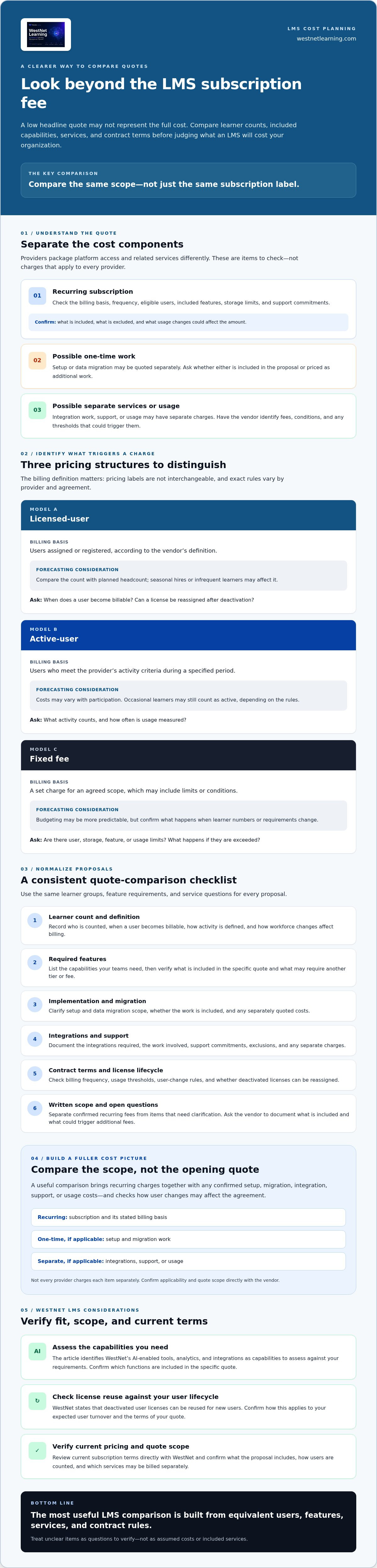
Ask every vendor to respond to the same requirements. A consistent comparison turns lms pricing proposals into a decision you can explain, rather than a choice based on headline fees or feature lists. Use this four-step process before procurement approval:
- 1. Define learner groups. Estimate users by group, such as employees, contractors, or seasonal staff. Include expected growth and infrequent learners so each provider prices the same user scenario.
- 2. Confirm requirements. Separate essential capabilities from optional ones. Specify the features, integrations, language needs, and support commitments your organization requires.
- 3. Normalize the quotes. Compare the same user counts, billing periods, feature scope, and services. Request a written breakdown of the billing basis, minimums, usage limits, and any separately scoped work.
- 4. Review contract terms. Check renewal and cancellation provisions, data export options, and minimum commitments. Record unanswered questions and resolve them before signing.
Keep a shared comparison sheet with one row for each requirement and one column per provider. Mark each item as included, separately scoped, unavailable, or awaiting confirmation. This creates a clear record of what each proposal actually commits to.
Questions to ask before accepting an LMS quote
Ask what counts as a billable user, how often the count is measured, and how additions, departures, or license reassignment affect billing. Request written confirmation of included services, integrations, and support commitments. Clarify renewal timing, cancellation conditions, data export, and any minimum user or contract commitment. If an answer is verbal, ask the vendor to add it to the proposal or agreement.
Match the quote to your organization’s requirements
Test each proposal against real workflows, not a generic feature checklist. Does the language support suit your learner groups? Is single sign-on (SSO) required? Does the HRIS connection fit your systems? Confirm that the course formats your teams use are supported, and ask the vendor to describe any conditions or additional scope.
For example, WestNet states that its platform supports up to 60 site languages. Confirm whether that capability and any other required features are included in the scope you’re evaluating. Assign an owner to every open question, with a due date before approval. This helps prevent unresolved assumptions from becoming implementation or budgeting surprises.
For a provider-specific next step, review WestNet pricing information and verify the current quote structure, included capabilities, and terms directly.
WestNet LMS pricing: verify fit, scope, and next steps
WestNet Learning’s AI Enhanced LMS combines learning administration with AI-enabled capabilities, analytics, gamification, integrations, and client support. WestNet subscriptions are typically scaled by user count, but specific pricing figures and package details aren’t provided here. Confirm the current subscription structure, user-count rules, and what each quoted fee covers before comparing it with other LMS pricing proposals.
What to assess in the WestNet AI Enhanced LMS
Start with your must-have requirements. Check how AI course creation, recommendations, analytics, automation, and HRIS integration map to your training workflows, and ask which capabilities are included in the quote. WestNet states that its platform supports up to 60 site languages and that deactivated user licenses can be reused for new users. These details may matter for multilingual teams and changing workforces, but confirm how they apply to your agreement.
A Dedicated Client Success Manager and Service Level Agreement are listed product features. Ask what each means in practice, whether it applies to the proposed subscription, and whether any related terms or costs are specified separately. Don’t assume a feature is included in a particular price just because it appears in product information. Get the scope and commitments in writing.
How to take the next step with confidence
Prepare before requesting a quote. Share expected learner counts and how they may change, required integrations, content formats, priority capabilities, and the support questions you need answered. Ask the provider to clarify setup, migration, integration, and support scope, along with user billing rules and any other charges. A complete proposal lets you assess operational fit as well as subscription cost.
Use a WestNet LMS demo to explore how the platform aligns with your requirements and identify questions to resolve. WestNet information also describes a free 30-day trial. Check the trial details directly to confirm current availability and terms before relying on it as part of your evaluation. These steps can help your team validate fit without treating unconfirmed features or services as part of a quoted scope.
Make your LMS decision with confidence
Strong lms pricing decisions come from comparing the full agreement, not just the subscription label. Confirm how each provider counts users, what capabilities and services are included, and whether setup, integrations, or support affect your total cost. Then evaluate every proposal against the same learner assumptions and organizational requirements.
WestNet’s AI Enhanced LMS brings together AI-powered course creation, learner recommendations, and help for learners and administrators, alongside learning analytics, gamification, task automation, and HRIS integration. The platform also supports up to 60 site languages, and deactivated user licenses can be reused for new users. Assess how these capabilities fit your needs, and verify current subscription terms and quote scope directly.
Prepare your learner counts, integration requirements, and priority questions, then request a WestNet LMS demo to explore the platform against your evaluation criteria. A clear comparison helps your organization select a solution that supports its learning goals and budget.
Frequently Asked Questions
How much does an LMS cost?
There isn’t one price that applies to every organization. LMS pricing depends on factors such as the number of users, billing structure, required capabilities, and what the provider includes in its agreement. Setup, migration, integrations, or support may also affect the total if they’re scoped separately. Request an itemized quote based on your expected users and needs, then verify each fee and any additional charges directly with the provider.
What is the most common LMS pricing model?
Per-user pricing is a common model, though providers may define a billable user differently. Some charge based on registered or assigned accounts, while active-user models count people who meet the vendor’s activity criteria. Other providers may offer fixed-fee structures or combine pricing approaches. Ask how the model works in practice, what user limits apply, and how changes in enrollment affect billing before comparing offers.
Is LMS pricing usually per user?
Many LMS proposals use a per-user basis, but it isn’t the only structure. A quote may count registered learners, assigned licenses, or users active during a defined period, and those distinctions can change the forecast. Ask whether occasional learners count, when usage is measured, and how new or departing users affect charges. WestNet subscriptions are typically scaled by user count, so verify the current billing basis in your quote.
What costs should I include when budgeting for an LMS?
Include recurring subscription fees and ask whether setup, data migration, integrations, maintenance, or support are charged separately. Also account for internal effort, such as administrator time, preparing course content, testing workflows, and communicating changes to learners. These items aren’t universal provider fees; they’re questions to investigate. Ask each vendor for a written cost breakdown and record whether each item is included, separately scoped, or not applicable.
Can LMS pricing change as my organization grows?
Yes, costs may change if growth affects the number of billable users, feature requirements, usage limits, or contract scope. Workforce turnover and seasonal hiring can also influence forecasts, depending on how licenses are counted and reassigned. Model expected user changes before selecting a structure. Ask the provider how often counts are measured, whether minimums apply, and what happens when your organization adds learners or changes its needs.
Does WestNet LMS offer a free trial?
WestNet Learning information describes a free 30-day trial, but confirm current availability and terms before planning your evaluation. Ask what access the trial includes, whether user or feature limits apply, and what happens when it ends. You can also request a demo to assess how the AI Enhanced LMS’s learning administration, analytics, gamification, and integrations align with your organization’s requirements.
How can I compare LMS quotes fairly?
Give each provider the same expected user counts, feature requirements, integration needs, and support questions. Compare the billing basis, recurring and possible one-time costs, included capabilities, user limits, and written contract terms. Clarify renewals, cancellation, and data export before making a decision. Mark unanswered items and get them resolved in writing. This approach helps you compare equivalent scope rather than choosing based on headline fees alone.