The era of the standalone learning portal has ended. High-growth enterprises are increasingly weary of fragmented workflows where employees must abandon their primary communication tools to complete mandatory training modules. Every click away from Microsoft Teams is a lost opportunity for engagement. You understand that app-switching fatigue and disconnected data silos between communication tools and learning records are stifling your organizational growth.
A seamless Microsoft Teams LMS integration changes this dynamic by embedding the WestNet AI LMS directly into the flow of work, effectively turning your collaboration hub into a powerhouse for professional development. We'll show you how to eliminate manual enrollment processes and use AI-generated course recommendations to drive 100% engagement across your workforce. This guide outlines the strategic path toward a centralized learning hub that improves ROI through higher completion rates and automated compliance tracking. It's time to bridge the gap between communication and capability.
Key Takeaways
- Eliminate app-switching fatigue by integrating your training ecosystem directly into the digital workspace where your employees already spend their time.
- Navigate the technical complexities of a Microsoft Teams LMS integration by focusing on the three pillars of authentication, content delivery, and data synchronization.
- Evaluate the differences between Microsoft Viva Learning and specialized LMS solutions to ensure your architecture supports advanced compliance and automation needs.
- Drive higher engagement rates through AI-powered course creation and automated, personalized learning recommendations delivered in the flow of work.
- Streamline your implementation process by establishing clear security protocols and SSO requirements in collaboration with your IT stakeholders.
Why App-Switching is Killing Your Corporate Training ROI
Context switching is a cognitive tax that few enterprises can afford. Every time an employee leaves their primary workspace to engage with a separate learning portal, they face what experts call app-switching fatigue. This disruption shatters focus. It forces the brain to re-orient to a new interface and set of credentials, leading to a measurable decline in mental energy. A robust Microsoft Teams LMS integration eliminates this friction by keeping the learner within a familiar environment. It transforms training from a disruptive event into a natural extension of the workday.
The Cost of Fragmented Learning Systems
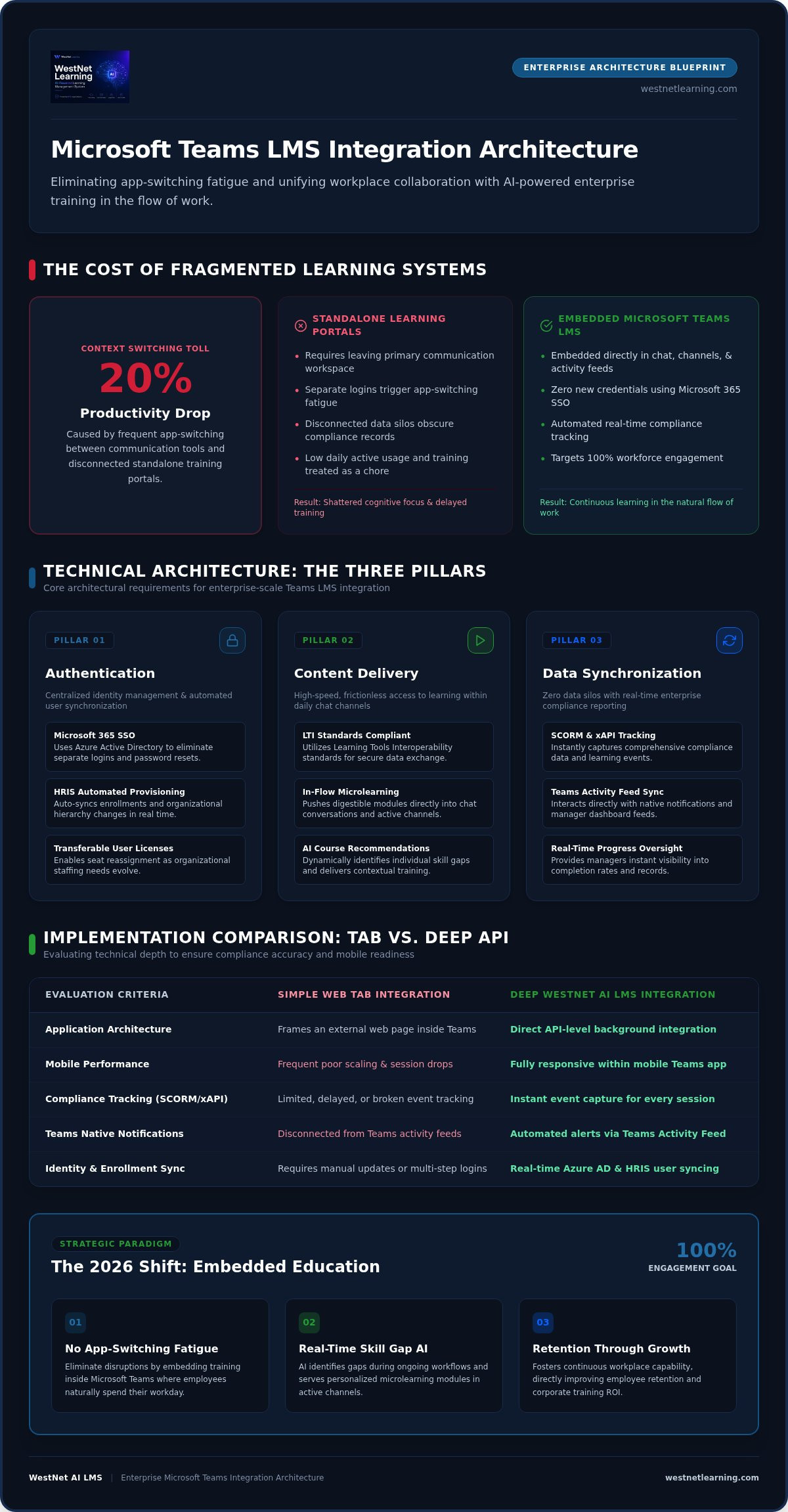
Fragmented systems do more than just frustrate users; they create operational silos that hide critical insights. Industry data suggests that frequent context switching can lead to a 20% drop in overall productivity. When your learning records are disconnected from your communication tools, data integrity suffers. Managers struggle to track progress in real time, and employees view training as an external chore rather than a core part of their role. This disconnect is why standalone LMS platforms often see low daily active usage. Without a unified interface, training becomes a "destination" that employees simply stop visiting.
The Strategic Shift to Embedded Education
By 2026, the industry standard has moved decisively toward learning in the flow of work. This philosophy treats education as an embedded feature of the digital employee experience. Instead of forcing users to seek out content, a Microsoft Teams LMS integration pushes relevant training directly into the chat and channel workflow. This transition relies on Learning Tools Interoperability (LTI) standards to ensure that data flows securely and seamlessly between the LMS and the collaboration hub.
Teams serves as the primary interface where communication and professional growth converge. AI plays a critical role here, identifying skill gaps in real time and suggesting microlearning modules within active conversations. This streamlined approach does more than just boost completion rates. It fosters a culture of continuous improvement that directly impacts employee retention. When people feel supported and empowered to grow without technical obstacles, they stay longer and perform better. Centralizing your training within Teams isn't just a technical upgrade; it's a strategic imperative for the modern, decentralized workforce.
Technical Architecture of a Seamless MS Teams LMS Integration
A robust Microsoft Teams LMS integration relies on three technical pillars to function effectively. These components work together to ensure that the learning experience feels native to the Teams environment. Architecture that lacks these core elements often leads to broken links and frustrated users. It undermines the engagement you aim to build.
- Authentication: Utilizing secure, centralized identity management.
- Content Delivery: Providing high-speed access to modules without leaving the application.
- Data Synchronization: Ensuring real-time reporting and record accuracy.
Single Sign-On (SSO) and User Management
Frictionless access is mandatory for enterprise-scale adoption. WestNet AI LMS leverages your existing Microsoft 365 credentials to eliminate the need for separate logins or password resets. This synchronization uses Azure Active Directory to verify identities, ensuring that security protocols remain consistent across all applications. Automated user provisioning further streamlines the process by syncing with your HRIS to manage enrollments and hierarchy changes in real time. For organizations with fluctuating staffing needs, transferable user licenses provide the flexibility to reassign seats as your team evolves.
Deep Integration vs. Simple Tab Implementation
Decision-makers must distinguish between a basic "web tab" and a deep API-level integration. A simple tab merely frames an external website within Teams, which frequently results in poor mobile performance and limited data tracking. A deep Microsoft Teams LMS integration, however, allows the LMS to interact directly with the Teams activity feed and notification system. This connectivity ensures that SCORM and xAPI compliance data is captured instantly, providing accurate reporting for every session. While Microsoft's official overview of Viva Learning showcases how content can be aggregated from various sources, a specialized LMS integration offers the granular control and advanced automation necessary for complex compliance environments.
Security is the final layer of this architecture. Enterprise-grade encryption and strict data privacy standards protect sensitive organizational records at every touchpoint. This methodical approach to security ensures that your training data remains isolated and protected from unauthorized access. If you want to see these technical features in action, you can explore our live environment to understand how we bridge the gap between communication and education.
MS Viva Learning vs. Third-Party LMS Integrations: Choosing Your Path
Decision-makers often view Microsoft Viva Learning as a complete solution for corporate education. It is a powerful content discovery hub that brings diverse learning sources into a single view. However, a strategic distinction exists between a discovery tool and a full-featured management system. While Viva excels at visibility, it often lacks the deep administrative control required for complex domestic operations across various departments. Choosing a specialized Microsoft Teams LMS integration ensures you don't sacrifice advanced functionality for the sake of a native interface.
Comparing Features: Tracking, Compliance, and Gamification
Viva Learning provides a streamlined experience for casual content consumption. It doesn't, however, offer the granular tracking necessary for high-stakes corporate environments. Enterprises must prioritize compliance training best practices to mitigate legal and operational risks across their US locations. WestNet AI LMS fills this gap with automated certification tracking and rigorous audit trails that basic aggregators can't match. We also introduce dynamic engagement tools like leaderboards and digital badges. These gamification elements transform mandatory training into a competitive, rewarding experience that drives higher daily active usage.
Customization and Branding for Large Teams
Large organizations require more than a one-size-fits-all interface. They need an environment that reflects their unique corporate identity across different states and business units. WestNet LMS supports multi-branding and custom logos, allowing you to maintain a cohesive brand presence within the Teams framework. This level of tailoring extends to personalized learning paths that adapt to specific user roles. Unlike generic interfaces, our system is backed by a dedicated Client Success Manager who guides you through complex integration setups to ensure your architecture remains stable and scalable.
The total cost of ownership often favors a hybrid approach. You can use Viva Learning as the "front door" for content discovery while relying on WestNet AI LMS as the robust engine for management and reporting. This configuration follows the Microsoft LMS integration architecture guidelines, ensuring that data flows correctly between your collaboration hub and your primary learning records. It's about finding the balance between a frictionless user experience and the sophisticated administrative power your business demands. Don't settle for a surface-level solution when your growth depends on deep, actionable insights.
Maximizing Engagement with AI-Powered Learning in the Flow of Work
Static training libraries are quickly becoming a relic of the past. Modern enterprises now require dynamic content that evolves at the speed of business operations. A sophisticated Microsoft Teams LMS integration thrives when it leverages generative technology to keep learning materials current and relevant. By utilizing AI course creation, administrators can move from conceptualization to rapid deployment in a fraction of the traditional time. This agility ensures that your teams always have access to the latest operational standards directly within their primary communication hub, regardless of which US office they call home.
Personalization is the catalyst for high engagement. AI-generated recommendations analyze individual user behavior to suggest the most relevant modules, effectively removing the guesswork from professional development. Integrated help bots serve as a 24/7 resource, answering learner queries and assisting administrators with complex reporting tasks. For diverse domestic workforces, the ability to translate content into up to 60 site languages ensures that every employee receives a consistent, high-quality experience. This inclusive approach removes communication barriers and fosters a unified learning culture across your entire national footprint.
Microlearning and Adaptive Content Delivery
Large, monolithic training sessions often lead to information overload and poor retention. We advocate for microlearning strategies delivered through Teams chat to combat this. AI plays a pivotal role in this shift by breaking down complex, technical topics into digestible, 5-minute modules. These bite-sized lessons are easier to fit into a busy workday, significantly reducing the cognitive load on your staff. Adaptive learning paths further enhance this by adjusting in real time based on learner performance. If a user demonstrates mastery of a topic, the system automatically pivots to more advanced material, keeping the experience challenging and productive.
Driving Engagement through Push Notifications and AI Insights
Visibility is the key to maintaining high completion rates. By utilizing the Teams activity feed, the system can send automated push notifications to remind learners of upcoming deadlines or new course assignments. These aren't generic alerts; AI analyzes engagement patterns to determine the best times for training delivery, ensuring notifications arrive when a user is most likely to act. This data-driven approach allows you to connect individual progress to broader ROI metrics for executive reporting. You can now prove the direct correlation between embedded training and organizational performance. To see how these intelligent features can transform your workforce, start building your first AI-powered course today.
Implementing WestNet AI LMS for Microsoft Teams: A Future-Ready Strategy
Transitioning from a fragmented legacy system to a unified digital workspace requires a methodical, step-by-step approach. A successful Microsoft Teams LMS integration isn't merely a software installation; it's a strategic alignment of your technology and your people. By following a structured roadmap, you ensure that the deployment is stable, secure, and immediately valuable to your employees. We recommend a five-stage process to move your organization from its current state to a fully integrated learning culture.
- Step 1: Define Goals and Compliance. Identify the specific KPIs you need to move, such as completion rates or certification speed. Establish your regulatory requirements early to ensure the system architecture supports necessary audit trails.
- Step 2: Establish Security Protocols. Collaborate with your IT department to set up SSO and Azure AD synchronization. This ensures that your M365 credentials remain the single source of truth for user identity.
- Step 3: Leverage AI for Migration. Use WestNet’s AI tools to ingest existing training data and rapidly generate new course content. This significantly reduces the manual labor typically associated with platform transitions.
- Step 4: Launch a Pilot Group. Select a specific department to test the Teams interface. Gather direct feedback on the user experience to refine your notification settings and learning paths before a wider release.
- Step 5: Scale and Support. Deploy the solution to the full organization. Utilize WestNet’s ongoing support to monitor engagement and optimize the system based on real-world usage patterns.
Preparing Your Infrastructure for 2026 Standards
Success depends on a foundation that supports automated workflows and real-time data exchange. Start with a comprehensive checklist for your HRIS integration to ensure that new hires are automatically enrolled in their onboarding paths. Accessibility is equally critical. You must ensure seamless mobile access for a modern workforce that often learns on the go. Finally, configure your gamification engine. Setting up leaderboards and badges early creates a sense of healthy internal competition that drives daily active usage from the moment of launch.
Partnering for Success: The WestNet Advantage
Large-scale operations require more than just a tool; they require a visionary partner. WestNet provides a robust Service Level Agreement (SLA) to guarantee the stability and uptime your enterprise demands. Your dedicated Client Success Manager handles the technical heavy lifting, from initial configuration to complex API troubleshooting. We don't just provide the platform; we provide the expertise to ensure your Microsoft Teams LMS integration becomes a permanent catalyst for growth. Ready to unify your team? Request a Demo today and see how we bridge the gap between communication and capability.
Architecting a Future-Ready Workforce
The transition to a unified digital ecosystem is a strategic necessity. By centralizing your education initiatives through a deep Microsoft Teams LMS integration, you remove the friction that traditionally stifles employee growth. Embedding learning into the daily workflow eliminates app-switching fatigue. This ensures that training becomes a natural extension of communication, empowering your team to stay focused while they develop new skills.
Modernizing your infrastructure allows you to leverage AI-Powered Course Creation in Minutes, turning complex operational updates into digestible microlearning. WestNet ensures global scalability with Seamless SSO for 60+ Languages, while a Dedicated Client Success Manager provides the stability your organization requires. This approach doesn't just track compliance. It drives a culture of continuous improvement and measurable ROI across every department.
The path from fragmented systems to a cohesive learning hub is clear. It's time to empower your workforce with the tools they need to excel without leaving their primary workspace. Streamline your training today, get started with WestNet AI LMS. Your journey toward a more intelligent, integrated future begins now.
Frequently Asked Questions
Is Microsoft Teams an LMS?
Microsoft Teams is primarily a collaboration platform, not a dedicated Learning Management System. While it excels at communication, it lacks specialized features like compliance automation and deep reporting. A Microsoft Teams LMS integration adds these critical capabilities by embedding a professional training engine into the familiar interface. This allows organizations to manage sophisticated learning requirements without forcing employees to leave their primary digital workspace, ensuring higher daily engagement.
How does WestNet LMS sync with my existing Microsoft 365 users?
WestNet LMS utilizes Single Sign-On (SSO) and automated HRIS synchronization to manage your user base. By connecting directly to your Azure Active Directory, the system identifies and authenticates your Microsoft 365 users instantly. This ensures that permissions and department assignments remain consistent across your entire organization. Automated provisioning handles the heavy lifting of enrollment, ensuring that every team member has immediate access to their specific training paths.
Can I track compliance training directly within the Microsoft Teams app?
Yes, you can monitor and manage compliance training without ever exiting the Teams environment. The integration captures detailed learner data and presents it through centralized dashboards accessible to administrators and managers. You can track completion rates, certification expirations, and audit trails in real time. This visibility ensures your organization maintains its regulatory standards while providing employees with a streamlined way to complete mandatory requirements within their natural workflow.
Does the integration support SCORM and xAPI content?
Our platform fully supports industry standards like SCORM and xAPI, allowing you to import your existing content library seamlessly. This compatibility ensures that interactive modules and detailed tracking data function correctly within the Teams interface. Whether you are using legacy assets or modern multimedia content, the integration preserves the integrity of your instructional design. This technical flexibility supports a diverse range of training methodologies across your various domestic business units.
Will my employees need a separate password for the LMS?
Employees don't need to manage separate login credentials for the LMS. Because the system leverages your existing Microsoft 365 authentication, users are recognized automatically when they open Teams. This frictionless access significantly reduces common barriers to engagement and minimizes password-related support tickets for your IT department. A robust Microsoft Teams LMS integration reinforces the concept of learning in the flow of work by making training as accessible as a standard chat message.
How does AI help with course creation inside the Teams integration?
AI drastically accelerates the content development cycle by transforming raw data into structured learning modules. Within the integration, administrators can use generative tools to build quizzes, summaries, and interactive lessons in minutes rather than weeks. This capability allows your organization to respond rapidly to changing market conditions or internal policy shifts. It ensures that your training content remains current and highly relevant to your specific operational needs without requiring extra design resources.
What languages are supported by the WestNet LMS Teams integration?
WestNet LMS supports up to 60 site languages to accommodate the diverse linguistic needs of a national workforce. Users can select their preferred language at login, ensuring that the interface and navigation are fully accessible to every team member across the country. This capability is essential for inclusive training programs, allowing all employees to engage with professional development in the language they understand best, which significantly improves comprehension and retention rates.
Can I use WestNet LMS for external partner training through Teams?
You can effectively use WestNet LMS to deliver training to external partners, such as vendors or franchisees, through the Teams framework. The platform supports multi-branding, allowing you to present a customized experience for different external audiences. By utilizing secure guest access protocols, you can provide specific training catalogs to these stakeholders without compromising your internal data. This ensures your entire business network stays aligned with your corporate standards and operational procedures.