What if partner training could do more than deliver courses and help partners represent your brand with confidence? The right partner training portal software can give external stakeholders a central place to learn about your products and processes. Low engagement, manual enrollment, disconnected systems, and unclear results can make that difficult to manage across a partner network.
These challenges are familiar to channel leaders. Training needs to be easy to access, relevant to different partner roles, and connected to measures the business can review. A portal should do more than store learning materials. It should make learning easier for partners and give your team a clearer view of participation and progress.
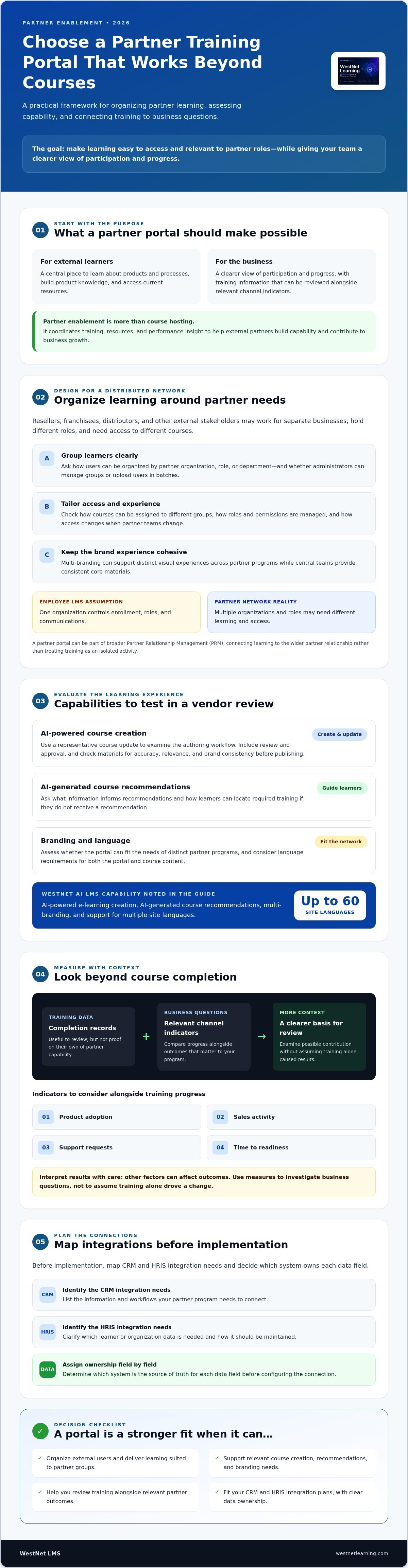
This guide explains how to evaluate and implement a partner training portal in 2026, from automation and integrations to analytics, access, and brand consistency. You’ll find practical questions to ask vendors and ways to assess capabilities such as WestNet LMS’s AI-powered course creation, multi-branding, and support for multiple site languages.
Key Takeaways
- Choose partner training portal software that can organize external users and deliver learning experiences suited to your partner groups.
- Assess how AI-powered course creation, course recommendations, and branding options fit your content and learner needs.
- Look beyond completion rates by choosing measures that help you examine training alongside partner outcomes.
- Map CRM and HRIS integration needs before implementation, including which system owns each data field.
- Evaluate WestNet AI LMS features such as AI-powered course creation, multi-branding, and support for up to 60 site languages against your requirements.
Defining the Strategic Value of Partner Training Portal Software
Resellers, franchisees, distributors, and other external stakeholders influence how customers experience your products. A partner training portal gives these learners a place to build product knowledge, understand processes, and access current resources. Its purpose goes beyond hosting courses: it can help partners represent your brand accurately and prepare to support customers.
Partner programs also have different organizational needs from employee training. External learners may work for separate businesses, hold different roles, and need access to different courses. Look for ways to organize users and learning by partner organization, role, or department, and ask how administrators can tailor the experience for different groups. Multi-branding can support distinct visual experiences, while a clear role and permissions structure helps administrators manage access. As part of broader Partner Relationship Management (PRM), the portal can connect learning to the wider partner relationship rather than treating training as an isolated activity.
In 2026, a useful partner learning strategy goes beyond proving completion. Completion records matter, but they do not show by themselves whether a partner can explain a product, handle a customer question, or identify the right solution. Effective partner training portal software supports practical learning and lets program owners examine training data alongside relevant channel indicators. The aim is not to assume training alone drives sales, but to make its contribution easier to assess.
Internal vs. External Training Systems
Standard employee LMS workflows often assume one organization controls enrollment, roles, and communications. Partner ecosystems are more distributed. Consider a manufacturer onboarding resellers with different product portfolios. The central team may need to provide consistent core materials, while administrators need to assign courses relevant to their learners. When evaluating a platform, ask how it organizes users and roles, whether administrators can manage groups or upload users in batches, and how access changes when partner teams change. Do not assume an internal deployment model will meet these needs without configuration.
The ROI of Empowered Partners
Start with business questions, then choose learning measures that help you investigate them. Compare training progress with indicators such as product adoption, sales activity, support requests, or time to readiness, while accounting for other factors that can affect results. If partners can find answers and apply product knowledge independently, they may need fewer routine clarifications from internal teams. Centrally distributed launch training can also help partners receive consistent information about new products.
Partner enablement is the coordinated use of training, resources, and performance insight to help external partners build capability and contribute to business growth. For a practical view of how technology can modernize learning operations, explore AI in corporate training.
Essential Features for High-Impact Partner Enablement
Partner training needs to keep pace with changing products, varied partner roles, and a brand experience that feels cohesive across the network. Evaluate partner training portal software for more than course delivery. Prioritize the tools that make learning relevant, accessible, and manageable for your team.
AI-Driven Personalization and Content
AI-powered course creation can help teams develop or update learning materials as products and processes change. It can support content creation, but administrators still need to review materials for accuracy, relevance, and brand consistency before publishing. AI-generated recommendations can also point learners toward courses suited to their needs. During a demo, ask what information informs recommendations and how learners can find required training if they do not receive a recommendation.
Do not rely on a generic course-development savings claim when assessing AI authoring. Instead, test the tool with a representative course update. Note the steps your team currently takes, then compare them with the workflow in the platform, including review and approval. For global programs, assess how language needs affect both the portal and its course content. WestNet AI LMS offers AI-powered e-learning creation and AI-generated course recommendations, and supports up to 60 site languages. A government example, FSA Partner Connect, illustrates how a partner-focused learning resource can sit within a wider external stakeholder program.
Branding, Enrollment, and Engagement
Make the portal feel connected to your organization. Multi-branding options can help present different visual experiences for partner groups while retaining a relationship to the parent brand. Before choosing a platform, ask which site elements can be customized and whether administrators can manage logos, banners, colors, fonts, and catalog display.
Then map enrollment rules to your partner structure. For example, decide which courses are required for each role or partner group, who is responsible for adding learners, and what should happen when a user changes teams. Automated enrollment can reduce repeated manual setup, but confirm which rules and user attributes the platform can use.
Engagement features should support learning rather than distract from it. Leaderboards and badges may encourage participation when recognition is tied to useful learning goals. Consider whether these features fit your partner culture, whether participation should be voluntary, and how you will check whether they are helping learners progress.
Global Access and Flexible Licensing
For international networks, review language support, sign-in options, and user management together. Confirm that the platform supports the authentication methods your organization requires, including single sign-on (SSO) if needed. WestNet AI LMS supports standard username and password sign-in and SSO, and users can select from supported site languages at login. Remember that a translated interface does not necessarily mean course materials have been translated or localized.
Also assess how user access changes as partner teams change. Transferable user licenses let a deactivated user license be reused for a new user. Ask how deactivation and reassignment work, who manages the process, and which licensing terms apply. Map these requirements against your partner structure before selecting a platform. To review WestNet’s broader learning capabilities, explore its LMS features.
Evaluating ROI: A Framework for Strategic Decision Making
Measure a partner learning program by what it helps you understand, not just what learners finish. Completion rates show participation; they do not reveal whether partners can apply product knowledge, resolve customer questions, or contribute to channel goals. Build an ROI framework before selecting partner training portal software so the platform’s reporting can support decisions, not simply record activity.
Advanced Learning Analytics and Reporting
Start with a baseline, then track a focused set of indicators that connect learning to business questions. For example, compare assessment results on a product launch course with partner sales activity or product adoption over the same period. Treat this as an observed relationship, not proof that training alone caused a change. If learning data can be connected with CRM or partner records, teams may be able to review these signals together and identify knowledge gaps that warrant additional training. Confirm the available data connections and reporting options during evaluation.
Set up reporting for the people who need to act on it. Partner managers may need to see overdue certifications or groups struggling with a product topic, while executives may need a concise summary of participation, readiness, and channel indicators. Identify the reports each role needs and how often they will be reviewed. Automation can also reduce repetitive administration. Estimate potential savings by comparing staff hours spent on enrollment, reminders, record checks, and reporting before and after implementation, then apply your organization’s internal labor cost to the hours saved.
Use data-driven training methods to define measures, review results consistently, and communicate learning’s contribution to stakeholders. Professional channel management also depends on structured knowledge and capability, as reflected in the Certified Channel Management Professional program.
The Financial Benefit of Transferable Licenses
External networks change. People join, leave, or move between partner organizations, so understand whether licensing is based on registered accounts, active users, or another model. Paying for inactive accounts can weaken budget efficiency, but pricing terms vary. Compare the total cost under realistic usage scenarios, including periods of turnover and new partner onboarding, rather than assuming every provider defines an active user the same way.
WestNet AI LMS supports transferable user licenses, which means a deactivated user license can be reused for a new user. Ask how reassignment works and which contractual terms apply, then compare that flexibility with fixed seat allocations and other licensing approaches. For a partner network with changing headcounts, model the cost using expected active learners and reassignment needs. Include administration effort and learning outcomes in the comparison, not just license counts. A balanced ROI case connects operational efficiency with partner readiness and business performance.
Implementation and Integration: Connecting Your Ecosystem
A partner portal works best when it fits the systems that manage partner relationships and business activity. Before selecting partner training portal software, map where partner records live, which system owns each data field, and how training results should be used. This exercise helps identify duplicate records and clarifies what an integration needs to accomplish.
For example, a CRM such as Salesforce may hold partner accounts and sales activity, while the learning platform records course progress and certifications. A connection between them can help teams review these signals together if the systems and integration methods support the required data exchange. HRIS synchronization may also be relevant where partner records are managed in an HRIS, but do not assume an HR system is the source of truth for external users. Define ownership, update frequency, and error handling for each data flow. Explore LMS integrations as part of that evaluation.
Security, Authentication, and Data Migration
Ask how SSO would work with partner identities and confirm which authentication options the platform supports. For global programs, review how personal data is handled across the regions where partners are based, including access controls, retention practices, and responsibilities shared with vendors. Request the service-level agreement (SLA) and check its definitions, incident processes, and support commitments against your operational needs.
Plan legacy data migration before launch. Identify the records and learning history worth carrying forward, clean and map the fields, then test a sample migration and verify the results with stakeholders. A staged cutover, with a defined rollback plan and clear communication, can reduce disruption. Confirm the migration approach for your systems rather than assuming it will happen without downtime.
Rollout and Client Success
A dedicated Client Success Manager can help coordinate platform setup and adoption. WestNet AI LMS includes a Dedicated Client Success Manager, so ask how that support works, what responsibilities remain with your team, and how issues will be escalated. For a phased rollout, begin with one partner group and a focused course set, gather feedback, resolve access or data issues, then expand to additional groups.
Set rollout stages around readiness rather than assuming a fixed launch timeline. First confirm requirements and prepare users. Then configure access, integrations, and content before testing with a small partner group. Establish checks for accurate records, successful sign-in, course access, reporting, and support ownership. For complex organizations, repeat the process for additional groups as needed instead of launching everywhere at once.
Connect your learning platform to the systems and workflows partners rely on. Explore WestNet LMS integrations to assess how they may fit your ecosystem.
Why WestNet AI LMS is the Premier Choice for Partner Portals
Choosing partner training portal software means balancing content development, brand consistency, and the day-to-day needs of an external network. WestNet AI LMS offers AI-powered e-learning creation, multi-branding options, transferable user licenses, and support for up to 60 site languages. These capabilities are worth assessing against your content workflow, partner structure, and access requirements.
The platform also includes AI-generated course recommendations, AI-powered help for learners and administrators, learning analytics and reporting, automated enrollment and other task automation, and HRIS integration. As you evaluate fit, confirm how each capability works for your use case, which data it uses, and what configuration your team will need. Do not assume that analytics alone can prove training caused a change in revenue or other business outcomes.
The WestNet Advantage: AI and Innovation
AI-powered authoring can help teams create e-learning content, while multi-branding options support customized site preferences such as logos and banners. For engagement ideas, consider how principles in gamification in employee training might be adapted for external learners, with recognition tied to useful progress rather than competition for its own sake. WestNet AI LMS includes gamification features such as leaderboards and badges.
WestNet AI LMS also includes AI-powered help for learners and administrators, as well as a Dedicated Client Success Manager. During evaluation, ask what the AI-powered help can assist with and how support responsibilities are divided between the platform and your team. For a broader view of enterprise AI learning strategy, explore the enterprise AI learning platform guide.
Assess scale against your own requirements. Ask vendors how their platform supports user growth, partner group organization, language needs, and license transfers. WestNet AI LMS can scale from small teams to tens of thousands of users, according to the platform information. Confirm the configuration and user-management approach that will fit your expected use.
Next Steps: From Evaluation to Execution
Move from feature lists to a practical evaluation. Define your partner groups, identify the systems that must connect, and prepare a representative learning scenario, such as onboarding a new reseller or sharing updated product content. Then assess how the platform supports content creation, branding, access, reporting, and administration against those requirements.
Use a demo to explore the platform in the context of your partner structure and integration needs. Ask which capabilities fit your plans, what your team will need to configure, and how you will measure progress after rollout.
Turn Partner Learning Into External Enterprise Growth
The right partner training portal software does more than organize courses. It can align partner learning with business priorities, bring training data into a clearer view, and create a consistent experience across external audiences. Choose a platform based on the outcomes you need, the systems it must connect with, and the scale and structure of your partner network.
WestNet AI LMS includes AI-powered course creation, learning analytics and reporting, automated enrollment, multi-branding, and a Dedicated Client Success Manager. As you evaluate fit, confirm how the platform’s capabilities map to your partner structure and projected user needs. A thoughtful rollout can help replace fragmented training processes with a more coordinated approach to partner learning.
Ready to explore the next step? Request a WestNet AI LMS demo to discuss your requirements and evaluate how the platform could support your learning strategy.
Frequently Asked Questions
What is partner training portal software?
Partner training portal software is a learning platform for educating external stakeholders such as resellers, franchisees, and distributors. It gives partners a central place to access courses and product information, while administrators can organize users and monitor learning progress. Unlike an employee-only LMS, a partner portal may need to support distinct partner groups, branded experiences, external user management, and learning that connects to channel goals.
How does AI improve partner training portals?
AI can help teams create e-learning content, recommend relevant courses to learners, and provide help to learners and administrators. For example, a learner may receive a course recommendation, while an administrator can use AI-powered help when working in the platform. WestNet AI LMS includes AI-powered e-learning creation, AI-generated course recommendations, and AI-powered help for learners and admins.
Can we white-label the partner training portal?
WestNet AI LMS supports multi-branding options, including logos and banners, as well as site preferences such as colors, fonts, and catalog display. These controls can help align the learning experience with your brand and distinguish experiences for different partner groups. During evaluation, clarify which elements can be customized, whether branding can vary by group, and how the portal will appear to learners and administrators.
Does the software integrate with our CRM like Salesforce?
Integration depends on the systems, data, and connection methods your organization requires. WestNet offers LMS integrations, but confirm Salesforce compatibility and the specific data flows during evaluation rather than assuming a particular connector is available. Define which records should sync, such as partner accounts or learning progress, which system owns each field, and how often updates should occur. Test the planned workflow before rollout.
How do transferable licenses work for external partners?
With transferable user licenses, a deactivated user’s license can be reused for a new user. This can help organizations manage access as partner teams change, rather than leaving licenses assigned to people who no longer need training. WestNet AI LMS supports transferable user licenses. Ask how deactivation and reassignment work, and review the applicable licensing terms when estimating capacity for your network.
What languages does WestNet AI LMS support?
WestNet AI LMS supports up to 60 site languages, and users can select their language at login. This can help global partner networks provide a more accessible portal experience across language groups. Before launch, identify the languages your learners need and confirm how language selection applies to the site interface and learning content. Course materials may require separate translation or localization, so plan for content review as well.
How do we track the ROI of our partner training?
Track training activity alongside the business indicators that matter to your channel, rather than relying on completion rates alone. For example, compare course progress or assessment results with product adoption, sales activity, support requests, or time to readiness. Treat these comparisons as evidence to investigate, not automatic proof that training caused a business outcome. Learning analytics and reporting can help teams monitor progress and share findings with stakeholders.
Is the platform SCORM and xAPI compliant?
WestNet AI LMS supports AI-powered e-course creation in SCORM or xAPI formats. That confirms format support for course creation, but your specific needs may also involve importing existing content, launching packages, tracking learner activity, or requiring particular standard versions. Confirm those requirements with WestNet during evaluation and test representative content before rollout. This helps ensure the platform and courses support the tracking and reporting your partner program expects.