What if the biggest risk in choosing a pre built safety training course catalog is selecting a long list before defining who needs what? A ready-made library can save time, but course titles alone won’t show whether the content fits your workforce, locations, and current requirements.
If you’re unsure which topics employees need, don’t have time to coordinate content, or struggle to track completions across teams, you’re not alone. The right choice starts with workforce risk, then checks whether the catalog and delivery tools can support training consistently.
This guide will help you shortlist relevant topics, assess content fit and currency, and compare the catalog capabilities that make training easier to administer. You’ll also see what to verify before adopting courses, including available titles, revision dates, and jurisdictional applicability. WestNet LMS offers off-the-shelf eCourses and an LMS with catalog categories, automated enrollment, and reporting, providing a platform option for organizing and tracking training without assuming every safety title is available.
Key Takeaways
- Use workforce roles and hazards to prioritize topics in a pre built safety training course catalog, rather than assuming one catalog fits every organization.
- Compare courses by intended audience, hazard relevance, delivery format, and review date to assess content fit and currency.
- Separate provider-confirmed course details from requirements your safety and compliance stakeholders need to validate internally.
- Build a launch workflow that assigns clear responsibilities for needs assessment, piloting, enrollment, reporting, and scheduled content review.
- Consider how an LMS can organize available eCourses with custom catalog categories, automated enrollment, and learning analytics, while verifying specific course availability first.
Pre-Built Safety Training Course Catalogs: What Buyers Should Expect
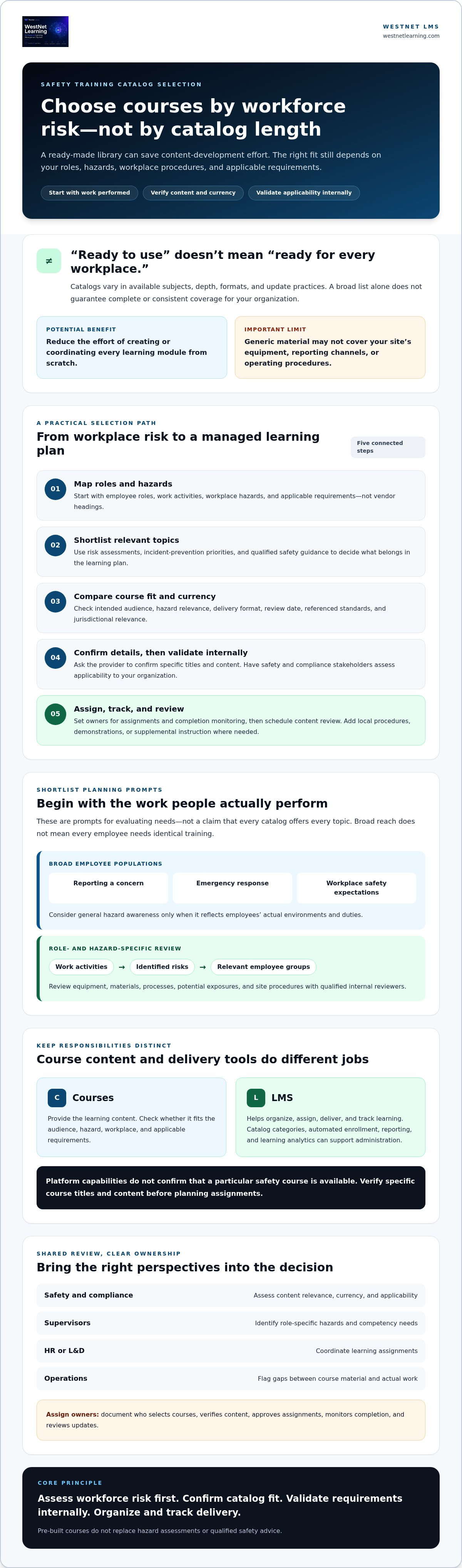
A pre built safety training course catalog is a collection of ready-made learning options that an organization can review and select from. It isn’t a promise of complete or consistent coverage: available subjects, depth, formats, and update practices vary by provider. Start by matching potential courses to employee roles, workplace hazards, and applicable requirements, rather than assuming a broad catalog will automatically meet every need.
Ready-made courses can reduce the effort of creating or coordinating every learning module from scratch. But “ready to use” doesn’t mean “ready for every workplace.” Review course content, revision dates, intended audience, jurisdictional relevance, and any standards referenced. The broad field of Occupational safety and health provides context, but your organization’s hazard assessments and qualified safety guidance should inform course selection.
How a ready-made safety course catalog differs from custom training
Existing courses give teams a starting point: select relevant learning, then organize how employees access and complete it. That can help reduce content-development effort, but generic material may not explain your site’s equipment, reporting channels, or operating procedures. Identify where local procedures, demonstrations, or supplemental instruction are needed. Pre-built courses don’t replace hazard assessments or qualified safety advice.
Keep the distinction clear: courses provide the learning content; a learning management system (LMS) helps assign, deliver, and track that content. Organizations evaluating digital compliance workflows can explore LMS capabilities for compliance training as a separate consideration from the course library itself.
Who should evaluate the catalog before adoption?
Bring safety, HR, compliance, operations, and learning and development (L&D) into the review. Supervisors can identify role-specific hazards and existing competency requirements, while safety and compliance stakeholders assess content relevance and currency. HR or L&D can coordinate assignment needs, and operations can flag practical gaps between course material and actual work.
Assign clear owners before rollout. Document who selects courses, verifies content, approves assignments, monitors completion, and reviews updates. This creates accountability without assuming every stakeholder has the same expertise. Confirm specific course titles and content details with the provider, then validate applicability internally before assigning training.
Safety Training Course Categories to Consider for Different Workforces
Build your shortlist from the work people actually perform, not from the headings in a vendor’s catalog. Treat the categories below as planning prompts, not a claim that any provider offers every topic. Your risk assessment, incident-prevention priorities, and applicable requirements should determine what belongs in the learning plan. For U.S. requirements and educational materials, consult OSHA training resources and confirm what applies to your organization.
Foundational topics for broad employee populations
Start with learning that may apply across roles, such as how to report a concern, respond to an emergency, or understand workplace safety expectations. General hazard awareness is useful only when it reflects employees’ actual environments and duties. Consider whether supervisors need additional guidance on their responsibilities, while employees need instruction relevant to their own tasks. Broad reach doesn’t mean identical training for everyone.
Hazard- and role-specific learning areas
Next, map work activities to the risks identified by qualified internal reviewers. Consider equipment, materials, processes, and potential exposures, then identify which employee groups encounter each one. In a manufacturing environment, for instance, a learning plan should reflect specific tasks and site procedures rather than assume a single course fits every worker. A manufacturing safety training example can offer context for how training is approached in that setting, but it doesn’t confirm what a course catalog contains.
Before adding any named course to a shortlist, confirm its title, scope, intended audience, revision date, and applicability with the provider and your internal safety stakeholders. A topic label alone may not tell you whether the content addresses the risks or procedures relevant to your teams.
How to prioritize a first-wave course shortlist
Use a consistent filter to move from a broad topic inventory to a practical first wave. For each candidate, record the documented risk, affected employee groups, and reason the training is a priority. Then check for prerequisite knowledge and decide whether employees also need practical demonstrations or supervisor-led reinforcement beyond the course.
- Rank by risk: Prioritize topics tied to documented hazards and prevention needs.
- Map to roles: Identify who needs the learning and who may need a different level of instruction.
- Flag gaps: Note where site procedures, demonstrations, or additional guidance may be required.
- Assign an owner: Give someone responsibility for confirming unanswered coverage questions before procurement.
This process keeps a pre built safety training course catalog in its proper role: a source of candidate learning, not a substitute for risk-based decisions. A focused shortlist gives your team a clearer basis for comparing available courses and planning assignments.
How to Compare Safety Course Catalogs for Content Fit and Currency
A useful comparison goes beyond course titles. For each candidate in a pre built safety training course catalog, capture the topic, intended audience, hazard relevance, format, and course review date. Add two notes: what the provider confirms about the course, and what your organization still needs to validate. This keeps catalog descriptions separate from internal decisions about risk, jurisdiction, and employee assignment.
- Topic: What subject does the course cover?
- Intended audience: Which roles or experience levels is it designed for?
- Hazard relevance: Which identified workplace risks does it address?
- Format: How is the learning delivered?
- Review date: When was the content last reviewed or revised?
Check audience, scope, and learning format
Ask the provider to clarify prerequisites, learning objectives, and depth of coverage. A course intended for general awareness may not suit workers who need task-specific instruction. Check whether the format fits employees’ schedules, access needs, and working environment. If you’re considering virtual or instructor-led modules alongside eCourses, confirm what’s available and appropriate; don’t assume a format is included with a particular catalog.
Verify course currency and regulatory relevance
Record the course version or review date and ask how updates are communicated. Then have qualified stakeholders confirm whether the content’s standards or regulatory references apply to your workforce and jurisdiction, including any relevant state, industry, or site-specific requirements. The ASSP OSH training standard can inform how you evaluate training program quality, but it doesn’t replace applicable requirements or your internal review.
Keep the boundary clear: course completion alone doesn’t guarantee compliance or replace employer responsibilities. Treat claims about standards, regulatory coverage, and compliance as questions to verify with the provider and qualified internal reviewers.
Compare platform administration, not just course titles
Check how a learning platform supports enrollment, reporting, user management, and catalog organization. Consider whether administrators can group courses in ways that make sense for roles or departments, and whether reporting can show the completion information your teams need. Also assess language access, authentication, data migration, and integration requirements against your learner population and implementation plan.
WestNet documents custom catalog categories, automated enrollment, Learning Analytics and Reporting, and user selection from up to 60 site languages at login. These are platform capabilities, not confirmation of specific safety course titles. For delivery context, review compliance training LMS capabilities, then confirm which safety eCourses and content details are currently available before deciding.
A Practical Checklist for Selecting and Launching Safety Courses
Turn your shortlist into a managed rollout. A clear workflow helps safety, HR or learning and development (L&D), managers, and platform administrators coordinate decisions without leaving ownership unclear. Use this sequence to move from identified needs to ongoing review:
- 1. Map workforce needs. Safety leads the review of documented hazards and training priorities. Managers identify affected roles, work locations, required knowledge, and existing competency expectations.
- 2. Confirm course fit. Safety and compliance stakeholders check course scope, revision details, and applicability. HR or L&D confirms learner access needs and accommodations, while unresolved questions are assigned to an owner.
- 3. Set assignment rules. HR or L&D and managers define who receives each course, how completion will be recorded, and how overdue assignments will be escalated. Platform administrators configure the relevant user groups and enrollment approach.
- 4. Pilot the experience. Test with a representative learner group before wider assignment. Include different roles or access conditions where practical, and check course access, enrollment, completion records, and manager reporting.
- 5. Review and refine. Safety and compliance owners schedule content reviews. Revisit course currency when work practices, identified risks, or applicable requirements change.
Before selecting or assigning courses
Keep the decision record practical: connect each course to the roles and hazards it addresses, note who approved its use, and document any access or applicability questions. Agree on completion tracking and escalation before assignments go live. For complementary program-planning guidance, see compliance training best practices.
During rollout and ongoing review
Use the pilot to find operational gaps, such as a learner group missing an assignment or a manager unable to see the report they need. After launch, use analytics to identify participation or completion gaps and follow up with the responsible teams. Treat completion as a record of course activity, not proof that an employee can perform a task competently. Schedule reviews and assign owners so updates don’t depend on memory.
A disciplined process helps your organization make better use of a pre built safety training course catalog while keeping course selection, assignment, and review accountable. To explore WestNet’s off-the-shelf eCourses as part of your planning, review the eCourse offering.
Deliver Pre-Built Safety Training Through WestNet's LMS
A pre built safety training course catalog is only useful when relevant courses can be assigned, accessed, and monitored across your workforce. WestNet Learning offers off-the-shelf eCourses alongside its LMS, giving organizations a platform option for administering available learning. Confirm specific safety course titles, subject coverage, and current content details with WestNet before treating them as part of the catalog. The platform can support course administration, but your safety stakeholders still determine which learning fits your hazards and requirements.
What WestNet's documented LMS capabilities can support
WestNet’s catalog and course management capabilities include custom catalog categories and course auto-enroll. Administrators can use categories to organize learning in ways that fit their catalog structure, then use automated enrollment to assign courses according to their setup. Learning Analytics and Reporting can provide visibility into learning activity and completion, supporting follow-up across groups. The platform also documents a Dedicated Client Success Manager as a support feature; confirm the support scope during evaluation.
For workforces with varied language needs, users can select from up to 60 site languages at login. Check that language access aligns with your learners’ needs, and separately verify the language and content availability of any specific eCourse under consideration. Platform language options don’t by themselves confirm that an individual safety course is translated.
Questions to ask before evaluating WestNet eCourses
Make the course review concrete. Request the available safety course titles, descriptions, intended audiences, and revision details. Then compare that information with your workforce’s roles, documented hazards, and applicable requirements. If a course references a standard or regulation, ask for its scope and have qualified internal stakeholders confirm relevance to your jurisdiction and work practices.
- Which safety eCourse titles are currently available?
- Who is each course designed for, and what topics does it cover?
- When was the content last reviewed, and how are updates communicated?
- Can the LMS organize and assign learning in a way that fits your teams?
- What reporting and support features should administrators evaluate?
Use the answers to distinguish confirmed course details from items your organization must validate. That keeps catalog selection grounded in both content fit and operational needs.
Explore WestNet's eCourses or request a platform demo to discuss administrative fit and confirm current safety course availability.
Build a Safety Training Plan That Fits Your Workforce
Choosing a pre built safety training course catalog is not about finding the longest list. Start with documented hazards and workforce roles, then assess whether each course’s audience, content, format, and review date fit your needs. Verify course titles and current details with the provider, and have qualified internal stakeholders confirm relevance to your requirements.
Plan for delivery as carefully as content. A practical rollout assigns clear owners, tests access and reporting with a pilot group, and sets a schedule to revisit course currency. An LMS can help connect these steps through administration features such as custom catalog categories, course auto-enroll, and Learning Analytics and Reporting.
WestNet Learning offers off-the-shelf eCourses, but specific safety titles and subject coverage should be confirmed directly. Explore whether the available courses and platform capabilities align with your priorities, then take the next step: Explore WestNet's eCourses and request a demo. With a focused shortlist and clear review process, your organization can move forward with greater confidence and a more manageable approach to safety training.
Frequently Asked Questions
What is a pre-built safety training course catalog?
A pre-built safety training course catalog is a collection of existing safety learning courses an organization can review and assign instead of creating every course from the beginning. Catalog scope varies by provider, so confirm available titles, intended audiences, formats, and revision dates. Ready-made content may save development effort, but it can still need to be supplemented with site procedures, practical instruction, or role-specific guidance to fit your workplace.
What courses should a workplace safety training catalog include?
There’s no universal course list that suits every workplace. Start with documented hazards, employee roles, work processes, and applicable requirements, then shortlist topics that address those needs. Ask the provider to confirm available course titles and scope before treating a topic as covered. Have qualified safety and compliance stakeholders review the shortlist, including any site-specific learning needs, before assigning courses across the organization.
How do I choose a safety training course catalog for my employees?
Choose a pre built safety training course catalog by mapping employee groups to their tasks and risks, then comparing relevant courses by audience, learning objectives, format, currency, and applicability. Check how the platform handles assignments, language access, and completion reporting. Pilot learner access and records before a wider rollout. Have qualified stakeholders assess regulatory references; a course alone shouldn’t be assumed to ensure compliance.
Are pre-built safety courses enough to meet workplace requirements?
Not necessarily. Whether a course is suitable depends on applicable requirements, workplace hazards, course content, and how training is delivered and documented. Your organization may also need site-specific procedures, practical demonstrations, or additional instruction for particular roles. Ask qualified internal stakeholders to confirm what applies to your workplace, and verify the course’s scope and currency with the provider before relying on it as part of your training program.
How often should safety training courses be updated?
There’s no single review schedule that fits every course or workplace. Review content when applicable requirements, hazards, equipment, procedures, or work practices change, and ask the provider how revisions are identified and communicated. Set an internal review cadence and name an owner for each course. Before assigning or renewing training, check the course version or review date rather than assuming the catalog has remained current.
Can an LMS track completion of safety training courses?
An LMS may offer enrollment and reporting tools that help administrators monitor learner activity and course completion. Before selecting a platform, confirm which records and reports are available, who can access them, and whether they fit your documentation process. Completion records show course activity, not necessarily practical competence or compliance. Pair LMS reporting with appropriate workplace assessment, supervisor oversight, and follow-up where needed.
What should I ask a provider before buying a safety training catalog?
Request the current course list, intended audiences, learning objectives, formats, revision dates, and details about any referenced standards or jurisdictions. Ask how content updates are communicated and whether courses can be organized and assigned through your learning platform. Confirm specific titles and availability directly. Broad catalog descriptions may not establish that a particular course addresses your workforce’s hazards or the requirements your organization needs to meet.
Does WestNet offer pre-built safety training courses?
WestNet Learning offers Off-the-Shelf eCourses, but specific safety course titles and catalog coverage should be confirmed directly with WestNet. Request the current inventory, course descriptions, intended audiences, and revision details. Then have your safety or compliance stakeholders assess whether available content fits your workforce, hazards, and applicable requirements. WestNet’s LMS includes documented catalog management and reporting capabilities for administering learning, but those features don’t confirm course availability.