The most scalable LMS for fast growing startups isn’t the platform with the longest feature list. It’s the one that reduces friction now and can accommodate growth without creating unnecessary complexity or forcing a disruptive switch later.
As headcount rises, training can become harder to coordinate. Manual enrollment, inconsistent onboarding, and limited reporting make it difficult to keep learning aligned across teams. You need useful integrations and clear insight into progress, but you also don’t want to pay for capabilities your startup isn’t ready to use.
This guide will help you evaluate an LMS against your current workflows and future plans, then compare vendors using practical criteria instead of feature-count claims. We’ll look at scalability, pricing models, integrations, automation, reporting, and content standards, including how capabilities such as AI course creation, automated enrollment, and HRIS integration may address specific operational needs. You’ll also learn how to validate fit before committing, so your choice supports growth without adding avoidable overhead.
Key Takeaways
- Assess whether an LMS can adapt to changing users, workflows, and training needs as your startup grows.
- Prioritize tools that reduce recurring administrative work across user management, course operations, integrations, analytics, and learner engagement.
- Compare must-haves, near-term requirements, and future options to find a scalable LMS for fast growing startups without overbuying.
- Test real workflows with People, L&D, IT, and operational stakeholders before selecting a platform.
- Evaluate WestNet LMS against your specific requirements, including its confirmed capabilities and stated support for growth from small teams to much larger user populations.
Why a Scalable LMS Matters as Your Startup Grows
A scalable LMS should support changing user numbers, workflows, and training needs without making learning harder to administer. Growth may bring new departments, locations, roles, and onboarding requirements. A platform that works for one team today should also give you practical ways to manage learning as those needs become more complex.
A Learning Management System (LMS) typically centralizes learning content and related activities. But scalability means more than having the technical capacity to add accounts. It also means being able to manage enrollment, update content, review completion data, and connect learning workflows with other systems as your organization changes.
Spreadsheets and shared folders can be useful at the start. Over time, separate files and manual processes can make it harder to confirm who needs training, whether they completed it, and which version of a resource is current. Disconnected records also limit visibility across teams. The goal isn’t to replace every simple process immediately. It’s to recognize when coordination is becoming a recurring operational burden.
What does LMS scalability mean for a startup?
Map the changes you expect, rather than relying on a vendor’s broad capacity claims. Consider possible shifts in team size, departments, locations, role-specific learning, and required courses. Then ask whether the LMS can accommodate those scenarios while keeping administration manageable.
Separate two questions: Can the platform technically support your expected users, and can your team operate it efficiently as learning requirements expand? Look at how it handles user administration, content updates, reporting, and integrations. A system that can host more learners but still requires repeated manual work may not solve the problem you’re trying to address.
When do startups outgrow informal training tools?
Watch for signals: new hires receive different onboarding, managers repeatedly assign the same training by hand, and completion records are scattered across files or tools. Unclear ownership compounds the issue. If no one knows who maintains a course, updates a process, or checks training status, the system can become unreliable as teams grow.
These are signs to assess your workflow, not proof that every startup needs a new platform immediately. Document what’s difficult to coordinate, who owns each step, and where information gets lost. For practical context on modernizing corporate training with AI, explore how technology can support more connected learning processes. Choose a scalable LMS for fast growing startups by balancing today’s real requirements with the need to avoid preventable replacement work later.
Which LMS Capabilities Support Fast-Growing Startups?
Choose capabilities by the work they simplify, not by the length of a vendor’s feature list. For a startup, useful evaluation areas include user administration, course operations, integrations, analytics, and learner engagement. A feature earns its place if it addresses a real workflow, such as assigning onboarding by role or helping administrators see which teams have outstanding learning.
AI tools can also support specific workflows. AI-powered course creation may help teams develop learning materials, while learner recommendations may help direct people to relevant content. Ask vendors to demonstrate how these features work with your content and processes. Treat them as options to test, not guaranteed improvements.
Can user management and automation keep pace with hiring?
Ask vendors to show how administrators add and deactivate users, organize departments or reporting lines, set permissions, and assign learning as teams change. Check whether bulk loading and custom roles are available if your processes require them. Automated enrollment can reduce repeated assignment work, but confirm the rules it supports and how administrators can review them.
If your user base changes frequently, ask whether deactivated licenses can be reused and confirm the applicable terms. A live demonstration using a realistic team change can reveal more than a feature checklist.
How do integrations, analytics, and content tools affect scale?
Verify that the LMS can connect with the HRIS and other systems your startup relies on. Clarify which data moves between platforms, how existing training records would be migrated, and what transition work your team would need to plan. For reporting, start with questions leaders actually need answered, such as who completed required learning or where participation needs attention. Then check whether the platform can produce those views.
Review content compatibility against your current and planned learning formats. Ask about SCORM and xAPI support if you use or expect to use those standards. If virtual or instructor-led learning is part of your program, confirm how the LMS records or supports those activities rather than assuming every platform handles them the same way.
Learner engagement tools, such as recommendations or gamification, are worth considering when they fit your learning approach. They shouldn’t outweigh core operational fit. To compare specific options, review the LMS platform capabilities and assess each against your own requirements.
How to Compare an LMS Without Overbuying for Growth
A strong comparison starts with your workflows, not a vendor’s full feature catalogue. Separate requirements into three groups: must-haves for current operations, near-term needs tied to likely changes, and optional future capabilities that don’t yet solve a defined problem. A scalable LMS for fast growing startups can support growth without requiring you to activate or adopt every capability on day one.
Use a simple scorecard to compare vendors across administrative effort, integration fit, reporting, learner experience, content workflows, and support. Record what you saw in a product demonstration or confirmed in documentation. Mark uncertain points as open questions, not assumptions. This makes trade-offs visible and gives your team a clear list of items to verify.
What should a startup LMS comparison scorecard include?
Score essential tasks, not feature names. Can an administrator provision users, assign a course to the right group, and find completion information without an unnecessarily complex process? Does the learner experience fit how your team accesses training? Note the evidence for each rating, such as a demonstrated workflow or a documented capability. Assign an owner and vendor follow-up to every unknown.
Keep the scoring practical. A capability that’s impressive but unrelated to your current or near-term plans shouldn’t outweigh a gap in a must-have workflow.
How can you test a vendor’s scalability claims?
Ask the vendor to demonstrate a realistic growth scenario: adding a department, changing administrator responsibilities, or updating access as teams shift. Discuss how authentication, HRIS data, and existing course records would be handled in the transition you’re considering. Confirm any service-level commitments and what client-success support includes directly with the vendor; don’t infer them from a sales presentation.
Test fit against defined scenarios, not hypothetical maximum capacity. A platform may be capable of supporting future needs without your team having to adopt every advanced feature immediately. That balance helps avoid both premature complexity and a rushed replacement later.
Finally, compare how each vendor’s pricing structure aligns with your expected user lifecycle and plans for expansion. Review the LMS pricing guide as one input, then confirm the terms and details that apply to your shortlist directly with each provider.
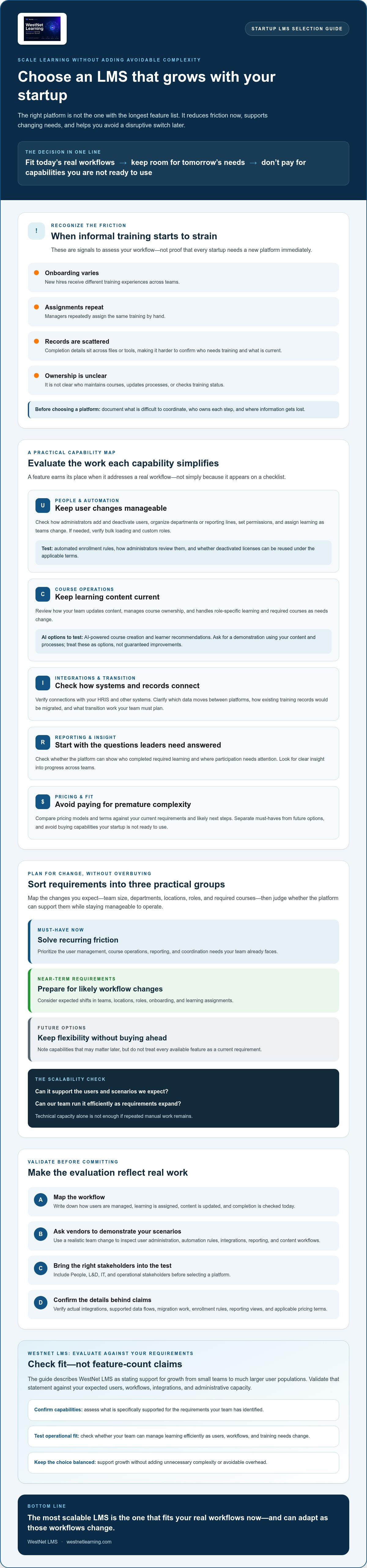
A Practical LMS Evaluation Plan for a Fast-Growing Startup
Turn your requirements into a repeatable evaluation, not a sequence of feature presentations. A clear process helps your team judge whether a scalable LMS for fast growing startups will fit actual workflows, support adoption, and accommodate likely changes without adding avoidable administration.
Involve the people who will select, manage, connect, and use the system. People or HR can outline onboarding needs, L&D can define learning workflows, IT can assess authentication and data requirements, and operational leaders can identify role-specific training. Agree on a few measures before speaking with vendors, such as whether administrators can assign required learning, whether learners can find the right content, and whether leaders can access the reports they need. These are evaluation criteria, not promised outcomes.
What should you prepare before an LMS demo?
Build a concise requirements brief. Document employee groups, onboarding steps, recurring training, and the questions your reporting needs to answer. List existing authentication, HRIS, and content requirements, then prepare realistic scenarios such as adding a group of users or changing a learner’s role and course assignments.
Share the same scenarios with each shortlisted vendor. Consistent demonstrations make comparisons more useful and reveal where a workflow needs manual intervention. For HRIS and system fit, review the provider’s LMS integration options and confirm that the specific connections your team needs are supported.
What should you validate during a trial or pilot?
Test both sides of the experience. Have an administrator run representative tasks, then ask employees from relevant roles to navigate sample content. Check authentication, language options, automated assignments, and reporting against your written requirements. Record what worked, what required assistance, and which questions remain unresolved.
Use the results to move through four stages:
- Map needs: Identify current workflows, friction points, and plausible growth scenarios.
- Shortlist: Remove platforms that miss essential requirements; compare the remaining options consistently.
- Test: Run realistic administrator and learner scenarios with representative content.
- Confirm adoption: Clarify data migration, support, service-level terms, ownership, and any training required for administrators before deciding.
Keep a question log and assign an owner to each open item. Ask vendors to confirm details in writing when they affect implementation or ongoing operations. To assess WestNet against your documented workflows, request a WestNet LMS demo.
Is WestNet LMS the Right Fit for a Growing Startup?
WestNet LMS may suit a startup seeking one platform for current training workflows and future expansion, but fit depends on your requirements. The business summary describes its AI Enhanced LMS as supporting organizations from small teams to tens of thousands of users. Treat that as a starting point for evaluation, then verify the capacity and workflows relevant to your plans directly with WestNet.
Which confirmed WestNet features may fit startup workflows?
Match capabilities to specific needs. AI-powered course creation may support teams developing learning materials, while AI learner recommendations can help connect employees with relevant content. Learning analytics and reporting may help administrators review training activity, and automated enrollment can support repeatable assignment processes. HRIS integration may be relevant if employee data needs to connect with learning administration.
Other confirmed capabilities include SSO, gamification, and support for up to 60 site languages, with users selecting a language at login. WestNet also identifies a Dedicated Client Success Manager. Ask how these features work in practice and whether they align with your setup, team responsibilities, and learner needs. A capability is valuable when it addresses a defined workflow, not simply because it appears on a checklist.
What should you confirm before choosing WestNet?
Bring your requirements to the conversation. Confirm whether your required integrations are supported, how data migration would be handled, and whether the platform’s security controls and service-level details meet your organization’s needs. Ask how configuration works and what administrator support includes, so you understand how ownership fits your operating model.
Use a demo or trial to test priority workflows, such as enrolling a new group, assigning learning, reviewing reports, and checking the learner experience. WestNet’s business summary identifies a free 30-day trial, but confirm current availability, terms, and eligibility directly before relying on it. Verify any capability or scalability claim against current product documentation, and compare the answers with your other shortlisted platforms.
If WestNet meets your must-haves and performs well against realistic scenarios, it may be a practical option for a startup looking for a scalable LMS for fast growing startups. If key integrations, migration requirements, or support expectations remain unclear, resolve them before making a commitment. Request a WestNet LMS demo to assess the platform against your team’s priorities and confirm the next steps.
Choose a Platform That Can Grow With Your Team
The right scalable LMS for fast growing startups should make today’s training easier to manage while accommodating changing teams and workflows. Compare platforms against your must-haves, test realistic administrator and learner tasks, and confirm integration, migration, and support details before you commit. Growth capacity matters, but so does practical fit.
WestNet’s confirmed capabilities include AI-Powered e-learning Creation, AI-Generated Course Recommendations, HRIS Integration, Data Migration, and Administrator Support. The business summary states that the platform can support organizations from small teams to tens of thousands of users. Validate those capabilities and the scalability details against your own requirements, and ask how they apply to your intended setup.
A demo gives your team a chance to assess the workflows that matter before making a decision. Request a WestNet LMS demo and bring your priority scenarios, integration questions, and growth plans to the conversation. With a clear evaluation process, you can choose with confidence and build a more coordinated foundation for learning as your startup grows.
Frequently Asked Questions
What is a scalable LMS for a startup?
A scalable LMS can adapt as users, administration needs, integrations, content, and reporting requirements change. For a startup, that means supporting plausible growth without forcing the team to adopt enterprise-level complexity before it’s needed. Assess likely changes, such as new departments or role-based learning, alongside current training operations. Then verify that shortlisted platforms can handle those scenarios while keeping everyday tasks manageable for administrators and learners.
When should a startup invest in an LMS?
Consider an LMS when training becomes difficult to coordinate through your current processes. Signs may include growing onboarding demands, repeated manual course assignments, inconsistent completion records, or multiple teams that need shared oversight. There’s no universal employee threshold. First document the operational problem, who it affects, and how often it occurs. Then evaluate whether an LMS can address it more effectively than your existing tools and processes.
Can a startup LMS scale as a company grows?
It can, but scalability involves more than the number of users a platform can support. Assess user administration, permissions, integrations, reporting, content workflows, and available support as requirements evolve. Ask vendors to demonstrate a realistic scenario, such as adding a department or changing administrator responsibilities. Confirm relevant product limits and service terms directly with each provider, and check that the workflows remain manageable as complexity increases.
How do I choose an LMS for a fast-growing startup?
Start by mapping immediate training needs, expected near-term growth, existing systems, and your team’s capacity to administer the platform. Compare vendors against must-haves rather than feature volume. Test representative tasks in a demo or trial, and record any gaps or unanswered questions. A scalable LMS for fast growing startups should fit current operations and accommodate likely changes, with evidence from testing rather than unverified capacity claims.
What LMS features should a startup prioritize?
Prioritize features that support real workflows, such as user management, automated enrollment, reporting, authentication, integrations, and course administration. Then consider whether AI tools, gamification, or multilingual support fit your content, learners, and training goals. For example, teams managing role-based onboarding may value automated assignments, while a multilingual workforce may need language options. Separate essential capabilities from optional ones, and verify each requirement with a vendor.
Is an AI-powered LMS suitable for a small startup?
An AI-powered LMS may suit a small startup if its capabilities address specific content, learner-support, or administrative needs. Don’t choose based on the AI label alone. Ask a vendor to demonstrate how AI-powered course creation or learner recommendations work with your intended workflows, and how administrators can review the results. Confirm which tasks the tools support, then assess their relevance to your team rather than assuming guaranteed time savings or learning outcomes.
How can a startup evaluate an LMS before buying?
Prepare representative users, sample courses, administrator tasks, integration questions, and reporting needs before a demo or trial. Test those scenarios from both administrator and learner perspectives, note any workflow gaps, and confirm data migration, support, and service-level details directly with the vendor. If a trial is offered, check its current terms and eligibility before planning your evaluation around it. Use documented evidence to compare platforms against your requirements.