What if the biggest SCORM risk isn’t whether a course launches, but whether the full learner workflow works as expected? A SCORM compliant AI LMS must fit your existing packages and support the tracking, reporting, and administration your team relies on. A compatibility label alone can’t answer those questions.
An AI-enabled LMS should do more than host legacy content. Package support, completion conditions, learner records, and AI-generated courses can behave differently across platforms, which makes migrations and evaluations difficult to compare.
This buyer’s guide shows you how to assess SCORM compatibility, package workflows, learner tracking, and integrations before choosing a platform. You’ll also see how SCORM relates to xAPI and cmi5, and how to evaluate AI course creation without assuming generated or converted content will work perfectly on the first try.
Use a representative course and learner journey to test the details that matter: launching a package, recording completion, reviewing available reports, and managing enrollment. WestNet’s AI-Powered e-learning Creation supports course creation in SCORM or xAPI, alongside Learning Analytics and Reporting. These are distinct capabilities to evaluate against your requirements.
Key Takeaways
- Assess a SCORM compliant AI LMS by testing your existing course workflow, not by relying on a compatibility label alone.
- Evaluate AI-assisted course creation separately from the delivery of existing packages.
- Compare content standards, learner tracking, administration, and AI functions to distinguish essential requirements from optional features.
- Use one course, one learner journey, and one reporting scenario to document expected launch, completion, enrollment, and results.
- Explore how WestNet LMS connects SCORM or xAPI course creation with Learning Analytics and Reporting and automated enrollment.
What Does SCORM-Compliant AI LMS Mean for Your Existing Courses?
SCORM, the Sharable Content Object Reference Model, is a set of technical standards for packaging e-learning content and enabling communication between that content and a learning management system (LMS). Organizations use SCORM packages to deliver existing courses through an LMS and connect the learner’s course experience with platform functions such as launch and progress reporting. For background on its development and specifications, see What is SCORM?
SCORM standardizes how e-learning content is packaged and communicates with an LMS; AI-powered course creation helps produce or adapt the learning content itself. The distinction matters: package compatibility doesn’t guarantee that a course is effective, that AI authoring meets your needs, or that the LMS reports the outcomes your team expects.
What does SCORM compatibility mean in an LMS?
A SCORM course package contains e-learning content designed to work within a compatible LMS. The learner launches the course through the platform, and the course and LMS exchange information according to the applicable SCORM model. The exact behavior depends on the package, its configuration, and the LMS.
Evaluate a compatibility claim against your actual course requirements. Identify the SCORM versions and package types in your library, then define how learners should launch each course and what should count as completion. Avoid relying on a general “SCORM-compatible” label alone. Testing a representative course can reveal whether the workflow meets your content and administrative needs.
How is SCORM different from xAPI and AI course creation?
SCORM and xAPI are distinct e-learning standards, not interchangeable labels. SCORM provides a structured approach for delivering course content through an LMS. xAPI is designed to record a broader range of learning experiences, including activity outside a traditional LMS. The right fit depends on the content and learning workflow you need to support.
AI authoring serves a different purpose: it helps create or develop learning materials, while standards address how content and learning activity work across systems. WestNet’s AI-Powered e-learning Creation supports course creation in SCORM or xAPI. That authoring capability is separate from verifying how an existing package behaves in an LMS. Explore AI course creation workflows to understand the authoring side in more detail.
Keep the evaluation focused. Test existing packages for compatibility, assess AI authoring against the content you want to create, and examine how the LMS presents the information your administrators need. Treat these as connected parts of the course workflow, not as one feature.
How Does a SCORM Course Move Through an AI LMS?
Evaluate the whole lifecycle, not just whether a course opens. A practical workflow moves from preparing content to making it available in the LMS, assigning it to learners, and reviewing the resulting activity. Each handoff matters: a successful launch alone won’t show whether the course behaves as intended or whether administrators can review the outcomes they need.
Test a SCORM course from learner launch through completion and reporting, then check that enrollment and administration fit the same workflow.
What should buyers test when launching a SCORM course?
Choose an existing course that represents your organization’s requirements. Before testing, document what a learner should experience: how the course launches, what counts as completion, and how any assessment should behave. Compare the observed experience with those expectations.
Keep a short validation record for the demo or trial. Include the package’s SCORM version and type, relevant browser requirements, and intended launch, completion, and assessment behavior. Review what the LMS records and makes available to administrators. A successful launch alone doesn’t prove the full workflow works.
How do AI creation and LMS administration fit together?
AI-assisted authoring and course delivery are connected, but they’re separate functions to assess. WestNet’s AI-Powered e-learning Creation supports course creation in SCORM or xAPI. That addresses development; an existing SCORM package follows its own delivery path through an LMS. Test each path against its purpose instead of treating AI creation as proof that every existing course will work as expected.
Once content is ready, administrators need to make training available to the right learners and manage enrollment. Automated enrollment can reduce repetitive assignment work, while user management supports the administrative steps around learners and courses. In a representative scenario, follow a learner from assignment to course access, then review how an administrator can examine results through Learning Analytics and Reporting. Validate the available data and completion conditions against your requirements.
For courses being adapted or converted, consider the content workflow separately from LMS delivery. WestNet’s AI course conversion tools article explores related conversion considerations. To see how the steps connect in a platform workflow, explore a WestNet LMS demo.
Which SCORM and AI LMS Requirements Should You Compare?
Build your comparison around the work the platform must support, not the length of its feature list. Separate non-negotiable requirements, such as compatibility with your existing packages, from optional capabilities that could improve future workflows. For a SCORM compliant AI LMS, this makes it easier to compare technical fit, learner experience, and administrative value consistently.
| Area | Define as a requirement | Consider as an added capability |
|---|---|---|
| Content standards | List the SCORM versions and package types used in your current course library. | Support for additional standards, such as xAPI, if it fits future learning plans. |
| Course workflow | Specify expected launch, completion, and assessment behavior for representative courses. | AI-assisted creation or conversion for new and refreshed learning content. |
| Learner tracking | Identify the learner data and reports needed for internal review or compliance records. | Broader analytics that support additional learning insights. |
| AI functions | Describe the authoring tasks AI should support and how outputs will be reviewed. | Further AI capabilities that align with your learning strategy. |
| Administration | Define enrollment, authentication, and user-management needs. | HRIS integration and other task automation to streamline connected workflows. |
Which SCORM package and tracking requirements matter?
Start with your course inventory. Record each package’s version and type, then document its completion rules and assessment behavior. Specify what administrators need to see, such as the learner outcomes required for internal review. Treat version compatibility, package handling, runtime data, and reporting behavior as items to validate against your actual courses. Don’t assume a general compatibility statement covers every package or tracking need.
Which AI and administration capabilities add practical value?
WestNet’s AI-Powered e-learning Creation supports course creation in SCORM or xAPI. Compare that authoring capability separately from the course-delivery workflow. Assess Learning Analytics and Reporting against your reporting needs, and consider how automated enrollment, authentication options, and administrator support fit daily operations. If learner or organizational data must synchronize with HR systems, include HRIS integration in your requirements. WestNet LMS integrations provide context for planning connected workflows.
Keep the core test focused: can the LMS support the packages and learner outcomes you rely on? Then weigh optional features by whether they simplify a real process or meet a defined future requirement. This keeps the comparison grounded in operational fit rather than feature count.
How Can You Evaluate a SCORM-Compliant AI LMS Before Choosing?
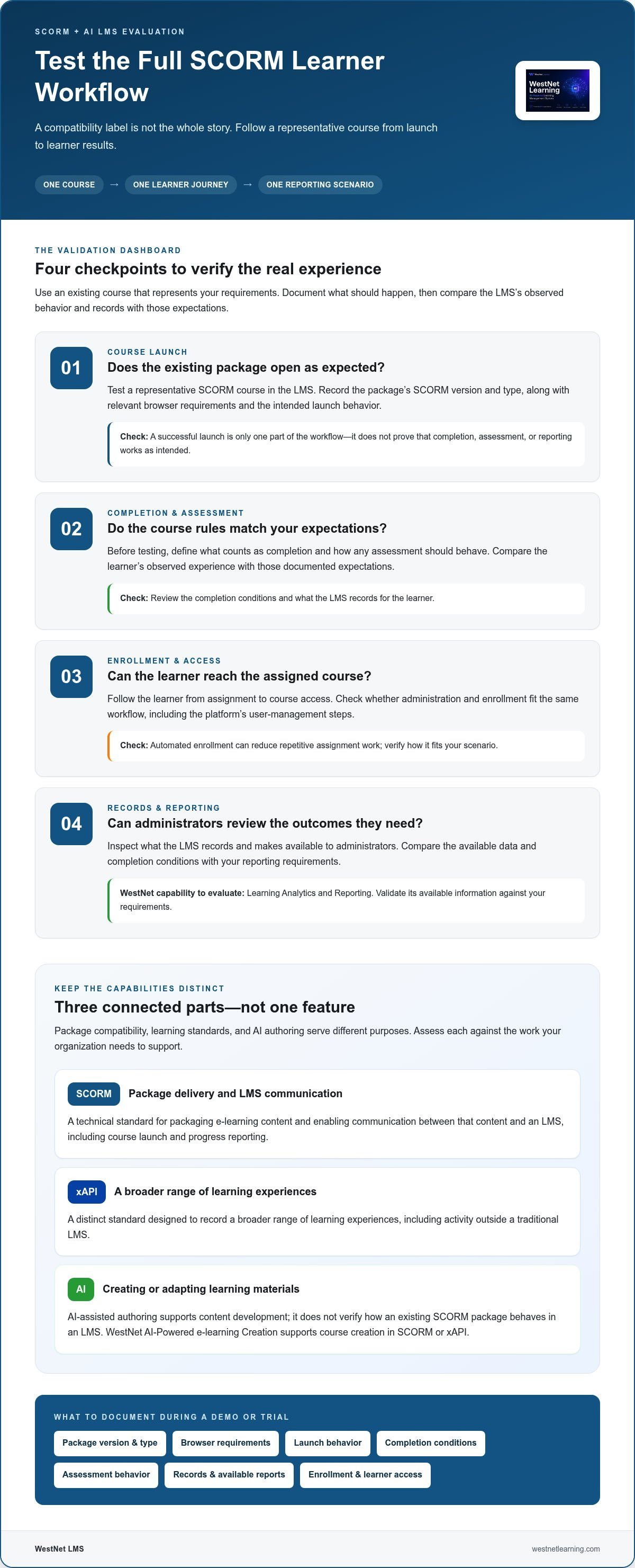
Run a practical acceptance test before making a decision. Use one existing course, one learner journey, and one reporting scenario to see how the LMS handles your requirements in context. A structured test helps distinguish a successful course launch from a workflow that also supports enrollment, completion review, and administration.
Before testing, document the outcomes you expect. Include the course launch experience, completion and assessment behavior, how learners are enrolled, and what administrators need to see in reports. Compare the results with those requirements, not with an assumption that every SCORM package behaves alike.
How do you run a representative SCORM acceptance test?
Choose a course that reflects the package type, assessment, and completion requirements your organization depends on. Record the package’s relevant version and browser needs, then use this sequence:
- Launch: Have a representative learner access the course through the expected workflow. Note whether it opens and behaves as intended.
- Complete: Follow the course’s required milestones, including assessment steps. Compare the observed completion behavior with your documented expectations.
- Review: Have an administrator examine the available learner information and reports. Check whether they support the organization’s stated review needs.
Capture results for each step. If a package behaves differently than expected, record the specific course and condition rather than treating one test as proof that all packages will behave the same way.
How do you assess rollout and integration readiness?
Test the people and data workflows alongside the course. Map how users are provisioned, how authentication works, how enrollment is assigned, and whether HRIS data needs to connect with the LMS. Include an administrator and representative learners to assess both operational tasks and the learner experience.
Use the test to identify handoffs that need attention before rollout: who assigns training, how learners gain access, and how administrators review outcomes. For connected-system planning, review LMS integration options alongside your workflow requirements.
A SCORM compliant AI LMS should be evaluated against the full course journey, not a single compatibility claim. Apply this test framework in a WestNet LMS demo to assess course workflows, learner administration, and reporting against your requirements.
How Does WestNet AI LMS Support SCORM-Ready Corporate Training?
WestNet AI Enhanced LMS brings AI-supported course creation together with LMS administration and learning analytics. Its AI-Powered e-learning Creation supports course creation in SCORM or xAPI, giving organizations a way to develop content for their learning workflows while managing training through an LMS.
For buyers assessing a SCORM compliant AI LMS, the key is to match platform capabilities to the full operating model: content development, learner access, enrollment, administration, and review of results. Course creation standards and existing package behavior are distinct evaluation points, so test your requirements rather than assuming one confirms the other.
Which WestNet features support course delivery and administration?
WestNet features address different stages of corporate training operations:
- AI-Powered e-learning Creation: Supports course creation in SCORM or xAPI, connecting AI-assisted authoring with established content standards.
- Automated enrollment: Helps streamline the assignment of training to learners as part of course administration.
- User Management and Administrator Support: Support the operational work involved in managing users and administering learning.
- Learning Analytics and Reporting: Gives administrators a platform feature for reviewing learning information. Evaluate it against the specific data and reporting outcomes your organization requires, without assuming particular SCORM runtime fields.
Authentication options and HRIS integration can also matter when planning learner access and how training fits with existing organizational systems. Map these needs alongside the course workflow to understand how administration connects end to end.
How can teams take the next step with WestNet?
Bring a representative SCORM course and written requirements to a demo. Define expected launch and completion behavior, assessment needs, enrollment steps, and the results administrators need to review. This gives your team a focused basis for evaluating platform fit and identifying package or reporting requirements to validate.
WestNet offers a 30-day free trial, so your team can evaluate the platform against its own course workflow. Decision-makers can also explore the corporate training LMS context as they consider how course creation and administration support organizational learning.
Start with your requirements, then put them into practice. Start evaluating WestNet AI LMS for your corporate training workflow.
Build a Learning Workflow That’s Ready for What’s Next
Choosing a SCORM compliant AI LMS means looking beyond a compatibility label. Define the needs of your existing courses, then test launch, completion, enrollment, and reporting with a representative learner journey. This gives your team a practical way to assess technical fit and administrative workflow before planning a transition.
Keep course creation and course delivery distinct in your evaluation. WestNet’s AI-Powered e-learning Creation supports course creation in SCORM or xAPI, while Learning Analytics and Reporting and automated enrollment support other parts of learning administration. Validate package behavior and reporting outcomes against your organization’s requirements.
A demo or the 30-day free trial can help your team evaluate the platform using its own course workflow. Bring your requirements, test a representative course, and assess how the pieces connect. Explore WestNet AI LMS and take the next step toward a more cohesive learning experience.
Frequently Asked Questions
What is a SCORM-compliant AI LMS?
A SCORM-compliant AI LMS combines learning-management capabilities with workflows for delivering SCORM-based e-learning. SCORM addresses content interoperability, while AI can support tasks such as course creation, learner recommendations, or help for learners and administrators. These solve different problems. Evaluate both independently: check the SCORM versions and course behavior your organization uses, then assess the AI capabilities you need. Test the platform against your tracking requirements before wider adoption.
Can an AI LMS work with SCORM courses created in another tool?
It may, depending on the LMS’s supported SCORM versions, package requirements, and the course’s behavior. A general compatibility label doesn’t establish that every package will work as expected. Test a representative course created with another authoring tool, then review its launch experience, completion conditions, assessment behavior, and required learner data. This practical check helps you assess fit before a wider rollout and can reveal differences a feature list alone might not show.
Does SCORM support mean an LMS tracks every learner interaction?
No. SCORM support alone doesn’t guarantee that every interaction or reporting detail your organization needs will be available. The course package, SCORM version, LMS implementation, and reporting configuration can affect what administrators can review. First define the completion and assessment data you require. Then test a representative course, complete its expected activities, and compare the resulting administrator reports with your stated needs before relying on them for internal review.
What is the difference between SCORM and xAPI in an AI LMS?
SCORM and xAPI are distinct e-learning standards with different approaches to content interoperability and learning data. The best fit depends on your existing content, the information you need, and the systems in your learning ecosystem. AI is separate from both standards. It may assist with course creation or learner support, but it doesn’t replace a standard or determine package compatibility. Assess standards and AI capabilities as separate requirements in your LMS evaluation.
How should I test SCORM compatibility before choosing an LMS?
Start with an existing course that reflects your package, assessment, and completion requirements. Have a representative learner launch it and complete the expected activities, then review the resulting information as an administrator. Compare actual behavior with a written acceptance checklist. Include relevant package versions, authentication, enrollment, and integration needs so the evaluation reflects your wider workflow. This test helps establish whether the LMS fits your requirements without assuming all packages behave alike.
Can AI create SCORM courses directly in an LMS?
Some LMS platforms provide AI-supported course creation alongside SCORM workflows, but capabilities vary. Assess how content is created, which output formats are supported, and how the resulting course is delivered and evaluated. WestNet AI LMS’s AI-Powered e-learning Creation supports course creation in SCORM or xAPI. Test a representative course against your learning and technical requirements, and assess authoring separately from the delivery of existing SCORM packages.
Is a SCORM-compliant AI LMS suitable for compliance training?
It can be suitable when the platform’s course workflow, learner administration, and reporting align with your organization’s compliance-training requirements. Define how learners should be enrolled, what completion evidence you need, and how administrators will review progress. Then test a representative course and examine the available reports against those requirements. AI may assist parts of the learning workflow, but it doesn’t replace organizational policies or compliance decisions.