The common pitfalls of LMS data migration include inaccurate or duplicated records, metadata that doesn’t map to the new system, broken workflows, insufficient testing, and weak learner adoption. Even when the transfer finishes, reports can become unreliable if course completions or user records don’t carry over correctly. A successful migration depends on validating the data and preparing people to use the new system.
It’s natural to focus first on moving courses and accounts. But the real test is whether learners can find the right content and teams can trust the reports afterward.
Learn how to identify migration risks early, check data integrity, map metadata, and plan tests that catch problems before go-live. You’ll also see how to support learner adoption and protect reporting accuracy after the transition, so the new LMS works as intended in daily training.
Key Takeaways
- Plan a phased rollout with a pilot, clear success measures, and a rollback path before switching systems.
- Combine automated record comparisons with manual reviews of critical learner histories, course launches, and reports.
- Set shared migration outcomes and assign clear ownership so business teams can validate decisions and results.
- Map source fields to destination fields, including metadata and transformation rules, to keep courses easy to find.
- Track learner engagement and reporting after launch; technical completion alone doesn’t show whether the new system is working for people.
1. How can you avoid consolidation pitfalls in LMS migrations?
Avoid consolidation problems by defining the migration’s business outcomes, inventorying data and content, and mapping dependencies before anything moves. Set goals for the next 12 to 36 months, then use them to decide what to migrate, what to retire, and how to measure success. Assign one accountable owner and agree on what “complete” means across technical teams and business stakeholders.
Create a migration document that tracks assets, dependencies, data owners, access permissions, risks, testing, and decisions. Include the pilot scope, acceptance criteria, rollback triggers, communications, and post-migration follow-up. The vendor agreement should define responsibilities, deliverables, data access and handling, validation and sign-off steps, and rollback support if acceptance criteria aren’t met.
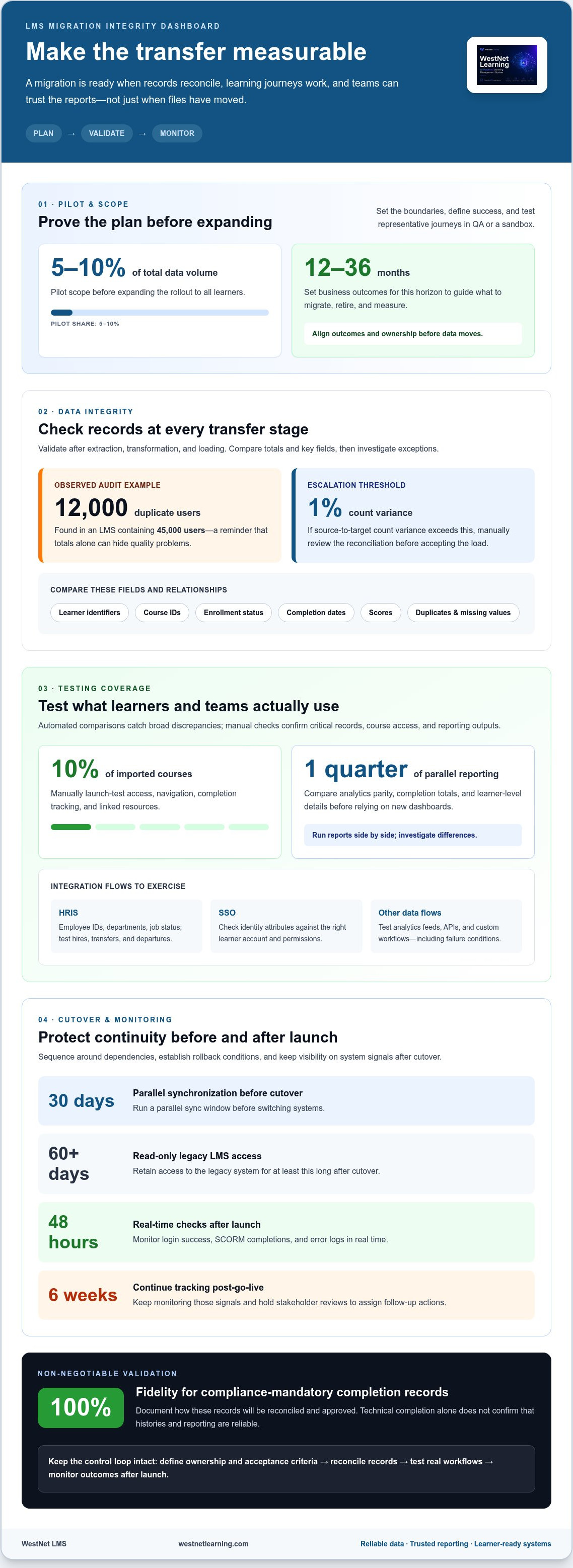
Sequence the work around dependencies. For example, configure required modules and reference data before importing courses that rely on them. Clean source records before transfer, and agree on which historical content is still useful. Compliance-mandatory completion records require 100% fidelity during migration, so document how those records will be reconciled and approved.
Use a phased rollout rather than moving every learner at once. Run a pilot covering 5–10% of total data volume, then test representative learner journeys, course launches, reports, and integrations in a QA or sandbox environment. Set a measurable success signal, such as course completion rate, and document issues before expanding the rollout. A rollback plan should specify who can pause the launch, which conditions trigger rollback, how the source LMS will be restored, and how new activity will be reconciled.
Plan security alongside data flows. Define who can access, edit, export, or remove personal information, and limit permissions to approved roles. Mishandling personal information may violate GDPR and HIPAA, according to the European Union and U.S. Department of Health and Human Services. Include data protection reviews and incident escalation in governance, rather than treating them as last-minute technical tasks.
Budget and schedule around the work, not just the platform switch. Include data cleansing, integration testing, stakeholder review, administrator training, and stabilization time; dependencies and content complexity influence the timeline. Preserve contingency capacity for rework when validation finds mismatches. Before cutover, run a 30-day parallel synchronization window, then retain read-only access to the legacy LMS for at least 60 days post-cutover.
After launch, monitor login success, SCORM completions, and error logs in real time for the first 48 hours. Continue tracking those signals for 6 weeks post-go-live, and hold stakeholder reviews to capture issues and assign follow-up actions. This closes the loop between migration completion and reliable day-to-day learning operations.
2. Automated integrity checks and manual spot checks
Validate records after extraction, transformation, and loading, not just when the transfer finishes. First, define expected counts for users, courses, enrollments, and completion records. Then compare source and destination totals using automated scripts. Document the rules, exceptions, and results so the migration team can trace discrepancies to a specific stage.
Counts alone can hide data quality issues. Compare key fields across systems, including learner identifiers, course IDs, enrollment status, completion dates, and scores. Set rules for required fields and valid relationships, such as ensuring every enrollment points to an existing user and course. Flag duplicates, missing values, and unexpected status changes for review.
A data audit at one organization identified 12,000 duplicate user records in an LMS containing 45,000 users. That kind of duplication can distort enrollments and learner histories even when total record counts appear plausible. Use automated duplicate checks against stable identifiers, then manually review affected accounts before merging or removing records.
Test integrations as complete data flows, not isolated connections. For an HRIS, define how employee IDs, departments, and job status map to LMS fields, then test hires, transfers, and departures. For SSO, verify that identity attributes match the correct learner account and permissions. Apply the same mapping discipline to analytics feeds, APIs, and custom workflows.
Integration testing should cover successful updates and failure conditions. For example, test what happens when an HRIS field is blank or a user’s department changes. Confirm whether the LMS updates the learner profile, enrollment, or reporting category as intended. Document system limitations and custom rules, because a field that doesn’t transfer can affect downstream reports.
Pair automated comparisons with manual spot checks of critical records. Select records across learner groups, course types, completion statuses, and reporting periods. If source-to-target count variance exceeds 1%, manually review the reconciliation before accepting the load. Also manually launch-test 10% of imported courses, checking access, navigation, completion tracking, and linked resources.
Finally, compare reporting outputs, not just database fields. Run parallel reporting for one quarter to check analytics parity, including completion totals and learner-level details. Investigate differences before relying on the new dashboards for decisions. If HR data feeds or identity mapping are central to the migration, HRIS and LMS data workflows can help frame the integration requirements.
3. How do you mitigate data migration risks?
Start by defining the business outcomes the learning system must support over the next 12 to 36 months. Translate those outcomes into measures, such as accurate compliance reporting, preserved learner histories, or uninterrupted access to required training. Assign an owner to each measure, then document who will validate it and what evidence counts as acceptance. Shared expectations give technical teams and business stakeholders a clear basis for decisions.
Assessment results, certificates, and completion histories can lose their connection to the correct learner, course, or date during migration. Missing scores may invalidate reports, while duplicate accounts can split a learner’s record. Compliance-mandatory completion records require 100% fidelity during migration, so define reconciliation rules and preserve source evidence for those records.
Involve business users and subject-matter experts before finalizing transformation rules. They understand how teams interpret course statuses, assessment attempts, and certificate expiration fields. Ask them to review sample records in a staging environment, then test realistic tasks, such as finding a certificate or confirming a required course completion. Their knowledge can reveal anomalies that technical checks miss.
Use user acceptance testing with migrated data, not demonstration data. Give end users realistic day-to-day scenarios, including accessing assigned learning and reviewing completion histories. Record each issue, its owner, and the decision required. Stakeholders should formally sign off on results. If a department can’t approve them, fix the underlying problem and run another test cycle.
Reduce business disruption by testing the full workflow in development or staging before cutover. Identify activities that depend on the legacy LMS, such as course access, enrollment updates, or compliance reports. Schedule the transition around those dependencies and communicate any temporary process changes. A clear escalation path helps employees and managers report access or record problems promptly.
When validation finds an anomaly, trace it to the source instead of applying a one-off correction. A blank field might originate in the source data, a transformation rule, or a target-system requirement. Fix the cause, reload affected records, and repeat the relevant test. This keeps corrections consistent and prevents the same defect from undermining later reports.
Make outcomes visible after launch. Review stakeholder feedback, unresolved defects, and business measures together, then assign follow-up actions. For example, if a department can’t reconcile completion histories with its required training report, investigate field mapping and report logic before calling the migration complete. A shared definition of success connects technical delivery to business value.
4. Metadata mapping and content discoverability
Learner profiles, roles, enrollments, assessment results, completion histories, and course metadata are especially vulnerable to mapping errors. A field may transfer but become unusable if its meaning or format changes. For example, mapping a completion status to the wrong target value may hide completed training from a learner’s history or a manager’s report.
To map and clean data before migration, inventory source fields, remove duplicates, resolve inconsistent values, and document each source-to-target relationship. Record field names, data types, transformation rules, and the owner responsible for decisions. Review the mapping with technical staff and business users, then test it on a subset of records before a full conversion cycle.
Account and access data need the same discipline. Map each learner identifier to one destination account, and define how source roles translate into target roles and permissions. Compare sample users across departments to catch an employee mistakenly mapped as an administrator or an enrollment assigned to the wrong group. Verify access rules alongside the migrated records.
Define how to handle required fields. If the destination LMS requires a field that the source lacks, obtain the value from another data source or deliberately leave it blank. Don’t fill gaps with assumptions: an invented department or competency tag can misdirect assignments and reporting. Before loading, confirm that the target system has the reference data and configured modules needed to accept incoming records.
Metadata also controls whether learners can discover relevant courses. Map titles, descriptions, categories, competency tags, language, and audience fields to the destination taxonomy. The article recommends at least 90% completeness for key metadata fields before cutover. In one illustrative case, course starts dropped by 20% after competency tags weren’t mapped; recovering the tags required three weeks of manual work.
Map application dependencies as well as individual fields. A focused three-day dependency-mapping exercise can identify related applications and migration order. For example, determine whether an HRIS supplies department codes that drive LMS audiences, or whether an analytics tool relies on course identifiers. Confirm each upstream and downstream relationship before changing infrastructure or loading dependent data.
Close the mapping loop with comparison tests. Import a representative subset, then compare source and target values for field accuracy, record relationships, and course search results. Ask business users to find courses by category or competency, and review records where results differ. Correct transformation rules at the source of the mismatch, then repeat the subset test before full migration.
5. Learner adoption and post-migration reporting
A completed transfer doesn’t prove learners can use the new LMS or leaders can trust its reports. Define functional measures for both outcomes before launch. Track login success, course starts, completions, support requests, and report totals, then compare them with the organization’s pre-migration baseline. Assign an owner to each measure and define what to do when results diverge.
Plan for changes to learner routines, not just the interface. A new navigation structure, enrollment process, or notification pattern can make familiar tasks harder. Explain where learners will sign in, how they’ll find assigned courses, and where to get help. Ask managers to reinforce the new process in team meetings, with instructions tailored to actual learner journeys.
Automate routine communications and enrollment steps where the LMS supports them. For example, test whether a new hire receives the right course assignment and notification after their profile becomes active. Confirm that department transfers update learning assignments correctly. These functional checks reveal whether the new system supports real work, rather than simply displaying imported records.
Reporting needs its own adoption plan. Compare key dashboards and exports with trusted source-system reports, including learner-level details and completion totals. Keep definitions consistent: a course started, passed, or completed must mean the same thing across systems. If leaders interpret a metric differently after migration, decision-making can suffer even when the underlying data transferred successfully.
Watch for delayed effects. The gap between technical milestones and expected business benefits may become apparent between months four and eight. People-related challenges may emerge between months four and ten as routines and expectations change. Schedule stakeholder reviews throughout that period, examining login patterns, enrollment issues, learner feedback, and report discrepancies together.
One illustrative data-cleanup case lost credibility for two quarters after completions and certifications were split across duplicate accounts. Prevent this by giving learners a clear way to report missing history, then assigning each case to an owner who can trace the account, enrollment, and completion record. Track resolution patterns to spot recurring mapping or process problems, not just individual complaints.
Make post-launch reporting actionable. Review adoption and data measures together, identify the teams or workflows behind any gap, and assign follow-up work. A dashboard showing low course starts may point to access friction, unclear assignments, or discoverability issues. Use the findings to refine communications and workflows, then measure whether the adjustment changes learner behavior. For a structured approach to these steps, explore this LMS adoption framework.
WestNet LMS: WestNet AI LMS
WestNet LMS offers WestNet AI LMS for organizations ready to bring corporate learning into a connected platform. Its analytics and gamification support personalized employee development, while LMS Integrations connect learning with existing tools. These capabilities are relevant when planning a new LMS environment and aligning learning workflows with business systems. The AI Course Creator supports automated course creation, and Off-the-Shelf eCourses provide ready-made learning content. Together, these offerings can help organizations build a learning setup that fits their training needs, whether they’re supporting a small team or a much larger workforce. To explore how WestNet AI LMS fits your migration goals, contact WestNet LMS or visit westnetlearning.com.
Turn migration lessons into a stronger learning system
A migration is more than a technical handoff. It’s an opportunity to shape how learning supports your organization’s next stage of growth. Treat the transition as an ongoing capability: keep ownership clear, listen to learner feedback, and use reporting to guide future decisions.
The common pitfalls of LMS data migration are easier to manage when your platform, content, and connected systems support the same learning goals. WestNet AI LMS brings corporate learning together with analytics and gamification. AI Course Creator supports course creation, while LMS Integrations connect learning with existing tools. Choose the capabilities that match your priorities and migration plans.
Ready to explore a practical next step for your learning environment? Contact WestNet LMS to discuss your goals. A thoughtful transition can create a more connected foundation for employee development.
Frequently Asked Questions
What can go wrong?
A migration can appear complete while learners encounter problems that a basic data transfer didn’t reveal. Date formats may shift, course bookmarks may disappear, or learners may be unable to resume a partially completed module. These failures often surface only during real use. Test representative learner journeys across devices, roles, and course formats, then provide a clear channel for reporting issues.
What is LMS migration?
LMS migration is the transfer of learning content, learner information, and related records from one learning management system to another. It may also involve reconnecting identity, HR, and reporting systems so training operations continue in the new environment. The work isn’t simply copying files: organizations must decide what to retain, how each data field should behave, and which workflows need to keep working after the transition.
How can you avoid consolidation pitfalls in LMS migrations?
Before merging LMS environments, create a decision record for each source system: who owns it, which learner groups use it, and what business process depends on it. Keep a crosswalk between legacy and destination identifiers so support teams can trace a learner’s history later. Agree on decommissioning criteria with system owners, including how archived content and unresolved records will be handled.
How do you measure success after a data migration?
Measure whether the new environment supports real learning tasks, not just whether records loaded. Ask learners to find assigned training, resume a course, and retrieve a completion certificate. Ask managers to answer a practical question using their reports, such as identifying employees with outstanding required learning. Compare results with the organization’s intended process, and categorize support requests to identify recurring friction.
How do you mitigate data migration risks?
Maintain a risk register that links each identified failure mode to its business impact, owner, detection method, and response. For example, if a failed identity sync could block learner access, document how administrators will identify affected accounts and restore access. Review risks at decision points, including test approval and cutover readiness. This makes unresolved concerns visible instead of burying them in technical notes.
What are the most common LMS data migration pitfalls?
The common pitfalls of LMS data migration include treating the project as a file transfer, overlooking inconsistent source records, and assuming old workflows will behave identically in the destination system. Another frequent trap is declaring success when technical checks pass without confirming that learners and managers can complete their tasks. Assign business owners to validate outcomes, and record decisions about data that won’t move.
How can course content, SCORM packages, and learning records be validated after migration?
Validate course behavior as well as file presence. Open each representative package, test navigation, bookmarking, assessment scoring, and completion reporting. If a destination requires a different format, test SCORM 1.2 content in the required format, such as SCORM 2004 or xAPI. For learning records, compare learner-level histories and investigate mismatches in dates, scores, or status before relying on certificates or reports.
How do LMS integrations and APIs complicate data migration?
Integrations add dependencies because systems may use different field names, identifiers, update rules, and authentication methods. An API can accept a record but map it incorrectly, or repeat an event after a failed response. Document which system owns each field, whether data flows one way or both ways, and how errors are logged. Then test key events, such as a new hire or department change, end to end.