The best corporate LMS systems aren’t simply the ones with the longest feature lists. Choose a platform that supports how employees learn, connects with existing tools, and makes professional development part of everyday work. That fit matters as much as the software itself.
It’s easy to focus on course libraries, dashboards, and price when comparing employee training platforms. But a system should also help people build relevant skills and see a path for development at work. Without that connection, even a capable platform can become another tool employees rarely use.
This comparison will help you assess LMS options for employee training, features, integrations, pricing, and professional development. You’ll see how different platforms serve different needs, what to consider when comparing them, and how to identify the right fit for your organization. Use the decision guide to move from a broad shortlist to a clearer choice.
Key Takeaways
- Match an LMS to your learners, training goals, and the way your organization delivers learning.
- Compare platforms on their ability to support employees and external audiences, not just a single team.
- Assess features and integrations by how well they connect training with your existing workflows.
- Look beyond the subscription model when evaluating costs; account for implementation, administration, and growth needs.
- Prioritize professional development pathways that help employees build relevant skills and see room to grow.
What is Learning Management System (LMS) software?
An enterprise LMS organizes employee learning in one digital system. Compare each option against your learners, training objectives, reporting needs, and course delivery model.
Enterprise LMS Definition
An enterprise learning management system assigns courses, records progress, and gives administrators a shared view of workforce training. Unlike a single-purpose course library, it can support different teams and learning objectives in one learning environment. For example, a company can set separate learning paths for new hires and managers, then review completion through reports and analytics.
LMS Benefits
The benefits of learning management systems depend on the work they make easier. A centralized course experience can replace scattered files, while progress records help managers see which employees completed assigned learning. Compare systems by the outcomes they support: onboarding, compliance knowledge, role-based development, or consistent training across locations. Weigh pricing against these operational needs.
AI-Powered Personalized Skills Development
AI-powered learning can tailor course recommendations or activities to an employee’s role, progress, and development goals. That differs from a fixed course sequence, where every learner receives the same material. Assess whether recommendations connect to practical objectives, such as helping a new team lead build coaching skills, and whether administrators can use analytics to understand participation and progress.
Skills Intelligence and Learning Paths
Skills intelligence organizes information about employees’ capabilities and the skills their roles require. A skills-based learning path uses that information to guide development, such as moving an employee from foundational product knowledge toward advanced customer support. Unlike a general course catalog, this approach connects learning to defined skills and role expectations. Clear skill profiles also help managers identify relevant courses for individual development.
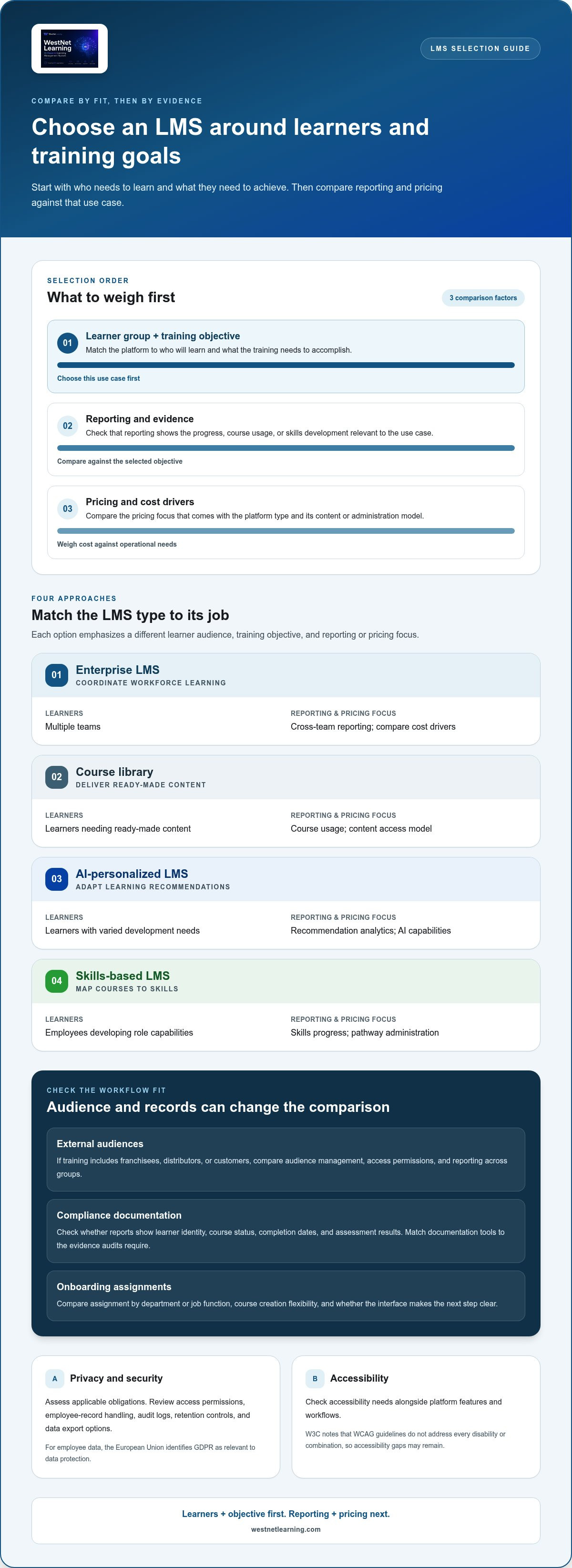
| Option | Learners | Training objective | Reporting and pricing focus |
|---|---|---|---|
| Enterprise LMS | Multiple teams | Coordinate workforce learning | Cross-team reporting; compare cost drivers |
| Course library | Learners needing ready-made content | Deliver existing courses | Course usage; content access model |
| AI-personalized LMS | Learners with varied development needs | Adapt learning recommendations | Recommendation analytics; AI capabilities |
| Skills-based LMS | Employees developing role capabilities | Map courses to skills | Skills progress; pathway administration |
Choose by matching the learner group and training objective first, then compare reporting and pricing against that use case. For connected learning workflows, an enterprise LMS API guide explains how system connections can support data exchange.
For employee data, the European Union identifies GDPR as relevant to data protection. The World Wide Web Consortium (W3C) notes that WCAG guidelines do not address every disability or combination, so accessibility gaps may remain.
What are the best LMS training platforms for employees?
The best-fit platform depends on who needs training and what each audience must learn. Compare platforms by audience access, course creation, documentation, and the interface employees use.
Multi-Audience Training
Multi-audience training serves employees alongside external groups, such as franchisees, distributors, or customers. An extended-enterprise LMS separates these audiences while supporting learning through one platform. For example, employees might receive role-specific onboarding while distributors access product courses. Compare audience management, access permissions, and reporting across groups. This differs from an employee-only system, where external learner access is not a central selection criterion.
Compliance Training and Audit Documentation
Compliance platforms organize required courses and records, helping administrators document assigned training and completion. Compare whether reports can show learner identity, course status, completion dates, and assessment results. For example, a safety course may need a clear record of who completed it and when. FDA 21 CFR Part 11 is identified as a regulatory requirement for compliance training, so regulated organizations should evaluate how their training records support applicable obligations.
Choose documentation tools that match the evidence your audits require. A platform focused on compliance differs from a general course library because traceable records and repeatable assignment workflows are central to its use.
Employee Onboarding Use Cases
Onboarding platforms organize learning around a new employee’s role and early tasks. A practical sequence might introduce company policies, product knowledge, and team procedures, then direct employees to role-specific courses. Compare how easily administrators assign learning by department or job function, and whether the interface makes the next step clear. Unlike ongoing development, onboarding prioritizes a consistent start for each new hire.
Industry needs shape onboarding content. A manufacturer may prioritize equipment procedures, while a financial services team may focus on internal processes and compliance topics. These examples show why course creation and assignment flexibility matter across enterprises.
Security, Privacy, and Data Compliance
In the United States, assess a platform against your organization’s applicable privacy, security, and industry obligations rather than relying on one universal standard. Review access permissions, how employee records are handled, audit logs, retention controls, and data export options. The European Union identifies GDPR as relevant to safeguarding employee data, though U.S. organizations should also map their own obligations and training context.
Compare how each platform documents these controls and supports administrator oversight. Security and privacy differ from course features: they govern who can access learner data, how records are managed, and what evidence remains available.
For a focused evaluation, compare compliance training LMS workflows against the documentation and assignment needs of your workforce.
Corporate LMS features and integrations
Evaluate features by how they support daily training operations, from account setup to course reporting. The main risks are disconnected data, confusing workflows, and integration work that adds administrative steps instead of removing them.
HRIS and Identity-Provider Integrations
An HRIS integration can use employee records to support LMS account and organization management. An identity-provider connection can link access to an organization’s sign-in process. Together, these integrations can reduce duplicate data entry, but mismatched department names or outdated employee records can lead to incorrect assignments. Map the source of each data field before choosing an integration approach.
Review the user-provisioning flow with a real example, such as a new employee joining the sales team. Confirm which system supplies their role, how that role maps to a learning group, and how a departure changes access. A corporate LMS with HRIS integration can connect employee data and learning workflows.
Content Authoring Integrations
Content authoring integrations connect course creation tools with LMS delivery. They matter when training teams build or update material outside the LMS, then need to publish it and track learner activity in one place. Compare supported file formats, how updates are handled, and how course completions feed into reporting. For example, a policy revision should result in the correct course version being assigned.
Also assess who maintains each connection. If course authors and LMS administrators work in separate systems, a clear publishing structure can reduce version confusion. Test a sample course from creation through learner access before scaling the workflow.
Scalability and Integrations
Scalability means the platform can support changing learner volumes and training operations. Assess whether existing integrations can support additional teams, locations, or external audiences without creating separate manual processes.
Integration quality involves more than seamless sign-in. Review data ownership, error handling, reporting consistency, and the steps administrators take when a connection fails. An intuitive interface helps employees find assigned learning, while a clear structure helps administrators manage groups and courses as usage expands.
Before adoption, document the systems involved, the data each one supplies, and who is responsible for resolving errors. Compare those requirements with the LMS’s integration options, then test a representative workflow, such as employee provisioning followed by course assignment and completion reporting. This review can reveal operational gaps before they affect a wider rollout.
LMS pricing models
Corporate LMS costs depend on the billing model, learner count, and capabilities an organization needs. Vendors commonly structure plans around users, usage, feature tiers, or negotiated subscriptions; a specific platform’s price depends on the case and is given after a quote request, with user volume, integrations, setup, and support shaping the total.
Total Cost of Ownership
Total cost of ownership combines the subscription with the work and resources needed to operate an LMS. Compare proposals over the same period and include implementation, data migration, integrations, content creation, administration, and support. These costs may be handled differently across plans, so review each line item rather than comparing subscription labels alone.
For example, one platform may include integrations in its subscription, while another may treat setup as a separate project. Ask how charges are triggered, whether they recur, and which features require a higher tier. This helps distinguish a low entry price from a plan that better supports personalized learning or advanced reporting as needs expand.
Build a comparison sheet with consistent assumptions: learner volume, required features, integration scope, and support needs. Include the internal time required to manage course assignments and platform administration. Organizations can then compare the total operating commitment, not just the first invoice. A guide to LMS pricing models can help structure that review.
Free Plans
A free plan can help a small team explore basic course delivery before committing to a paid subscription. Compare its learner limits, reporting, customization, integrations, and support with the requirements of the intended rollout. A plan that enables a simple pilot may not provide the administration or advanced analytics needed across multiple departments.
Use a trial or free tier to test a defined workflow, such as assigning a course and reviewing completion. Record which capabilities are essential, then check whether the paid option includes them. The key difference is scope: free access can support an initial evaluation, while larger programs may require more control, integrations, and structured reporting.
Corporate LMS vendors may bill per registered learner, per active user, by subscription tier, or through a negotiated enterprise agreement. Before choosing, request a complete breakdown of setup, migration, integrations, support, content creation, and any usage-based charges. Compare each item rather than assuming it will be billed separately.
Compare platforms using the same learner assumptions and feature requirements. A low-cost plan can become a poor fit if it excludes a required integration, while a higher tier may bundle capabilities your team won’t use. Select the model that aligns billing with participation and the training structure you plan to maintain.
Employee retention and professional development
Professional development can shape whether employees see a future with their organization. In a survey finding included in this comparison, 94% of employees said they would stay longer if their company offered more development opportunities. A learning management system can make those opportunities visible, organized, and connected to employee goals.
Make growth practical. Identify the skills needed for each role, then connect them to courses, practice, and milestones. For example, a customer support employee could build product knowledge before progressing to advanced issue resolution. Managers can discuss that pathway during performance conversations and use learning progress to choose relevant next steps.
Structured onboarding is another important retention touchpoint. A new employee’s plan can combine company policies, team procedures, role-specific knowledge, and manager check-ins. The LMS provides a consistent sequence, while managers connect each course to the employee’s responsibilities.
Use learning management systems to make development more than a completion record. A dashboard showing course progress can help employees and managers identify what’s finished and what comes next. Pair that view with career conversations: an employee interested in team leadership might follow courses in communication, coaching, and operational planning. The learning path should reflect the role and the person’s goals.
Training also has a business case. Companies offering comprehensive training have 218% higher income per employee and 24% higher profit margins than companies with less comprehensive training, according to the supplied market facts. These figures do not establish that training alone caused the difference. They do show why leaders should connect workforce development with business priorities and track progress against clear objectives.
Build a practical development cycle:
- Identify: Define role skills and employee goals, such as stronger product knowledge.
- Assign: Match courses and learning activities to the identified gap.
- Discuss: Review course progress during manager check-ins and agree on a next step.
- Refine: Update the learning path when responsibilities or goals change.
Keep the employee experience clear. If a promotion path requires several capabilities, present them as connected stages rather than an unstructured course list. For example, an aspiring supervisor could move from peer collaboration to coaching practice, then into team planning. This gives employees a visible development route and managers a concrete basis for discussing progress.
To connect employee learning with performance goals, explore LMS performance tracking and identify which progress signals can guide development conversations.
WestNet LMS: WestNet AI LMS
WestNet LMS offers WestNet AI LMS, an AI-powered learning management system for employee training and development. It combines AI-powered course creation, advanced analytics and reporting, and gamification, and supports integration with existing tools. The platform can scale from small teams to tens of thousands of users.
Turn to WestNet LMS when your training needs call for a learning platform and practical course options. AI Course Creator supports automated course creation, while Off-the-Shelf eCourses provide ready-made learning content. LMS Integrations connect training with existing tools. Together, these offerings support course development, content access, and system connectivity within your training strategy.
To explore how WestNet LMS may fit your employee training needs, contact WestNet LMS.
Turn your LMS decision into a learning strategy
Make the decision actionable: identify a workforce priority, define what employee progress would look like, and map the learning experience that could support it. This gives your team a practical basis for evaluating corporate LMS systems beyond feature lists, while keeping professional development connected to real business needs.
WestNet LMS offers WestNet AI LMS, AI Course Creator, and LMS Integrations for organizations shaping that approach. Consider how course creation and connected learning workflows could fit your priorities, then use those needs to guide your evaluation.
A focused conversation can help you explore how those offerings align with your training goals and existing tools. Contact WestNet LMS to discuss your next step. Build a learning strategy your employees can grow with.
Frequently Asked Questions
How does an LMS work?
An LMS organizes digital training from assignment through completion tracking. An administrator selects a course, assigns it to a learner group, and sets the required activity. Employees access the course, complete its materials or assessment, and their progress appears in the system. For example, a manager can assign a product update to a sales team and use completion records to identify who still needs to finish.
Is AI-driven personalization only for large companies?
No. AI-driven personalization can be useful for a small team as well as a large organization. A small support team, for example, could receive learning suggestions based on job responsibilities or completed courses. The value depends on whether recommendations fit employees’ goals and available learning content, not simply on workforce size. Start with one role or learning objective, then assess whether the suggested content is relevant.
What is Enterprise Learning?
Enterprise learning is an organization’s coordinated approach to building knowledge and skills across roles, teams, and business priorities. It can include onboarding, role development, leadership learning, and required training. For example, a company may connect a product launch with learning for sales, customer support, and operations. This approach aligns learning activities with shared objectives while allowing each function to address its own work.
What is a Corporate LMS?
A corporate LMS is software organizations use to manage employee learning. It gives training administrators a place to organize courses, assign learning, and track participation. Unlike a personal study app, it supports workplace processes such as role-based assignments and manager oversight. For example, a company can use it to provide a consistent course experience for employees joining different departments.
Which LMS is best for rapid deployment?
The best fit for rapid deployment is a platform that lets your team start with its simplest training use case and expand from there. Review how it handles existing course uploads, learner account setup, and routine administration. A team launching product training, for example, could begin with a ready-made course and a defined learner group. Compare the steps required to publish, assign, and monitor that course.
What is a corporate LMS and what features should businesses look for?
A corporate LMS manages workplace learning, and its features should match the tasks your team needs to complete. Look for course assignment, learner progress records, useful reporting, and connections to relevant business tools. For example, a training administrator may need to assign different materials to managers and frontline employees, then review completion by role. A clear learner interface also helps employees find assigned work.
What are the best corporate LMS platforms in 2026?
There isn’t one best platform for every organization in 2026; the right choice depends on training goals, learners, workflows, and content needs. Shortlist options against a specific use case, such as onboarding distributed teams or coordinating recurring compliance courses. Then compare how each handles learner access, course management, integrations, reporting, and administration. A practical trial with representative users can reveal fit more clearly than feature lists alone.
How do leading corporate LMS systems compare on features, integrations, and ease of use?
Compare platforms using the same sample workflow, such as adding a learner, assigning a course, and reviewing completion. For features, note which steps the system supports directly. For integrations, assess whether relevant employee or sign-in data can connect to existing tools. For ease of use, observe whether an employee can locate the assignment and whether an administrator can complete routine tasks without unnecessary navigation.