The biggest course library doesn’t necessarily make the strongest learning system. A corporate training platform gives an organization a central way to deliver, manage, and measure employee learning. The right choice connects training with the skills people need, while making it easier to create courses, track progress, and support compliance.
A platform should do more than host courses, especially when training serves employees with different roles, goals, and experience levels. This comparison explains how options differ in AI course creation, analytics, security, compliance, and personalized development. Use the criteria and decision guidance to match platform capabilities with your organization’s learning priorities.
Key Takeaways
- Compare learning platforms by how well their course delivery, integrations, and reporting capabilities fit your organization’s needs.
- Assess AI course creation and recommendations for their role in making learning content more relevant and easier to develop.
- Use analytics and compliance dashboards to monitor learner progress and identify where training needs attention.
- Evaluate security controls, encryption, ISO and GDPR considerations, and single sign-on against your organization’s requirements.
- Prioritize skills development that connects learning pathways to employee roles and evolving business needs.
What are the leading employee training platforms?
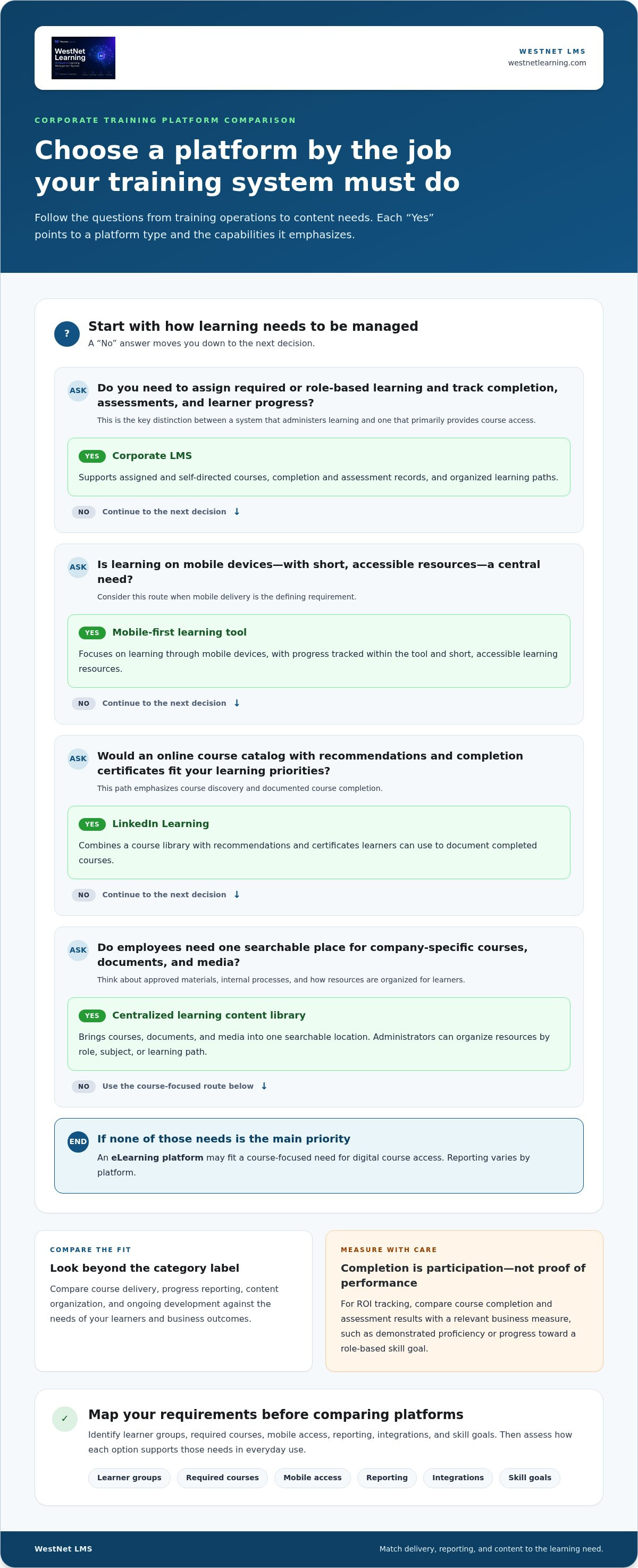
A learning management system (LMS) organizes employee training, courses, and progress in one system. The right fit depends on whether your priority is managing courses, helping learners find content, or developing measurable skills.
Corporate eLearning Platforms and LMSs
Corporate eLearning platforms deliver digital courses, while an LMS also assigns learning, tracks completion, and reports results. That distinction matters: a content-first library helps employees find material, while an LMS gives administrators tools to structure required and role-based learning. G2 returns upwards of 950 results for “learning management system,” so compare platforms by function, not category label.
LinkedIn Learning combines a course library with recommendations and certificates that learners can use to document completed courses. Other LMS options focus more on assigning and administering internal learning. Assess whether a platform supports ongoing learning beyond assigned modules, including development paths that connect courses with employee roles.
Course Delivery and ROI Tracking
Course delivery tools distribute learning through assigned courses, self-directed content, or mobile access. An LMS also records enrollment, completion, and learner progress, giving managers a clearer view of participation than a folder of training files. Automated assignments can help teams manage recurring training without manually tracking each learner.
ROI tracking means connecting learning activity to a defined business outcome. Record course completion and assessment results, then compare them with a relevant measure, such as demonstrated proficiency or progress toward a role-based skill goal. Completion shows participation, not whether training improved performance.
Centralized Learning Content Libraries
A centralized library brings courses, documents, and media into one searchable location. Employees can find approved materials without relying on scattered folders or old email attachments. Administrators can organize resources by role, subject, or learning path, helping employees progress from an individual course to ongoing development.
Compare libraries by content format, search and categorization, and how easily administrators can update materials. A broad course catalog may prioritize discovery and recommendations, while an internal library may focus on company-specific processes and resources. Look for a platform that supports both discovery and structured training, rather than assuming every learner needs the same course list.
Choose a corporate training platform by mapping your needs first: identify learner groups, required courses, mobile access, reporting, integrations, and skill goals. Then compare how each option supports those needs in everyday use, not just in its feature list.
The pricing model and number of active users shape the total, so compare pricing structures with expected participation.
Look for course assignment, progress reporting, searchable content, mobile access, and tools for ongoing learning. For example, an AI course creation tool can help teams develop course content, while an LMS organizes delivery and learner records.
| Option | Course delivery | Progress and ROI | Content and development |
|---|---|---|---|
| Corporate LMS | Assigned and self-directed courses | Completion and assessment records | Organized learning paths |
| eLearning platform | Digital course access | Varies by platform | Course-focused learning |
| Content library | Browseable course catalog | Often focused on participation | Centralized media and courses |
| LinkedIn Learning | Online courses and recommendations | Course completion records | Certificates and catalog discovery |
| Mobile-first learning tool | Learning on mobile devices | Progress tracked within the tool | Short, accessible learning resources |
Choose the option whose delivery, reporting, and content model best match your learners and business outcomes.
AI-powered course creation and recommendations
AI can accelerate course creation and help match learning materials with employee needs. Its value depends on the source content, review process, and learning goals behind each recommendation. Treat it as a development aid, not a substitute for subject-matter expertise.
Start course creation with approved materials, such as process documents, product information, or onboarding checklists. An AI tool can help structure source material into a draft course, which learning teams can review for accuracy, tone, and relevance. For example, a new-hire course could organize role expectations, key procedures, and knowledge checks into a clear sequence. Have a person review the content before publishing, especially when it is sensitive or frequently updated.
Recommendations work best when they connect an employee’s role, learning history, or development goals to relevant courses. A sales employee might be directed toward product knowledge, while a new manager could receive leadership content. Compare how each system explains or organizes recommendations, and give employees a way to discover additional learning beyond assigned modules. A useful AI course creation workflow keeps recommendations aligned with current company priorities.
Coursera for Business offers courses and credentials for professional development. Compare its catalog-based approach with tools for creating internal courses: a catalog can surface external subject matter, while internal creation can address company-specific procedures. Credentials can document completed learning, but course selection should still reflect the skills required for each role.
Pre-built compliance libraries can help businesses deploy ready-made material for recurring topics, reducing the need to create every course from scratch. Internal courses can explain organization-specific processes. Review library coverage, update practices, and assignment management. Some learning systems combine ready-made content with internal materials, so a learning path can include both general knowledge and company procedures.
For onboarding, map the employee’s learning journey before creating content. Group essential policies, role-specific tools, and team procedures into a sequence, then identify where a manager or colleague needs to provide context. Use AI-assisted creation to draft or reorganize source material, but validate each step against actual onboarding practices. This makes course creation more structured and gives new hires a clear path through required learning.
To compare options, test a realistic task: create or assign an onboarding course, find a relevant library item, and see how recommendations appear to a learner. This shows whether AI supports your team’s workflow, rather than simply appearing in a feature list.
Training analytics and compliance dashboards
Analytics show whether training programs reach employees and where progress stalls. Compare dashboards, custom reports, integrations, and automation to see how each supports internal decisions.
Training Analytics and Progress Tracking
Training analytics show enrollment, completion, assessment results, and overdue learning. A compliance dashboard, for example, can show which employees completed assigned safety training and which teams have outstanding courses. These measures help administrators focus follow-up, but completion data alone doesn’t show whether employees can apply what they learned.
Compare how easily managers can filter progress by department, role, location, or course. A department lead’s view should highlight their team’s required learning, while an administrator may need organization-wide results. Learner-friendly dashboards can also show employees their assigned courses and progress without requiring a status update from a manager.
Custom Reporting
Custom reporting lets teams select fields and groups that match a business question. For example, an L&D manager could compare assessment results across onboarding programs, while a compliance lead could review course completion by location. Unlike a standard dashboard with preset indicators, custom reports help teams investigate specific patterns in training data.
Before choosing, define the decision each report should support. Identify the required fields, such as learner, course, completion status, assessment result, or department. Check whether users can save and share report views with relevant managers. A report is useful when its fields lead to an action, such as assigning a refresher course to a team with low assessment results.
Automation and Reporting
Automation connects training activity with repeatable actions. An LMS might assign onboarding courses when a new employee record enters an HRIS, then send reminders for incomplete learning. Compare these workflows with dashboards: automation moves a process forward, while reporting shows activity and gaps.
Integration with HRIS, CRM, and analytics tools can connect course records with employee roles or business processes. For example, an HRIS may provide job status and department, while a CRM can help organize sales training by team. Assess which system owns each field, how records are matched, and how errors are handled. Clear data mapping helps keep reports consistent across tools.
Evaluate one training program by defining the completion signal, choosing report fields, and mapping the data source. Then test an automated assignment and confirm that the dashboard reflects the employee’s progress. This practical sequence shows whether analytics, integration, and automation work together rather than as disconnected features.
Data security, encryption, ISO and GDPR compliance, and SSO
Assess security controls, access management, compliance records, and accessibility together. Key risks include unauthorized access, inaccurate completion records, integration errors, and learning materials some employees can’t use.
Security, Encryption, and SSO
Encryption helps protect data, while Single Sign-On (SSO) connects access to an organization’s identity system. They address different needs: encryption protects information, while SSO streamlines authentication and supports centralized account controls. Map user roles before evaluating access, then consider how administrators manage account changes and which records support security reviews.
For example, an employee who leaves the organization should no longer have access to internal training records. A connected identity system can make account management more consistent, but poorly mapped roles or integration errors can create access gaps. Include security and IT teams in the review, and compare documented controls with company policies.
ISO and GDPR Compliance
ISO and GDPR address different aspects of organizational assurance and personal-data handling. Treat certification and privacy practices as evidence to assess, not interchangeable labels. Review the scope of any claimed certification and how learner records are collected, used, retained, and accessed. This matters when training data includes employee identities, course histories, or assessment results.
Compliance tracking also depends on accurate records. Check whether administrators can retrieve completion history and supporting reports for internal reviews. If a workforce includes people with disabilities, assess whether course content and platform workflows are accessible. The European Accessibility Act has applied since June 28, 2025, and standard EN 301 549 maps to WCAG 2.1 level AA.
Compliance training is most useful when assigned to relevant employee groups and recorded clearly. For example, a company can organize a required course by role, track completions, and retain reports for internal review. A dashboard should make outstanding learning visible without confusing course assignment with verified understanding. Assessment results and completion records provide different evidence, so decide which each program needs.
Accessibility affects whether employees can complete training, not just whether a platform offers a reporting feature. Review a sample course using keyboard navigation, captions, readable text, and screen-reader tools. Standard EN 301 549 maps to WCAG 2.1 level AA, providing a reference point for accessibility reviews. Include course content and platform interfaces in the same assessment.
Before adoption, document who can view learner records, how account access is managed, and which reports compliance teams need. Test SSO with representative user roles, then review whether HRIS or other integrations transfer accurate employee details. These steps can expose mismatches early and help keep compliance reporting consistent across systems.
AI-powered skills development and personalization
Personalized learning connects employee development to role requirements, demonstrated skills, and future business needs. AI can help identify relevant courses and suggest learning paths, but the quality of those suggestions depends on the information organizations use. In the 2024 Annual L&D Benchmark Report, 49% of employees said AI was advancing faster than their company’s training. That gap makes deliberate, skills-focused implementation essential.
Start with a clear skills framework. Define the capabilities required for each role, then map current learning resources to them. For example, a customer support team might need product knowledge, communication, and troubleshooting skills. An LMS can organize courses around those goals, while AI can help recommend relevant next steps based on available learning records and role information.
Personalization should support employee choice, not just automate assignments. A new manager might receive leadership material, while an experienced employee preparing for a different role could follow an upskilling path. Recommendations are more useful when they reflect stated career interests as well as role expectations. Help employees understand why a course appears and give them a way to explore other relevant options.
Use a focused implementation process:
- Define target skills: Connect each learning path to a role or business priority.
- Map learning resources: Match courses, assessments, and practical activities to those skills.
- Set recommendation inputs: Decide which role, learning history, and employee goals inform suggestions.
- Review recommendations: Have subject-matter experts check relevance and accuracy before rollout.
- Refine the pathway: Use learner progress and feedback to improve the next learning experience.
Keep human judgment in the loop. AI can recommend a course, but managers and learning teams understand context such as changing responsibilities or a new project. For example, an employee may need a short product update rather than a full introductory course. Reviewing recommendations helps prevent outdated content from shaping development plans.
Measure whether personalization is useful through meaningful indicators, such as course engagement, assessment performance, and progress toward defined skills. These signals can show where learners are progressing or where a pathway needs revision. They don’t prove skill mastery on their own, so pair learning data with relevant work-based evidence, such as a completed task or a manager-observed capability.
Build a skills-driven approach around clear role goals, relevant learning, and regular review. Explore this strategic guide to enterprise AI learning platforms for practical considerations when shaping that approach.
WestNet LMS: WestNet AI LMS
WestNet LMS offers WestNet AI LMS for organizations seeking a connected approach to employee learning. The platform combines automated course creation, analytics, and gamification to support personalized development, while LMS Integrations connect learning with existing tools.
Turn to WestNet AI LMS when fragmented training processes make it difficult to create courses, track learning progress, or support employee development at scale. The AI Course Creator supports course creation, and Off-the-Shelf eCourses provide ready-made learning content. Together, these offerings bring course development and delivery into a more connected system.
Explore how WestNet AI LMS can support your training goals at westnetlearning.com.
Turn learning priorities into a practical next step
Choose a corporate training platform with a clear picture of what should change for learners and the organization. Before implementation, define the skills to develop, the learning experience employees need, and the indicators that will show progress. This gives your team a practical basis for aligning platform capabilities with workforce priorities.
WestNet LMS offers WestNet AI LMS, AI Course Creator, and LMS Integrations. These offerings help organizations connect course creation, learning management, and existing workplace tools. Start by identifying your main training challenge, such as creating learning content or aligning systems, then consider which capabilities fit that priority.
Build momentum by turning that priority into a focused conversation about your organization’s training needs. Contact WestNet LMS to discuss your needs and take the next step toward a more connected learning strategy.
Frequently Asked Questions
What is a Corporate LMS?
A Corporate LMS is software organizations use to assign, organize, and record employee learning. For example, a company could assign different onboarding courses to sales and customer support teams, then keep each team’s learning history in one system. An LMS can also support ongoing development by organizing learning around job roles, required knowledge, or employee goals, rather than treating each course as a standalone event.
Can LMS platforms support multi-audience training?
Yes. An LMS can serve different audiences by organizing learners into groups and assigning relevant content by role, department, or organization. For example, a company might provide product training to employees and a separate learning path for partner organizations. Before choosing a system, map the audiences, their access needs, and the content each group should see. Separate assignments and reports help keep each program relevant.
Is AI-driven personalization only for large companies?
No. AI-driven personalization can support small teams as well as large organizations. A smaller business might use recommendations to direct new employees toward role-specific learning, while a larger workforce may use them across varied job functions. WestNet AI LMS is designed to scale from small teams to tens of thousands of users. Start with clear learning goals and relevant learner information, whatever your company’s size.
What is an eLearning Platform?
An eLearning platform is a digital environment for accessing and completing online learning. It may focus on delivering a course library, while an LMS typically adds administration features such as learner management and course assignment. For instance, a team seeking professional development courses may value a broad catalog, while an organization managing structured internal training may also need enrollment and progress records.
What is training software?
Training software is a broad term for digital tools that help deliver, manage, or measure learning. It can include an LMS, course authoring tools, assessment systems, or virtual classrooms. A company creating internal product training might use authoring software to build course materials, then use an LMS to assign courses and record learner activity. Identify the task first, since different tools address different training needs.
Which LMS is best for rapid deployment?
The best fit for rapid deployment is one that matches your existing content, user data, and integration needs. Preloaded courses and straightforward user imports can simplify an initial rollout, while HRIS integration and SSO can add implementation work. Enterprise LMS implementations typically take 4 to 12 weeks, particularly when HRIS integration and SSO are involved. WestNet AI LMS can be live in just minutes after sign-up.
What are the best corporate training platforms for U.S. businesses in 2026?
There isn’t one best option for every U.S. business in 2026; the right shortlist depends on the learning model. Consider WestNet AI LMS for AI-supported learning management, LinkedIn Learning or Coursera for Business for catalog-based learning, and other LMS options for structured course administration. Compare each against your content strategy, learner groups, integrations, and reporting requirements. Treat platform names as starting points, not a universal ranking.
How do leading corporate training platforms compare on features and pricing?
Compare platforms by course creation, content libraries, learner management, reporting, integrations, and security controls. Some emphasize ready-made catalogs, while others focus on internal course administration or AI-supported workflows. Pricing may use active-user or flat-rate models. The price depends on the case and is provided after a quote request; cost factors include user count, selected capabilities, content needs, and integrations. Compare the pricing model alongside the features your organization will use.