The most feature-rich learning and development software isn’t automatically the best fit for your organization. A learning and development platform brings employee training and learning activity into a digital system; depending on its design, it can also support compliance tracking, personalized learning, and course creation.
Learning management systems (LMSs), learning experience platforms (LXPs), and AI-enabled tools are often grouped together, but they serve different purposes. An LMS typically organizes and tracks training, while an LXP emphasizes discovery and personalized learning. AI features can help create or tailor content, but their value depends on how well they support your goals and workflows.
This comparison explains how these options differ and what to consider when evaluating compliance needs, scalability, integrations, analytics, and course creation. You’ll also see a practical way to compare 12 platform options and narrow the field to the capabilities your organization needs now, with room to support future growth.
Key Takeaways
- Match platform capabilities to your training goals, then use reporting to see where learners are progressing and where support may be needed.
- Assess collaborative authoring workflows to understand how teams can create, review, and maintain courses together.
- For compliance and growth, compare completion records, audit trails, reporting, integrations, and the ability to support a changing workforce.
- Choose between an LMS and an LXP by weighing structured training and tracking against content discovery and personalized learning.
- Evaluate AI tools by how they support course creation and personalization, then consider whether they fit your organization’s existing learning processes.
What Is a Learning and Development Platform?
Learning and development software organizes employee training, tracks participation, and turns learning activity into useful insights. Its reporting can connect individual progress with business priorities such as onboarding, compliance, and skills development.
Learning Analytics and Progress Tracking
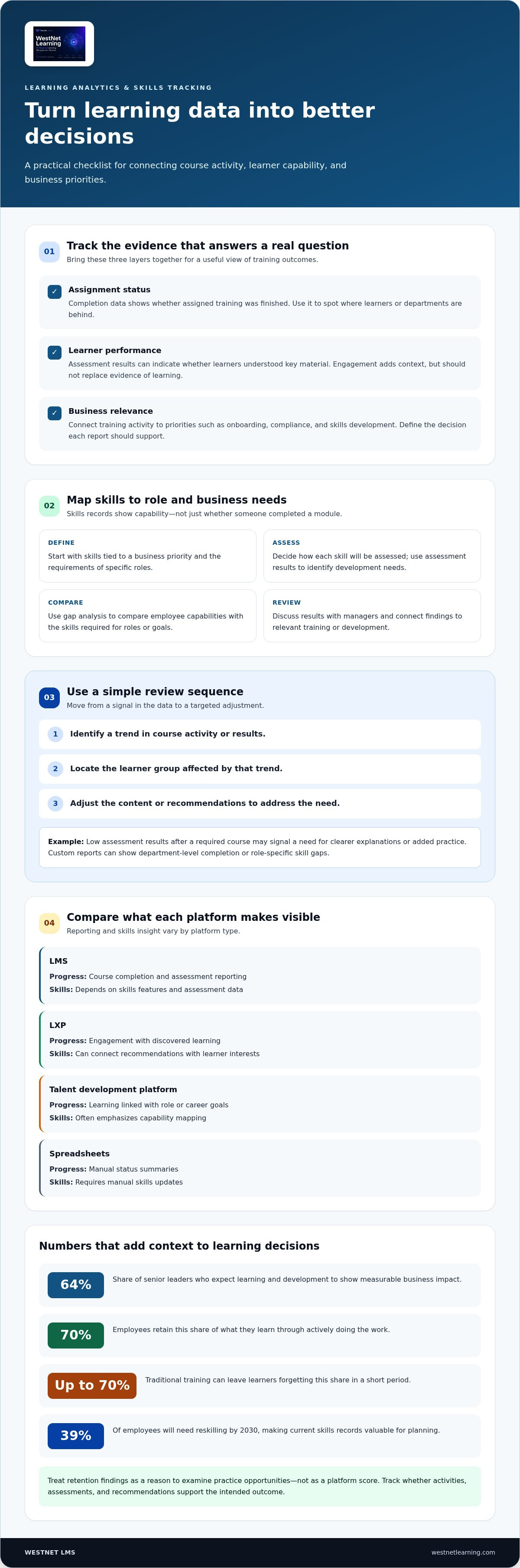
Learning analytics bring course activity, assessment results, and completion records together to show learner progress. For example, a manager can compare completion across departments and identify where employees stop or struggle. A course catalog, by contrast, lists available learning but may not show how learners use it. Look for dashboards that support reporting by role, team, course, and time period.
Choose measures that answer a practical question. Completion data shows whether assigned training was finished; assessment results can indicate whether learners understood key material. Engagement signals, such as participation in activities, add context but shouldn’t replace evidence of learning. A 64% share of senior leaders expect learning and development to show measurable business impact, so define the decision each report should support.
Skills Tracking and Gap Analysis
Skills tracking maps employee capabilities against the skills required for specific roles or business goals. Gap analysis compares the two, helping learning teams identify where training may be useful. Unlike course-progress reports, skills records focus on capability, not simply whether someone completed a module. For example, a team can map communication skills to role expectations and use assessment results to identify development needs.
Keep the process connected to work. Start with the skills tied to a business priority, define how each skill will be assessed, and review the results with managers. Nearly half of learning and talent development professionals say employees lack skills needed to execute business strategy effectively. Also, 39% of employees will need reskilling by 2030, making current skills records valuable for planning.
Training analytics become more actionable when teams combine three layers: assignment status, learner performance, and business relevance. A broader view of employee training and development can help connect course activity with workforce goals. Use a simple review sequence: identify a trend, locate the affected learner group, then adjust content or recommendations. For example, low assessment results after a required course may call for clearer explanations or added practice. Custom reports matter when leaders need different views, such as department-level completion or role-specific skill gaps.
Retention figures also help frame learning choices. Employees retain 70% of what they learn through actively doing the work, while traditional training can leave learners forgetting up to 70% in a short period. Treat those findings as a reason to examine practice opportunities, not as a platform score. Track whether activities, assessments, and recommendations support the intended outcome.
| Platform option | Progress visibility | Skills insight |
|---|---|---|
| LMS | Course completion and assessment reporting | Depends on skills features and assessment data |
| LXP | Engagement with discovered learning | Can connect recommendations with learner interests |
| Talent development platform | Learning linked with role or career goals | Often emphasizes capability mapping |
| Spreadsheets | Manual status summaries | Requires manual skills updates |
Choose software with reporting that connects learner activity to the decisions your team needs to make.
What is a learning management system?
A learning management system (LMS) assigns, delivers, and records employee training in one platform. Its course tools help teams manage learning paths, publish updates, and track progress from assignment through completion.
Collaborative Course Authoring
Collaborative authoring lets subject matter experts, editors, and learning teams build courses together. A safety specialist, for example, can provide accurate procedures while an editor structures lessons and assessments. Unlike individual authoring tools, shared workflows emphasize review, version control, and coordinated updates. Before publication, define who drafts, reviews, and approves each course to prevent conflicting edits.
Course management connects approved materials with delivery. Teams can organize content by role, topic, or learning path, then update a source course when procedures change. For example, a revised customer service process can replace outdated guidance across assigned courses. Check for reusable content, review permissions, and clear ownership, especially when several departments contribute expertise.
AI-Assisted Content Authoring
AI-assisted authoring can turn source material into draft lessons, summaries, or assessment questions. Unlike collaborative authoring, it accelerates content production rather than coordinating human review. Start with approved reference material, generate a draft, and route it to a subject expert. Review every generated answer for accuracy, tone, and alignment with the intended skills.
AI can also help adapt courses into different learning paths or recommend content based on learner needs. Recommendations are useful only when they reflect accurate source material and relevant goals. Compare tools by the inputs they accept, the editing control they provide, and how teams review outputs. An AI Course Creator can support this workflow by helping develop training content from source material.
Microlearning and Course Authoring
Microlearning breaks a broader topic into short, focused learning units. A product team, for example, could create separate lessons on setup, troubleshooting, and customer questions. A longer course may instead group several topics into one sequence. Use microlearning for specific tasks employees need to revisit, and connect each unit to a broader learning path.
Authoring tools should make it straightforward to assemble text, scenarios, knowledge checks, and other learning activities. Before building a course, outline its objective, audience, and evidence of progress. Then select a format that fits the material: a procedure may suit a concise lesson, while a complex decision may need branching practice. Explore the AI Course Creator when AI-supported course drafting is part of your authoring workflow.
Compliance, scalability, and platform selection
Compare platforms against your compliance workflows, workforce growth, and data controls. For regulated organizations, prioritize certification tracking, audit trails, and training-completion reporting.
Automated Onboarding and Compliance Training
Automated onboarding assigns role-based courses when an employee joins or changes teams. A new finance employee, for example, can receive policy training alongside department-specific learning. Compliance automation adds due dates, completion records, and reminders. Unlike general onboarding, compliance training needs clear evidence of who completed each assigned course and when.
Map the workflow before comparing platforms: identify the employee group, assign required content, and define the records managers need. Structured onboarding can connect initial orientation with later compliance courses instead of treating each as a separate task. Check whether administrators can update assignments when roles or procedures change.
Employee Skills and Compliance Training
Compliance courses explain required procedures, while skills development builds employees’ ability to apply them. A data-handling course, for example, can explain approved practices, while scenario-based exercises help employees choose an appropriate response. These goals call for different learning activities, even when they share a learning path.
Connect each course to its intended outcome. For a safety topic, pair policy content with a practical scenario, then review assessment results for knowledge gaps. This makes compliance training more relevant to daily work without confusing course completion with demonstrated skill. Keep required records separate from broader development progress.
Compliance Training Administration
Administration includes assignment rules, content updates, completion records, and evidence retrieval. In a regulated organization, an audit trail can show course changes and learner activity, while completion reports summarize status by department or role. These capabilities go beyond basic course delivery by supporting oversight and documentation.
Assess whether administrators can filter reports, correct employee assignments, and find records for a defined group. A manager may need completion status for a specific team, for example, while a compliance lead reviews course versions. Assign clear ownership for content accuracy, learner records, and periodic reviews.
Scalability involves more than adding learners. Review how platforms handle growing course libraries, changing roles, multiple departments, and integrations with existing employee systems. A growing organization may need centralized reporting alongside relevant views for local managers. Test a representative workflow, such as assigning onboarding and compliance courses across separate teams, before deciding whether a platform fits.
Data controls matter during selection, too. Compare how platforms protect employee information and support privacy requirements such as GDPR or CCPA. Map the data collected during enrollment, assessments, and reporting, then identify who can access each record. The right choice connects compliance evidence, employee learning, and administrative oversight without creating disconnected processes.
Learning management systems and learning experience platforms
The best learning platforms in 2026 depend on whether your priority is structured employee training, personalized discovery, or both. L&D software can integrate with an HRIS and other business tools, connecting employee records, course assignments, and completion data through supported integrations.
Learning Management Systems
An LMS organizes courses, assignments, assessments, and completion tracking. It suits organizations that need consistent delivery, such as assigning the same product training to sales employees across departments. Compared with an LXP, an LMS typically emphasizes administration and structured learning paths over content discovery. Review reporting, permissions, and course management alongside support for your training workflows.
An LXP centers the learner experience, helping employees discover content through recommendations, search, or curated collections. It can complement formal courses with self-directed learning, such as a manager finding coaching resources beyond assigned training. The distinction matters: an LXP may prioritize engagement, while an LMS prioritizes assignment and tracking. Some platforms combine both approaches, so compare workflows rather than labels.
Enterprise and SMB Platform Suitability
Enterprise suitability depends on coordination across business units, employee groups, and existing systems. A multinational team, for example, may need role-based learning paths and centralized reporting with local administration. A small business may value straightforward course assignment and progress visibility without complex workflows. Organization size helps frame requirements, but the key question is how many distinct processes the platform must support.
Map your use case before comparing capabilities. List employee groups, required training, content owners, reporting needs, and integrations. Then test a representative journey, such as onboarding an employee and assigning role-specific courses. This shows whether the platform’s administration suits your team’s capacity. For an enterprise, examine configuration and governance; for a smaller organization, assess how easily routine training can be managed.
HRIS and Business Tool Integrations
Integrations connect learning workflows with systems that already hold employee or business data. An HRIS connection may support employee updates and course assignments, while single sign-on can simplify access. Unlike standalone platform capabilities, integrations can reduce duplicate administration across tools. Identify which data should move between systems, who owns it, and how updates affect enrollment.
Build an integration checklist around real workflows. For example, consider whether a department change should update learning assignments, or whether completion data needs to appear in another system. Review connection methods, data fields, permissions, and error handling. An HRIS-integrated LMS workflow can show how employee records and learning processes connect.
Apply the same selection criteria to each platform: employee experience, administration, reporting, content delivery, integration fit, and scalability. Weigh each against a real task, such as tracking onboarding or offering optional development courses. Then compare how an LMS, LXP, or combined platform handles that task. The best fit is the one that matches your priorities without adding unnecessary complexity.
AI-assisted course creation and personalization
AI can speed up course drafting and help tailor learning to employee needs. Its value depends on source quality, human review, and how well recommendations relate to actual roles. Treat AI as an authoring aid, not a substitute for subject expertise. A learning management system provides the delivery and tracking context for AI-created materials.
Start with a defined content task. For example, provide an approved policy document and request a lesson outline, plain-language summary, or draft knowledge check. Compare every generated statement with the source. Remove unsupported details, correct terminology, and confirm that the course teaches the intended procedure. This makes accuracy a deliberate part of the review process.
Personalization should serve a clear learning goal. A platform might use role, prior progress, or assessment results to recommend relevant material. A new manager, for example, could receive coaching resources, while an experienced manager sees content addressing a different skill gap. Evaluate how recommendations are generated and whether learning teams can adjust them.
Mobile delivery matters, too. Review AI-generated lessons on a phone as well as a desktop. Check that headings, interactions, and knowledge checks work on a smaller screen. A concise scenario about handling a customer complaint may suit mobile, while a dense policy document may need clearer sections and supporting examples.
Feedback can improve both generated content and the learner experience. Use assessment results, course comments, and completion patterns to find unclear explanations. Repeated incorrect answers to one question, for instance, may point to confusing wording or a missing example. Revise the lesson, then review subsequent feedback. Keep learner responses separate from evidence that the content is accurate.
During evaluation, compare authoring controls, source handling, editing options, review workflows, and output formats. Ask how teams can preserve approved terminology, update generated drafts, and manage versions. Test every platform with the same course: use an approved procedure, generate a draft lesson, and assess the review controls. This shows how well each system fits your authoring process.
AI can also support scenario and simulation development. Simulation-based training can improve knowledge retention by as much as 60%. Use that finding to assess whether practice suits the learning objective, not as a promised result for every course. A strong scenario asks learners to make a realistic decision and gives feedback tied to that choice.
Use a consistent review sequence: define the skill, select an approved source, generate a draft, validate it with a subject expert, and test delivery on mobile. Then use learner feedback to refine the material. Explore AI-powered course authoring as part of your evaluation of a more connected content workflow.
WestNet LMS: WestNet AI LMS
WestNet LMS offers WestNet AI LMS for organizations managing corporate training in one platform. It combines automated course creation, advanced analytics, and gamification to personalize employee development, and can scale from small teams to tens of thousands of users.
Use the AI Course Creator to support course development, or choose Off-the-Shelf eCourses for ready-made training content. LMS Integrations connect learning with existing tools and help align training workflows with your organization’s systems. These offerings fit organizations focused on course creation, reporting, and coordinated delivery.
Contact WestNet LMS to discuss how its learning tools can support your training goals.
Turn Your Learning Strategy Into a Practical Next Step
Move from comparing features to defining the learning workflow you want to improve. Choose a priority, such as course creation or connecting training with existing tools, then identify who will use the system and how you will measure progress. This gives your team a practical basis for evaluating learning and development software and aligning the platform with organizational goals.
WestNet AI LMS brings AI-powered learning management together with analytics and gamification. The AI Course Creator supports course development, while LMS Integrations connect learning with existing tools. Consider these capabilities when you want to bring training workflows into a more cohesive system.
Set your priorities, identify the workflows that matter most, and explore how they could fit your organization’s learning approach. Contact WestNet LMS to discuss your training goals and potential next steps. A clear starting point can help your organization build a more connected path for employee development.
Frequently Asked Questions
How does an LMS work?
An LMS links learner accounts to training content and records activity as employees use it. An administrator might assign a security course to new hires, set a completion requirement, and review assessment results. When an employee changes roles, the learning plan can be updated to reflect new responsibilities. Clear ownership of course updates and user records helps keep assignments relevant as teams change.
What Is Training Software?
Training software is a digital tool that helps organizations deliver, manage, or evaluate employee learning. It may include an LMS for assigned courses, authoring tools for building lessons, or systems for practice and feedback. For example, a company could use an online course to teach product procedures, followed by a quiz to identify topics that need clarification.
What Makes a Great L&D Platform?
A strong L&D platform fits an organization’s learning workflows and makes useful information accessible to the right people. A training administrator may need to update a course, while a manager needs to understand team progress. Assess ease of use, content management, reporting, integrations, and learner access against real tasks. A short, scenario-based evaluation can reveal friction in the workflow.
What is an LMS for Employee Training?
An LMS for employee training is a system organizations use to assign and manage workforce learning. A retail manager, for example, could assign a product update to store employees and review their assessment results. The platform can also help organize training as people join teams or take on new duties. Define employee groups and learning tasks first, then match them to platform workflows.
What is learning and development software?
Learning and development software is a category of digital tools for employee learning and skills development. It can include systems for course delivery, content creation, learner recommendations, and progress reporting. A company might use one platform to manage required training and create learning resources, or connect specialized tools for different needs. The right setup depends on how training is planned, delivered, and reviewed.
What features should L&D software include?
Prioritize features that support your actual training process: user management, course assignment, authoring, assessment, reporting, and connections with existing tools. A team onboarding employees, for example, may need role-based assignments and a way to monitor completion. If employees use different locations or devices, assess how they access courses. Build a shortlist around essential workflows before comparing optional features such as recommendations or gamification.
How do L&D platforms compare with learning management systems?
L&D platform is a broad category, while an LMS is one type of learning system within it. An LMS commonly focuses on organizing and administering training; broader L&D platforms may also combine content authoring, personalization, or skills development. For example, an organization seeking both required-course administration and learning recommendations may compare integrated platforms with an LMS connected to separate tools.
What are the best L&D software options for small businesses?
The best fit for a small business is the option that handles its essential training without adding unnecessary administrative work. Start with needs such as onboarding, compliance assignments, course creation, and progress visibility. WestNet AI LMS can scale from small teams to tens of thousands of users. Organizations can use its free 30-day trial or request a demo to evaluate how the platform fits their workflows.