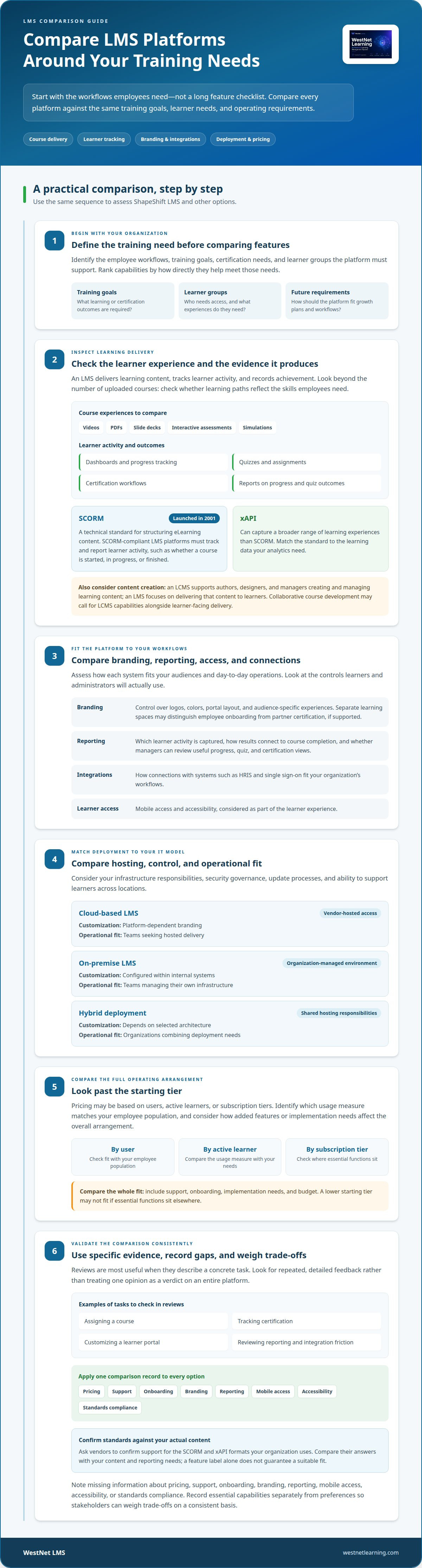
To compare ShapeShift LMS with other learning management systems, start with your organization’s training needs, not a feature checklist. Assess how each platform delivers courses, supports customization and integrations, and fits your learners, workflows, and growth plans. Include SCORM and xAPI compatibility if those standards matter to your content and learning data.
A long feature list can distract from the real question: how well will the platform support your organization’s training? This comparison covers course delivery, branding, reporting, mobile access, accessibility, and connections with systems such as HRIS and single sign-on. It also explains when an LMS fits, when content-management or instructor-led training tools may be relevant, and which capabilities to prioritize. Use these criteria to focus your decision on your learners, operating model, and future requirements.
Key Takeaways
- Start with your organization’s training goals, then rank the platform capabilities that support them.
- Compare course delivery options, learner progress tracking, and compatibility with content standards such as SCORM and xAPI.
- Assess how branding, reporting, and integrations with systems such as HRIS and single sign-on fit your workflows.
- Match the system to your training model: digital learning, content development, and instructor-led logistics can call for different tools.
- Use the comparison criteria to identify which platform best fits your learners today and your organization’s plans ahead.
Choosing a platform to meet organizational goals
To compare ShapeShift LMS with other options, identify the workflows employees need first, then assess deployment, learning features, and customization. Prioritize capabilities that support your training, certification, and the groups your organization serves.
LMS Features and Pricing Models
Compare the platform’s course delivery, learner tracking, reporting, branding, and integrations against your requirements. Pricing models may charge by user, active learner, or subscription tier, so identify which usage measure matches your employee population. Also consider how added features or implementation needs affect the overall arrangement. A platform with a lower starting tier may not fit if essential functions sit elsewhere. This LMS pricing comparison explains why model structure matters alongside included capabilities.
ShapeShift LMS Alternatives and User Reviews
Reviews are most useful when they describe specific tasks, such as assigning a course, tracking certification, or customizing a learner portal. Look for repeated, detailed feedback rather than treating one opinion as a verdict on an entire platform. Assess course access, reporting, integration friction, branding controls, and deployment constraints against your own requirements. These are evaluation criteria, not claims about a particular review consensus.
Deployment affects how much infrastructure your team manages. Cloud-based platforms are hosted by the vendor and accessed online, while on-premise systems run in an organization’s own environment. A hybrid approach combines elements of both. Compare these options with your IT operating model, security governance, update processes, and ability to support learners across locations.
| Option | Hosting and control | Customization | Operational fit |
|---|---|---|---|
| Cloud-based LMS | Vendor-hosted access | Platform-dependent branding | Teams seeking hosted delivery |
| On-premise LMS | Organization-managed environment | Configured within internal systems | Teams managing their own infrastructure |
| Hybrid deployment | Shared hosting responsibilities | Depends on selected architecture | Organizations combining deployment needs |
Branding can influence whether learners recognize and use a portal. Compare control over logos, colors, portal layout, and audience-specific experiences. For example, separate learning spaces can distinguish employee onboarding from partner certification, if the platform supports that structure.
Before deciding, map each deployment option against your required features, support arrangements, implementation needs, and budget. Choose a platform whose hosting approach and design controls align with your systems and employee training goals.
Evaluate each option against the needs of its users, then compare pricing, support, onboarding, branding, reporting, mobile access, accessibility, and standards compliance. Treat these as connected decision points: a platform may fit the budget but still demand support or onboarding your team cannot readily provide. Check that branding and reporting serve the audiences and goals you identified, and include mobile access and accessibility in your assessment of the learner experience. Record which capabilities are essential and which are preferences.
Ask vendors to confirm support for the SCORM and xAPI formats your organization uses. Compare their answers with your content and reporting needs rather than assuming a feature label guarantees a suitable fit. Apply the same criteria to every option, noting any gaps in information about pricing, support, onboarding, branding, reporting, mobile access, accessibility, or standards compliance. This gives stakeholders a consistent basis for weighing trade-offs and identifying follow-up questions before deciding.
Core LMS features and course delivery
An LMS hosts and delivers learning content, then tracks learner activity and achievement. To compare ShapeShift LMS with other platforms, assess the learner experience alongside reporting, assessment, and course compatibility. Check whether the platform makes it clear who each course is for and how employees progress through training.
Course delivery may include videos, PDFs, slide decks, interactive assessments, and simulations. Learner dashboards, progress tracking, quizzes, assignments, and certification workflows help organize those experiences. For example, a compliance course might combine a video lesson with a quiz and a completion record. Check that learning paths reflect the skills employees need, rather than simply counting uploaded courses.
Content standards affect how courses communicate with an LMS. SCORM is a technical standard for structuring eLearning content, launched in 2001; SCORM-compliant LMS platforms must track and report learner activity. That activity may show whether a course is started, in progress, or finished. The xAPI specification can capture a broader range of learning experiences than SCORM. Match the standard to the learning data your analytics need.
When evaluating ShapeShift LMS, examine the reports available, the learner activity they capture, and how results connect to course completion. Compare whether managers can review progress, quiz outcomes, and certification status in useful views. These criteria help identify the evidence each platform provides without assuming specific product features.
A learning content management system, or LCMS, supports authors, designers, and managers as they create and manage learning content. An LMS focuses on delivering that content to learners. Organizations that develop courses collaboratively may need LCMS capabilities alongside learner-facing delivery, so consider this distinction when comparing platform scope.
A training management system, or TMS, coordinates instructor-led training logistics, while an LMS focuses on digital learning. TMS features may include enrollment, waitlists, session prerequisites, instructor assignments, credentials, and workload management. Prioritize these functions when classroom sessions are central to your training operation, not simply because a platform lists many features.
Prioritize features by mapping each one to a learner or administrator task: assign a course, complete an assessment, review progress, or record certification. Then assess scalability across audiences and groups, plus the analytics needed to act on results. Teams converting existing materials into digital courses can explore AI course conversion workflows as part of course preparation.
An LMS hosts and shares learning content across an organization and tracks learner activity and achievement. It connects content access with evidence of learning, rather than merely providing a course library. Some LMS platforms support offline access, with learning data uploaded later. During evaluation, check whether this capability is available and suits your learners’ needs.
An LCMS provides a collaborative environment for content authors, designers, and managers, primarily to support learning-content development. This distinction helps clarify whether your priority is distributing courses and tracking learners or collaborating to develop content.
Customization, branding, and integrations
Customization affects whether employees recognize the learning portal and whether administrators can connect learning management with existing workflows. Compare ShapeShift LMS and other platforms by asking three questions: what can be branded, which external systems connect, and what data or actions move between them.
When assessing ShapeShift LMS, evaluate integrations by named system, supported data, and the workflow each connection enables. Relevant categories include HRIS, CRM, single sign-on, and productivity platforms. The specific connectors and functions matter: an HR system connection might support employee records, while another workflow might pass course assignments or completion data. A general integration claim does not prove every connection supports the same actions.
Automation can reduce repetitive administration when connected systems exchange the right information. For example, an HRIS integration may align employee records with learning assignments, while single sign-on can connect access to an organization’s existing identity workflow. Compare what triggers an action, what information transfers, and how the system handles errors or changes to employee details. These details show whether an integration removes manual steps or simply adds another place to manage data.
Evaluate content standards and authoring tools separately. Check whether the platform accepts the SCORM or xAPI content your organization uses, then examine how course files are created, updated, and published. An LMS may deliver and track courses, while an authoring tool creates learning materials; one capability does not guarantee the other. Compare ShapeShift LMS’s documented standards and authoring workflow with your current content resources.
Branding involves more than adding a logo to a portal. Compare control over colors, navigation, page layouts, and audience-specific learning spaces. Employees and external partners, for example, may need distinct views, course catalogs, or access pathways. Choose customization controls that match your audiences and the governance needed to keep their learning experiences coherent.
Integrations between an LMS and a TMS matter when digital courses sit alongside instructor-led sessions. An LMS can track digital learning, while a TMS can coordinate session enrollment, waitlists, prerequisites, and instructor assignments. Connected workflows can keep course pathways and classroom logistics aligned. Map which system owns each task, then determine whether learner records and completion information need to pass between them.
- List each external system and the employee or learner data it must exchange.
- Map the course workflow, from authoring and assignment through assessment and reporting.
- Separate LMS delivery needs from TMS session logistics before assessing integration fit.
For organizations connecting HR data and learning workflows, an HRIS-integrated LMS approach can clarify which records and processes need to connect.
Choosing a system based on organizational needs
Don’t choose a learning management system by its label alone. Assess ShapeShift LMS against your organization’s operating model and learner groups instead of assuming it serves a particular industry or audience.
Start with the training purpose. Employee onboarding may call for structured learning paths and completion records, while compliance teams need to assign courses and track completions. Certification tracking and reminders can support rule-based training workflows. In education or professional development, course access and progress visibility may matter more than compliance administration.
Organization size changes the evaluation. An international organization with more than 1,000 learners across several languages should prioritize industrialized delivery, multilingual support, adaptive learning, and HRIS integrations. These needs differ from those of a small team with a single learner group and simpler administration. Match the management system to the number of audiences, languages, and workflows it must serve.
Consider where employees learn. For mobile or deskless learners, assess whether the platform’s mobile experience suits how they access training. Someone using a phone between shifts has different needs from an employee learning at a desktop. Review course navigation, assessment completion, and progress visibility on the devices your learners use.
Training format also affects system fit. An LMS delivers and tracks digital learning; a TMS coordinates instructor-led sessions. Organizations running blended programs may need both. For example, an enterprise compliance program could use digital courses for preparation and scheduled sessions for practical instruction. Match each task to the system designed to manage it.
Plan beyond the immediate rollout. Assess whether a platform can still meet organizational needs in 2-3 years as learner groups, course catalogs, and integrations change. For a growing business, scalability may mean supporting new departments; for a global organization, it may mean adding languages and tailored learning paths without fragmenting administration.
- Define the audience: identify employees, external learners, or other groups, then map their learning needs.
- Prioritize outcomes: connect compliance, certification, onboarding, or skills development to specific platform workflows.
- Match delivery: distinguish mobile digital learning from scheduled instructor-led training.
- Test future fit: compare current requirements with expected changes over the next 2-3 years.
Choose a system that fits your learners, delivery model, and growth requirements, not simply the one with the longest feature list.
A platform may suit organizations with different operating models, from small teams to international organizations, if its capabilities match their workflows and learner groups. Relevant audiences include employees in onboarding, compliance, certification, or skills-development programs, as well as external, mobile, and deskless learners and people pursuing education or professional development.
What are the best alternatives to ShapeShift LMS?
The right alternative depends on what you need ShapeShift LMS to support: employee learning, course creation, compliance, or instructor-led sessions. Compare platforms by organizational fit, not feature count alone. Rank named systems only when you have reliable product details to substantiate the comparison.
Use these platform types to build a focused shortlist:
- Enterprise learning management systems: Consider this category when administration spans multiple departments, audiences, or regions. Compare reporting, integrations, permissions, and how learning workflows scale across the organization.
- Streamlined cloud LMS platforms: These may suit teams seeking hosted digital course delivery with simpler administration. Compare branding, learner access, content compatibility, and available reporting before judging fit.
- Open-source or self-hosted systems: Evaluate these when internal teams want more control over deployment or configuration. Weigh that control against the organization’s capacity to manage hosting, maintenance, and system changes.
- Learning content management systems: Consider an LCMS if the main challenge is collaborative course development. It supports content authors and managers, while an LMS focuses on delivering learning to learners.
- Training management systems: Choose this category for operational coordination of instructor-led courses, such as enrollment, waitlists, prerequisites, and instructor assignments. A TMS complements digital learning delivery rather than replacing it.
- AI-powered LMS platforms: Assess this category when course creation, personalization, or learning analytics are key priorities. Compare the specific workflows offered, how they fit existing content, and what learner or administrator tasks they support.
Separate essential requirements from preferences before comparing platforms. An organization delivering compliance courses, for example, may prioritize completion tracking and reporting. A team developing content collaboratively may value authoring workflows instead. If learners attend digital courses and scheduled sessions, assess whether one system meets both needs or connected LMS and TMS capabilities make more sense.
Apply the same criteria to every candidate. Check SCORM and xAPI compatibility where those standards matter, and assess integrations such as HRIS, CRM, single sign-on, or productivity tools. Compare cloud and on-premise deployment with your operating model. Include mobile access, accessibility, onboarding, support, branding, and pricing structure instead of treating them as afterthoughts.
For a practical decision, score each option against required workflows: assign learning, complete an assessment, record certification, produce reports, and support future growth. Set aside platforms that miss a critical requirement, then compare the remaining options for usability and implementation fit.
Use the LMS comparison resource to continue evaluating platforms against your organization’s priorities.
WestNet LMS
WestNet LMS connects course delivery, content creation, and existing learning workflows. If your comparison points toward an AI-powered platform for corporate training, WestNet AI LMS combines course creation, analytics, and gamification to support employee development.
Use the AI Course Creator to develop learning content, LMS Integrations to connect learning with existing tools, or Off-the-Shelf eCourses for ready-made training content. These offerings address different needs without assuming every organization’s learning program is the same.
To discuss how WestNet LMS can support your organization’s training goals, contact WestNet LMS.
Make your next LMS decision with confidence
Turn your comparison into a decision framework your stakeholders can use. As you compare ShapeShift LMS with other options, connect each requirement to a real learning workflow, then distinguish essential capabilities from preferences. This keeps the decision focused on what employees and administrators need to accomplish, rather than features that sound impressive but do not support your operating model.
Bring the right people into the decision. Learning leaders can clarify course and reporting needs, IT can assess system fit, and department managers can identify workflows for their teams. A shared view of priorities makes it easier to choose a platform that supports organizational goals and adapt the plan as those goals evolve.
If you’re ready to discuss how WestNet LMS could fit your learning requirements, contact WestNet LMS. Take the next step with a clear view of your needs and a practical direction for the future.
Frequently Asked Questions
What is an LMS, and why compare platforms?
An LMS delivers digital learning and manages learners’ training activity. Comparing platforms helps determine which system fits your workflows, technical environment, and learners’ needs. For example, a company introducing role-specific onboarding can assess whether each option supports separate learning paths for new hires and managers. The decision is about operational fit, not simply which platform offers the longest feature list.