A specialized platform isn’t automatically the best choice for compliance training. Training teaches employees the rules and procedures relevant to their work, while compliance training software helps organizations deliver courses and track completion. OSHA and food safety training typically require annual recertification, GDPR awareness training is often conducted annually, and California requires harassment prevention training every two years.
Managing these requirements takes more than assigning courses. Teams need a clear view of learning content, records, and renewal workflows. This comparison explains how specialized compliance platforms differ from general learning management systems, helping you decide which approach fits your organization. It covers course libraries, security, reporting, integrations, mobile learning, and customization, then offers a practical guide to matching platform capabilities to your training needs.
Key Takeaways
- Map training assignments and renewal reminders to your organization’s requirements so expirations are easier to manage.
- Choose a specialized platform or general LMS based on your industry, organizational size, and regulatory complexity.
- Use pre-built course libraries to access standardized training, while keeping course content responsive to changing requirements.
- Assess security, mobile access, integrations, and reporting together; useful audit records can include completion details, assessment scores, expiry dates, and content versions.
- Compare platforms against your actual workflows, then use a decision guide to identify which capabilities matter most.
What is compliance training?
Compliance training teaches employees the rules and procedures relevant to their work. Compliance training software organizes assignments, course delivery, completion records, certificates, and renewal reminders in one system.
Automated Compliance Workflows
An automated workflow connects an assignment to its completion record and certificate. For example, an organization can assign a hazardous-chemical course to workers who may be exposed, then record who completed it. The National Institute for Occupational Safety and Health says employers must provide those workers with information and training on working around hazardous chemicals. This workflow connects training responsibilities with documented completion.
Unlike recurring delivery, which determines when courses are assigned, a compliance workflow connects tasks across the training cycle. A workflow can include enrollment, course completion, assessment, certificate issuance, and follow-up. For teams adapting existing materials into digital lessons, the AI course conversion tools for LMS compliance topic relates to preparing course content for that process.
Recurring Course Delivery
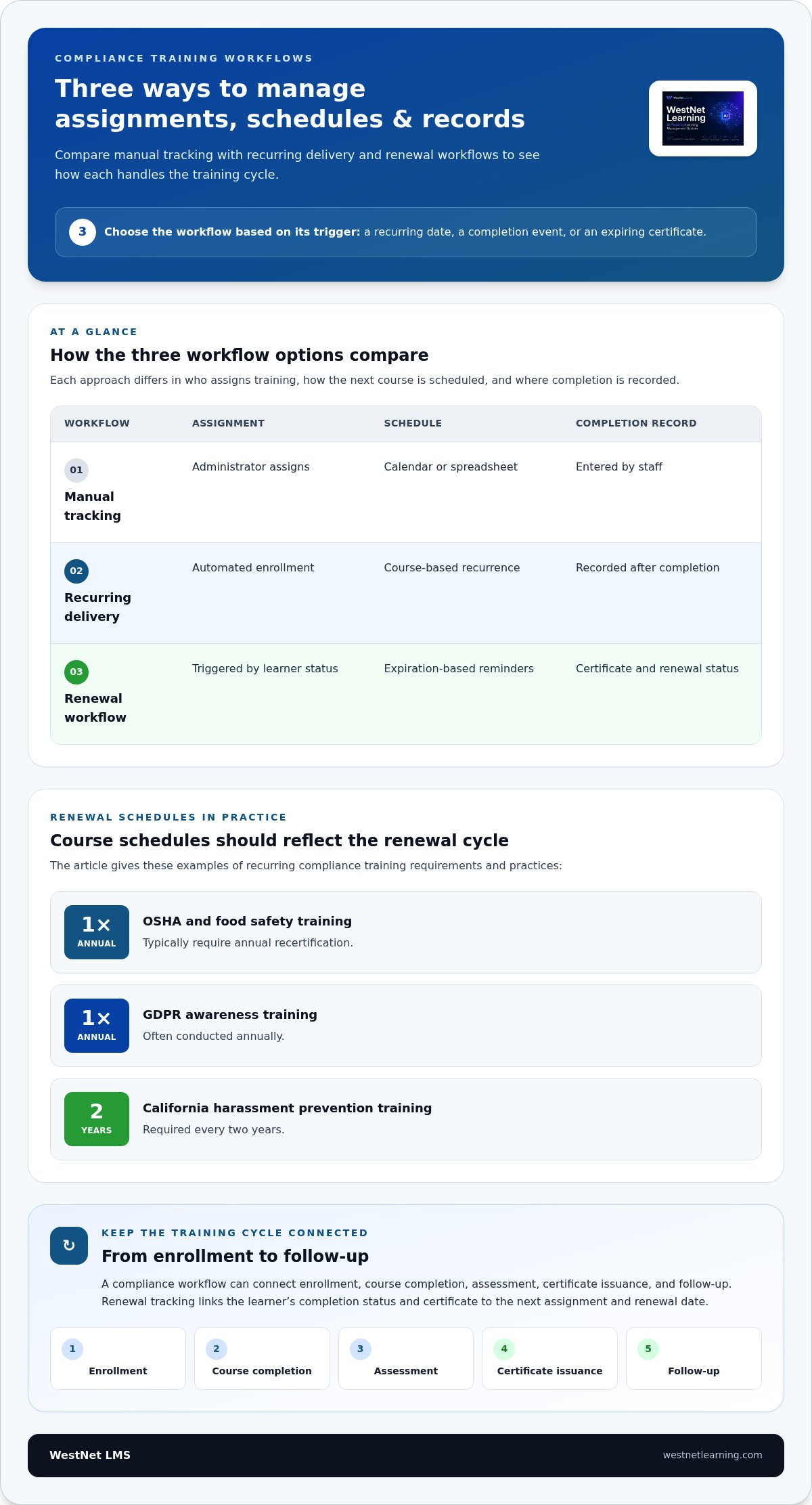
Recurring delivery assigns training again on a set schedule, rather than relying on employees to remember to take a course. OSHA and food safety training typically require annual recertification, while GDPR awareness training is often conducted annually. California requires harassment prevention training every two years. These examples show why schedules should reflect each course’s renewal cycle.
Set the course, eligible employees, and schedule, then use automated enrollment and reminders to support completion. Mobile access can help employees take assigned lessons away from a desk. Unlike expiry tracking, recurring delivery focuses on getting the next course to the right learners at the right time.
Renewals and Expiration Tracking
Renewal tracking records certificate issue and expiry dates, then prompts the next assignment before a credential expires. Automated reminders give employees a clear next step, while administrators can identify incomplete renewals. For example, a worker with annual food safety training can receive a new assignment according to the course schedule.
Automated certificates provide a record of course completion, while renewal schedules determine what happens next. Keep the course, completion status, certificate, and renewal date connected. This differs from recurring delivery: reminders and expiry records focus on each learner’s status, not just the organization-wide calendar.
Compare how three workflow options handle assignments, schedules, and records:
| Option | Assignment | Schedule | Completion record |
|---|---|---|---|
| Manual tracking | Administrator assigns | Calendar or spreadsheet | Entered by staff |
| Recurring delivery | Automated enrollment | Course-based recurrence | Recorded after completion |
| Renewal workflow | Triggered by learner status | Expiration-based reminders | Certificate and renewal status |
Choose a workflow that matches the training trigger: a recurring date, a completion event, or an expiring certificate.
Choosing between a specialized platform and a general LMS
Specialized platforms emphasize compliance workflows, while general LMS options support broader training programs. Compare both against your organization’s regulatory complexity, employee needs, security requirements, and existing systems.
Specialized Compliance Platforms
A specialized platform centers its features on compliance tasks, such as assigning required courses, tracking completion, and maintaining records. That focus can suit organizations managing complex regulations or recurring training across departments. A general LMS, by contrast, may bring compliance learning together with onboarding, professional development, and other employee programs.
Compare platforms by asking how assignments, reporting, and integrations fit your workflows. For example, a company with different requirements across locations may prioritize rules-based enrollment. A smaller organization with varied learning needs may value a broader platform that brings compliance and other programs together.
Security and Data Protection
A security review should cover learner records, access controls, data handling, and reporting permissions. Match each user role to the information it needs: an employee may need course access, while a training administrator may need completion reports. This helps determine whether a platform’s access model fits your organization’s responsibilities.
Compare how each option handles identity management, data retention, audit logs, and integrations with existing systems. For example, connecting an LMS to an HR system can align employee records with training assignments. Assess the integration’s data flow and permissions alongside the platform’s security controls, rather than treating them as separate decisions.
Cost, Accessibility, and Language Support
In the United States, platform costs depend on user count, feature scope, content needs, and integrations; pricing is provided after a quote request. Compare the same requirements across options, including implementation scope and the administrative work each platform can consolidate. A low-cost fit on paper may still require more manual coordination.
Accessibility matters for employees using different devices and assistive technologies. Look for keyboard navigation, screen-reader compatibility, captions, clear contrast, and readable course layouts. Language support should cover both interface navigation and learning content, including assessments and learner instructions.
Mobile compatibility also affects access for employees away from a desk. Test a sample course on a phone, including its text, video, assessment, and completion steps. This practical check reveals whether the learning experience remains usable across devices.
Use a consistent comparison process to connect platform capabilities with training priorities:
- List the regulations, employee groups, and training programs the system must support.
- Map assignments, reporting, and integrations to existing workflows.
- Review security, accessibility, language options, and mobile usability.
- Compare administrative effort alongside platform features and cost factors.
A review of LMS options for compliance training can help connect these criteria to practical program needs. Choose the platform whose capabilities align with your organization’s training scope and operational priorities.
Pre-built compliance course libraries
Pre-built libraries give organizations ready-made courses for common workplace topics. Choose content based on regulatory relevance, employee role, and location, then review whether it fits.
Anti-Bribery and Workplace Courses
Anti-bribery courses can use scenarios about gifts, conflicts of interest, and third-party relationships. Workplace courses may cover harassment prevention, respectful conduct, and safe procedures. These standardized modules provide a prepared starting point for recurring subjects, unlike courses created for a specific organization.
Review each course’s examples, assessment, and intended audience before assigning it. For example, a procurement team may need scenarios about supplier interactions, while a people manager may need workplace conduct examples. A course library streamlines access, but role-specific context helps employees apply the material.
Compliance Topics and Regulations
U.S. employers should identify topics according to their industry, employee duties, and applicable requirements. HIPAA, SOC 2, OSHA, and GDPR are examples of regulations or frameworks that compliance training software may address. They do not form one universal course list for every organization.
Build a topic map by connecting each requirement to affected roles, locations, and course objectives. For example, OSHA-related safety instruction may apply to workers facing workplace hazards, while privacy training may suit teams handling sensitive information. This approach makes selection more precise than assigning every course to every employee.
Role- and location-based assignments help an enterprise library serve different groups without giving everyone the same curriculum. First, identify job functions and work locations. Next, match each group to relevant courses, such as workplace conduct for people managers or safety instruction for exposed workers. Finally, review enrollment rules when roles or locations change.
Course libraries can provide standardized, regularly updated material. Frequent updates help organizations adapt to changes in regulations or standards. Before adding a module, compare its version, stated learning objectives, and update process. A clear review process helps training leaders identify content that needs attention as requirements evolve.
Use a simple content review before assigning a pre-built course:
- Match the topic to a workplace duty or organizational requirement.
- Confirm the audience, examples, assessment, and content version.
- Assign the course by role or location where relevant.
Course authoring complements a library when standard material needs local examples. An author can adapt a lesson with internal procedures, workplace terminology, or a company-specific scenario. For example, an anti-bribery module can include the organization’s approval process for gifts. Keep the core learning objectives clear, then assess whether employees understand the relevant steps.
For enterprise programs, combine library courses with carefully governed course creation. Review updates, role assignments, and assessment results together, then revise material when procedures or standards change. This keeps standardized content useful while making learning relevant to each workplace.
Security, reporting, integrations, mobile learning, and customization
Compliance training software connects learning activity with records, reports, and audit evidence. Completion tracking can capture course status and assessment results, while role-based access helps limit who can view employee records.
Completion Reporting and Analytics
A dashboard can show assigned, completed, and overdue courses by employee group or location. Assessment results add context, helping training leaders identify where learners struggle. For example, low scores on a chemical-safety assessment may point to a need for clearer instruction or targeted follow-up.
Use analytics to look for compliance gaps and target training interventions at higher-risk areas. Set a reporting period and consistent filters, such as department and course, so comparisons remain useful. Some reported statistics cover the last 12 months; the report should make its date range clear.
Certification and Audit Reporting
Certification tracking connects a learner’s course completion to the resulting credential and expiry date. An audit-ready report should include the employee name, course title, completion date and time, assessment score when applicable, certification expiry date, and content version. These fields help reviewers see who completed which course and what material they received.
Assessment records matter because completion alone doesn’t show whether a learner met the course requirements. Keep the score alongside the completion record when applicable. For example, a report filtered by course can show completion status and assessment outcomes together.
Audit Trails and Compliance Records
An audit trail organizes training events into a traceable record, including assignment, completion, assessment, and certificate details. Unlike a dashboard, which summarizes activity, the trail provides the underlying evidence behind a reported status. Clear timestamps and content versions help connect each employee record to the relevant learning event.
To track completion, assessments, and audit records, the system stores course assignments, completion status, assessment results, and certificate details. Administrators can then filter records into reports by course, employee group, or period.
Security and integrations shape how these records move through an organization. Review user permissions, access controls, and the data shared with connected HR systems. For example, an HR integration can alert training leaders when employees join or transfer, allowing them to assess which assignments are needed.
Mobile compatibility lets employees access assigned learning on phones, while customization can align course views with internal terminology or workflows. Test a course’s text, video, assessment, and completion steps on a mobile device. For construction teams, tracking OSHA 10 and OSHA 30 completions across a mobile workforce illustrates why reporting and access need to work together.
Compliance training software comparisons
Small businesses often prioritize straightforward assignments, essential reporting, and manageable administration. Enterprises typically need to coordinate training across roles, locations, and systems while meeting complex compliance requirements.
Compare platforms against your actual programs, not feature counts alone. A small employer with one workplace and a focused course plan may prefer a general LMS that combines compliance with other learning. An enterprise with distinct teams, locations, and regulatory obligations may benefit from specialized workflows and more detailed reporting.
Use the same criteria for each platform under consideration:
| Option | Program scope | Workflow needs | Comparison focus |
|---|---|---|---|
| General LMS | Compliance and broader learning | Shared employee training processes | Course flexibility and integration |
| Specialized platform | Compliance-centered programs | Detailed requirements and tracking | Compliance workflows and reports |
| Combined approach | Multiple systems or learning sources | Connected records and assignments | Data flow and administration |
For a small organization, compare how easily administrators can assign courses and view completion. A platform with broad functionality may add unnecessary complexity when the training program is limited. For an enterprise, assess whether permissions, reports, and integrations can accommodate different departments without fragmenting records.
Check course compatibility as well as workflow fit. For example, assess whether the system supports AICC and SCORM content if those formats are part of your existing course library. Then test a representative course, assessment, and report. This reveals whether employees can complete learning and administrators can retrieve useful results.
Language support also affects the comparison. Review the learner interface, course content, assessments, and completion instructions separately. For example, translated course text alone may not help employees if navigation and assessment instructions remain difficult to understand.
Use a practical evaluation sequence: map your compliance topics and employee groups, identify required workflows, then compare reporting and integrations. Include the people who administer training and those who complete it. Their different tasks can reveal gaps that a feature checklist misses.
Choose the option that supports required knowledge, clear workflows, and usable records without adding needless administration. Explore compliance training platform options to consider how a learning system can support your organization’s programs.
Users assess LMS platforms for compliance training based on mobile compatibility, reporting depth, and integration flexibility. Treat these as practical test areas, not just labels on a product page. For mobile compatibility, review the learner experience on the devices your organization expects people to use, including access to course material, assessments, and completion steps. For reporting depth, identify the results administrators need and check whether a sample report makes them clear and usable. For integration flexibility, map the systems and records that must work together, then ask how the proposed platform supports that flow. Use the same questions for each candidate and record where evidence is clear, incomplete, or needs confirmation. This makes trade-offs easier to discuss alongside program scope and workflow fit, while keeping the comparison focused on the training tasks people need to complete.
WestNet LMS: WestNet AI LMS
WestNet LMS’s WestNet AI LMS supports organizations bringing employee learning into a connected system. It combines automated course creation, analytics, and gamification to support personalized development across corporate training programs.
Use the AI Course Creator when your team needs to develop course content efficiently. Off-the-Shelf eCourses provide ready-made learning content, while LMS Integrations connect training with existing tools. These options address different needs, from creating learning materials to bringing systems together.
If your comparison points to a need for coordinated course delivery, training analytics, or connected learning tools, explore how WestNet AI LMS fits your program. Visit WestNet LMS online to learn more.
Make Your Next Training Decision Count
Start with the decisions your team needs to make: which learning activities to bring together, what content to develop, and how systems should connect. This shifts the comparison from feature counts to how compliance training software can support your organization’s priorities.
WestNet AI LMS supports corporate learning, while AI Course Creator helps create course content. LMS Integrations connect learning with existing tools. Consider how these capabilities fit your compliance training software strategy and the next stage of your training program.
A focused discussion can help translate those priorities into a clearer path forward. Contact WestNet LMS to discuss your needs and explore an approach that aligns with your organization’s learning goals.
Start with a clear plan, then keep improving your training program as needs evolve.
Frequently Asked Questions
Can a compliance LMS produce audit trails for regulators?
Yes, an LMS can create records documenting training activity for regulatory review. These records can connect an employee with assigned learning, completion events, assessments, and relevant content versions. Before using them, define who can access the records and how administrators retrieve them. For example, trace a sample employee’s learning history from assignment through completion to confirm the record supports your review process.
What are the best compliance training software platforms in 2026?
The best option depends on your organization’s program scope, workflows, and reporting needs. Compare specialized systems and general LMS platforms using consistent criteria, including content management, integrations, mobile access, and administrative effort. WestNet AI LMS is a corporate learning option with analytics, automated course management, and connections to existing tools. Assess each platform against your actual requirements rather than relying on feature counts alone.
Which compliance training software integrates with HRIS, LMS, and identity management systems?
Choose a platform whose integrations align with your employee data and access workflows. WestNet AI LMS supports HRIS integration and Single Sign-On, while LMS Integrations connect learning with existing tools. For example, an HRIS connection can help administrators keep learner records aligned with workforce changes. Map the systems involved and the data each needs before deciding how an integration should fit your environment.
How do companies choose and implement compliance training software?
Start by documenting learner groups, course sources, reporting needs, and the systems involved. Assign an implementation owner, then map how employee information should flow into learning workflows. Test a representative course and assessment with administrators and learners before rollout. For example, ask a manager to review the completion report and an employee to complete the course on their usual device. Record decisions for future updates.
What are the risks of using compliance training software, including privacy and data security concerns?
Risks include excessive access to employee records, inaccurate data transfers, and outdated learning content. Reduce exposure by assigning permissions according to job responsibilities and reviewing information shared through integrations. For example, test how a transferred employee’s profile and learning history appear after an HRIS update. Define who reviews access, maintains course content, and handles records so accountability remains clear as workflows evolve.