Migrate when your current LMS limits the learning experience, scalability, or integrations your organization needs. A sound LMS migration strategy and checklist protects data integrity and learning continuity by defining what to transfer, how to test it, and what to monitor after launch.
It’s easy to focus on selecting a new platform and underestimate the work involved in moving users, learning records, course content, reports, and integrations without disrupting training. A structured plan brings these moving parts together and gives your team clear checkpoints before and after cutover.
This guide covers the practical steps: set migration goals, audit and prepare your data, map legacy content, then test user access, reports, integrations, and mobile use before rollout. You’ll also learn what to track after launch so issues surface quickly and the new LMS can support your organization’s evolving needs.
Key Takeaways
- Set migration priorities by deciding which records, courses, and reports to transfer, archive, or retire.
- Audit learner histories, certifications, course details, and system connections before moving data.
- Use a pilot to uncover access, course, reporting, integration, and mobile issues before broader rollout.
- After launch, track system errors, login activity, course completions, and learner feedback to guide fixes.
- Check legacy content standards and package compatibility early so transfer issues don’t surface at cutover.
What data do you need to migrate?
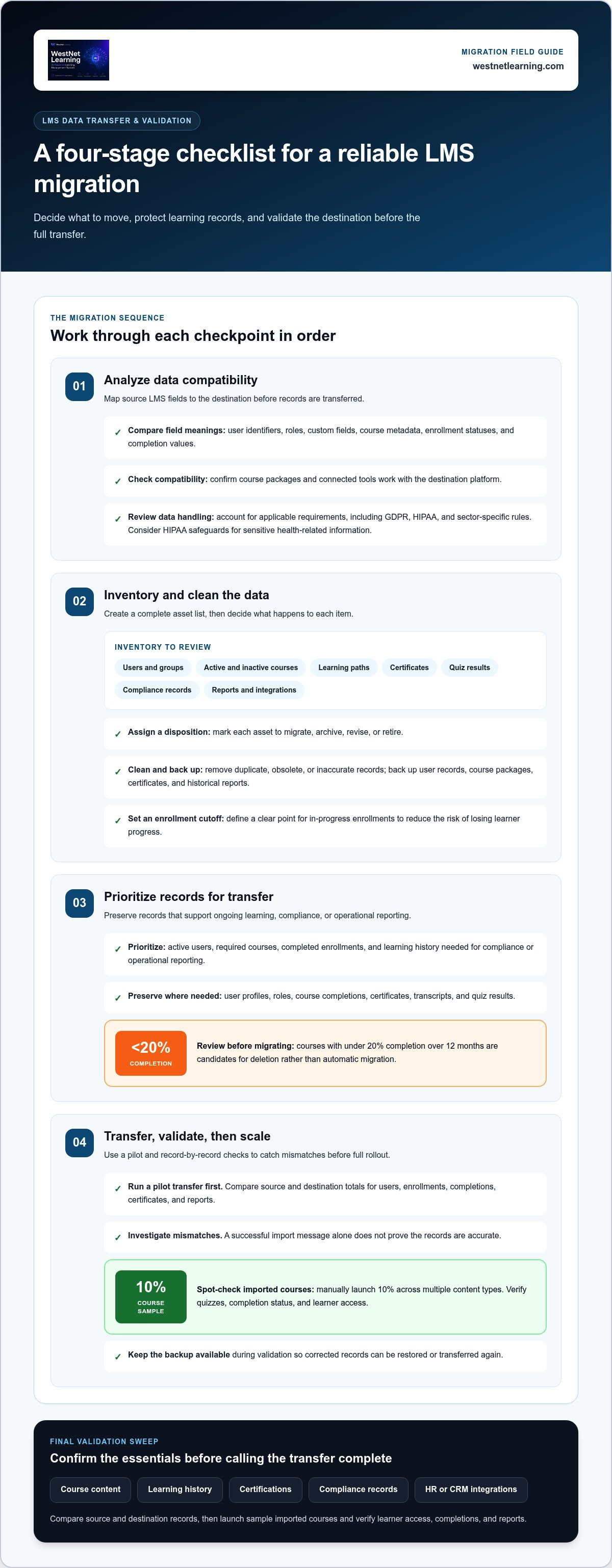
A practical LMS migration strategy and checklist covers data analysis, inventory, prioritization, transfer, and validation. Check accuracy by comparing source and destination records, then launch a sample of imported courses and verify learner access, completions, and reports.
-
Analyze Data Compatibility
Map source LMS fields to the target platform before transferring records. Compare user identifiers, roles, custom fields, course metadata, enrollment statuses, and completion values, since different database structures may interpret the same field differently. Check that course packages and connected tools are compatible with the destination. Review data-handling procedures against applicable requirements, including GDPR, HIPAA, and sector-specific rules. Consider HIPAA safeguards when handling sensitive health-related information.
-
Inventory and Clean Data
Inventory users, groups, active and inactive courses, learning paths, certificates, quiz results, compliance records, reports, and integrations. Mark each asset to migrate, archive, revise, or retire. Remove duplicate, obsolete, or inaccurate records before migration, and back up user records, course packages, certificates, and historical reports. Set a clear cutoff for in-progress enrollments to reduce the risk of losing learner progress during the transition.
-
Prioritize Records for Transfer
Prioritize active users, required courses, completed enrollments, and learning history needed for compliance or operational reporting. Preserve user profiles, roles, course completions, certificates, transcripts, and quiz results where they support ongoing learning or audit needs. Treat courses with under 20% completion over 12 months as candidates for deletion rather than automatic migration. For onboarding paths, map learner groups and milestones together; this enterprise onboarding LMS checklist covers related workflow planning.
-
Transfer and Validate Data
Conduct a pilot transfer before the full migration, then compare source and destination totals for users, enrollments, completions, certificates, and reports. Investigate mismatches instead of treating a successful import message as proof of accuracy. Spot-check 10% of imported courses with manual launch tests across multiple content types, and verify that quizzes, completion status, and learner access behave as intended. Keep the backup available during validation so corrected records can be restored or transferred again.
A final audit should cover course content, learning history, certifications, compliance records, and HR or CRM integrations. Poor planning can lead to data loss, downtime, and disrupted learning.
Auditing courses, learner records, certifications, and integrations
Audit your current learning management system before deciding what to move. A focused review clarifies why you’re switching, what must remain reliable, and where learners may need support adopting the new platform.
-
Audit Courses and Learner Records
Review active and inactive courses, modules, assessments, and learner accounts. For each course, document its objectives, intended audience, prerequisites, and format to help administrators identify outdated material and gaps. Compare learner records with enrollment and completion reports. For example, confirm that a completed course still appears in the learner’s history, rather than checking only active enrollments.
-
Review Certifications and Integrations
Match certifications to their issuing courses, learner records, and renewal workflows. Check that completion evidence and compliance records remain understandable in the destination system. Then document how the current platform exchanges data with HR, payroll, CRM, identity providers, and collaboration tools. A review of HRIS and LMS data workflows can help clarify which learner fields and processes need to stay connected.
- Identify why the organization may switch. Record specific limits in the current platform, such as outdated functionality, poor usability, limited scalability, or missing integrations. Connect each issue to a business impact: manual user updates can delay enrollment, while fragmented reporting can make course engagement harder to assess. Use these findings to set migration priorities, rather than simply reproducing existing workflows.
- Test the audit findings and prepare learners. Make a two-week data audit a migration milestone, involving administrators, learning and development, IT, and relevant business teams. Have them review sample courses, learner records, certifications, reports, and integration workflows. Record each mismatch with an owner and resolution. Before the change, tell learners why the organization is switching, what to expect, the transition timeline, and any known downtime.
- Define post-launch monitoring measures. Track logins, course launches, completion trends, error logs, reporting accuracy, and learner feedback after the transition. Compare these measures with the audit baseline to spot adoption problems or broken workflows. For example, fewer course launches alongside more login errors may indicate an access issue, while incomplete records call for closer report validation.
Where disconnected systems are driving the change, explore connected LMS workflows to understand how integration planning fits into a migration.
Testing access, courses, reports, integrations, and mobile responsiveness
Test the migrated LMS before opening it to every learner. A pilot helps teams find access, content, reporting, and integration issues while fixes are still manageable.
-
Test Integrations and Run a Pilot
Start with a pilot group that reflects real user roles, locations, and learning workflows. Test each integration, including identity, HR, and collaboration systems, from data transfer through to the learner’s experience. Confirm that user updates, enrollments, and completion records flow as intended. For connected platforms, document expected inputs and outputs before testing, then log each failure with an owner and resolution.
-
Conduct Functional and Security Testing
Test sign-in, role-based permissions, course launches, quizzes, certificates, and completion tracking. Use administrator, manager, and learner accounts to confirm each role can access the right functions and records. Check that restricted learner information remains inaccessible to unauthorized roles. Compare report filters and totals with known records, so completion reports don’t silently omit learners or duplicate results.
-
Complete User Acceptance Testing
Ask representative learners, managers, and administrators to complete real tasks during the pilot. A learner might sign in, find an assigned course, complete a quiz, and confirm that progress is recorded. A manager can check team assignments and reports, while an administrator tests enrollment workflows. Gather specific feedback about confusing labels, navigation, and course access, then resolve blockers before expanding the rollout.
- Check mobile use and localization. Open the same course on a phone, tablet, and desktop browser. Check navigation, readable text, media playback, quiz controls, and completion tracking on each device. If learners use translated content, compare key instructions, assessment questions, and interface labels with approved versions. A course that works on desktop can still create a poor experience on a smaller screen.
- Test performance under realistic demand. Run representative workloads during a planned stress test, including concurrent logins, course launches, video playback, and report generation. Watch for slow pages, failed requests, and delayed completion updates. Include a peak-use scenario based on your organization’s actual training schedule. Record the affected workflow and system response, then retest after making adjustments.
- Prepare users and track adoption signals. Train administrators first so they can support common learner workflows and explain new processes. Give pilot participants concise instructions for signing in, accessing courses, and reporting issues. Track login success, course launches, completion trends, and user feedback during rollout. If activity drops or support requests cluster around one task, investigate that workflow before expanding the audience.
For systems that exchange data through APIs, document the workflows and test each connection end to end; this guide to enterprise LMS integrations explains connected learning workflows.
Monitoring post-migration performance and engagement
Include cutover owners, a migration window, validation checks, and documented rollback actions in the launch checklist. After launch, monitor system health, learner activity, errors, and report accuracy to guide stabilization and optimization.
- Prepare cutover and rollback. Name the decision-makers, technical owners, and communication lead before the cutover window. Record the data backup location, system-freeze timing, validation tasks, and conditions that would trigger rollback. Define who can pause launch, who restores the prior environment, and how employees will receive status updates. Keep the legacy LMS read-only for at least 60 days post-cutover.
-
Monitor Go-Live Performance and Engagement
Track login success, SCORM completions, and system error logs in real time for the first 48 hours after go-live. Compare those signals with expected activity and investigate failures by workflow, user group, or course. Then monitor login rates, SCORM completions, and error logs for 6 weeks post-go-live. A login decline paired with rising access errors can point to a sign-in problem.
-
Stabilize the Migrated Platform
During stabilization, review support requests, performance indicators, and reporting accuracy with the migration team. Assign each issue an owner, priority, and next action. For example, investigate any completion report that disagrees with course records. Check connected workflows and employee access after each correction. Keep stakeholders informed about resolved issues and remaining work to prevent outdated processes from returning as workarounds.
- Validate launch results. Compare migrated records and reports with the approved baseline, focusing on active enrollments, completions, and certificates. Recheck a corrected course or integration from the learner’s perspective, then confirm the result appears accurately in reports. Document each passed check and unresolved issue. This creates an evidence trail for launch decisions and helps administrators distinguish data problems from access problems.
-
Optimize After Launch
Use learner feedback, course launches, and completion trends to identify friction after initial stabilization. If employees sign in but don’t start assigned learning, review course visibility, assignment rules, and navigation. If reports don’t support stakeholder decisions, refine the relevant filters or workflows. Prioritize changes by their impact on access, learning continuity, and reliable reporting.
- Close the transition deliberately. Review open incidents, rollback readiness, and legacy access with stakeholders before retiring old workflows. Confirm that administrators can handle routine enrollment and reporting tasks in the new LMS. Use the remaining read-only period to resolve questions about historical records, while directing employees to the current platform for active learning.
Transferring legacy content and SCORM materials
Decommission the old LMS only after its required records and course assets are accessible in the new platform or an archive. Retain read-only access for at least 60 days post-cutover, then use your organization’s retention and access procedures to guide retirement.
-
Audit and Categorize Learning Content
Inventory courses, modules, assessments, media, and supplementary files in the current LMS. For each asset, record its audience, purpose, format, owner, and last review status. Mark it to migrate, revise, archive, or retire. For example, keep a current compliance course in the transfer queue, but flag a duplicate module for review. This classification helps prevent outdated or inaccurate material from following learners into the new system.
-
Back Up Content and Configuration
Back up course files, SCORM packages, user databases, reports, configuration settings, certificates, and media assets before migration begins. Label backups with their source system and export so the migration team can identify each file. Include course metadata and configuration details, since files alone may not preserve how content was organized. Keep source records available during validation, and document who can access the archive.
-
Check Content and Integration Compatibility
Test representative packages in the target LMS before scheduling the full transfer. Check SCORM 1.2 and SCORM 2004 launch behavior, completion status, quiz results, and progress tracking. Validate xAPI and cmi5 compatibility against the destination as well. Review multimedia files, third-party plugins, HRMS and CRM connections, and Single Sign-On workflows. If a package or integration depends on a legacy feature, identify that dependency before cutover.
- Separate transferable content from exclusions. List formats, plugins, and custom elements that cannot move directly, then assign each a clear action: convert, replace, retain in an archive, or retire. Preserve the original package and related records when conversion changes learner progress or assessment behavior. For example, compare quiz results before and after conversion to identify lost scoring details. Document exclusions so administrators can explain changes to learners.
- Retire the legacy platform in controlled stages. After cutover, confirm that course access, completion history, certificates, and historical reports remain available where needed. Use read-only access during the 60-day post-cutover period to resolve record questions without creating new data drift. Before shutting down the old LMS, reconcile remaining records and confirm the archive is usable by authorized staff. This makes decommissioning a planned final step, not a rushed cleanup.
For connected workflows that must carry over to the new environment, plan LMS integrations alongside checks for content compatibility.
WestNet LMS: WestNet AI LMS
WestNet LMS offers WestNet AI LMS, an AI-powered learning management system for corporate training. It combines automated course creation, analytics, and gamification to support personalized employee development.
For migration planning, LMS Integrations can connect learning with existing tools, while AI Course Creator supports course development. Off-the-Shelf eCourses provide ready-made learning content. These offerings can address integration gaps, content needs, or opportunities to streamline training workflows identified during your audit.
Explore WestNet AI LMS as a potential fit for your next learning platform. Visit westnetlearning.com to learn more or contact WestNet LMS.
Make the Next Learning Platform Work Harder
Treat migration as a strategic reset, not just a platform change. Use your LMS migration strategy and checklist to connect learning workflows with the capabilities your organization will need next. Clear ownership, useful reporting, and an adaptable course environment can help teams make better decisions as requirements evolve.
WestNet LMS offers WestNet AI LMS for corporate training, AI Course Creator for automated course creation, and LMS Integrations to connect learning with existing tools. These offerings can support organizations modernizing training and aligning learning workflows more closely with their needs.
Contact WestNet LMS to discuss your migration and consider how your next platform can support your organization’s direction. Make the transition with purpose, then build confidently on the foundation you create.
Frequently Asked Questions
Why consider an LMS migration for your organization?
Consider migration when your current platform blocks a defined business goal, such as connecting training data with HR workflows or improving learner access. Brandon Hall Group research found that 87% of companies planning an LMS change cited the need for a better user experience. Translate that motivation into a measurable objective, such as reducing manual enrollment work or making required learning easier to find, before comparing replacement platforms.
Should IT or L&D lead?
Use a cross-functional team with one accountable project lead and clear decision rights. L&D should define learning outcomes, course requirements, and adoption needs; IT should own technical architecture, access, and data flows. Include HR, security, administrators, and business stakeholders who understand the systems and workflows involved. For example, HR can clarify how employee changes affect course assignments, while security can assess sensitive-data handling.
Should you migrate all at once or in phases?
Choose a phased rollout when the migration spans different user groups, locations, or complex workflows. A pilot lets the team uncover issues in a contained setting and apply lessons before broader deployment. A single cutover may suit a simpler environment with fewer dependencies and well-tested records. Decide by weighing operational disruption, integration complexity, learner-support capacity, and the ability to keep old and new workflows aligned.
What LMS functionality is mission-critical?
Prioritize capabilities tied to essential learning and business processes. For a compliance program, that may mean accurate completion evidence, certification tracking, and reports managers can use. For distributed teams, dependable access and mobile usability may matter more. List each required workflow, identify the roles involved, and define what success looks like. Then evaluate platform features against those scenarios instead of relying on a generic feature checklist.
Which step carries the most risk?
Data transfer and mapping carry concentrated risk because errors can affect learner access, progress, and reporting at once. A source field may not correspond directly to a destination field, or a completion status may be interpreted differently. Reduce risk by assigning an owner to each data mapping, preserving source exports, and testing representative records. Treat unresolved mismatches as launch blockers when they affect compliance evidence or active learning.
Why do companies migrate to a new LMS?
Companies migrate to address gaps between current platform performance and future operating needs. Common triggers include limited scalability, fragmented integrations, outdated learner experiences, or reporting that doesn’t support decisions. A useful business case connects each trigger to a consequence: disconnected HR data, for example, may create manual enrollment work. This distinction helps stakeholders separate genuine platform requirements from a preference for new technology.
How do you assess LMS requirements and choose a replacement platform?
Start with a requirements matrix that ranks each need as essential, important, or optional. Include usability, mobile learning, integrations, analytics, security, compliance, support, and migration assistance. A useful LMS migration strategy and checklist ties every requirement to a real workflow and test case. For example, specify how a new employee should receive assigned training, then assess whether the platform supports the process and reports its outcome.
How do you audit, clean, and map data before an LMS migration?
Create a mapping register with a row for each source field, its destination field, the transformation rule, and the test result. For example, document how department names or completion statuses should translate between systems. Assign data owners to resolve conflicting values, then flag duplicates, blanks, and obsolete entries for review. Keep the register versioned so administrators can trace decisions and reconcile exceptions after import.