The most flexible answer to the LMS vs. LXP for corporate training question may be a platform that combines structured administration with personalized learning. An LMS is generally a stronger fit for assigned courses, completion tracking, and consistent training records. An LXP emphasizes learner-led content discovery and development.
Each approach addresses different learning needs. An LMS provides a framework for required training and clear progress records. An LXP gives employees more room to explore content and develop skills around their goals. Some organizations need both capabilities; others can meet their needs with a platform that brings them together.
This guide explains how an LMS differs from an LXP, where each works best, and how to decide whether an integrated approach makes sense. It also covers course creation and management, helping you assess how a learning platform could fit your training priorities, existing tools, and workforce needs.
Key Takeaways
- Choose an LMS when structured courses, completion tracking, and consistent training records are central to your needs.
- An LXP supports learner-led discovery, personalized development, and social learning, with analytics helping assess engagement and progress.
- Match platform capabilities to workforce roles and training goals; required training and self-directed skill development may call for different approaches.
- Combining LMS and LXP capabilities can bring formal training and flexible learning together, but a single platform may cover both needs.
- Explore how WestNet LMS offerings, including WestNet AI LMS, AI Course Creator, LMS Integrations, and Off-the-Shelf eCourses, align with your training priorities.
What is a learning experience platform (LXP)?
An LXP puts employees in the lead, helping them discover relevant learning instead of relying only on administrator-assigned courses. The experience often combines personalized recommendations, shared content, and social interaction.
Learner-Driven Learning and Personalization
In an LXP, employees can explore material suited to their interests, roles, and development goals. AI-powered recommendations can suggest relevant content based on learner choices and requirements, while personalized paths organize material around strengths, weaknesses, and skill gaps. Learners have more control over what they explore and when than in an administrator-driven model. For example, an employee developing presentation skills could follow a path of relevant videos and practice resources.
Content Aggregation and Social Learning
An LXP can bring internal resources and external learning materials together in one discovery experience. Employees can access a broader range of formats and perspectives than in a catalog limited to centrally assigned courses. Social features such as discussion boards and chat groups let colleagues share ideas and discuss topics. A cohort can also follow a shared learning path and exchange practical insights, adding peer collaboration to self-directed exploration.
Analytics and Reporting
LXP reporting can help learning teams understand which resources employees discover, how they engage, and where interest is growing. AI recommendations can adapt to learner choices, while analytics can reveal patterns that inform future content decisions. Learning platforms may use xAPI to record informal and impromptu learning activities, giving teams a view beyond formal course completion. These signals support decisions about content relevance and skill development, though reporting needs should guide platform selection.
For engagement and skills development, an LXP gives employees more choice and can match recommendations to individual learning needs. An LMS more often supports administrator-led assignments and structured progress tracking, which is useful when training requires consistent completion records.
In the US, platform costs depend on factors such as user count, capabilities, content access, integrations, and implementation needs. Compare the full set of requirements rather than relying on a single price point, since these factors shape what your organization needs from a platform.
The table compares common approaches across three practical criteria:
| Platform option | Learning direction | Content access | Reporting focus |
|---|---|---|---|
| LXP | Learner-led discovery | Internal and external resources | Engagement and exploration |
| LMS | Administrator-assigned training | Managed courses | Progress and completion |
| Combined capabilities | Assigned and self-directed learning | Courses and broader resources | Structured activity and engagement |
Choose an LXP when employee-led development and content discovery are priorities. Select reporting based on the learning outcomes your teams need to understand.
Can I integrate an LMS and an LXP into a single platform?
Yes. Organizations can combine LMS structure with LXP-style discovery through a platform with both capabilities or connected systems. The right approach depends on workforce roles, training goals, reporting needs, and gaps in the current learning ecosystem.
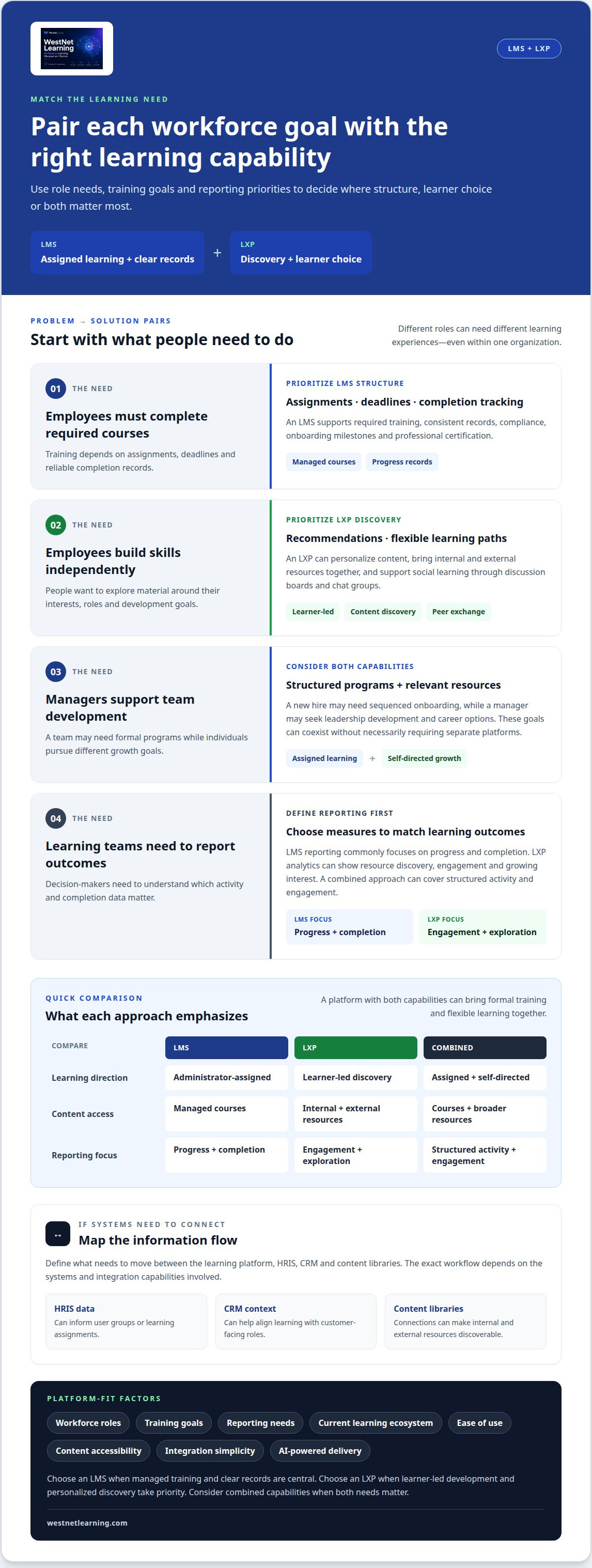
Start with the work employees need to do. A new hire may need a sequenced onboarding path, while a manager may seek leadership development and career options. A customer-facing team might need product updates alongside searchable reference materials. These goals can coexist without necessarily requiring separate platforms.
Use this role-and-goal check to define priorities:
- Employees completing required courses: prioritize assignments, deadlines, completion tracking, and consistent records.
- Employees building skills independently: prioritize content discovery, recommendations, and flexible learning paths.
- Managers supporting team development: consider structured programs alongside relevant resources for individual growth.
- Learning teams reporting outcomes: identify which activity and completion data must reach decision-makers.
Choose an LMS when compliance, onboarding milestones, or professional certification depend on managed training and clear reporting. Choose an LXP when employee-led development and personalized recommendations are central, and detailed completion records matter less. A combined platform can support both assigned courses and self-directed exploration. Separate systems may suit organizations with distinct requirements and the capacity to integrate them.
For integrations, define what information needs to move between the learning platform, HRIS, CRM, and content libraries. HRIS data can inform user groups or learning assignments; CRM context can help align learning with customer-facing roles. Content library connections can make internal and external resources discoverable. The exact workflow depends on the systems and integration capabilities involved. A connected HRIS and learning workflow can help frame those requirements.
When evaluating platforms, assess ease of use, content accessibility, reinforcement, integration simplicity, and AI-powered delivery. Ask for demonstrations of workflows your teams actually need, such as assigning required courses, recommending development content, and reviewing completion reports. Compare those workflows with your workforce roles and existing systems, not just feature lists.
Before selecting a learning platform, document your core goals and gaps in the current ecosystem. If compliance training needs reliable administration but employees also need ongoing skill development, look for a coherent way to support both. If one platform meets those goals and connects with the required systems, a second may add complexity without filling a meaningful gap.
LMS strengths in compliance and structured training
An LMS gives organizations a controlled way to assign formal courses, set deadlines, and track completion. That structure suits training where employees need the same core material and administrators need clear records. For example, a company can assign a refresher course to a defined employee group, review progress, and identify incomplete training.
In compliance-heavy sectors such as healthcare and finance, an LMS can help organize required training and maintain training records. It does not replace an organization’s compliance policies or determine which courses apply. Administrators can use course assignments, completion tracking, and reports to manage learning and see where follow-up is needed.
Course administration also supports repeatable workflows. An administrator can organize courses by role, set assignment deadlines, assess learner understanding, and use certificates to document completion. A structured learning path can guide a new hire through onboarding, then assign role-specific refresher courses as responsibilities change.
- Define the audience: Group employees by role, department, or training assignment so relevant courses reach the right learners.
- Set the sequence: Order courses and milestones when employees need to complete learning in a particular progression.
- Track progress: Use enrollment and completion reports to identify unfinished courses and learners who need follow-up.
- Review understanding: Use assessments to evaluate how learners have engaged with course material.
These controls make an LMS a strong fit when training is administrator-led and the organization needs consistent records. For instance, a finance team can receive an assigned course while managers review completions by department. A more flexible, learner-led platform may suit optional development, but may place less emphasis on assigned training workflows.
Choose the platform around the actual training need. Identify which courses are mandatory for organizational policy, which groups must complete them, and what reporting managers need. Then map those requirements to LMS functions such as role-based access, deadlines, assessments, completion tracking, and certificates. A compliance training LMS can organize these workflows in one learning environment.
An AI Course Creator can help turn existing learning materials into digital courses. This is useful when teams need to develop or update content for structured delivery. The LMS then manages course assignments and tracking, connecting course preparation with administration without conflating content creation and completion oversight.
Use an LMS as the primary platform when audit-ready training records and consistent administration are central needs. If employees also need open-ended skill exploration, combine structured courses with learner-led development rather than expecting one learning path to serve every purpose.
What is a learning management system (LMS)?
An LMS centralizes learning management, including course delivery, enrollment, progress tracking, and reporting. Its structure helps organizations deliver consistent programs across teams.
LMS Features for Corporate Learning
For example, an administrator can assign onboarding courses, set deadlines, and review completion reports in one system. LMS platforms may also provide assessments, analytics, user roles, and access permissions. These tools organize formal training around administrator-defined objectives. An LXP takes a different approach, emphasizing discovery and learner choice rather than centrally managing each course assignment.
Content Control and Navigation
In an LMS, administrators control which groups can access courses and can set the order of a learning path. A new hire might see onboarding materials before role-specific training. In an LXP, learners typically browse curated material and receive recommendations, giving them more control over navigation. Organizations can combine these approaches by managing required courses while enabling discovery of additional resources.
Content aggregation can make internal resources and external materials easier to find in one place. For instance, a sales employee could discover a product course alongside a shared presentation or discussion. Social learning features, such as discussion boards and chat groups, help peers share context around those materials. Clear labels and curated collections keep discovery useful rather than turning a library into an unstructured feed.
Content Design and User Experience
LXP content design prioritizes an intuitive experience, making recommendations and relevant materials easy to discover. A curated collection for new managers, for example, might bring together short courses, internal guides, and peer discussions. LMS navigation usually emphasizes assigned courses, deadlines, and progress. The distinction matters: employees seeking a required module need a direct route, while independent learners benefit from personalized discovery.
Content strategy should connect each format to a specific learning goal. A policy course may need a clear sequence and assessment, while a skill-building program could include articles, videos, and peer discussion. Before launch, learning teams can map content to employee roles, remove outdated resources, and decide which materials are mandatory or optional. Change management can then explain where employees find each type of learning and how to use recommendations.
To implement an LMS or LXP, define training goals, organize content by audience, and configure access and navigation around those needs. Pilot a learning path with a small group, gather feedback on engagement and usability, then refine the structure before expanding it across the organization.
What features do LMS platforms typically offer for corporate learning
An LMS brings course delivery and administration into a managed workflow. For example, a learning team can enroll a new sales group, assign product training, set deadlines, and review completions. These features connect course access with defined training goals rather than leaving employees to find each required resource on their own.
Course creation and delivery tools let administrators organize learning materials, publish courses, and arrange content into a sequence. Enrollment management helps assign courses to relevant users or groups. User roles and permissions distinguish learners from administrators, giving each role appropriate access. For instance, a new employee can receive onboarding content while a training administrator manages course settings.
Common LMS capabilities support different parts of the learning cycle:
- Course management: Organize digital materials, assign deadlines, and deliver training in a defined order.
- Enrollment: Assign learners to courses and manage who can access each learning activity.
- Progress tracking: Monitor enrollment and completion to see which learners have finished assigned courses.
- Assessments: Evaluate understanding through course assessments and review learner results.
- Reporting and analytics: Summarize activity and progress for administrators planning follow-up or future training.
- Engagement tools: Use points, badges, or leaderboards to encourage participation in training activities.
Certificates can document an employee’s course completion, including recurring training. For example, a completion certificate after a refresher course can help record participation. Administrators can pair certificates with reports to review progress across a group. A certificate records course completion, while assessments can help show understanding.
These features work together in a sequence. An administrator assigns a course, the learner accesses its materials, and the LMS records activity and completion. An assessment helps evaluate learning, while reporting gives administrators a view of results. This connected workflow is useful for onboarding, sales enablement, skill development, and refresher training.
Gamification adds another layer of engagement. Badges, points, and leaderboards can recognize course activity or encourage learners to continue. They do not replace course content or assessment; instead, they provide visible progress cues. A team completing a shared learning program, for example, might use badges to recognize milestones.
Prioritize features by the work your learning team needs to manage. If consistent assignments and completion records matter most, focus on enrollment, tracking, and reporting. If creating courses is a bottleneck, include course authoring in the evaluation. Explore how corporate training workflows can bring these requirements together.
WestNet LMS
WestNet LMS brings course creation, delivery, and learning management together for corporate training. WestNet AI LMS supports employee development with automated course creation, analytics, and gamification, while LMS Integrations connect learning with existing tools. Teams developing course materials can use AI Course Creator to turn content into courses, and Off-the-Shelf eCourses provide ready-made learning content.
Consider these offerings when your organization needs to create or manage courses, connect learning systems, or deliver training resources more effectively. The right combination depends on whether your priority is structured assignments, skill development, or both. Share your training goals and platform needs with WestNet LMS to discuss a suitable next step.
Build a Learning Strategy That Can Grow
Treat the platform decision as a starting point, not the finish line. Connect learning priorities with the employee experience you want to create, then establish how your organization will assess whether the system supports that direction.
For the LMS vs. LXP for corporate training decision, consider how learning needs may change as roles, skills, and business priorities evolve. A useful plan should support today’s structured programs while leaving room to adapt learning paths and content over time. Aligning learning, technology, and workforce goals early can help make future changes deliberate rather than reactive.
Bring your priorities into a focused discussion. Discuss your learning platform options with WestNet LMS and identify a practical next step for your organization’s training strategy.
Frequently Asked Questions
LMS vs LXP: What’s the difference?
An LMS is typically organized around training assigned by an organization, while an LXP emphasizes learner-led discovery. For example, a company could guide new employees through a planned onboarding program with an LMS, while an LXP helps employees explore development resources relevant to their roles. The key distinction is who guides the experience: administrators set the structure, or learners choose what to explore.
But what if you could have both?
You can combine LMS and LXP capabilities in one platform or connect separate systems. For example, employees might complete required safety courses in a managed learning path, then discover optional skill-building resources through personalized recommendations. Before combining tools, identify which system manages learner records, course assignments, and content discovery. Clear roles reduce duplicate courses and help employees know where to begin.
Can an LMS replace an LXP?
An LMS can replace an LXP when the organization’s main requirement is assigned training and extensive learner-led discovery is not needed. For example, a company focused on onboarding and recurring courses may prefer one managed environment. If employees also need personalized recommendations, peer discussion, or broad exploration of internal and external resources, assess whether the LMS supports those experiences before treating it as a substitute.
Do I need both an LMS and an LXP?
Most organizations should add both only when each platform meets a distinct need. A company might use an LMS for formal onboarding and an LXP for employee-led career exploration, but overlapping catalogs can create confusion. Map learning tasks to each system, including where employees enroll, find optional resources, and view progress. If one platform can support the required workflows, a second may add unnecessary complexity.
Is an LXP better than an LMS?
An LXP is not automatically better; it is a stronger fit when employees need autonomy to discover learning for ongoing development. For example, a team exploring new capabilities could benefit from recommendations and curated resources. An LMS may suit organizations that need a more controlled learning experience, such as assigning the same course to employees in a defined program. Choose based on the outcome, not the platform label.
LMS vs LXP: Which is better for your organization?
The better option depends on the training task and the people completing it. Start by selecting an employee group, such as new hires, managers, or a customer-facing team. Then define whether the immediate goal is assigned instruction, open-ended skill development, or both. For example, a company may prioritize structured onboarding for new employees while supporting managers with resources they can explore independently.
LXP vs LMS: Which is better?
Neither platform is best in every situation; compare how each supports your learning priorities. Consider a company introducing a new process: employees may need a centrally assigned course first, followed by optional resources for deeper practice. That sequence calls for both structure and discovery, whether through combined capabilities or connected tools. Evaluate how employees move between those activities before deciding.
What is the difference between an LMS and an LXP for corporate training?
In corporate training, an LMS generally organizes formal learning around organizational assignments, while an LXP helps employees find learning based on individual interests and needs. For example, a company could assign a sales product course and separately offer a discovery space for communication resources. The practical difference is how training is selected and managed, affecting course access, learner choice, and the development experience.