A Salesforce record can do more than track a customer or sales opportunity. It can help guide the right learning journey. An LMS with Salesforce integration connects learning activity with CRM data, helping teams manage access, automate course enrollment, and view progress alongside relevant Salesforce records. This can make onboarding more coordinated and reduce the need to manage it as a separate administrative task.
A connected system can reduce manual work, but its value depends on how it handles data and learner access. This article explains what a Salesforce LMS is, how integration and two-way data sync work, and which decisions help create a reliable setup. It also covers what to evaluate, including embedded access, automatic enrollment, compatibility, learner experience, and reporting, so you can judge how well a solution fits your team’s workflows.
Key Takeaways
- Connect learning outcomes to business goals such as sales enablement, compliance, or customer education.
- Set a source of truth for each synced data point and transfer only the information needed for your objectives.
- Compare LMS options for Salesforce compatibility, learner experience, scalability, and reporting capabilities.
- Plan embedded access around how teams use Salesforce, so learners can reach relevant training within their workflows.
- Map onboarding rules to learner attributes and course requirements to make enrollment more consistent.
Business benefits of connecting an LMS and Salesforce
An LMS with Salesforce integration connects learning activity to customer, sales, or partner workflows. Teams can use Salesforce records to guide course access, then review completion data alongside business activity. The practical benefit is a clearer view of who needs training, what they have completed, and where follow-up may be useful, with fewer disconnected records.
Platform costs depend on the scope of the implementation and are provided after a quote request. Factors include the required data flows, Salesforce configuration, enrollment rules, reporting needs, and any custom work. A straightforward connection differs from a project linking several systems and complex workflows.
Start with a specific business goal. For sales enablement, a team might assign product learning when a representative joins a sales group. For customer education, a partner record could guide access to relevant product courses. These workflows align learning with the people and tasks already tracked in Salesforce.
Automation can reduce repetitive administration. A change to a learner’s role, for example, could trigger a relevant course assignment, while completion data returns to a Salesforce record. Teams can then review progress on a dashboard and identify learners who may need a reminder. Clear enrollment rules and accurate records are essential for these workflows.
Compliance training can benefit from clearer assignment and completion tracking. A healthcare organization might connect HIPAA training assignments with relevant employee records. Finance teams could organize learning about the Sarbanes-Oxley Act, while software and IT teams could track PCI-DSS training. Linking records improves visibility, but course completion alone does not establish compliance.
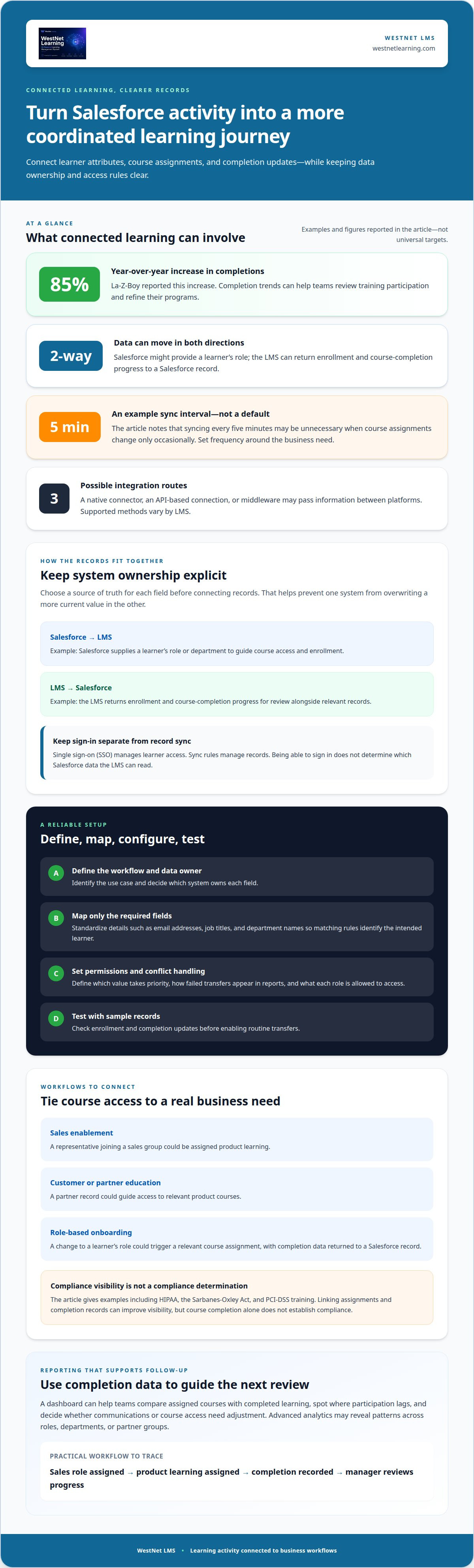
Learning data can also help teams refine programs. La-Z-Boy reported an 85% year-over-year increase in completions, illustrating how completion trends can inform training decisions. A dashboard can help leaders compare assigned courses with completed learning, then adjust communications or course access when participation lags. Advanced analytics may reveal patterns across roles, departments, or partner groups.
- Connect each course to a business goal, such as sales enablement or customer education.
- Define which Salesforce record or learner attribute should guide each enrollment rule.
- Use completion dashboards to identify follow-up needs, not just report activity.
- Separate training completion records from any broader compliance determination.
To assess the benefits, map one workflow from a Salesforce trigger to course assignment and completion reporting. For example, follow a new sales representative from role assignment through product learning and manager review. This concrete path shows where connected software could reduce manual handoffs and where teams need clearer data or ownership.
Salesforce LMS integration and bi-directional data sync
A connected platform moves selected learner and course information between systems. Define data ownership, access, and sync rules before configuring the connection.
Two-Way Data Synchronization
Two-way synchronization sends agreed data between Salesforce and the learning platform. Salesforce might supply a learner’s role, while the LMS returns enrollment and completion progress. Decide which system owns each field first. Otherwise, a change in one system could overwrite a more current value in the other.
Single sign-on (SSO) manages learner access, not record synchronization. It can let users enter learning through their organization’s identity process, while sync rules handle records. Keep these functions distinct when setting access controls: a learner’s ability to sign in does not determine which Salesforce data the LMS can read.
Sync Conflicts and Performance
A data conflict occurs when the systems hold different values for the same field. Set a source of truth for each one, such as Salesforce for a learner’s department and the LMS for course completion. Then define how updates are handled, including which value takes priority and how failed transfers appear in reports.
Sync frequency affects how current records are and how much activity the connection creates. Syncing every five minutes may be unnecessary if course assignments change only occasionally. Match the schedule to the business need, and transfer only the data required for the learning workflow.
Integration Methods and Synced Records
LMS integrations may use a native connector, an API-based connection, or middleware to pass data between systems. Supported methods vary by platform. To connect systems, identify the workflow, map fields, set permissions, configure the connection, and test it with sample records before enabling routine transfers.
What Salesforce integrations do LMS platforms support? Options may include exchanging user and enrollment data, course or completion records, SSO, and connections through APIs or middleware. What Salesforce data can an LMS sync? Depending on the workflow, this may include user attributes, course assignments, and completion records.
Clean records before mapping them. Standardize fields such as email addresses, job titles, and department names so matching rules identify the intended learner. Then limit transfers to necessary information and assign permissions by role. A course administrator, for example, may need completion reports, while a learner needs access only to assigned learning.
How do you connect an LMS to Salesforce step by step? Define the use case and source of truth, map required fields, configure the connection and access controls, then test enrollment and completion updates. A focused LMS integration approach can help teams plan those data flows around existing systems.
Criteria for choosing an LMS
Choose a learning platform by matching its capabilities to your organization’s goals and systems. Compare Salesforce compatibility, learner experience, automation, reporting, and scalability before deciding.
Salesforce Integration Availability
Which LMS platforms integrate with Salesforce? Options include learning platforms with Salesforce connectors, API-based connections, or middleware support. Compare how each supports your organization’s workflows, rather than relying only on a general claim of compatibility.
Start by naming the primary goal: sales enablement, compliance training, or customer education. Then assess whether Salesforce and the LMS can exchange the records and reports that goal requires. Check compatibility with other systems already in use, such as identity or HR tools. Healthcare organizations should consider HIPAA implications, while financial services organizations should consider SEC regulations.
Integration Types
Which Salesforce LMS integrations are native, third-party, or API-based? A native integration uses capabilities built into the platforms; third-party tools or APIs offer alternative routes between systems. The right approach depends on the required data flows, connected applications, and how much configuration your organization can manage.
Compare each method using a concrete workflow, such as assigning product learning to a sales team. Identify the systems involved, the fields exchanged, and who maintains the connection. A learning platform should fit your organization’s broader software architecture, not just solve one isolated connection.
Automation and Reporting
How do Salesforce-integrated LMS platforms compare on automation, reporting, and ease of setup? Check whether each can support the enrollment workflows you need and produce useful reports. A sales manager, for example, may need completion by team, while a customer education lead may need progress by audience.
Review dashboard clarity alongside analytics capabilities. Look for reports that support action, such as identifying assigned learners who have not completed a course. Assess social learning, gamification, and personalization too. These capabilities should support your learning goals, not add complexity without purpose.
Ease of Setup
Setup depends on the integration method, the number of connected systems, and the configuration required. A simple native connection may take a few hours, while a complex custom integration may take several months. Before choosing, map the workflows you need and compare the expected work.
Assess the learner experience as well. An intuitive interface, mobile access, and customizable dashboards can make learning easier to access and progress easier to monitor. Consider how course creation, enrollment, and reporting work together. Choose capabilities that can scale with your organization, from one team to broader learner groups.
Use a practical evaluation sequence:
- Define the business goal, such as sales enablement or customer education.
- Compare Salesforce compatibility and connections to other systems.
- Test a representative learner workflow on desktop and mobile.
- Review automation, reporting, and scalability against real team needs.
Embedded LMS access across Salesforce clouds
Embedded learning access places course entry points inside familiar Salesforce workflows. Plan each location around a user task: a sales representative may need product training while reviewing an opportunity, while a support employee may need service guidance during case work. The goal is to make the next learning step easy to find without confusing Salesforce records with the LMS itself.
Sales Cloud, Service Cloud, and Experience Cloud support different audiences and workflows. First, identify the learner group, then find the Salesforce page or process where training is relevant. A sales team might need a product certification link near its sales workflow, while an external partner might need access through a partner-facing experience. Each entry point should match the user’s permissions and purpose.
Embedded access and single sign-on address related but distinct needs. An embedded entry point places a learning action in a Salesforce context; single sign-on streamlines authentication between systems. A new employee’s workflow might begin by opening a Salesforce page, selecting assigned learning, and entering the LMS through the organization’s sign-in process. Decide whether learners need a course link, a progress view, or both.
Design the experience around the information each audience needs. A manager may need course status, while a learner needs a clear route to assigned content. Avoid displaying every LMS function in every Salesforce context. Choose the actions that belong in Sales Cloud, Service Cloud, or Experience Cloud, then align access with role-based permissions and the data each role should see.
- Sales Cloud: Place relevant sales enablement access near sales activities, such as product learning for representatives.
- Service Cloud: Connect support teams with learning related to service tasks or product updates.
- Experience Cloud: Organize partner or customer learning around the audience and its permitted access.
Test each route with representative accounts before a wider rollout. A sales representative, support employee, and partner should each see the learning entry point intended for their role. Confirm that course links open the right content, permissions work as designed, and completion information is available through the planned reporting workflow. Testing can reveal mismatched roles or confusing navigation before they affect broader adoption.
Keep the embedded experience focused. If a Salesforce page needs only a course launch link, avoid adding unrelated learning controls. If a manager needs progress information, define which status is useful and where it should appear. A clear update plan also matters: when course assignments or Salesforce page layouts change, review the corresponding learning entry points and permissions together.
Document the final design by cloud, audience, and learning task. For example, note whether Sales Cloud serves employee learning, Experience Cloud serves partner learning, and which roles can view completion status. This map gives administrators a practical reference for maintaining embedded access as workflows, courses, and organizational needs change.
Salesforce user onboarding and automatic course enrollment
Automatic enrollment links a Salesforce user’s profile or status to a relevant learning assignment. A new sales employee, for example, could receive product courses when their role is recorded, while a partner could be assigned customer-facing product learning. The goal is to turn a defined business event into a clear learning path, not to enroll every record automatically.
First, identify the onboarding event that should trigger learning. It might be a new user record, a department change, or a move into a role with different responsibilities. Then choose the Salesforce fields that distinguish learners, such as role, team, or audience type. Clear criteria help prevent duplicate assignments and keep unrelated employees from receiving the wrong courses.
Build enrollment rules around a simple relationship: learner attribute, course requirement, and assignment action. A new support employee might receive service-process courses, while a sales representative receives product education. Keep the rule specific. If Salesforce records use job titles inconsistently, standardize them before relying on that field for automatic enrollment.
- Define the trigger: Select the record event or field change that starts onboarding.
- Match the learner: Use relevant role, department, or partner attributes.
- Assign the courses: Connect each learner group to the appropriate learning path.
- Review the outcome: Check enrollment and completion records for errors or duplicates.
Decide how updates should affect existing assignments. If an employee moves from sales to support, the new role may call for a different course path. Define whether earlier courses remain accessible, whether new assignments are added, and how the change appears in learning reports. These decisions help keep onboarding consistent as Salesforce records evolve.
Learner and manager preferences matter too. Learners may need a clear view of assigned courses, due dates, and progress, while managers may need team-level analytics. Keep each view relevant to its audience. Managers reviewing onboarding completion need useful status information; learners need straightforward access to their next course.
Test the workflow with representative Salesforce records before a broad rollout. Include a new employee, an existing employee whose role changes, and a partner if partner learning is part of the program. Confirm that each receives the intended courses and that completion updates appear in the right reports. Use the results to refine fields and rules before expanding the process.
Course relevance is just as important as enrollment logic. An employee onboarding learning path can organize role-specific material into a coherent sequence. For teams building new course content, an AI Course Creator can support course creation. Connect enrollment rules to accurate learner attributes, then use analytics to improve the onboarding experience over time.
WestNet LMS: WestNet AI LMS
WestNet LMS offers WestNet AI LMS, an AI-powered learning management system for corporate training. Its LMS Integrations support connections with existing tools, while advanced analytics and gamification support employee development. The AI Course Creator supports course creation, and Off-the-Shelf eCourses provide ready-made learning content.
Consider WestNet AI LMS if you need a scalable learning platform with integration capabilities, automated course creation, and progress insights. It supports teams from small groups to large workforces, helping align learning operations as your organization grows.
Contact WestNet LMS to discuss your learning and integration needs.
Turn your integration plan into a learning roadmap
Treat the next step as an operating decision, not just a software selection. Identify who will own the learner journey, which business outcome it supports, and how leaders will know the workflow is working. An LMS with Salesforce integration should fit how your organization expects learning to evolve, including future changes to roles, courses, and reporting needs.
Start with one priority audience and define its learning journey from access through completion. Then align stakeholders on the key implementation decisions: which records guide enrollment, which system owns each data point, and what managers need to see. A focused roadmap gives technical teams and learning leaders a shared foundation before the connection expands across departments or partner groups.
WestNet LMS helps organizations align learning technology with training goals through WestNet AI LMS and LMS Integrations. The AI Course Creator also supports course development as learning needs evolve.
Contact WestNet LMS to discuss integration and take the next step toward a connected learning experience.
Frequently Asked Questions
What is a Salesforce LMS?
A Salesforce LMS is a learning management system connected to Salesforce, allowing learning activity to support CRM-related workflows. An organization might use a learner’s role to determine relevant training, then make completion information available for follow-up. The LMS manages courses and learning records; Salesforce provides the customer or business context. The connection depends on the fields and workflows the organization configures.
Can I view individual reports in an LMS as well as on a Salesforce dashboard?
Yes. Individual learning reports can be available in the LMS, while selected data can appear in a Salesforce dashboard if the integration is configured to share it. A manager might review an employee’s course status in the LMS and see team-level completion in Salesforce. The details shown depend on the synced records, reporting setup, and each user’s permissions.
Which LMS offers the best Salesforce integration for small businesses?
There is no single best option for every small business. Choose an LMS that supports the Salesforce workflow you need, such as onboarding a new sales hire or educating customers, without unnecessary integration complexity. Compare setup effort, administration, learner access, reporting, and compatibility with your existing software. A small team should prioritize a manageable workflow and useful reporting over capabilities it will not use.
What are the limitations and risks of integrating an LMS with Salesforce?
Common risks include mismatched records, excessive data sharing, unclear permissions, and delays before learning activity appears in Salesforce. Duplicate user profiles, for example, can split one person’s course history across records. A role change may also leave someone with outdated learning access if assignment rules do not account for updates. Include common changes, such as team moves and account deactivation, in integration maintenance tests.
Which LMS works with Salesforce Sales Cloud, Service Cloud, and Experience Cloud?
The right LMS supports the Salesforce clouds and workflows your organization plans to use. Sales Cloud might serve employee enablement, Service Cloud service-related learning, and Experience Cloud access for external audiences. Evaluate each use separately: where learners enter courses, which records the connection uses, and what reporting each audience needs. A fit in one cloud does not automatically establish fit across all three.