The best onboarding LMS isn’t the one with the longest feature list. An onboard LMS should make it easy to deliver consistent, role-relevant training, track new-hire progress, gather feedback, and connect learning with the tools your organization already uses. These capabilities help teams coordinate onboarding and identify where employees may need more support.
New hires need clear guidance, while HR and learning teams need a process they can manage across roles and locations. A learning platform can bring course content, progress data, and feedback together, making it easier to assess how onboarding is working and where the experience needs attention.
This guide explains which features to compare, how they support employee onboarding, and what trade-offs matter when choosing a platform. It also covers integration planning, analytics, course creation, and pilot rollouts to help you build a consistent program without losing sight of the new-hire experience.
Key Takeaways
- Compare onboarding platforms by how well they organize learning content, track progress, and collect feedback from new hires.
- Use structured learning paths and clear milestones to make training more consistent across roles and teams.
- Plan integrations by mapping the learner and training data that needs to move between systems.
- Test courses and platform workflows before launch, and use a pilot to identify issues before a wider rollout.
- Review engagement and completion insights to spot where new hires may need clearer guidance or additional support.
What is an Onboard Learning Management System?
An onboarding learning management system is software for organizing and delivering employee training. It brings learning content, assigned modules, learner progress, and feedback into a coordinated program.
For example, a new customer support representative might receive product knowledge, system practice, and service-process modules. A manager can see what the employee has completed and where guidance may be needed. The platform streamlines delivery, while the organization defines role expectations and selects the learning material.
Onboarding Workflows and Learning Modules
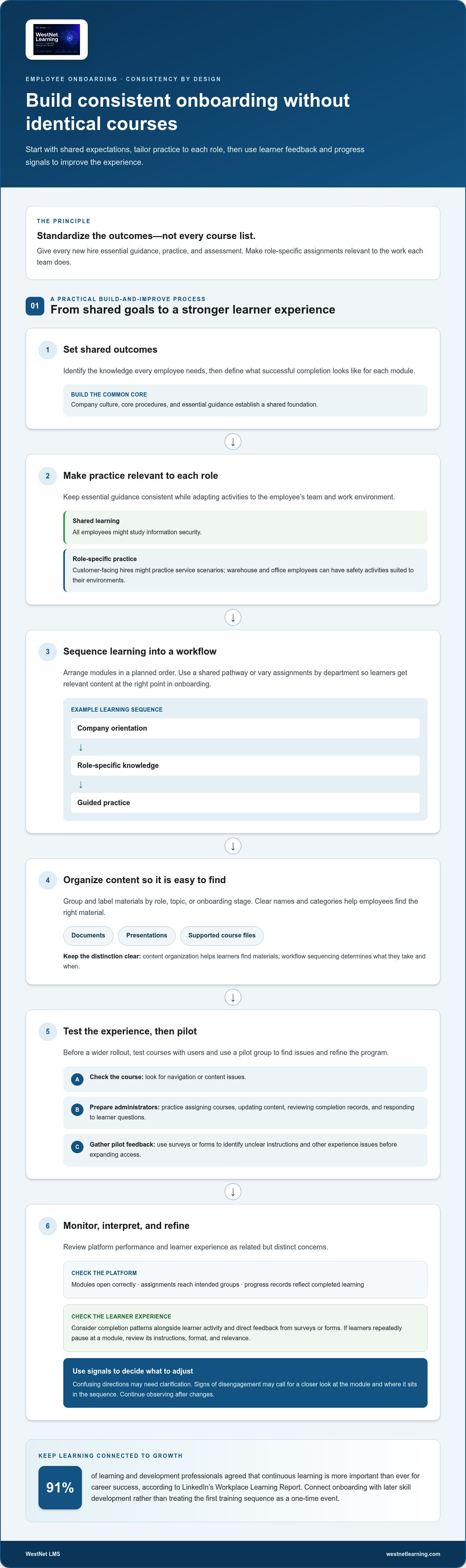
An onboarding workflow arranges learning modules in a planned sequence, such as company orientation, role-specific knowledge, and guided practice. Assignments can follow a shared pathway or vary by department, so sales and finance hires receive relevant content. Unlike a content library, a workflow emphasizes what learners take and when they encounter each module.
Learning Content Organization and Uploads
Content organization covers how materials are grouped, labeled, and maintained in the learning management system. A team might sort courses by role, topic, or onboarding stage, then upload documents, presentations, or supported course files. Clear names and categories help employees find the right material; workflows determine how it is assigned.
Learner Engagement and Collaboration
Engagement features encourage learners to participate, while collaboration gives them opportunities to share knowledge with colleagues. For example, a discussion prompt after a product module can invite new hires to compare customer scenarios. Unlike workflow sequencing or content organization, these features focus on interaction and learning experience, not course order or file structure.
Assess engagement through learner activity, completion patterns, and direct feedback. Before launch, test the courses with users to identify navigation or content issues. If a full rollout feels premature, start with a pilot group, gather feedback, and refine the program before expanding access. Surveys can reveal whether instructions are clear, while analytics can help show where learners disengage.
After launch, monitor platform performance and learner experience as related but distinct concerns. Check that modules open correctly, assignments reach the intended groups, and progress records reflect completed learning. Then collect survey or form responses and compare them with engagement data. If learners repeatedly pause at a module, review its instructions, format, and relevance before changing the wider program.
| Option | Primary criterion | What to assess | Useful example |
|---|---|---|---|
| Workflow sequencing | Learning order | Role-based assignment and progression | Orientation before job practice |
| Content organization | Findability | Categories, labels, and upload process | Courses grouped by department |
| Engagement and collaboration | Participation | Discussion, activity, and learner feedback | Team scenario discussion |
| Post-launch monitoring | Quality and experience | Testing, analytics, and feedback collection | Pilot review before wider rollout |
Start by identifying the biggest onboarding gap, then compare how each option addresses it.
Organizations should collect learner feedback through surveys, feedback forms, or analytics tools to assess LMS user experience and engagement. These inputs can help teams consider whether learners can use the platform and stay involved, rather than relying only on whether assigned learning is marked complete. Feedback and activity data offer ways to identify parts of the experience that may need closer review, such as unclear instructions or signs that learners are disengaging.
Use the information to review specific parts of the learning experience. If comments point to confusing directions, revisit the instructions; if activity suggests learners are disengaging, examine the module and its place in the onboarding sequence. Consider feedback alongside completion patterns and direct responses, since each offers a different perspective. The goal is to use what you learn to decide what to clarify or adjust, then continue observing the learner experience. This keeps the review connected to onboarding goals and the organization’s responsibility for setting expectations and choosing learning material.
Consistency in new-hire training
Consistency means every new hire receives the same essential guidance, practice, and assessment, even when roles differ. A shared program can establish company culture and core procedures, while role-specific assignments build skills for each team. For example, everyone might study information security, while customer-facing hires also practice responding to service scenarios.
Build consistency around outcomes, not identical course lists. Identify the knowledge every employee needs, then define what successful completion looks like for each module. A warehouse employee and an office administrator may both need workplace safety training, but their practice activities can reflect different environments. This approach standardizes expectations without making learning irrelevant.
Continuous learning also matters to career development. In LinkedIn’s 2025 Workplace Learning Report, 91% of learning and development professionals agreed that continuous learning is more important than ever for career success. Use that finding as a reason to connect onboarding with later skill development, rather than treating the first training sequence as a one-time event.
Train users and administrators
Prepare administrators to assign courses, update content, review completion records, and respond to learner questions. Give them a practice scenario, such as assigning an introductory module to a sample group and checking the records. New hires also need a brief platform orientation showing them how to open a lesson, complete an activity, and find help. Keep the audiences distinct: administrators manage delivery, while learners build job knowledge.
Use a repeatable setup checklist for each intake. Confirm learner groups, course assignments, start instructions, and support contacts, then test the experience with a sample account. If a link leads to the wrong module or instructions assume prior knowledge, fix it before employees begin. A clear procedure helps different administrators deliver the same core experience.
Use OQ training and testing deliberately
If your organization uses OQ to mean operational qualification, define its purpose and completion evidence internally. For example, a new equipment operator could study operating steps, demonstrate a task in supervised practice, and complete a knowledge check. Align the training material, task criteria, and assessment so the test measures the skill employees need.
Use the same structure wherever OQ training applies: explain the procedure, provide guided practice, assess performance, and record the result. Assessment might combine a short knowledge test with a demonstrated task. Subject-matter experts should review the criteria for clarity, while administrators confirm assigned learners can access the right materials. Treat OQ as a specific training pathway, not a label for every onboarding course.
Standardize feedback as well as instruction. After a course, ask learners which step was unclear and invite managers to identify skills that need more practice. Compare those responses with assessment results. If several new hires miss the same process question, revise the lesson or add a practice example. This creates a focused improvement cycle rather than a general satisfaction score.
Finally, monitor early progress without treating course completion as proof of workplace proficiency. Review whether employees complete required learning, then use manager observations or practical assessments to understand skill application. For a structured view of LMS-based onboarding, connect those measures to clear learning objectives and consistent role expectations.
Technical planning, data mapping, and integrations
Plan integrations before implementing an onboard lms platform. List the systems involved, such as an HR information system (HRIS), applicant tracking system (ATS), identity provider, and learning platform. For each connection, define what information moves, which system owns it, and what event triggers the transfer. For example, a new employee record might trigger a course assignment.
Map fields before configuring a connection. A mapping document can pair an HRIS field such as “department” with the learning platform’s group or assignment rule. Include employee ID, work email, job title, manager, location, and employment status when they support onboarding workflows. Document acceptable formats, required values, and how updates are handled. This helps prevent a department-label mismatch from sending a new hire into the wrong learning path.
HRIS and ATS integrations serve different points in the employee journey. An ATS holds candidate and hiring information, while an HRIS typically manages employee records after hiring. Decide whether the learning platform should receive records from the ATS, the HRIS, or both. For example, an ATS event might prepare an account, while the HRIS supplies the confirmed department and manager after the employee starts. Define a single source of truth for each field.
HR system integrations can also support changes after the first assignment. If a new hire moves teams, an updated job title or department may affect required modules. Specify whether the learning platform should retain completed courses, assign new learning, or notify an administrator. Document these rules before implementation. Clear handling of transfers and status changes keeps records understandable and reduces manual corrections.
Use a staged implementation process to protect data quality and learner access:
- Inventory systems: Name each application and its owner, such as Workday for employee records or an ATS for hiring workflows.
- Map fields: Match source data to learning platform fields, then flag differences in naming, format, or permitted values.
- Define events: Specify what happens when a person is hired, changes departments, or becomes inactive.
- Test scenarios: Use sample records for a new hire, a department transfer, and a corrected email address.
- Review results: Confirm account creation, course assignment, completion history, and administrator visibility.
Test both the data flow and the employee experience. A sample learner should be able to sign in, find assigned modules, and see accurate progress. Administrators should confirm that the right people receive the right courses. Record each issue, its cause, and its resolution before expanding the rollout. This provides a repeatable reference for future system changes.
After launch, monitor integration logs and learner feedback as distinct sources of insight. A failed record transfer points to a technical issue; a learner unable to find a module may indicate an assignment or navigation problem. Review both during routine platform maintenance. Teams planning an HRIS connection can use this HRIS and LMS integration guide to structure field mapping and workflow decisions. WestNet LMS integrations are most useful when they connect trusted employee data with clear learning assignments.
Assessment-related data can be included in technical planning alongside other mapped information to support a seamless employee experience. ITS psychometric consulting reviews worker assessment data for validity, reliability, and fairness in training assessments and evaluations. Keep these three dimensions visible when planning how the data is represented. This places assessment information within the broader planning process while keeping the review focused on validity, reliability, and fairness.
Benefits of using an LMS for employee onboarding
An LMS gives onboarding teams a shared place to deliver training and review learner progress. This structure can make employee development easier to coordinate across departments. For example, a new customer service employee can complete product lessons before practicing customer scenarios with a manager. The software records learning activity, while supervisors connect course knowledge to daily work.
Training can also build skills and confidence. Indeed states that employee training improves job skills and knowledge, builds confidence, and can improve performance and efficiency. A practical onboarding program can put this into practice through short lessons followed by guided practice. An employee might study a returns process, then use a sample case to practice before handling customer requests.
Early visibility helps managers respond while onboarding is underway. Onboarding LMS platforms can use early engagement tracking to help reduce 90-day employee turnover. If a new hire stops progressing through assigned learning, a manager can follow up and identify barriers. The cause might be unclear instructions, limited time for training, or a need for more direct support.
Use platform reports to turn activity into specific follow-up:
- Review participation: Identify assigned modules that employees have not started.
- Compare progress: Look for differences between teams or role-based learning paths.
- Check assessment results: Find concepts that need another example or practice activity.
- Plan manager follow-up: Connect learning gaps with coaching or workplace demonstrations.
Interactive activities can make learning more practical. A scenario-based exercise might ask a new employee to choose the next step in a customer conversation. A knowledge check can show whether they understand the process before applying it. These activities support communication between learners and managers, especially when feedback explains why an answer works.
Consistent onboarding can help employees understand how their work connects to company culture. A shared introduction might explain communication channels, team responsibilities, and where to find key resources. Role-specific learning then shows how those expectations apply to a particular job. Keep the common foundation clear, and use relevant examples to make learning meaningful for each role.
Measure success using more than completion alone. Combine course activity with assessment results, learner feedback, and manager observations. For example, a completed safety module shows participation, while a supervisor’s observation can show whether the employee follows the procedure at work. Reviewing these signals together helps teams improve learning content and support ongoing development.
Explore onboarding LMS capabilities to see how structured learning can support employee training and progress tracking.
WestNet LMS: WestNet AI LMS
WestNet LMS offers WestNet AI LMS for organizations building connected, scalable employee onboarding. The AI-powered platform combines automated course creation, advanced analytics, and gamification to personalize employee development and help learning teams manage training in one system.
Use AI Course Creator to support course creation, LMS Integrations to connect learning with existing tools, and Off-the-Shelf eCourses to add ready-made learning content. These offerings can address common onboarding needs, from organizing training materials to connecting learning workflows with business systems. WestNet AI LMS can scale from small teams to tens of thousands of users as organizational requirements grow.
Planning a more coordinated onboarding program? Contact WestNet LMS or visit westnetlearning.com to explore the next step.
Build the Next Stage of Onboarding
Make your next step a focused decision: identify the onboarding challenge you want to solve, then align the platform with that priority. The right onboard LMS should support your people, workflows, and learning goals as they evolve. Base your choice on how new hires will use training and how your team will sustain it.
WestNet LMS offers WestNet AI LMS, AI Course Creator, and LMS Integrations. These offerings can bring learning delivery, course creation, and connected systems into a more coordinated approach. Consider how these capabilities fit your onboarding plans and the operational processes you want to improve.
Set a clear objective for your next phase, such as making learning easier to manage or connecting training with existing tools. Then discuss how WestNet LMS can support that goal. Contact WestNet LMS to explore your next steps and move forward with confidence.
Frequently Asked Questions
What key features should you look for in an onboarding LMS?
Prioritize features that fit your workforce’s actual training needs. If managers assign courses by department, for example, look for role-based learning paths and clear administrative controls. If employees work across locations, mobile access may matter more than discussion tools. Rank needs with stakeholders, then compare platforms against the same criteria. This helps separate essential capabilities from features that add complexity without serving your program.
Which Businesses Can Benefit From An Employee Onboarding LMS?
Organizations with repeatable training needs can benefit, whether they hire steadily or in groups. A retailer can orient store associates to service procedures, while a growing technology company can guide new team members through internal tools. Distributed workforces can also use structured digital learning to provide consistent access to essential information, even when managers work in different locations.
How Do You Implement an LMS for Onboarding in Your Organization?
Begin with a defined objective, such as preparing new sales hires to use a customer relationship management system. Assign owners for content, administration, and manager communication. Configure a sample learning path and test it with representative users. Before expanding access, ask managers to review the path and explain how new hires can get help. An onboard LMS should fit existing responsibilities, not create an unclear extra process.
How does a top onboarding LMS improve employee retention?
An onboard LMS can help teams identify early disengagement and follow up with new employees. Early engagement tracking is identified as a way onboarding LMS platforms can help reduce 90-day employee turnover. Treat activity as a prompt for conversation, not proof of an employee’s intentions. For instance, a manager can ask whether priorities are clear when assigned learning remains untouched, then address any barriers directly.
How does an onboarding LMS differ from a standard corporate LMS?
An onboarding LMS is configured around a new employee’s transition into a role, while a standard corporate LMS may serve broader workforce learning needs. The underlying software can be similar; the difference often lies in assigned learning and reporting priorities. A new hire may need role-readiness guidance, while an established employee may use the same platform for leadership development or changing job skills.