Course production no longer has to start with a blank page. An online course creator uses AI to help turn source material, ideas, or learning objectives into draft course content, then supports editing and refinement before publication. It can speed up parts of development, but human review remains essential for accuracy, clarity, and fit with learners’ needs.
AI can generate outlines, draft explanations, and adapt content for different formats. Editing tools can then help improve structure and readability. This can make course development more efficient, but you still need suitable tools and clear quality standards. This guide explains what an online course creator can do, how course-building software fits into the process, and which content formats and editing features to consider. You’ll also learn how to assess a platform for your organization’s training needs and when an integrated learning system can help.
Key Takeaways
- Use AI to accelerate course drafting, then review and customize materials for accuracy, relevance, and your learners’ context.
- Plan for accessibility from the start: according to OpenLearn Create, provide transcripts for audio and video, plus captions or subtitles for videos.
- Match course formats and editing tools to the learning task, and consider how learners will access and use each format.
- Support learners by connecting course content with clear guidance and ways to assess progress.
- Use course performance insights to identify where learners may need support and where content could be refined.
What is an AI course creator?
An AI course creator turns source material and learning objectives into organized lessons, activities, and assessments. In employee training, it can support course development, while a learning management system (LMS) delivers lessons and tracks participation.
Creation Prompts and Learning Objectives
Start with a specific prompt that names the audience, the skill to learn, and the work task learners must perform. For example, ask for a lesson for new managers on giving feedback, followed by a role-play scenario and knowledge check. Clear learning objectives give the course creator a structure to follow and help reviewers assess whether each part of the course is useful.
For workplace training, link each objective to an observable action, such as identifying a phishing email or explaining a safety procedure. Then ask the tool to draft lessons that teach that action. A focused outline makes missing topics easier to spot and keeps generated material aligned with the intended learning outcome.
Platform costs depend on the pricing model and included capabilities, such as authoring, learner management, analytics, and integrations. Compare these features with your audience, workflow, and training requirements. Don’t assume every platform includes the same tools.
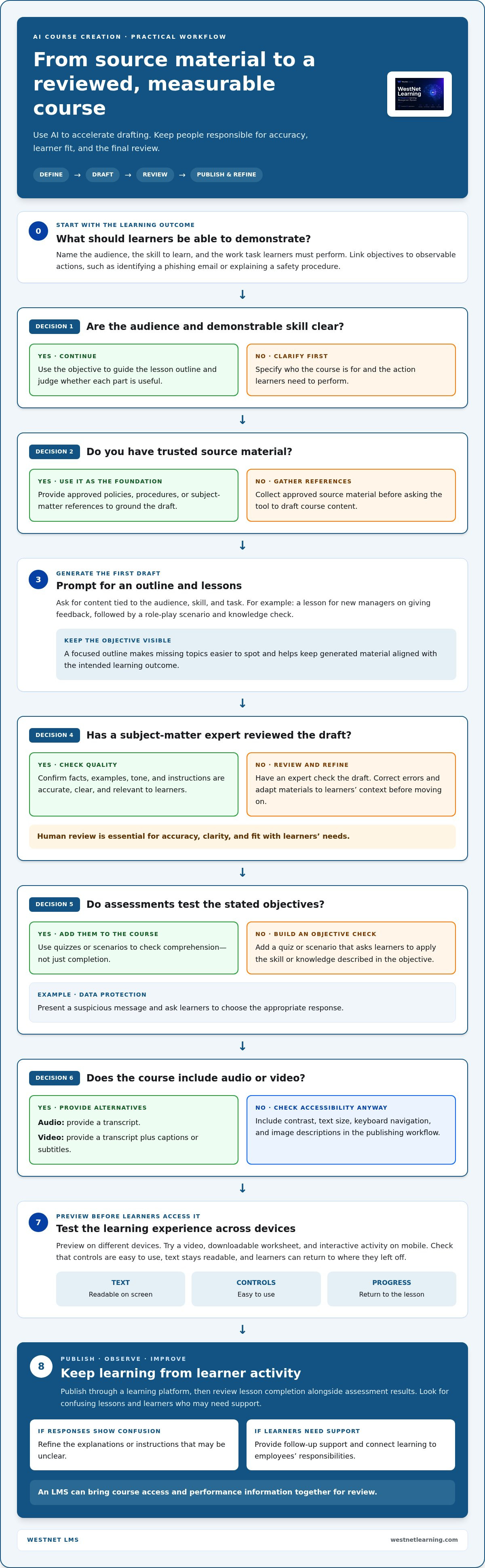
To create and launch a course, define the learning outcome, gather trusted source material, draft a lesson outline, generate and review content, add assessments, then publish it through a learning platform. For a practical structure, align the material with a clear training course framework before building individual lessons.
- Set the audience and the skill learners need to demonstrate.
- Collect approved policies, procedures, or subject-matter references.
- Use prompts to create an outline and draft lessons.
- Review facts, examples, tone, and instructions with a subject-matter expert.
- Add quizzes or scenarios that test the stated objectives.
- Publish the course and review learner activity and assessment results.
Lesson Materials and Learner Progress
Decide how learners will access materials, including lesson text, downloadable references, and media. Set a clear sequence, such as making a policy lesson available before its related quiz. In employee training, this helps learners find the right material when they need it and helps administrators keep related content organized.
Use quizzes to check comprehension, not just completion. In a data-protection lesson, for example, a scenario could ask learners to choose the appropriate response to a suspicious message. Review results alongside completion records to identify lessons that need clearer explanations or learners who may need support. An LMS can bring course access and performance information together for this review.
Support learners with clear instructions, consistent lesson labels, and a defined route for questions. Track lesson completion and look for confusion in assessment responses. These signals help training teams refine content, provide follow-up support, and connect learning to employees’ responsibilities.
What Is Online Course Builder Software?
Online course creator software brings course materials, learner access, and engagement features into one workflow. Assess how a platform supports accessibility, mobile learning, course delivery, and any sales process your course requires.
Engagement and Mobile Access
Check how learners use a course on a phone as well as on a desktop. Readable text, clear navigation, and responsive videos make lessons easier to follow on a smaller screen. Interactive elements, such as scenario choices or knowledge checks, can help learners apply ideas instead of only viewing content.
Accessibility also means offering alternatives to audio and video. OpenLearn Create recommends transcripts for audio and video, and captions or subtitles for videos. For example, provide a transcript alongside an audio lesson and captions on its video version. Include checks for contrast, text size, keyboard navigation, and image descriptions in your publishing workflow.
Look for tools that let you preview lessons on different devices before learners enroll. Test a video, downloadable worksheet, and interactive activity on mobile. Check that controls are easy to use, text remains readable, and learners can return to where they left off. These checks can reveal friction before it affects engagement.
Course Access and Delivery
Course access includes enrollment, sign-in, lesson availability, and the learner’s route through materials. For example, a course could place an orientation lesson before a product walkthrough, giving new employees a logical sequence. Check whether administrators can organize lessons, manage access, and update content without rebuilding the full learning path.
Delivery options should fit the audience and training context. A remote team may need self-paced access, while a scheduled program may use instructor-led sessions alongside online materials. Check how the platform handles videos, documents, interactive tasks, and progress records. A useful course authoring workflow connects these materials into a coherent learning experience.
Selling, Payments, and Student Data
In the United States, course-sale fees and tax treatment depend on the platform, transaction, relevant locations, and product classification. Before selling, identify any payment-processing or platform charges, and decide how to handle tax responsibilities and refunds.
For payments, review how a platform records transactions, communicates purchase status, and supports your refund process. For student data, identify what information is collected, who can access it, and how long records are kept. Enrollment details and course progress, for example, may need different access permissions. Choose features that fit your business processes and learner privacy expectations.
Before launch, test the full learner journey: enroll, sign in, open a lesson, view a video, and complete an interactive activity. Review the course on mobile and confirm that accessible alternatives are available. This practical check can uncover delivery or engagement problems while there’s still time to improve the experience.
How accurate are AI-generated course materials?
Accuracy depends on the source material, prompt, and review process. An AI assistant can draft a clear explanation from supplied policies, but it may misstate a procedure or add unsupported details. Treat every draft as a starting point, not an approved training resource. A subject-matter expert should verify claims before learners rely on them.
Use a repeatable review process. First, compare each generated claim with an authoritative source, such as the current internal policy or product documentation. Then check examples, definitions, and instructions against the intended audience. For instance, a draft about expense reporting should follow the organization’s actual approval steps, not a generic workflow. Remove invented details and record who approved the final version.
Review the learning purpose as well as the facts. A lesson can be technically correct yet fail to help employees perform a task. For a customer-service module, confirm that the dialogue reflects real support standards and that the practice activity tests the required response. Ask a reviewer to flag outdated terms, missing exceptions, and steps learners could misunderstand.
Editing should also shape voice and context. Replace generic scenarios with familiar roles, tools, and decisions from your workplace. If a generated example describes a retail return, but the course serves field technicians, revise the setting and action. A custom edit should preserve the learning objective while making the material relevant to the learner’s work. This approach to customizing training courses helps align course content with a specific audience.
Course customization shapes how learners experience approved content. Organize lessons with meaningful titles, consistent formatting, and clear directions. Add relevant downloads, such as a checklist or approved reference document, beside the lesson where they’re used. Preview the course as a learner, then confirm that links, files, and activities support the intended sequence.
Before publishing, use a practical quality-check sequence:
- Compare every factual statement with an approved source.
- Check examples, terminology, and procedures with a subject-matter reviewer.
- Confirm each lesson supports its stated learning objective.
- Test the learner view, including links, downloads, and activities.
- Collect reviewer feedback and update the course when source material changes.
Keep source documents and review notes with the course workflow. If a policy changes, these records help the team identify which lessons need revision. AI can help generate and revise drafts, but accountable review determines whether published material is accurate, useful, and suited to its audience.
AI-generated course materials
An AI course creator can turn approved source material into learning assets, including lesson drafts, summaries, scenarios, and knowledge checks. For example, a product team could provide a user guide and request a lesson explaining its main workflow. The result gives course authors a structured draft to adapt, not a finished course ready to publish without review.
Start with a defined learning outcome and a reliable source. Ask the tool for an outline that separates core concepts, practical steps, and common errors. A visual map of the topics can reveal gaps before you draft full lessons. For a customer-service course, the outline might distinguish greeting a customer, diagnosing a request, and explaining the resolution.
Generate material in formats suited to the learning task. A process explanation may work best as concise lesson text, while a decision-making skill may benefit from a branching scenario. A glossary can clarify specialized terms, and a downloadable checklist can support performance after training. Match each format to what learners need to understand or do.
Useful prompts define context, audience, tone, and output. Instead of asking for “a course about cybersecurity,” specify that learners handle customer records and request a scenario about identifying a suspicious message. Clear direction helps the creator produce focused content and makes editing easier because each draft has a defined purpose.
- Lesson draft: Ask for an explanation based on approved source documents.
- Scenario: Request a realistic workplace choice with plausible responses.
- Visual aid: Ask for a process diagram description or labeled sequence.
- Knowledge check: Request questions tied to a stated learning outcome.
Keep visual material connected to the lesson, not merely decorative. For example, a workflow diagram should show the same sequence as the written procedure. Check labels, terminology, and the relationship between each visual and its explanation. Use specific product names and internal role titles consistently in captions, examples, and lesson text.
Customize generated courses by adapting the tone and practice to the audience. A manager course might use coaching conversations, while a technical course could use equipment or software examples familiar to learners. Replace generic settings with relevant tasks while preserving the central knowledge and intended learning outcome. That connection makes course material more practical.
Create a clear content workflow: provide source material, generate a structured draft, choose suitable formats, and adapt examples for learners. An AI-powered course creation workflow can organize these stages, while human authors tailor the material to their organization. Success depends on whether learners can use the knowledge for the task the course is designed to support.
Course formats and editing tools
Choose formats based on what learners need to understand or do. A process demonstration may work well as a video, while a reference procedure may suit searchable text or a downloadable document. For practice, an interactive scenario can ask learners to choose a response and consider its consequences. Match the format to the teaching goal.
A sample course includes 12 hours of on-demand video. That length makes structure especially important: divide the material into focused lessons, and give each segment a clear purpose. Use editing tools to refine pacing, remove unnecessary sections, and keep explanations connected to the learner’s next task. Breaks between topics can help learners return to the right point.
Review the editing workflow before building a full program. Check whether authors can revise text, organize lessons, replace a file, and preview the learner view. If a product procedure changes, for example, a clear editing process helps the team find the affected lesson and update its materials without confusing them with older instructions.
Use a consistent structure across formats. A lesson might introduce a concept, show an example, and then offer a short practice activity. A video explaining a customer interaction could be followed by a written decision guide. Consistent labels and transitions help learners see how each item supports the same learning outcome.
- Video: Demonstrate a workflow, product task, or teaching technique.
- Text: Explain concepts learners may need to search or revisit.
- Downloads: Provide a checklist or reference for use during work.
- Interactive activities: Let learners apply knowledge to a realistic decision.
Editing tools should support useful revisions, not just initial production. Review text for clarity, check that media matches the lesson, and confirm that links and downloads work. If several programs share a course template, standardize headings and navigation while tailoring examples to each audience. This keeps shared material coherent without making every course identical.
Plan commercial details separately from learning design. If a course requires payment, explain the purchase process and access instructions before enrollment. For internal training, prioritize reliable access and a clear route through lessons. In either case, test the learner journey from the first course page to the final activity.
Build a sample lesson first. Test its structure, editing workflow, and formats with representative learners, then apply their feedback to the wider program. To explore tools for developing course material, look at AI course creation options.
WestNet LMS: WestNet AI LMS
WestNet AI LMS brings AI-supported course creation and learning management together in one platform for corporate training. It fits organizations that need to create courses, manage employee learning, and connect training with existing tools.
The AI Course Creator supports automated course creation, while advanced analytics and gamification help personalize employee development. LMS Integrations connect learning workflows with existing tools, and Off-the-Shelf eCourses provide ready-made training content. Together, these offerings help organizations coordinate course creation and delivery as training needs evolve.
Planning a corporate training program? Contact WestNet LMS to discuss the platform and relevant learning options.
Turn Your Course Plan Into a Learning Path
Set the course’s direction before choosing a format. Identify the workplace behavior it should support, the source material learners need, and how your team will recognize meaningful progress. These decisions give an online course creator a clear purpose and keep development focused on practical learning, not content volume alone.
As training needs grow, consider how course creation connects with delivery and the tools your organization already uses. WestNet LMS offers WestNet AI LMS, AI Course Creator, and LMS Integrations to support connected corporate learning workflows. Choose the next step that fits your priorities, whether you’re developing course material or aligning learning delivery across existing systems.
Build with intention, keep employee needs at the center, and refine the learning path as those needs evolve. Contact WestNet LMS to discuss your course and move your training plan forward.
Frequently Asked Questions
Can I customize and edit the content generated by the AI?
Yes. Treat generated material as an editable draft, then tailor its examples, terminology, and tone to your organization. For instance, replace a generic customer scenario with one based on your team’s service process. Keep source documents and approvals together so future updates follow the same standards. In WestNet AI LMS, administrators can also configure site preferences and catalog display for their learning environment.
What does an online course creator platform do?
An online course creator platform helps authors develop and organize digital learning, then deliver it to learners. Depending on the platform, it may support content creation, lesson sequencing, assessments, enrollment, and reporting. For example, a training team could use one system to prepare a new-hire course and monitor completion. WestNet AI LMS combines automated course creation with learning analytics and gamification for employee development.
What are the best online course creator platforms in 2026?
The right platform fits your learners, content workflow, and training goals. Compare course authoring, learner management, analytics, accessibility support, and integration with existing tools. For corporate training, WestNet AI LMS combines AI-supported creation, analytics, gamification, and LMS integrations. Assess these capabilities against your needs, such as managing employee learning across departments or connecting training with current systems.
Can I sell online courses through my own website or marketplace?
Yes, courses can be sold through a business website or a marketplace, depending on the platform and how you want to reach learners. A website can keep course presentation within your brand, while a marketplace offers a separate sales channel. Before choosing, map the enrollment and payment journey, refund process, and student-data handling. WestNet AI LMS includes an eCommerce module for course catalog administration within its learning platform.
What are the risks and drawbacks of online course creator platforms?
AI-generated materials can misstate procedures or add unsupported details, so subject-matter experts should verify drafts. Platforms also differ in capabilities, accessibility, mobile experience, and data controls. Review these against your needs before launch.