The hardware question is simpler than the platform decision: staff can access learning on a laptop, phone, or workplace device, whether they’re remote or on-site. Installation and software requirements for a professional development LMS depend on its deployment and integrations, so compare them with the devices and tools your team already uses.
It’s reasonable to want a clear setup before choosing a system, especially when learning records, credits, and skills data need to work together. This guide explains how a professional development LMS can organize transcripts, competencies, and skills-gap information. It also covers what to compare across platforms, including reporting, integrations, and course access, to help you assess fit and plan a practical rollout.
Key Takeaways
- Define how learning hours, credits, and relicensure records should be captured so staff can maintain organized professional learning histories.
- Compare transcript access and course-authoring options to see how each platform supports teachers’ learning workflows.
- Use competency maps and progress reports to connect completed learning with role expectations and career development.
- Assess skills through benchmarks, then use identified gaps to guide relevant upskilling across teams.
- Compare platforms by reporting, integrations, course options, and rollout fit; a small-group pilot can help evaluate the preferred system before wider adoption.
Tracking professional learning hours, credits, and relicensure
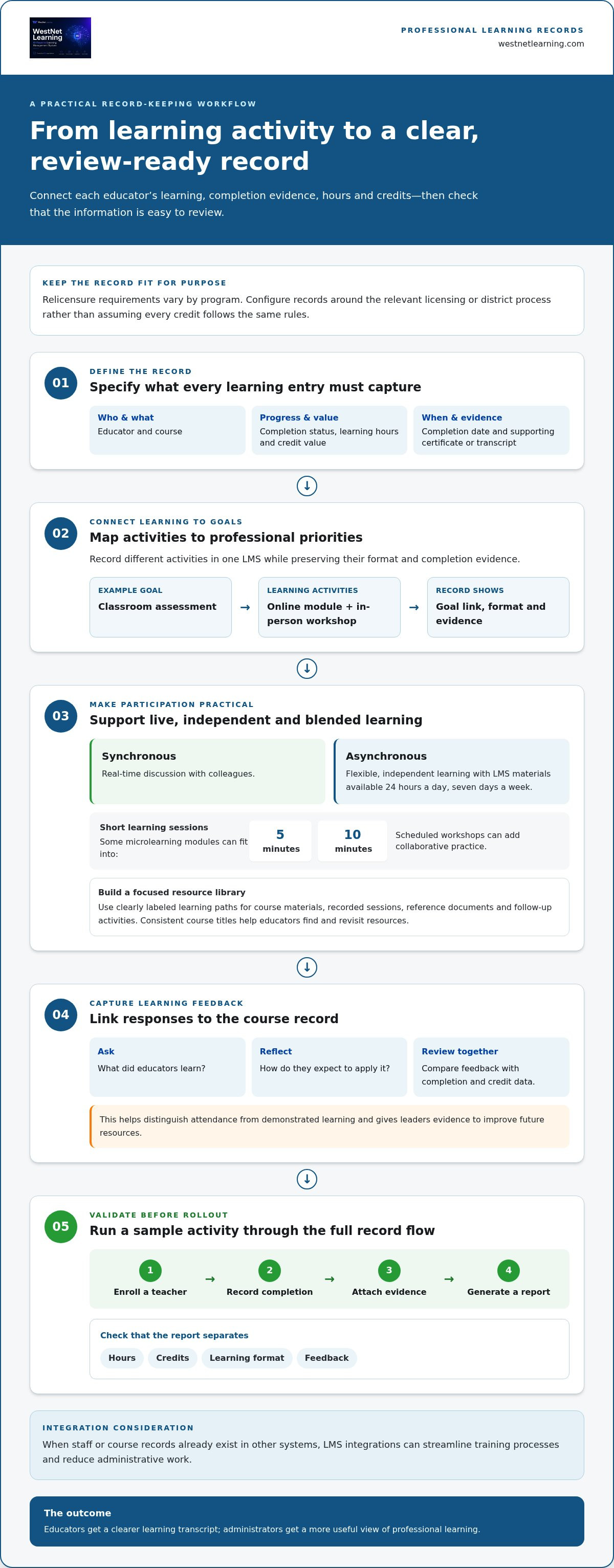
Start by defining what each learning record must capture. A useful record connects the educator, course, completion status, learning hours, credit value, and completion date. Add the evidence your team uses to support relicensure, such as a certificate or course transcript. Requirements vary by program, so configure records around the relevant licensing or district process rather than assuming every credit follows the same rules.
Next, map learning activities to professional goals. For example, a teacher focused on classroom assessment might combine an online module with an in-person workshop. Record both activities in one learning management system, while distinguishing their formats and completion evidence. A professional development LMS should make it easy to see which learning supports a goal and which records contribute to a credit or relicensure review.
Plan for blended participation. Synchronous sessions let educators discuss a topic with colleagues in real time; asynchronous materials give them flexibility to complete learning independently. LMS-based professional development can offer faculty access to materials 24 hours a day, seven days a week. Some microlearning modules can fit into 5- or 10-minute sessions, while a scheduled workshop can provide collaborative practice.
Build a focused resource library for educators. Include course materials, recorded sessions, reference documents, and follow-up activities in clearly labeled learning paths. Remote staff can access training on a laptop, phone, or at work. You can also review the employee training and development guide for a related perspective on structuring learning around workforce development. Use consistent course titles so educators can find and revisit the right resource.
Connect completion tracking to feedback. After a workshop or course, use an impact form to ask what educators learned and how they expect to apply it. Keep responses tied to the course record, then review them alongside completion and credit data. This helps distinguish attendance from demonstrated learning and gives leaders evidence to improve future resources.
Before rollout, test the full record flow with a sample activity. Enroll a teacher, record completion, attach the relevant evidence, and generate a report. Confirm that it separates hours, credits, learning format, and feedback. Integrating WestNet LMS with enterprise applications can streamline training processes and reduce administrative work, especially when staff or course records already exist in other systems. This approach gives educators a clearer transcript and administrators a more useful view of professional learning.
Will teachers have access to their transcripts and professional learning data?
Educators should be able to review their learning history without relying on an administrator for every update. During a platform evaluation, open a teacher account and inspect its transcript. Check whether it shows course titles, completion status, dates, certificates, and recorded credits. Then compare it with administrator reports. Both views should show consistent records, while access controls protect information teachers don’t need to manage.
Certificates and transcripts serve related but different purposes. A certificate documents completion of a particular course, while a transcript brings together a person’s learning history. Check whether the system can issue a certificate after defined steps, such as completing lessons and passing an assessment. See whether teachers can retrieve or download it later. For a relicensure review, a clear transcript makes relevant courses and supporting records easier to locate.
Personalized recommendations should support learning goals, not simply promote another course. For example, a teacher who selects classroom assessment as a development priority might see resources on assessment design. Review what informs recommendations, such as role, selected interests, completed courses, or recorded competencies. Confirm that teachers can understand why a course appears and browse the full catalog when they want to explore other content.
Interactive training can combine short explanations with scenarios, knowledge checks, and reflection prompts. For example, a course on classroom communication could present a scenario, ask teachers to choose a response, then explain the learning objective. Evaluate the course-authoring workflow by building or editing a sample lesson. Check whether editors can arrange content, add assessment activities, preview the learner experience, and revise materials without disrupting existing courses. A practical course development workflow can help teams plan this process.
Custom course content should reflect local terminology, teaching priorities, and district procedures. Compare how the platform handles updates when guidance changes and whether revised content can be distinguished from older versions. For example, an updated lesson should clearly present its latest material, while reports preserve a useful record of course completion.
Test inactivity time-outs before rollout. Start a course, leave it idle, then return to see whether progress is saved or the teacher must sign in again. The timeout should balance account security with practical access, especially for staff who pause between classroom duties. Include the result in your platform comparison alongside transcript access, recommendation controls, course-authoring tools, certificates, and report details.
Competency tracking and progress reporting
An LMS can track professional development by linking completed learning activities to defined competencies and reporting progress against them. Managers can use assessments and benchmarks to identify strengths, gaps, and development priorities.
Competency Progress Tracking
Begin with a competency map that describes the knowledge or skill expected in each teaching role. For example, a district might connect classroom assessment courses with an assessment-design competency. The Department of Veterans Affairs maps learning events to competencies at baseline proficiency levels, illustrating how learning activity can connect to a defined capability.
During evaluation, examine how the system records evidence and displays progress. A useful view distinguishes assigned learning from completed learning and shows assessment results. It should also help leaders identify competencies that need further development, without treating course completion alone as proof of proficiency. This makes progress visible and connects learning with career growth.
LMS Reporting and Certification Tracking
Reports should let authorized users review learning activity by employee, team, competency, or course. Check whether filters answer practical questions, such as which teaching teams completed a learning path or where assessment results point to a need for further support. Real-time reporting can support learning and development, while certification tracking helps administrators review credential status and related course records.
Assess how certificates connect to the underlying learning evidence. For instance, a report might show a course completion and its linked certificate, while a competency report summarizes assessment progress. According to the Internal Revenue Service, data captured in the LMS is automatically transferred to the EMS to support evaluation data collection and analysis. This example highlights why data flows and system connections matter when comparing platforms.
District control starts with purposeful access design. Decide what information teachers, school leaders, and district administrators need for their work. Then test each role with sample accounts: can a teacher see personal progress, can a principal view relevant team results, and can central staff produce district-level reports? Keep reporting useful by limiting each role’s view to the questions it needs to answer.
Before adoption, test a reporting scenario from start to finish. Assign a learning activity, record an assessment result, map it to a competency, and generate a progress report. Compare the report with the underlying record to make sure the connection is clear. A shared view of competencies and learning outcomes helps leaders provide targeted development, support teaching priorities, and make informed decisions about employee growth.
Skills-gap assessment and upskilling
Use assessments and benchmarks to identify skill gaps, then connect the findings to relevant professional learning. A centralized view helps administrators compare needs across teams and plan focused development.
Continuous Assessment and Feedback
Start with the skills educators need for their current responsibilities and future roles. For example, a district could assess teachers’ confidence in digital lesson design, then compare responses with an established competency benchmark. Review results by team as well as individually to distinguish shared development needs from personal learning priorities.
Build feedback into the learning activity instead of waiting for an annual review. A short reflection after a course can ask educators to name a classroom practice they’ll apply. A follow-up assessment can show whether their understanding has advanced. Compare responses with course participation and assessment results. Together, these signals can shape a useful next step instead of assigning the same content to everyone.
Choose a platform that lets administrators connect assessment findings to specific learning opportunities. A teacher who needs support with assessment design, for instance, could receive a relevant course or guided practice. The Department of Veterans Affairs maps learning events to competencies at baseline proficiency levels, demonstrating how a competency framework can organize learning around defined skills.
Assessments and Proctored Exams
Match each assessment format to the skill being measured. Knowledge checks can test understanding of a concept, while scenario-based questions can explore how a teacher applies it. For advanced teaching practice, a submitted lesson plan or classroom case analysis may provide more useful evidence than recall questions alone. Explain the assessment’s purpose before learners begin.
Proctored exams may suit situations where controlled test conditions matter to an organization’s evaluation process. Compare how the LMS presents exam instructions, records results, and connects outcomes to a competency or learning path. Consider whether the assessment measures the actual skill or simply test-taking under supervision. Choose a format based on the evidence needed, rather than adding proctoring by default.
Close the loop with a practical review process. Administrators can compare assessment results with benchmarks, identify recurring gaps, and recommend targeted learning. For example, if several educators need more practice interpreting student assessment data, a shared learning path can address that need. Reassess after the activity, then use the results to refine future opportunities and keep upskilling aligned with observed progress.
Comparison of professional development LMS platforms
Compare platforms against your organization’s learning goals, workflows, and reporting needs. Before implementation, define desired outcomes, configure learning paths and reporting, and pilot the system with a small staff group before a wider rollout.
Use the same evaluation criteria for each option. A polished demonstration still needs to reflect educators’ and administrators’ daily work. Build your comparison around practical tasks, such as assigning a course, recording completion, reviewing progress, and preparing a report for district leaders. A professional development LMS should support these workflows without adding unnecessary steps.
- Learning records: Test how courses, completions, credits, and certificates appear in teacher and administrator views.
- Competency insights: Check whether leaders can connect learning activity to skills, assessments, and development priorities.
- Course options: Compare available resources with your organization’s goals and its process for creating or updating content.
- Integration fit: Identify existing tools that need to connect, then assess how each platform supports those workflows.
- Access and reports: Review learner access, reporting controls, and the information each role can see.
Run a practical evaluation instead of relying on feature lists. Give evaluators a shared scenario: assign a learning path, complete an activity, record an assessment, and generate a progress report. Ask a teacher, an administrator, and a district leader to complete the tasks. Their different perspectives can reveal workflow friction that a single demonstration may miss.
Plan implementation around the systems and devices your organization already uses. Integrations with enterprise applications can streamline training and reduce administrative work. For group training with many simultaneous logins, make sure the local network can support the required bandwidth. These operational factors can shape adoption as much as learning features in a professional development LMS.
Use a pilot to test the full experience with a small staff group before district-wide rollout. Select participants who represent different roles and access patterns. Ask them to complete assigned learning, review their records, and share feedback on navigation and reporting. Use the findings to refine configuration, learning paths, and rollout communications before expanding access.
Set evaluation measures before launch. For example, leaders might review course completion, assessment results, and feedback to see whether the system supports intended outcomes. Compare reports with the organization’s original goals, then identify workflows that need refinement. A consistent evaluation process grounds platform selection in staff experience and operational fit. Use a structured LMS selection framework to guide your team’s next comparison.
WestNet LMS: WestNet AI LMS
WestNet LMS offers WestNet AI LMS, an AI-powered learning management system for teams bringing development and training into one platform. Automated course creation, advanced analytics, and gamification support personalized employee learning, while LMS Integrations connect learning workflows with existing tools.
For teams building or refreshing learning content, AI Course Creator supports course creation, while Off-the-Shelf eCourses provide ready-made learning options. These offerings can suit organizations aiming to consolidate training delivery and track development more coherently. Consider WestNet AI LMS when your team needs a scalable learning platform alongside integrated tools and course options.
Explore how WestNet LMS can support your organization’s learning goals by visiting westnetlearning.com.
Turn Your Learning Strategy Into Action
The next step is to turn your priorities into a clear implementation plan. Identify the learning outcomes that matter most, decide who will guide adoption, and set a review process to help your team adjust as needs evolve. A professional development LMS works best when it supports an intentional learning strategy, rather than becoming another system staff must manage without a clear purpose.
Start with a focused conversation among educators, administrators, and decision-makers. Agree on the first capabilities to prioritize, the workflows that need to fit together, and how you’ll evaluate progress after launch. That shared direction can help your organization move from platform selection to practical use with greater clarity.
WestNet LMS can help you explore how its learning platform fits your team’s priorities and existing environment. Contact WestNet LMS to discuss your needs, and take the next step toward a more connected approach to educator development.
Frequently Asked Questions
What hardware or software do I need to install?
Installation depends on the platform’s deployment model and your organization’s existing environment. WestNet LMS supports desktop, web browser, iOS (iPhone and iPad), and Android devices. Before rollout, have IT staff test access on a school-managed laptop and a mobile device. They can also identify sign-in or network settings that need attention, helping teachers use the system on familiar equipment.
Why use an LMS for professional development in schools?
A learning management system gives schools a shared way to organize educator learning. For example, a district can group resources by subject area and direct staff to materials relevant to their responsibilities. This structure can help administrators coordinate participation across schools and reduce reliance on separate email threads. The system is most useful when its organization reflects how educators find and use learning resources.
What does a professional development LMS do?
A professional development LMS is software for organizing and delivering structured learning, then recording participation and results. A school might use one to coordinate learning around a new curriculum, with separate resources for grade levels or subject teams. The system can bring course access and administration into a shared environment. Capabilities vary, so match platform functions to the learning work your organization needs to manage.
Which capabilities should a learning platform offer?
Choose features according to your intended use. A district preparing teachers for a curriculum update may prioritize content management and course assignments; another may focus on administrator reporting or connections with existing tools. Consider how educators find resources, how course progress is recorded, and what information leaders can access. A small evaluation task, such as assigning a sample course, can show whether the workflow suits staff.
Which platforms are suitable for organizations?
There isn’t one best platform for every organization; suitability depends on learning goals, workflows, and operational needs. WestNet AI LMS is an AI-powered learning management system for corporate training. Include it in a comparison when it aligns with your team’s requirements. Test each candidate with the same realistic task, such as assigning a learning path and reviewing its administration, so your decision reflects practical use.
What is the best way to compare platforms?
Use a consistent evaluation method rather than comparing feature names alone. Give each platform the same scenario, such as organizing resources for a new teaching initiative, and note the steps learners and administrators must take. Record where the process is straightforward and where staff need extra support. A shared scorecard lets decision-makers compare usability, administration, and alignment with organizational goals on equal terms.
How should an organization select its learning platform?
Begin by identifying who will use the system and what tasks it must support. For example, include classroom teachers, school administrators, and central learning leaders in the evaluation. Ask each group to test relevant workflows and describe what would help them adopt the platform. Then weigh their feedback against organizational priorities, implementation capacity, and plans for managing learning content over time.
Which integrations should the system support?
Prioritize integrations that support real workflows in your organization. List the tools staff already use, then identify where duplicate entry or disconnected records create extra work. For example, administrators may want learner information to move between an existing enterprise application and the learning platform. Clarify what data needs to connect and who uses it. Then evaluate the available LMS Integrations against those practical needs.