Solving low LMS user adoption rates starts before launch, not after employees stop logging in. Align learning with business goals, make the platform easy to use, and involve employees in testing so its design and content reflect how they work.
Low adoption does not necessarily mean employees are uninterested in learning. Friction in navigation, unclear value, limited time, or a rollout that overlooks employee readiness can all get in the way. This article explains how to shape an LMS adoption strategy, improve design and content, prepare employees through clear communication and change management, and use analytics to identify where learners drop off. It also covers how renewal planning, employee feedback, pilot rollouts, and sandbox testing can reveal practical improvements before a wider launch. The goal is a learning experience employees can access, understand, and return to as part of their work.
Key Takeaways
- Connect learning goals to business priorities, and balance engagement features with relevant, regularly refreshed content.
- Use LMS analytics to find navigation friction and content drop-off, then make targeted improvements based on learner behavior.
- Build employee readiness with clear communication, visible manager support, and learning that fits into work routines.
- Before renewal, focus on simpler navigation and a smoother user experience to encourage repeat use.
- Involve end users in a pilot or sandbox test to uncover usability issues before a wider rollout.
1. What is an LMS adoption strategy?
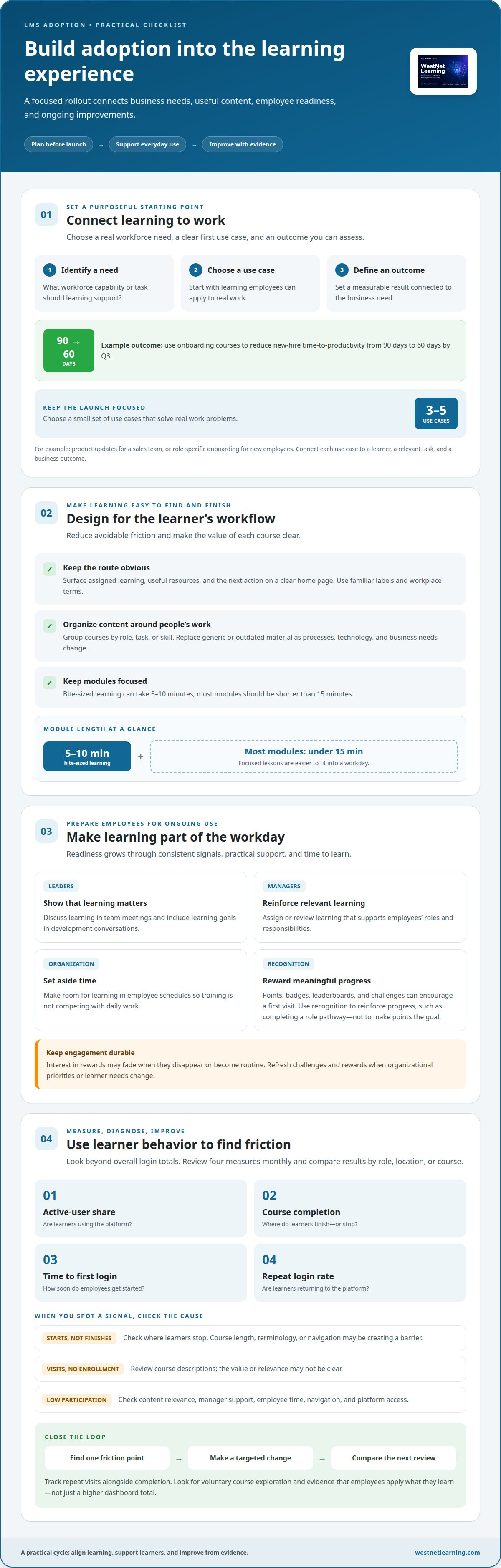
An LMS adoption strategy connects a learning management system to business goals and employee workflows. It defines what the organization needs learning to achieve, who will use it, and how progress will be assessed. Start with three decisions: identify a workforce need, choose an initial use case, and set a measurable outcome. For example, a company could use onboarding courses to reduce new-hire time-to-productivity from 90 days to 60 days by Q3.
Launch with 3 to 5 use cases that solve real work problems. This keeps the learning experience focused instead of filling the system with courses employees cannot prioritize. A sales team might need product updates, while new employees need role-specific onboarding. Each use case should connect a learner, a relevant task, and a business outcome. A [structured LMS adoption framework](https://www.westnetlearning.com/blog/how-to-increase-corporate-lms-adoption-a-strategic-framework-for-2026) can help teams organize those decisions before rollout.
Build a learning culture through consistent signals, not launch-day messaging alone. Leaders can make learning a priority by discussing it in team meetings and including learning goals in development conversations. Managers can reinforce that message by assigning or reviewing relevant learning. Organizations should also set aside time for learning in employees’ schedules. Without dedicated time, training competes with daily work, and participation can feel like an obligation rather than a useful part of the job.
Content must earn attention through relevance and clear organization. Group courses by role, task, or skill, then use familiar workplace terms in titles and descriptions. Replace generic or outdated material as processes, technology, and business needs change. Keep modules focused: bite-sized learning can take 5-10 minutes, and most modules should be shorter than 15 minutes. For example, a brief system-update lesson is easier to fit into a workday than a long course covering unrelated topics.
Engagement tactics can encourage employees to get started, but they need a durable learning system behind them. Points, badges, leaderboards, and seasonal challenges can make participation visible and encourage a first visit. Interest may fade, though, when rewards disappear or become routine. Use recognition to reinforce meaningful progress, such as completing a role pathway, rather than treating points as the goal. Refresh challenges and rewards when organizational priorities or learner needs change.
Low adoption can limit learning outcomes when employees miss the practice, guidance, or knowledge they need for their roles. Distinguish required completion from deeper engagement: look for voluntary course exploration, repeat visits, and evidence that employees apply what they learn at work. When participation is weak, review whether content is relevant, managers support learning, and employees have time to use the system. These checks make adoption an ongoing improvement process rather than a one-time launch target.
2. Does LMS design affect adoption rates?
Yes. Design affects whether employees can find, start, and return to courses. A cluttered dashboard, unclear labels, or unnecessary login steps can make learning feel difficult before it begins. For example, employees may overlook a safety course placed under an unfamiliar category, even when it supports their roles. A clear home page should surface assigned learning, useful resources, and the next action. Making this route easy to follow is a practical first step in solving low LMS user adoption rates.
Use analytics to find friction rather than relying on overall login totals. Review four measures monthly: active-user share, course completion, time to first login, and repeat login rate. Compare results by role, location, or course. If one team starts courses but rarely finishes them, look at where learners stop and whether course length, terminology, or navigation creates a barrier. LMS reports can show progress, completion status, assessment history, and organizational capability.
Low adoption often reflects several operational barriers: confusing navigation, irrelevant or outdated courses, limited time, weak manager support, or difficulty accessing the platform. Identify the causes before changing the design. Repeated visits to a course page without enrollment, for instance, may point to unclear descriptions, while early exits may indicate a content or usability problem. Learner feedback can explain what the metrics alone cannot.
The price depends on the case and is given after a quote request; initiative costs depend on staff time, platform configuration, integrations, training materials, and course development. A focused rollout that uses existing tools and content has different resource needs from one requiring new integrations and extensive course creation.
There is no single typical adoption rate for every industry or organization size. Compare teams against their own baseline, since access, role requirements, manager support, and course relevance all affect participation. A desk-based team with regular computer access may use the platform differently from frontline employees working across multiple locations. Define the audience and measurement period before interpreting a percentage.
Set two or three measurable adoption goals before launch, and connect each KPI to a learning outcome. For example, track repeat visits alongside completion rather than treating one login as success. Check whether employees explore courses beyond assigned requirements and apply skills at work. When solving low LMS user adoption rates, a rise in completions matters most when it supports capability or performance, not simply a higher dashboard total.
Turn monthly or quarterly reviews into continuous improvement cycles. Identify one friction point, make a targeted change, and compare the next reporting period. If analytics show learners leaving at the same lesson, revise its structure or clarify the next step. Teams looking to connect reporting with learning outcomes can explore enterprise learning analytics as part of their optimization approach.
3. Change management and employee readiness
Prepare employees before launch, then reinforce the change through ongoing communication. Start weeks before go-live by explaining why the learning management system is changing, how employees will use it, and where they can get help. Invite feedback through team discussions or short pulse checks. Address recurring concerns directly, such as whether training time fits existing workloads or how assigned learning relates to daily responsibilities.
Managers and executives increase participation by making learning visible and practical. Executives can connect the initiative to organizational priorities, while managers can discuss relevant courses in team meetings, assign learning, and review progress. A useful starting target is for at least 50% of managers to assign or review learning. Employees also need scheduled time to participate, rather than an expectation to complete training around existing work.
Buy-in depends on more than a launch announcement. Resistance to change causes about 39% of change programs to fail, and lack of leader and manager support makes up about 33% of failure causes. These figures reinforce the need for visible sponsorship and consistent follow-through. Assign a solution sponsor to help resolve adoption barriers, and ask managers to share employee feedback with the implementation team.
Kotter’s change-management process offers a useful structure for coordinating a transition. Apply its core logic: explain why change matters, form a group of visible supporters, communicate a clear direction, and reinforce progress. For an LMS rollout, leaders might explain the need, managers demonstrate the new workflow, and a cross-functional team respond to access or content concerns. Recognize short-term wins, such as a team completing its first role-based learning path.
Turn readiness into a sequence of actions. Before launch, identify affected roles and common questions. During rollout, provide clear instructions and talking points for managers. After launch, collect feedback and review participation patterns, then adjust communications or support where confusion persists. If employees repeatedly ask how to find onboarding courses, for example, simplify the guidance and show the route in a team meeting.
Keep communication active after the launch date. Organizations should communicate about an LMS for at least 90 days after launch, using reminders that explain a concrete benefit rather than repeating generic announcements. A manager might highlight a course that helps employees handle a new process, while an executive can recognize teams applying newly learned skills. Recognition should reinforce useful behavior, not just course completion points.
Build the process around employee readiness, not just platform activation. Ask whether learners understand the purpose, know how to begin, have time to participate, and can raise concerns. Review these signals alongside manager involvement and employee feedback. This ongoing approach helps leaders distinguish a communication gap from a scheduling issue or unclear learning priorities, then make a focused change.
4. How do you improve LMS adoption before renewal?
Use the renewal period to identify friction in employees’ routine learning tasks. Start with the dashboard: can learners locate assigned courses, understand priorities, and resume unfinished development without searching through unrelated menus? Group safety, onboarding, and role-based skills in clearly labeled areas. Remove duplicate categories and use the same terms employees hear from managers.
Prioritize usability over decorative changes. A clean interface should make the next action obvious, whether that means starting a course, finding a resource, or checking progress. Review common learner journeys from sign-in through course completion. If employees need several screens to find a required lesson, simplify the route. Use familiar scenarios and plain workplace language so navigation labels match everyday tasks.
Mobile access matters when employees work away from a desk or have limited time between responsibilities. Test the experience on the devices employees actually use. Check that text is readable, controls are easy to select, and course content makes sense on a smaller screen. If a lesson is difficult to complete on mobile, prioritize a format or pathway that suits that context.
Make first use purposeful. A new learner should quickly reach a relevant task, not face a blank dashboard or a catalogue without direction. Create a welcome path that explains where to begin, how to find role-specific courses, and where to get help. For example, an onboarding learner could start with a short introduction, then continue to the policies and tools needed for the role. A clear LMS onboarding experience can establish this sequence.
Use learner behavior and support feedback to choose improvements before renewal. Look for repeated searches, abandoned courses, frequent navigation changes, and questions about where content lives. Pair those signals with employee comments. If learners can’t distinguish required training from optional development, update labels and course descriptions. If they struggle to find material for particular skills, organize the catalogue around roles or tasks.
Review accessibility and consistency across the full experience. Check that buttons use clear action words, instructions appear where learners need them, and terminology stays consistent across the dashboard, course pages, and notifications. For instance, avoid calling the same sequence a “learning path” in one area and a “program” in another. Consistency reduces the effort needed to interpret the platform and makes it easier to sustain.
Before renewal, distinguish interface fixes from broader challenges. Navigation changes may solve a discovery problem, while low participation can also reflect limited time or weak relevance. Document each issue, the evidence behind it, and the adjustment made. Then compare learner feedback and platform behavior after the change. This gives decision-makers a practical view of which improvements support repeat use and which needs remain unresolved.
5. End-user involvement and sandbox testing
Involve employees in LMS decisions before implementation is finalized. End users can assess whether course titles make sense, assigned learning is easy to find, and workflows match daily responsibilities. Include a cross-functional group from roles that will use the system, such as frontline staff, managers, and learning administrators. Their feedback can uncover usability gaps the project team may overlook.
Use a sandbox to test real tasks, not just browse the interface. Give participants scenarios such as finding a required course, resuming a lesson, or locating completion status. Observe where they pause, take an unexpected route, or ask for help. Record the issue, the affected user group, and the change needed. This turns impressions into practical implementation decisions.
A pilot rollout can run for 2 to 4 weeks before a wider launch. Select a group that reflects different roles and access patterns, then test a representative set of courses and workflows. Keep the scope focused enough to act on findings. For example, if employees can open courses but cannot distinguish required learning from optional development, revise labels before expanding access.
Collect feedback through several channels because each can reveal different adoption barriers. Short surveys capture broad reactions, while focus groups explain why a step feels confusing. Support tickets reveal recurring problems, and in-platform behavior shows where learners stop or return. Combine these signals with direct observations from test sessions. A learner who abandons a course may need clearer instructions, better navigation, or a more relevant learning path.
Define success criteria before the pilot begins. Track whether participants can complete priority tasks, understand the course sequence, and reach the learning they need. Compare their experience with the intended workflow, then sort findings by impact. A blocked login or missing course needs immediate attention; a preference about button placement may be less urgent. This prioritization keeps testing focused on launch outcomes.
Close the feedback loop. Tell participants which changes resulted from their input, and explain decisions when a suggestion does not fit the rollout. Then repeat the affected task after making adjustments. If users still struggle to find a required course, test a revised category or label with the same audience. Visible progress builds confidence and encourages ongoing participation.
Use the pilot to validate both the platform and organizational practices. Confirm that managers know how to guide employees, course owners understand update responsibilities, and learners can access support. Once the team resolves the highest-impact barriers, expand the rollout and continue gathering feedback. To assess the learner experience before launch, request a corporate training LMS demo.
WestNet LMS
WestNet LMS helps organizations address adoption barriers with a connected learning platform, course tools, integrations, and ready-to-use training content. WestNet AI LMS combines automated course creation, analytics, and gamification to personalize employee development. LMS Integrations connect learning with existing tools, while Off-the-Shelf eCourses provide ready-made content. The AI Course Creator helps teams develop course materials more efficiently.
Consider these capabilities when user testing reveals friction in course access, content relevance, or learning workflows. The right next step depends on what employees need to learn and how existing systems support that process. Contact WestNet LMS to discuss your learning goals and adoption challenges.
Make adoption part of the next learning decision
A practical approach to solving low LMS user adoption rates starts with treating adoption as an ongoing organizational capability, not a launch milestone. Each new role, process, and business priority can change what employees need from learning. The next step is deciding how learning will stay aligned with work, not simply whether the platform remains in place.
Choose one adoption barrier to address first, then make the change visible to the people affected. A clearer route to relevant learning, stronger connections with existing systems, or a more effective way to create course content can each address a different need. Prioritize the change that is grounded in employee experience and organizational goals.
Bring that priority into a focused conversation about your learning environment and the improvements that could make participation more useful. Contact WestNet LMS to discuss your next steps. Build from what employees need, and make learning easier to carry forward.
Frequently Asked Questions
What is an LMS adoption strategy?
An LMS adoption strategy is a plan for making learning part of how employees build skills and perform their roles. It links platform use to a defined organizational need, then establishes how teams will encourage participation and assess progress. For example, a customer service organization might align product training with support workflows so employees can apply new information in customer interactions.
How do you improve LMS adoption before renewal?
Use the period before renewal to connect employee experience with evidence about platform value. Gather feedback from different roles, identify recurring support issues, and compare learning activity with business needs. If a new process requires consistent knowledge, for example, review whether the relevant courses are accessible and useful to affected teams. Bring those findings and improvement priorities into renewal planning.
Does LMS design affect adoption rates?
Yes. Design influences how much effort learners spend finding and completing training. A crowded home page can hide an assigned course, while unclear labels can make useful content difficult to discover. Consider an employee who needs a reference during a task: a clearly organized course library makes that resource easier to find than a catalogue without role-based context.
How do you get leadership buy-in for LMS adoption?
Connect the learning initiative to an organizational priority leaders already support, such as consistent onboarding or capability development. Present a clear use case, the employee group it serves, and the result the organization wants to observe. For example, explain how role-based learning can help new team members follow the same core procedures. Invite leaders to sponsor the effort and reinforce its relevance.
How long does it take to see strong LMS adoption?
Adoption develops over time as employees encounter useful learning, receive support, and build repeat habits. Organizations with a communication plan, structured onboarding, and defined champions typically see meaningful LMS adoption within 90 days after launch. Treat that as a review horizon, not a guarantee: examine whether employees return, explore relevant material, and use learning in their work as participation develops.
What Does “LMS Adoption” Actually Mean?
LMS adoption means employees use the learning system as a practical part of work, not merely that accounts exist. Strong adoption can include returning to relevant learning, finding resources independently, and applying new knowledge. An employee who revisits a product course before helping a customer, for example, shows more meaningful use than someone who logs in once only to satisfy an assignment.
What is LMS user adoption?
LMS user adoption describes how employees start using and continue engaging with a learning platform. It includes initial access, participation in relevant courses, and ongoing use beyond a single required task. A manager reviewing a learning path with an employee, followed by the employee returning to explore related development material, shows adoption as an ongoing behavior rather than a one-time login.
What metrics should HR track for LMS adoption?
HR can track active-user share, course completion, time to first login, and repeat login rate. Read these measures together instead of treating any single figure as proof of success. High completion alongside low repeat visits, for example, may mean employees finish assigned courses but rarely use the platform independently. Add learner feedback and work-related outcomes to understand what the numbers mean.